

編輯:關於 Android 程式設計
前陣子工作上需要修改 Android 系統的關機與重啟行為,於是做了不少嘗試並蒐集資料,這裡整理成四種方式,方便學習與日後參考。
由於原生 SDK 並未對開發者開放直接的關機/重啟 API,而這類操作又需要較高權限(系統權限甚至 Root),因此一般 APP 想實現時,通常得透過宣告系統權限、廣播或反射等「間接」方式,或者乾脆放進源碼環境編譯,直接調用未公開的 API。以下逐一說明。
Android 系統本身內建了許多廣播,其中就包含關機與重啟相關的:Intent.ACTION_REQUEST_SHUTDOWN 與 Intent.ACTION_REBOOT,它們是 Intent.java 中定義的字串常量:
public static final String ACTION_REBOOT = "android.intent.action.REBOOT";
public static final String ACTION_REQUEST_SHUTDOWN = "android.intent.action.ACTION_REQUEST_SHUTDOWN";
實作方式如下:
// 廣播方式關機
Intent intent = new Intent(Intent.ACTION_REQUEST_SHUTDOWN);
intent.putExtra(Intent.EXTRA_KEY_CONFIRM, false); // 改為 true 會彈出確認視窗
intent.setFlags(Intent.FLAG_ACTIVITY_NEW_TASK);
startActivity(intent);

// 廣播方式重啟
Intent intent2 = new Intent(Intent.ACTION_REBOOT);
intent2.putExtra("nowait", 1);
intent2.putExtra("interval", 1);
intent2.putExtra("window", 0);
sendBroadcast(intent2);
需要注意:其一,需將 APP 提升為系統權限,在 AndroidManifest.xml 中加入 android:sharedUserId="android.uid.system";其二,需添加關機權限 uses-permission android:name="android.permission.SHUTDOWN";其三,ACTION_REQUEST_SHUTDOWN 與 EXTRA_KEY_CONFIRM 未對上層開放,在 Eclipse 中會報錯,必須在源碼環境編譯才能通過;其四,需為專案編寫 Android.mk 並以 platform 簽名,最後用 adb push 到機器上驗證。
Android 啟動後第一個執行的應用是 /init,它會解析 init.rc 與 init.xxx.rc 並執行解析出的任務。利用這一點,可以編寫關機或重啟的 sh 腳本,交由 init 解析執行。
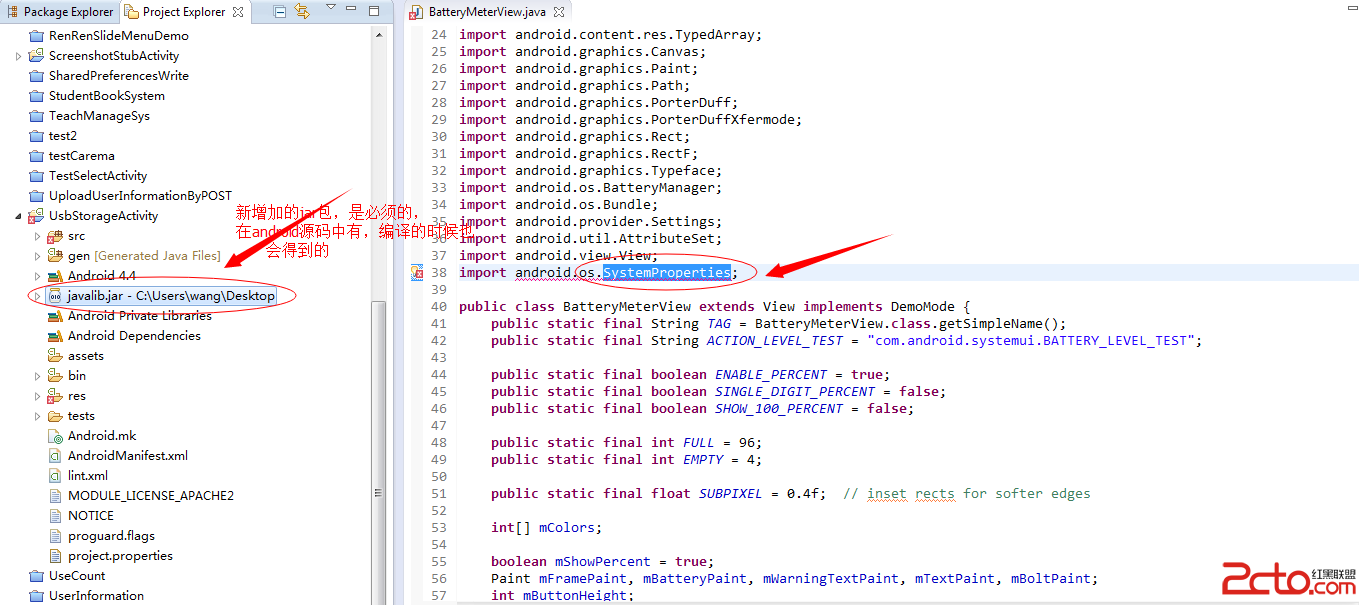
首先撰寫腳本。重啟腳本 system_reboot.sh 內容為 #!/system/bin/sh 後接 reboot;關機腳本 system_shutdown.sh 則是 #!/system/bin/sh 後接 reboot -p(注意關機用的是 reboot -p 而非 shutdown)。接著在 Android.mk 中將兩者編譯到 /system/bin,並在 init.rc 尾端加入 service 定義(加上 oneshot 表示只啟動一次,disabled 表示不隨開機自動啟動)。最後在程式碼中以 SystemProperties.set("ctl.start", "system_reboot") 來觸發。
Runtime 這個 Java 類別可用來執行 shell 命令,而 Android 虛擬機支援 Linux-shell,因此可用它來執行關機或重啟命令:
// 關機
Process proc = Runtime.getRuntime().exec(new String[]{"su", "-c", "reboot -p"});
proc.waitFor();
// 重啟
Process proc2 = Runtime.getRuntime().exec(new String[]{"su", "-c", "reboot"});
proc2.waitFor();
使用此法的前提是設備已 Root,加上 su 是為了取得管理員權限;同時系統的 system/bin 下需存在 reboot 與 shutdown 檔案。由於部分設備缺少 shutdown,只能改用 reboot -p 來關機。
PowerManager 提供了 reboot 介面,用它來重啟相當簡單:
PowerManager pManager = (PowerManager) getSystemService(Context.POWER_SERVICE);
pManager.reboot("");
但 PowerManager 並未公開關機的 shutdown 介面。它透過 IBinder 與 PowerManagerService 通訊,而 IPowerManager 中實作了 shutdown。因此只要取得 Power 服務的 IBinder,再透過兩次反射即可呼叫 shutdown:
try {
    // 取得 ServiceManager 的 getService 方法
    Class ServiceManager = Class.forName("android.os.ServiceManager");
    Method getService = ServiceManager.getMethod("getService", java.lang.String.class);
    Object oRemoteService = getService.invoke(null, Context.POWER_SERVICE);
    // 取得 IPowerManager.Stub 的 asInterface 方法
    Class cStub = Class.forName("android.os.IPowerManager$Stub");
    Method asInterface = cStub.getMethod("asInterface", android.os.IBinder.class);
    Object oIPowerManager = asInterface.invoke(null, oRemoteService);
    // 呼叫 shutdown 方法
    Method shutdown = oIPowerManager.getClass().getMethod("shutdown", boolean.class, boolean.class);
    shutdown.invoke(oIPowerManager, false, true);
} catch (Exception e) {
    Log.e(TAG, e.toString(), e);
}
以上四種方式各有適用情境:廣播與 init 服務適合源碼編譯環境,Runtime 需要 Root,而反射調用則展現了 Android 系統服務的強大擴充能力。
 Android 系統應用編譯缺少 Framework 類別的原因與解法
在 Android 源碼環境中編譯 framework 下的應用程式時,常會遇到找不到某些類別的問題。這並不是程式碼本身錯誤,而是因為部分 framework API 在
 Android 程式碼優化:透過 ProGuard 關閉輸出的日誌
開發時,我們經常會輸出各種日誌來 debug 程式碼;但等到應用發布的 apk 運行時,往往不希望它再輸出日誌。本文說明如何關閉 Log.v()、Log.i()、Log.
 Android基礎實戰:手把手寫一個短信發送器
這是一個很典型的入門練習:做一個短信發送器,填號碼、填內容、點擊發送。看似簡單,但裡面涵蓋了 SmsManager 的使用、長短信拆分、空值校驗等幾個常見知識點。 佈局
 手機QQ怎麼省流量 一個開關屏蔽群聊圖片
是不是總覺得流量不夠用?仔細回想才發現,流量都耗在手機QQ的群聊裡了。現在手上的QQ群越來越多,群友又愛發圖片與視頻,那該怎麼省下這部分消耗?下面就一起來看。 手機QQ省