

編輯:關於 Android 程式設計
本文示範如何以「檔案儲存」的方式,實作一個具備「記住密碼」功能的登入界面。整體分為版面配置、字串資源、Activity 邏輯與檔案讀寫業務四個部分。
使用 LinearLayout 垂直排列,包含帳號列、密碼列,以及「登入」按鈕與「記住密碼」核取方塊。
<LinearLayout xmlns:android="https://schemas.android.com/apk/res/android"
    xmlns:tools="https://schemas.android.com/tools"
    android:layout_width="match_parent"
    android:layout_height="match_parent"
    android:orientation="vertical" >

    <!-- 用戶名的布局 -->
    <LinearLayout
        android:layout_width="match_parent"
        android:layout_height="wrap_content" >
        <TextView
            android:id="@+id/view_name"
            android:layout_width="wrap_content"
            android:layout_height="wrap_content"
            android:text="@string/text_name" />
        <EditText
            android:id="@+id/edit_name"
            android:layout_width="0dp"
            android:layout_height="wrap_content"
            android:layout_weight="1"
            android:ems="10"
            android:inputType="textPersonName" >
            <requestFocus />
        </EditText>
    </LinearLayout>

    <!-- 密碼布局 -->
    <LinearLayout
        android:layout_width="match_parent"
        android:layout_height="wrap_content" >
        <TextView
            android:id="@+id/view_pass"
            android:layout_width="wrap_content"
            android:layout_height="wrap_content"
            android:text="@string/text_pass" />
        <EditText
            android:id="@+id/edit_pass"
            android:layout_width="0dp"
            android:layout_height="wrap_content"
            android:layout_weight="1"
            android:ems="10"
            android:inputType="textPassword">
            <requestFocus />
        </EditText>
    </LinearLayout>

    <LinearLayout
        android:layout_width="match_parent"
        android:layout_height="wrap_content" >
        <Button
            android:id="@+id/btn_login"
            android:layout_marginLeft="0dp"
            android:layout_width="wrap_content"
            android:layout_height="wrap_content"
            android:text="@string/text_login" />
        <CheckBox
            android:id="@+id/cbx_rember"
            android:layout_marginLeft="100dp"
            android:layout_width="wrap_content"
            android:layout_height="wrap_content"
            android:text="@string/text_rember" />
    </LinearLayout>

</LinearLayout>
<?xml version="1.0" encoding="utf-8"?>
<resources>
    <string name="app_name">lession02-file</string>
    <string name="action_settings">Settings</string>
    <string name="hello_world">Hello world!</string>
    <string name="text_name">用戶名:</string>
    <string name="text_pass">密碼:</string>
    <string name="text_login">登陸</string>
    <string name="text_rember">記住密碼</string>
</resources>
效果圖:
在 onCreate 中先嘗試讀取本機檔案回顯上次的帳號密碼;按下登入時,若勾選「記住密碼」則呼叫業務物件存檔,否則僅提示。
package com.example.file;

import java.io.IOException;
import java.util.Map;

import www.csdn.net.service.FileService;

import android.app.Activity;
import android.os.Bundle;
import android.text.TextUtils;
import android.view.Menu;
import android.view.View;
import android.widget.Button;
import android.widget.CheckBox;
import android.widget.EditText;
import android.widget.Toast;

public class LoginActivity extends Activity {

    public EditText edit_name, edit_pass;
    public Button btn_login;
    public CheckBox box_remember;
    public FileService fileService;

    @Override
    protected void onCreate(Bundle savedInstanceState) {
        super.onCreate(savedInstanceState);
        setContentView(R.layout.activity_login);

        fileService = new FileService(this);

        edit_name = (EditText) findViewById(R.id.edit_name);
        edit_pass = (EditText) findViewById(R.id.edit_pass);
        btn_login = (Button) findViewById(R.id.btn_login);
        box_remember = (CheckBox) findViewById(R.id.cbx_rember);

        btn_login.setOnClickListener(new MyOnClickListener());

        // 回顯數據
        Map<String, String> map = null;
        try {
            map = fileService.readFile("private.txt");
        } catch (IOException e) {
            e.printStackTrace();
        }
        if (map != null) {
            edit_name.setText(map.get("name"));
            edit_pass.setText(map.get("pass"));
        }
    }

    @Override
    public boolean onCreateOptionsMenu(Menu menu) {
        getMenuInflater().inflate(R.menu.login, menu);
        return true;
    }

    class MyOnClickListener implements View.OnClickListener {
        @Override
        public void onClick(View v) {
            int id = v.getId();
            if (id == btn_login.getId()) {
                String name = edit_name.getText().toString();
                String pass = edit_pass.getText().toString();

                if (TextUtils.isEmpty(name) || TextUtils.isEmpty(pass)) {
                    Toast.makeText(LoginActivity.this, "用戶名或者密碼不能為空",
                            Toast.LENGTH_LONG).show();
                    return;
                } else {
                    if (box_remember.isChecked()) {
                        try {
                            LoginActivity.this.fileService.saveToRom(name, pass, "private.txt");
                        } catch (IOException e) {
                            e.printStackTrace();
                        }
                        Toast.makeText(LoginActivity.this, "用戶名和密碼需要保存",
                                Toast.LENGTH_LONG).show();
                    } else {
                        Toast.makeText(LoginActivity.this, "用戶名和密碼不需要保存",
                                Toast.LENGTH_LONG).show();
                    }
                }
            }
        }
    }
}
存檔時以 openFileOutput 搭配 MODE_PRIVATE 將「帳號:密碼」寫入檔案;讀取時則用 openFileInput 讀回並以冒號拆分還原。
package www.csdn.net.service;

import java.io.FileInputStream;
import java.io.FileNotFoundException;
import java.io.FileOutputStream;
import java.io.IOException;
import java.util.HashMap;
import java.util.Map;

import www.csdn.net.tools.StreamTools;

import android.content.Context;

public class FileService {
    public Context context;

    public FileService(Context context) {
        this.context = context;
    }

    /** 往手機內存上存儲用戶名與密碼 */
    public boolean saveToRom(String name, String pass, String fileName) throws IOException {
        try {
            FileOutputStream fos = context.openFileOutput(fileName, Context.MODE_PRIVATE);
            String result = name + ":" + pass;
            fos.write(result.getBytes());
            fos.flush();
            fos.close();
        } catch (FileNotFoundException e) {
            e.printStackTrace();
            return false;
        }
        return true;
    }

    // 讀取數據
    public Map<String, String> readFile(String fileName) throws IOException {
        Map<String, String> map = null;
        try {
            FileInputStream fis = context.openFileInput(fileName);
            String value = StreamTools.getValue(fis);
            String values[] = value.split(":");
            if (values.length > 0) {
                map = new HashMap<String, String>();
                map.put("name", values[0]);
                map.put("pass", values[1]);
            }
        } catch (FileNotFoundException e) {
            e.printStackTrace();
        }
        return map;
    }
}
package www.csdn.net.tools;

import java.io.ByteArrayOutputStream;
import java.io.FileInputStream;
import java.io.IOException;

public class StreamTools {
    public static String getValue(FileInputStream fis) throws IOException {
        ByteArrayOutputStream stream = new ByteArrayOutputStream();
        byte[] buffer = new byte[1024];
        int length = 1;
        while ((length = fis.read(buffer)) != -1) {
            stream.write(buffer, 0, length);
        }
        stream.flush();
        stream.close();
        return stream.toString();
    }
}
若要檢視存檔結果,可在 Eclipse 的 File Explorer 中查看 data - data - com.example.files - private.txt,即可看到如 aaa 123 的內容。
小提醒:此範例將密碼以純文字存入本機檔案,僅適合教學用途;正式專案應改用更安全的機制(如加鹽雜湊或系統 Keystore),切勿明文保存使用者密碼。
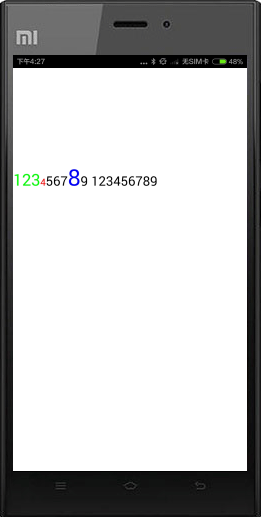 Android 自定義控件:在同一行文字裡混排不同字級與顏色
需求很單純:一段文字裡,某些片段要比別人大、顏色也要不一樣,而且這些片段的位置、字級、顏色都應該由呼叫方自由指定。系統現成的 SpannableString 能做,但若
 Android 自製帶進度條的 WebView:可重用的自訂控制項與通用 Activity
前言 如果你不用系統預設的 TitleBar(也就是把 Activity 的主題設成 @android:style/Theme.NoTitleBar),那就得自己畫一個載
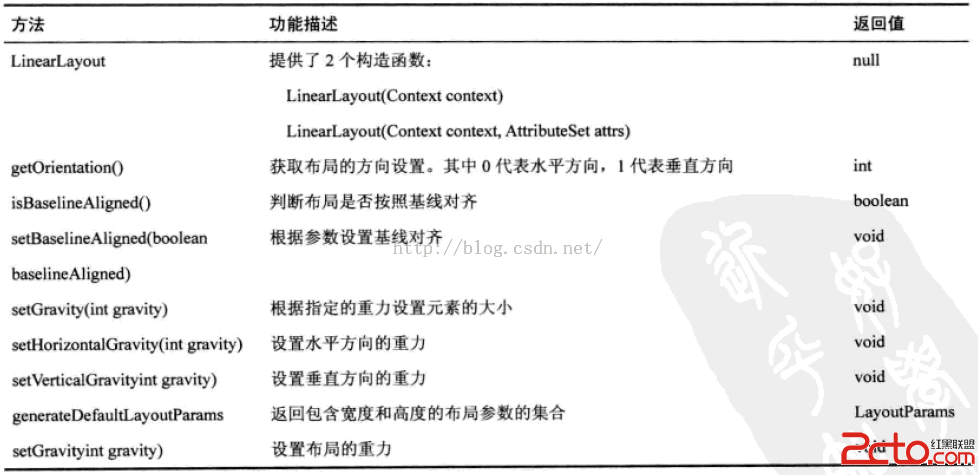 《Android 從入門到精通》閱讀筆記(29):四大 Layout 的常用方法速查
版面配置類別的方法實在太多,每次翻文件找都很耗時間。這篇把 LinearLayout、RelativeLayout、TableLayout 與 AbsoluteLayou
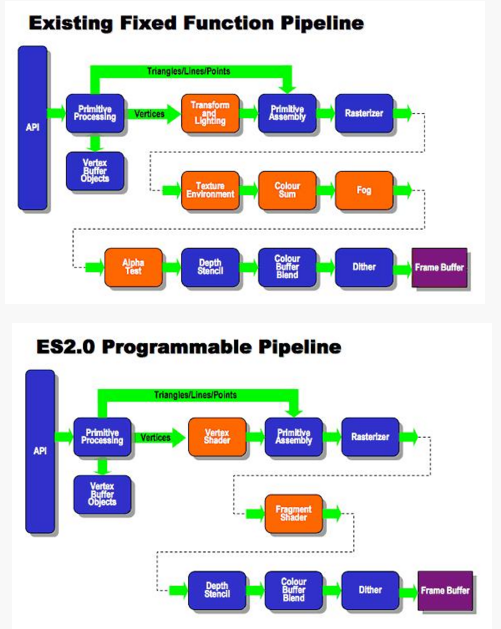 Android OpenGLES 2.0(一)——走進 OpenGLES 2.0
什麼是 OpenGL ES? OpenGL(全寫 Open Graphics Library)定義了一個跨編程語言、跨平台的編程接口規格的專業圖形程序接口。它用於三維圖像


