

編輯:關於 Android 程式設計
在開發圖片合成、相冊選圖或相機相關功能時,常會遇到一個問題:使用者從相冊選擇圖片後,圖片在應用中顯示的方向可能與預期不同。這通常是因為照片本身包含 EXIF 方向資訊。
Android 可透過 ExifInterface 讀取圖片的 EXIF 資訊,再判斷 Orientation 屬性。
常見寫法如下:
ExifInterface exifInterface = new ExifInterface(path);
int orientation = exifInterface.getAttributeInt(ExifInterface.TAG_ORIENTATION, ExifInterface.ORIENTATION_NORMAL);
可根據 orientation 對應到 0、90、180、270 度:
概念如下:
public static int readPictureDegree(String path) { ... }
取得角度後,可在顯示或儲存前使用 Matrix 旋轉 Bitmap:
Matrix matrix = new Matrix();
matrix.postRotate(degree);
Bitmap rotatedBitmap = Bitmap.createBitmap(source, 0, 0, width, height, matrix, true);
這樣可以確保使用者看到的圖片方向正確,也能避免後續合成時出現方向錯誤。
 Android 自訂狀態欄顏色的實作教學
每次使用 iOS 上的應用時,總會發現狀態欄的顏色能和標題欄保持一致,整體視覺相當協調,使用體驗也很出色。像我一樣好奇心強的人,自然會想:這樣的效果在 Android 上
 透徹理解Android Service:基礎知識與編寫實戰
首先,什麼是Service? Service就是Android系統中的服務,它有這麼幾個特點:它無法與使用者直接交互,必須由使用者或其他程式顯式啟動;它的優先級比較高——
 Android AsyncTask 與 Handler 用法實例全面分析
本文全面分析 Android 中 AsyncTask 與 Handler 的用法,供大家參考。 首先,我們得釐清一個概念:什麼是 UI 執行緒?顧名思義,UI 執行緒就是
 Android 逆向入門:Apktool 與 Jadx 源碼剖析及反編譯報錯修復實錄
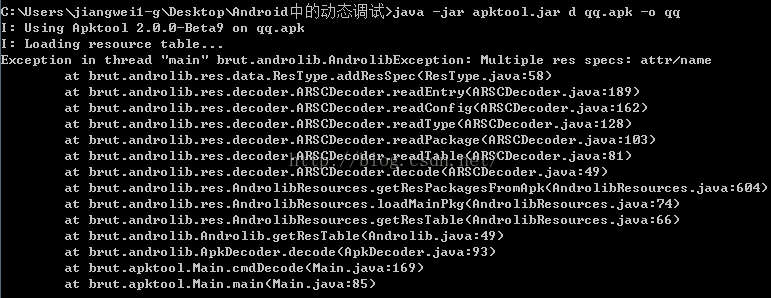
一、前言 在之前的破解實踐中,唯一離不開的工具就是 apktool。它有多強大不必多說,沒有它後面的工作根本無從談起。這個工具開源、用 Java 編寫、代碼結構相對清晰,