

編輯:關於 Android 程式設計
每次使用 iOS 上的應用時,總會發現狀態欄的顏色能和標題欄保持一致,整體視覺相當協調,使用體驗也很出色。像我一樣好奇心強的人,自然會想:這樣的效果在 Android 上能不能做到呢?在 Android 4.4 之前,答案是否定的;但從 4.4 開始,Google 開放讓開發者自訂狀態欄的背景顏色,這無疑是相當貼心的一項改進。如果你的手機裝有最新版的 QQ,而且系統是 Android 4.4 以上,就能親眼看到這種效果:

要實現這個功能,大致有兩種做法:
1. 在 XML 中設定主題或自訂 style;
Theme.Holo.Light.NoActionBar.TranslucentDecor
Theme.Holo.NoActionBar.TranslucentDecor
考量到市面上手機 SDK 版本五花八門,並不建議採用這種方式;
2. 在程式碼中控制;
首先建立一個 Activity,並在 onCreate 方法中處理:
@Override protected void onCreate(Bundle savedInstanceState) { super.onCreate(savedInstanceState); if (Build.VERSION.SDK_INT >= Build.VERSION_CODES.KITKAT) { setTranslucentStatus(true); SystemBarTintManager tintManager = new SystemBarTintManager(this); tintManager.setStatusBarTintEnabled(true); tintManager.setStatusBarTintResource(R.color.barcolor);//通知欄所需顏色 } setContentView(R.layout.activity_main); } @TargetApi(19) private void setTranslucentStatus(boolean on) { Window win = getWindow(); WindowManager.LayoutParams winParams = win.getAttributes(); final int bits = WindowManager.LayoutParams.FLAG_TRANSLUCENT_STATUS; if (on) { winParams.flags |= bits; } else { winParams.flags &= ~bits; } win.setAttributes(winParams); } SystemBarTintManager.java 檔案
package com.test.statusbarcolor; import android.annotation.SuppressLint; import android.annotation.TargetApi; import android.app.Activity; import android.content.Context; import android.content.res.Configuration; import android.content.res.Resources; import android.content.res.TypedArray; import android.graphics.drawable.Drawable; import android.os.Build; import android.util.DisplayMetrics; import android.util.TypedValue; import android.view.Gravity; import android.view.View; import android.view.ViewConfiguration; import android.view.ViewGroup; import android.view.Window; import android.view.WindowManager; import android.widget.FrameLayout.LayoutParams; import java.lang.reflect.Method; /** * Created by lplj on 2016/9/6. * Class to manage status and navigation bar tint effects when using KitKat * translucent system UI modes. * */ @SuppressWarnings({ "rawtypes", "unchecked" }) public class SystemBarTintManager { static { // Android allows a system property to override the presence of the navigation bar. // Used by the emulator. // See https://github.com/android/platform_frameworks_base/blob/master/policy/src/com/android/internal/policy/impl/PhoneWindowManager.java#L1076 if (Build.VERSION.SDK_INT >= Build.VERSION_CODES.KITKAT) { try { Class c = Class.forName("android.os.SystemProperties"); Method m = c.getDeclaredMethod("get", String.class); m.setAccessible(true); sNavBarOverride = (String) m.invoke(null, "qemu.hw.mainkeys"); } catch (Throwable e) { sNavBarOverride = null; } } } /** * The default system bar tint color value. */ public static final int DEFAULT_TINT_COLOR = 0x99000000; private static String sNavBarOverride; private final SystemBarConfig mConfig; private boolean mStatusBarAvailable; private boolean mNavBarAvailable; private boolean mStatusBarTintEnabled; private boolean mNavBarTintEnabled; private View mStatusBarTintView; private View mNavBarTintView; /** * Constructor. Call this in the host activity onCreate method after its * content view has been set. You should always create new instances when * the host activity is recreated. * * @param activity The host activity. */ @TargetApi(19) public SystemBarTintManager(Activity activity) { Window win = activity.getWindow(); ViewGroup decorViewGroup = (ViewGroup) win.getDecorView(); if (Build.VERSION.SDK_INT >= Build.VERSION_CODES.KITKAT) { // check theme attrs int[] attrs = {android.R.attr.windowTranslucentStatus, android.R.attr.windowTranslucentNavigation}; TypedArray a = activity.obtainStyledAttributes(attrs); try { mStatusBarAvailable = a.getBoolean(0, false); mNavBarAvailable = a.getBoolean(1, false); } finally { a.recycle(); } // check window flags WindowManager.LayoutParams winParams = win.getAttributes(); int bits = WindowManager.LayoutParams.FLAG_TRANSLUCENT_STATUS; if ((winParams.flags & bits) != 0) { mStatusBarAvailable = true; } bits = WindowManager.LayoutParams.FLAG_TRANSLUCENT_NAVIGATION; if ((winParams.flags & bits) != 0) { mNavBarAvailable = true; } } mConfig = new SystemBarConfig(activity, mStatusBarAvailable, mNavBarAvailable); // device might not have virtual navigation keys if (!mConfig.hasNavigtionBar()) { mNavBarAvailable = false; } if (mStatusBarAvailable) { setupStatusBarView(activity, decorViewGroup); } if (mNavBarAvailable) { setupNavBarView(activity, decorViewGroup); } } /** * Enable tinting of the system status bar. * * If the platform is running Jelly Bean or earlier, or translucent system * UI modes have not been enabled in either the theme or via window flags, * then this method does nothing. * * @param enabled True to enable tinting, false to disable it (default). */ public void setStatusBarTintEnabled(boolean enabled) { mStatusBarTintEnabled = enabled; if (mStatusBarAvailable) { mStatusBarTintView.setVisibility(enabled ? View.VISIBLE : View.GONE); } } /** * Enable tinting of the system navigation bar. * * If the platform does not have soft navigation keys, is running Jelly Bean * or earlier, or translucent system UI modes have not been enabled in either * the theme or via window flags, then this method does nothing. * * @param enabled True to enable tinting, false to disable it (default). */ public void setNavigationBarTintEnabled(boolean enabled) { mNavBarTintEnabled = enabled; if (mNavBarAvailable) { mNavBarTintView.setVisibility(enabled ? View.VISIBLE : View.GONE); } } /** * Apply the specified color tint to all system UI bars. * * @param color The color of the background tint. */ public void setTintColor(int color) { setStatusBarTintColor(color); setNavigationBarTintColor(color); } /** * Apply the specified drawable or color resource to all system UI bars. * * @param res The identifier of the resource. */ public void setTintResource(int res) { setStatusBarTintResource(res); setNavigationBarTintResource(res); } /** * Apply the specified drawable to all system UI bars. * * @param drawable The drawable to use as the background, or null to remove it. */ public void setTintDrawable(Drawable drawable) { setStatusBarTintDrawable(drawable); setNavigationBarTintDrawable(drawable); } /** * Apply the specified alpha to all system UI bars. * * @param alpha The alpha to use */ public void setTintAlpha(float alpha) { setStatusBarAlpha(alpha); setNavigationBarAlpha(alpha); } /** * Apply the specified color tint to the system status bar. * * @param color The color of the background tint. */ public void setStatusBarTintColor(int color) { if (mStatusBarAvailable) { mStatusBarTintView.setBackgroundColor(color); } } /** * Apply the specified drawable or color resource to the system status bar. * * @param res The identifier of the resource. */ public void setStatusBarTintResource(int res) { if (mStatusBarAvailable) { mStatusBarTintView.setBackgroundResource(res); } } /** * Apply the specified drawable to the system status bar. * * @param drawable The drawable to use as the background, or null to remove it. */ @SuppressWarnings("deprecation") public void setStatusBarTintDrawable(Drawable drawable) { if (mStatusBarAvailable) { mStatusBarTintView.setBackgroundDrawable(drawable); } } /** * Apply the specified alpha to the system status bar. * * @param alpha The alpha to use */ @TargetApi(11) public void setStatusBarAlpha(float alpha) { if (mStatusBarAvailable && Build.VERSION.SDK_INT >= Build.VERSION_CODES.HONEYCOMB) { mStatusBarTintView.setAlpha(alpha); } } /** * Apply the specified color tint to the system navigation bar. * * @param color The color of the background tint. */ public void setNavigationBarTintColor(int color) { if (mNavBarAvailable) { mNavBarTintView.setBackgroundColor(color); } } /** * Apply the specified drawable or color resource to the system navigation bar. * * @param res The identifier of the resource. */ public void setNavigationBarTintResource(int res) { if (mNavBarAvailable) { mNavBarTintView.setBackgroundResource(res); } } /** * Apply the specified drawable to the system navigation bar. * * @param drawable The drawable to use as the background, or null to remove it. */ @SuppressWarnings("deprecation") public void setNavigationBarTintDrawable(Drawable drawable) { if (mNavBarAvailable) { mNavBarTintView.setBackgroundDrawable(drawable); } } /** * Apply the specified alpha to the system navigation bar. * * @param alpha The alpha to use */ @TargetApi(11) public void setNavigationBarAlpha(float alpha) { if (mNavBarAvailable && Build.VERSION.SDK_INT >= Build.VERSION_CODES.HONEYCOMB) { mNavBarTintView.setAlpha(alpha); } } /** * Get the system bar configuration. * * @return The system bar configuration for the current device configuration. */ public SystemBarConfig getConfig() { return mConfig; } /** * Is tinting enabled for the system status bar? * * @return True if enabled, False otherwise. */ public boolean isStatusBarTintEnabled() { return mStatusBarTintEnabled; } /** * Is tinting enabled for the system navigation bar? * * @return True if enabled, False otherwise. */ public boolean isNavBarTintEnabled() { return mNavBarTintEnabled; } private void setupStatusBarView(Context context, ViewGroup decorViewGroup) { mStatusBarTintView = new View(context); LayoutParams params = new LayoutParams(LayoutParams.MATCH_PARENT, mConfig.getStatusBarHeight()); params.gravity = Gravity.TOP; if (mNavBarAvailable && !mConfig.isNavigationAtBottom()) { params.rightMargin = mConfig.getNavigationBarWidth(); } mStatusBarTintView.setLayoutParams(params); mStatusBarTintView.setBackgroundColor(DEFAULT_TINT_COLOR); mStatusBarTintView.setVisibility(View.GONE); decorViewGroup.addView(mStatusBarTintView); } private void setupNavBarView(Context context, ViewGroup decorViewGroup) { mNavBarTintView = new View(context); LayoutParams params; if (mConfig.isNavigationAtBottom()) { params = new LayoutParams(LayoutParams.MATCH_PARENT, mConfig.getNavigationBarHeight()); params.gravity = Gravity.BOTTOM; } else { params = new LayoutParams(mConfig.getNavigationBarWidth(), LayoutParams.MATCH_PARENT); params.gravity = Gravity.RIGHT; } mNavBarTintView.setLayoutParams(params); mNavBarTintView.setBackgroundColor(DEFAULT_TINT_COLOR); mNavBarTintView.setVisibility(View.GONE); decorViewGroup.addView(mNavBarTintView); } /** * Class which describes system bar sizing and other characteristics for the current * device configuration. * */ public static class SystemBarConfig { private static final String STATUS_BAR_HEIGHT_RES_NAME = "status_bar_height"; private static final String NAV_BAR_HEIGHT_RES_NAME = "navigation_bar_height"; private static final String NAV_BAR_HEIGHT_LANDSCAPE_RES_NAME = "navigation_bar_height_landscape"; private static final String NAV_BAR_WIDTH_RES_NAME = "navigation_bar_width"; private static final String SHOW_NAV_BAR_RES_NAME = "config_showNavigationBar"; private final boolean mTranslucentStatusBar; private final boolean mTranslucentNavBar; private final int mStatusBarHeight; private final int mActionBarHeight; private final boolean mHasNavigationBar; private final int mNavigationBarHeight; private final int mNavigationBarWidth; private final boolean mInPortrait; private final float mSmallestWidthDp; private SystemBarConfig(Activity activity, boolean translucentStatusBar, boolean traslucentNavBar) { Resources res = activity.getResources(); mInPortrait = (res.getConfiguration().orientation == Configuration.ORIENTATION_PORTRAIT); mSmallestWidthDp = getSmallestWidthDp(activity); mStatusBarHeight = getInternalDimensionSize(res, STATUS_BAR_HEIGHT_RES_NAME); mActionBarHeight = getActionBarHeight(activity); mNavigationBarHeight = getNavigationBarHeight(activity); mNavigationBarWidth = getNavigationBarWidth(activity); mHasNavigationBar = (mNavigationBarHeight > 0); mTranslucentStatusBar = translucentStatusBar; mTranslucentNavBar = traslucentNavBar; } @TargetApi(14) private int getActionBarHeight(Context context) { int result = 0; if (Build.VERSION.SDK_INT >= Build.VERSION_CODES.ICE_CREAM_SANDWICH) { TypedValue tv = new TypedValue(); context.getTheme().resolveAttribute(android.R.attr.actionBarSize, tv, true); result = TypedValue.complexToDimensionPixelSize(tv.data, context.getResources().getDisplayMetrics()); } return result; } @TargetApi(14) private int getNavigationBarHeight(Context context) { Resources res = context.getResources(); int result = 0; if (Build.VERSION.SDK_INT >= Build.VERSION_CODES.ICE_CREAM_SANDWICH) { if (hasNavBar(context)) { String key; if (mInPortrait) { key = NAV_BAR_HEIGHT_RES_NAME; } else { key = NAV_BAR_HEIGHT_LANDSCAPE_RES_NAME; } return getInternalDimensionSize(res, key); } } return result; } @TargetApi(14) private int getNavigationBarWidth(Context context) { Resources res = context.getResources(); int result = 0; if (Build.VERSION.SDK_INT >= Build.VERSION_CODES.ICE_CREAM_SANDWICH) { if (hasNavBar(context)) { return getInternalDimensionSize(res, NAV_BAR_WIDTH_RES_NAME); } } return result; } @TargetApi(14) private boolean hasNavBar(Context context) { Resources res = context.getResources(); int resourceId = res.getIdentifier(SHOW_NAV_BAR_RES_NAME, "bool", "android"); if (resourceId != 0) { boolean hasNav = res.getBoolean(resourceId); // check override flag (see static block) if ("1".equals(sNavBarOverride)) { hasNav = false; } else if ("0".equals(sNavBarOverride)) { hasNav = true; } return hasNav; } else { // fallback return !ViewConfiguration.get(context).hasPermanentMenuKey(); } } private int getInternalDimensionSize(Resources res, String key) { int result = 0; int resourceId = res.getIdentifier(key, "dimen", "android"); if (resourceId > 0) { result = res.getDimensionPixelSize(resourceId); } return result; } @SuppressLint("NewApi") private float getSmallestWidthDp(Activity activity) { DisplayMetrics metrics = new DisplayMetrics(); if (Build.VERSION.SDK_INT >= Build.VERSION_CODES.JELLY_BEAN) { activity.getWindowManager().getDefaultDisplay().getRealMetrics(metrics); } else { // TODO this is not correct, but we don't really care pre-kitkat activity.getWindowManager().getDefaultDisplay().getMetrics(metrics); } float widthDp = metrics.widthPixels / metrics.density; float heightDp = metrics.heightPixels / metrics.density; return Math.min(widthDp, heightDp); } /** * Should a navigation bar appear at the bottom of the screen in the current * device configuration? A navigation bar may appear on the right side of * the screen in certain configurations. * * @return True if navigation should appear at the bottom of the screen, False otherwise. */ public boolean isNavigationAtBottom() { return (mSmallestWidthDp >= 600 || mInPortrait); } /** * Get the height of the system status bar. * * @return The height of the status bar (in pixels). */ public int getStatusBarHeight() { return mStatusBarHeight; } /** * Get the height of the action bar. * * @return The height of the action bar (in pixels). */ public int getActionBarHeight() { return mActionBarHeight; } /** * Does this device have a system navigation bar? * * @return True if this device uses soft key navigation, False otherwise. */ public boolean hasNavigtionBar() { return mHasNavigationBar; } /** * Get the height of the system navigation bar. * * @return The height of the navigation bar (in pixels). If the device does not have * soft navigation keys, this will always return 0. */ public int getNavigationBarHeight() { return mNavigationBarHeight; } /** * Get the width of the system navigation bar when it is placed vertically on the screen. * * @return The width of the navigation bar (in pixels). If the device does not have * soft navigation keys, this will always return 0. */ public int getNavigationBarWidth() { return mNavigationBarWidth; } /** * Get the layout inset for any system UI that appears at the top of the screen. * * @param withActionBar True to include the height of the action bar, False otherwise. * @return The layout inset (in pixels). */ public int getPixelInsetTop(boolean withActionBar) { return (mTranslucentStatusBar ? mStatusBarHeight : 0) + (withActionBar ? mActionBarHeight : 0); } /** * Get the layout inset for any system UI that appears at the bottom of the screen. * * @return The layout inset (in pixels). */ public int getPixelInsetBottom() { if (mTranslucentNavBar && isNavigationAtBottom()) { return mNavigationBarHeight; } else { return 0; } } /** * Get the layout inset for any system UI that appears at the right of the screen. * * @return The layout inset (in pixels). */ public int getPixelInsetRight() { if (mTranslucentNavBar && !isNavigationAtBottom()) { return mNavigationBarWidth; } else { return 0; } } } }
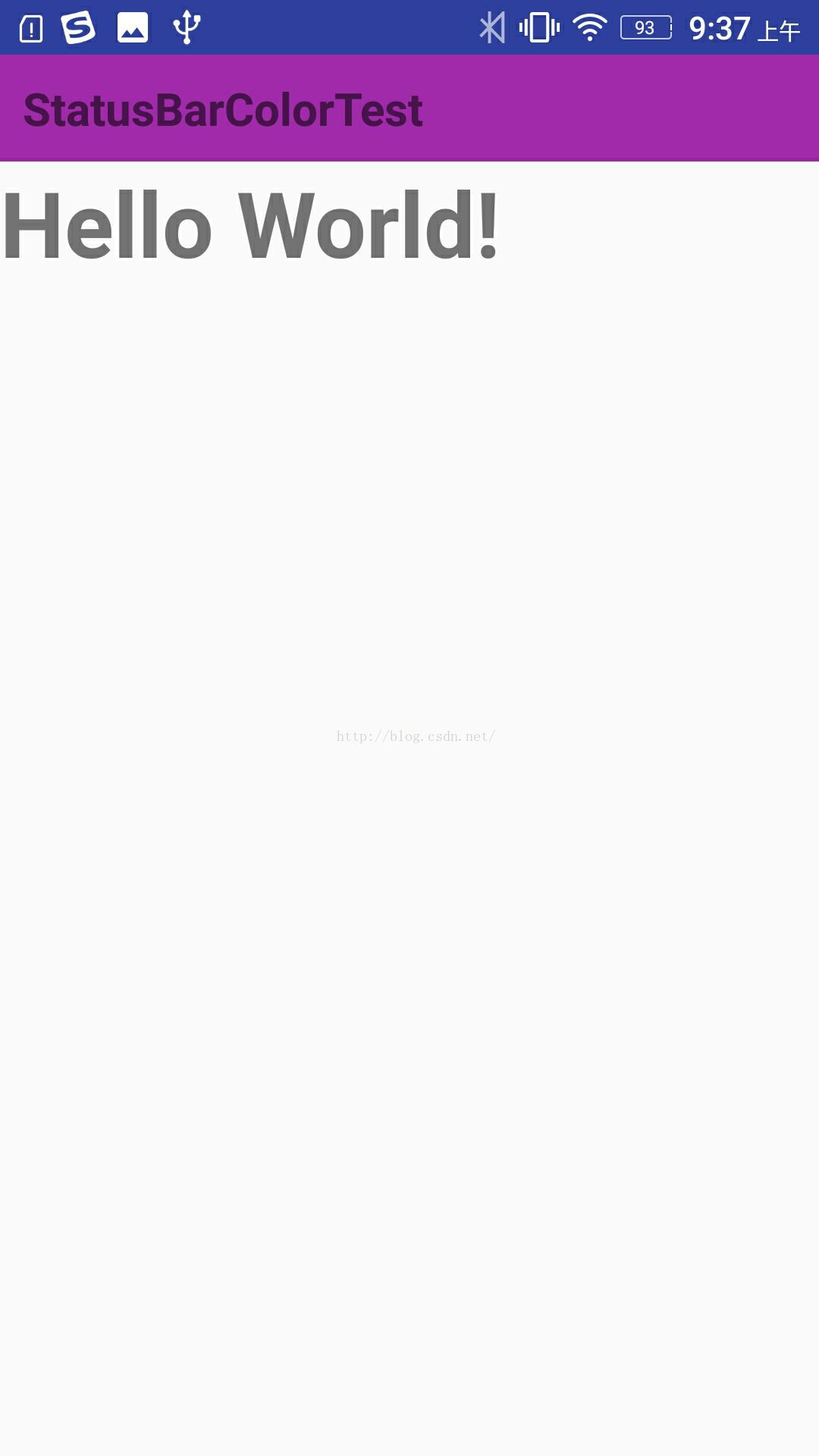
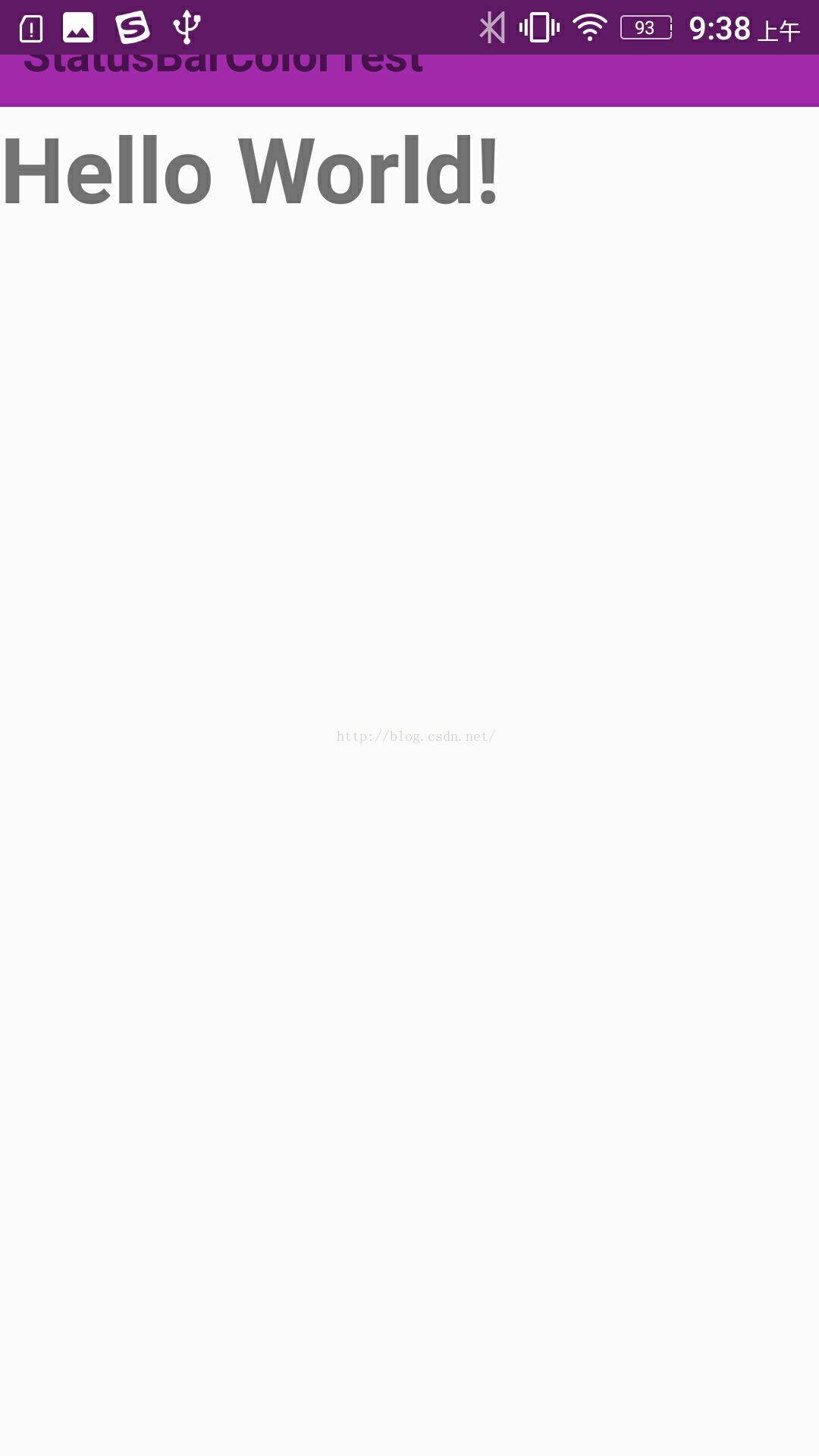
乍看之下似乎已經達到目的了,但仔細觀察會發現,標題欄好像被往上頂了,也就是說 App 介面變成了全螢幕,狀態欄蓋到了 App 上頭。恩,這並不是我們想要的效果。那該怎麼讓介面從狀態欄下方開始佈局呢?只要在 Activity 佈局檔最外層的控件加上一個屬性即可:
android:fitsSystemWindows="true",來看看成果:
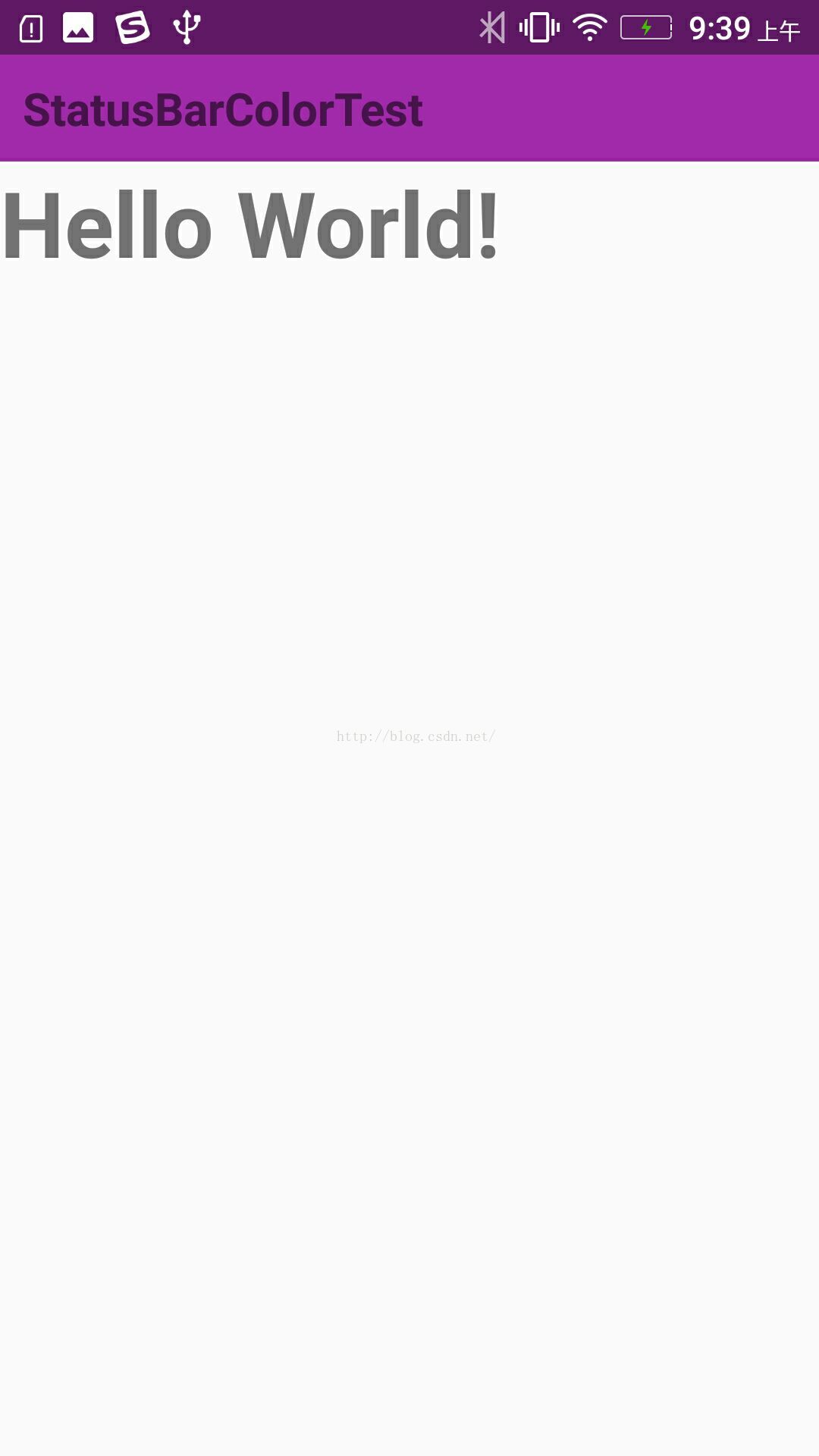
大功告成!
PS:實作過程中發現了一些問題。以上方法對單一 Activity 有效,但對於繼承了 TabActivity 的導覽頁該怎麼辦呢?假設 MainActivity 繼承自 TabActivity,而 Tab1Activity、Tab2Activity、Tab3Activity 是三個子項,那麼設定狀態欄的程式碼要寫在 MainActivity 裡,而 android:fitsSystemWindows="true" 則要寫在三個子 Activity 的 XML 佈局檔中。這樣設定之後仍然有問題:進入應用後,首頁也就是 Tab1Activity 沒有問題,但 Tab2Activity、Tab3Activity 卻達不到效果,它們的表現相當於沒加 android:fitsSystemWindows="true" 時的樣子。一開始我懷疑是 Activity 不同的緣故,於是就把 Tab1Activity 和 Tab3Activity 的位置對調,結果 Tab3Activity 變成首頁後又正常了,而 Tab1Activity 反而不正常了,實在百思不得其解。最後實在沒轍,只好在 Tab2Activity、Tab3Activity 的 onCreate 方法中加了幾行程式碼:
if (Build.VERSION.SDK_INT >= Build.VERSION_CODES.KITKAT) {
((LinearLayout)findViewById(R.id.ll)).setPadding(0, SysUtils.getStatusHeight(this), 0,0);
}
意思是先求出狀態欄高度,再把最外層控件的 topPadding 設為狀態欄高度,結果剛好達到效果。至於為什麼只有首頁 Activity 能生效、後面的子項卻不行,我到現在也還在苦惱,有知道的朋友歡迎一起討論!
狀態欄高度演算法:
/** * 狀態欄高度算法 * @param activity * @return */ public static int getStatusHeight(Activity activity){ int statusHeight = 0; Rect localRect = new Rect(); activity.getWindow().getDecorView().getWindowVisibleDisplayFrame(localRect); statusHeight = localRect.top; if (0 == statusHeight){ Class localClass; try { localClass = Class.forName("com.android.internal.R$dimen"); Object localObject = localClass.newInstance(); int i5 = Integer.parseInt(localClass.getField("status_bar_height").get(localObject).toString()); statusHeight = activity.getResources().getDimensionPixelSize(i5); } catch (ClassNotFoundException e) { e.printStackTrace(); } catch (IllegalAccessException e) { e.printStackTrace(); } catch (InstantiationException e) { e.printStackTrace(); } catch (NumberFormatException e) { e.printStackTrace(); } catch (IllegalArgumentException e) { e.printStackTrace(); } catch (SecurityException e) { e.printStackTrace(); } catch (NoSuchFieldException e) { e.printStackTrace(); } } return statusHeight; }
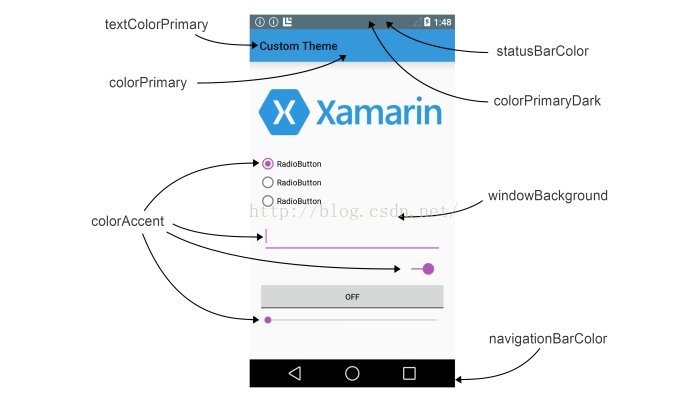
這樣是不是清楚多了?繼續加油吧,程式這條路還很長,我們慢慢走。
 Android 仿 iOS UIAlertView 對話框
顯示效果 我在參考連結中看到原作者仿的 QQ 提示框,但实际使用起來並不太順手,有一些不足之處。於是我參照系統的 AlertDialog 設計,沿用參考連結中的布局檔
 Android 官方文件導讀:Location and Sensors APIs(中)
本文接續介紹 Android 裝置中的各類感測器(Sensor),包含感測器概述、分類、框架,以及如何在程式中監聽感測器事件。感測器概述(Sensors Overview
 Android SnackBar:介於 Toast 與 Dialog 之間的那個控件
為什麼需要 SnackBar Toast 只能顯示、無法互動;AlertDialog 能互動,卻又太重,還得使用者親手點掉。真實產品裡經常需要中間地帶:一條從底部滑出的提
 用 Tomcat + Gradle 打造 Android APK 全自動打包平台
看到公司 iOS 同事做了一個打包工具給 QA 用,效果很好:QA 自己就能取到測試包,開發也不必反覆被打斷去手動出包。於是也替 Android 端做了一個——用 Tom