

編輯:關於 Android 程式設計
要讀取聯絡人,核心是 ContentResolver 搭配 ContactsContract。以下提供三個實用方法:全量抓取、分頁抓取、取得總筆數。
public class ContactInfoProvider {
    private Context mContext;

    public ContactInfoProvider(Context context) {
        mContext = context;
    }

    /**
     * 取得系統所有聯絡人
     */
    public List<ContactInfo> getSystemContactInfos() {
        List<ContactInfo> infos = new ArrayList<ContactInfo>();

        // 用 ContentResolver 查聯絡人表
        Cursor cursor = mContext.getContentResolver().query(
                ContactsContract.Contacts.CONTENT_URI, null, null, null, null);

        while (cursor.moveToNext()) {
            ContactInfo info = new ContactInfo();

            String contactId = cursor.getString(
                    cursor.getColumnIndex(ContactsContract.Contacts._ID));
            String name = cursor.getString(
                    cursor.getColumnIndex(ContactsContract.Contacts.DISPLAY_NAME));
            info.setContactName(name);

            // 以 contactId 反查該聯絡人的所有號碼
            Cursor phones = mContext.getContentResolver().query(
                    ContactsContract.CommonDataKinds.Phone.CONTENT_URI,
                    null,
                    ContactsContract.CommonDataKinds.Phone.CONTACT_ID + " = " + contactId,
                    null, null);

            while (phones.moveToNext()) {
                String phoneNumber = phones.getString(phones.getColumnIndex(
                        ContactsContract.CommonDataKinds.Phone.NUMBER));
                info.setPhoneNumber(phoneNumber);
            }
            phones.close();
            infos.add(info);
            info = null;
        }
        cursor.close();
        return infos;
    }

    /**
     * 分頁查詢聯絡人
     * @param pageSize      每頁筆數
     * @param currentOffset 目前偏移量
     */
    public List<ContactInfo> getContactsByPage(int pageSize, int currentOffset) {
        List<ContactInfo> infos = new ArrayList<ContactInfo>();
        Uri uri = ContactsContract.CommonDataKinds.Phone.CONTENT_URI;
        String[] projection = {
                ContactsContract.CommonDataKinds.Phone.DISPLAY_NAME,
                ContactsContract.CommonDataKinds.Phone.DATA1,
                "sort_key"
        };
        // 用 limit / offset 做分頁
        Cursor cursor = mContext.getContentResolver().query(
                uri, projection, null, null,
                "sort_key COLLATE LOCALIZED asc limit "
                        + pageSize + " offset " + currentOffset);

        if (cursor != null) {
            while (cursor.moveToNext()) {
                ContactInfo info = new ContactInfo();
                info.setContactName(cursor.getString(0));
                info.setPhoneNumber(cursor.getString(1));
                infos.add(info);
                info = null;
            }
            cursor.close();
        }
        return infos;
    }

    /**
     * 取得聯絡人總筆數
     */
    public int getAllCounts() {
        int num = 0;
        Cursor cursor = mContext.getContentResolver().query(
                ContactsContract.Contacts.CONTENT_URI, null, null, null, null);
        while (cursor.moveToNext()) {
            num++;
        }
        cursor.close();
        return num;
    }
}
幾點實作上的差異值得留意:
全量查詢走 Contacts 表,再對每筆聯絡人反查 Phone 表,語意清楚但效能較差——N+1 次查詢,聯絡人一多就明顯卡頓。
分頁查詢直接以 Phone 表為起點,一次拿到名稱與號碼,再用 SQL 的 limit/offset 切頁,搭配 sort_key COLLATE LOCALIZED asc 讓排序貼近當地語言習慣。列表只顯示畫面上那幾筆,明顯比一次全抓划算。
另外别忘了在 Manifest 補上 READ_CONTACTS 權限;Android 6.0 以上還要執行期動態申請,否則 query 會直接回空或丟 SecurityException。
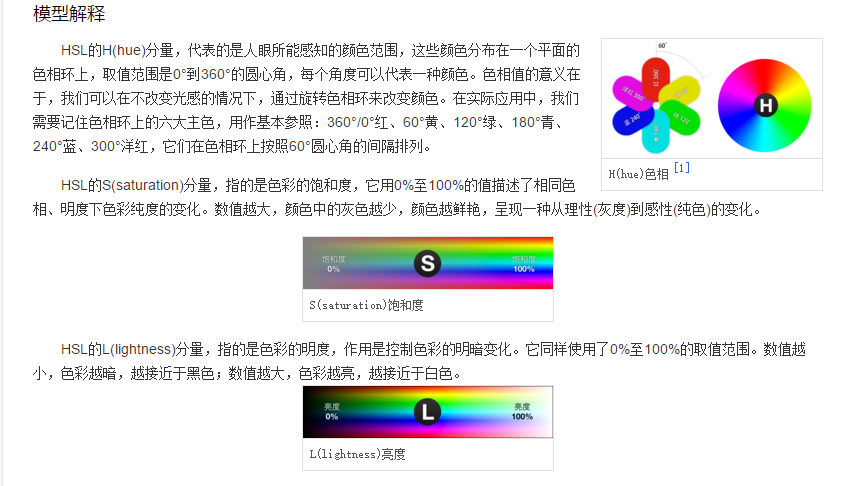 深入剖析 Android L Palette 取色背後的實作原理
有些介面的配色看起來令人心情舒暢,有些則讓人忍不住皺眉。Android L 的 Palette 能從圖片中萃取並篩選出協調的顏色,效果往往相當討喜。本文就帶你看看 Pal
 Material Design 實作(四):用 RecyclerView 與 CardView 打造列表與卡片
要在 App 裡做出符合 Material Design 風格的複雜列表與卡片,官方提供的兩個元件是 RecyclerView 與 CardView。這篇說明各自的用法與
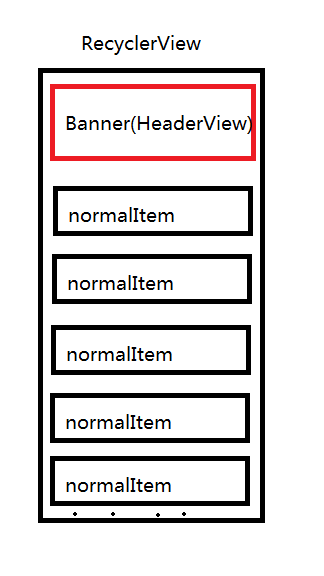 Android 自定義 LayoutManager 入門:常見誤區、關鍵 API 與復用真相
自定義 LayoutManager 系列開篇 這篇文章是深入掌握自定義 LayoutManager 系列的第一篇,也是一份學習前的總整理。內容會先釐清常見誤區,再說明背後
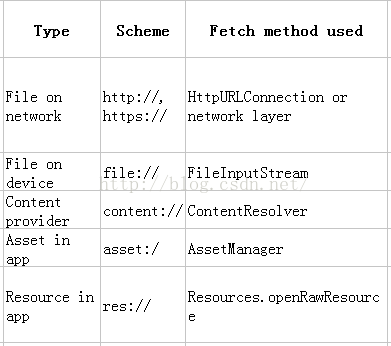 Fresco 入門:Facebook 開源的圖片加載方案
此前我在項目裡一直使用 Android-Universal-Image-Loader,它是一個提供異步圖片加載、緩存與顯示能力的開源 UI 組件,用的人很多。這次要換一個