

編輯:關於 Android 程式設計
Gallery 雖然在後續版本中被標記為 deprecated,但它做橫向滾動式圖片列表這件事仍然相當直觀,很多老專案裡也還在跑。這篇示範兩種用法:一般的 Gallery,以及透過技巧做出來的循環 Gallery。
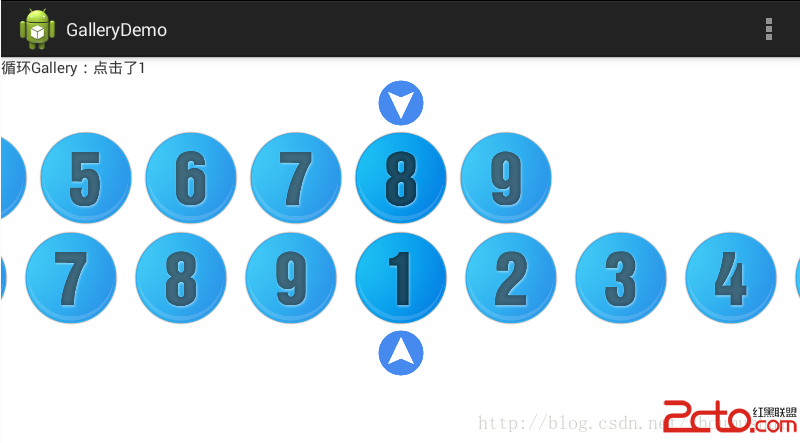
效果圖:
<LinearLayout xmlns:android="https://schemas.android.com/apk/res/android"
    android:layout_width="fill_parent"
    android:layout_height="fill_parent"
    android:orientation="vertical" >

    <TextView android:id="@+id/num"
        android:layout_width="wrap_content"
        android:layout_height="wrap_content"
        android:text="@string/hello_world" />

    <ImageView android:layout_width="50dp"
        android:layout_height="50dp"
        android:layout_gravity="center"
        android:src="@drawable/arrow_down" />

    <Gallery android:id="@+id/gallery"
        android:layout_width="fill_parent"
        android:layout_height="wrap_content"
        android:gravity="bottom" />

    <Gallery android:id="@+id/galleryLoop"
        android:layout_width="fill_parent"
        android:layout_height="wrap_content"
        android:gravity="bottom" />

    <ImageView android:layout_width="50dp"
        android:layout_height="50dp"
        android:layout_gravity="center"
        android:src="@drawable/arrow_up" />
</LinearLayout>
package com.example.gallerydemo;

import android.app.Activity;
import android.content.Context;
import android.os.Bundle;
import android.view.Menu;
import android.view.MenuItem;
import android.view.View;
import android.view.ViewGroup;
import android.widget.AdapterView;
import android.widget.AdapterView.OnItemClickListener;
import android.widget.BaseAdapter;
import android.widget.Gallery;
import android.widget.ImageView;
import android.widget.TextView;

public class Main extends Activity {

    private Gallery gallery = null;
    private Gallery galleryLoop = null;
    private TextView tvNum = null;

    @Override
    protected void onCreate(Bundle savedInstanceState) {
        super.onCreate(savedInstanceState);
        setContentView(R.layout.main);

        tvNum = (TextView) findViewById(R.id.num);

        // 一般 Gallery
        gallery = (Gallery) findViewById(R.id.gallery);
        gallery.setAdapter(new ImageAdapter(this));
        gallery.setSpacing(5);
        gallery.setOnItemClickListener(new OnItemClickListener() {
            public void onItemClick(AdapterView<?> arg0, View arg1, int arg2, long arg3) {
                int num = arg2 + 1;
                tvNum.setText("常規 Gallery:點擊了 " + num);
            }
        });

        // 循環 Gallery
        galleryLoop = (Gallery) findViewById(R.id.galleryLoop);
        galleryLoop.setAdapter(new LoopImageAdapter(this));
        galleryLoop.setSpacing(10);
        galleryLoop.setOnItemClickListener(new OnItemClickListener() {
            public void onItemClick(AdapterView<?> arg0, View arg1, int arg2, long arg3) {
                int num = (arg2 + 1) % 9;
                if (num == 0) {
                    num = 9;
                }
                tvNum.setText("循環 Gallery:點擊了 " + num);
            }
        });
    }

    /** 一般 Gallery 的 Adapter */
    class ImageAdapter extends BaseAdapter {
        private Context context;

        public ImageAdapter(Context context) {
            this.context = context;
        }

        private Integer[] imageInteger = {
            R.drawable.pic_1, R.drawable.pic_2, R.drawable.pic_3,
            R.drawable.pic_4, R.drawable.pic_5, R.drawable.pic_6,
            R.drawable.pic_7, R.drawable.pic_8, R.drawable.pic_9
        };

        public Object getItem(int position) { return position; }
        public long getItemId(int position) { return position; }
        public int getCount() { return imageInteger.length; }

        public View getView(int position, View convertView, ViewGroup parent) {
            ImageView imageView = new ImageView(context);
            imageView.setImageResource(imageInteger[position]);
            imageView.setScaleType(ImageView.ScaleType.FIT_XY);
            imageView.setLayoutParams(new Gallery.LayoutParams(100, 100));
            return imageView;
        }
    }

    /** 循環 Gallery 的 Adapter */
    class LoopImageAdapter extends BaseAdapter {
        private Context context;

        public LoopImageAdapter(Context context) {
            this.context = context;
        }

        private Integer[] imageInteger = {
            R.drawable.pic_1, R.drawable.pic_2, R.drawable.pic_3,
            R.drawable.pic_4, R.drawable.pic_5, R.drawable.pic_6,
            R.drawable.pic_7, R.drawable.pic_8, R.drawable.pic_9
        };

        public Object getItem(int position) { return position; }
        public long getItemId(int position) { return position; }

        // 關鍵:把數量回傳成一個極大的值
        public int getCount() { return Integer.MAX_VALUE; }

        public View getView(int position, View convertView, ViewGroup parent) {
            ImageView imageView = new ImageView(context);
            // 關鍵:用取餘數把 index 映射回真實圖片
            imageView.setImageResource(imageInteger[position % imageInteger.length]);
            imageView.setScaleType(ImageView.ScaleType.FIT_XY);
            imageView.setLayoutParams(new Gallery.LayoutParams(100, 100));
            return imageView;
        }
    }

    @Override
    public boolean onCreateOptionsMenu(Menu menu) {
        getMenuInflater().inflate(R.menu.main, menu);
        return true;
    }

    @Override
    public boolean onOptionsItemSelected(MenuItem item) {
        int id = item.getItemId();
        if (id == R.id.action_settings) {
            return true;
        }
        return super.onOptionsItemSelected(item);
    }
}
「循環 Gallery」其實沒有任何魔法,只靠兩個改動:
第一,把 getCount() 回傳成 Integer.MAX_VALUE,讓 Gallery 相信項目幾乎無限多,因此可以一直往同一個方向滑動而不會碰到頭。
第二,在 getView() 中對 position 取餘數(position % imageInteger.length),把龐大的 index 映射回真實的圖片陣列。
兩者搭配起來,就得到了視覺上無始無終的效果。也因為這個特性,在 onItemClick 中拿到的 arg2 已經不再是真實的圖片序號,必須再做一次取餘數還原,這就是範例中 (arg2 + 1) % 9 的由來。
要提醒的是,範例中每次 getView 都 new 一個新的 ImageView,這是為了程式碼清楚而做的簡化。實務上應該複用 convertView 並加上 ViewHolder,否則在圖片數量多、滑動頻繁時會產生大量不必要的物件配置。若要在新專案裡實作類似效果,也建議改用 HorizontalScrollView + 自定義佈局,或 RecyclerView 搭配橫向 LayoutManager 來取代 Gallery。
 解決 Android Studio 反覆提示重啟 ADB 的問題
用手機連上電腦除錯時,Android Studio 常常跳出提示要你重啟 ADB,但點了重啟之後,那個提示對話框又立刻跳出來。會這樣反覆出現,是因為 ADB 根本沒有重啟
 Android Frame 逐幀動畫完整示例
Android Frame 逐幀動畫 Frame 動畫是 Android Animation 的一種形式,其原理與電影放映類似:將多張圖片依序切換,形成連續動畫效果。它適
 Android ActionBar 入門:Toolbar、Action View 與導航
ActionBar 是什麼 ActionBar 是 Android 3.0 之後加入的導航欄功能。它通常用來標示目前所在位置,並提供操作入口與導航能力。ActionBar
 Android MP3 播放器實作拆解(一):掃描媒體庫與 Service 播放
做一個音樂播放器,第一步永遠是「把歌找出來」,第二步則是「點下去要能響」。本文示範如何用 MediaStore 掃描本機音樂、以 SimpleAdapter 填充列表,再