

編輯:關於 Android 程式設計
目標很清晰:用戶在系統相冊裡點「分享」時,我們自己的 App 能出現在候選列表並正確接收圖片。整個過程分兩步——先在 Manifest 註冊,再在 Activity 裡解析。
在 AndroidManifest.xml 中為目標 Activity 聲明它能接收發送型 Intent:
<intent-filter>
    <action android:name="android.intent.action.SEND" />
    <category android:name="android.intent.category.DEFAULT" />
    <data android:mimetype="image/*" />
</intent-filter>
這裡的 mimetype 決定了你的 App 會出現在哪些分享場景。只寫 image/* 就只出現在圖片分享裡;若還想接文本,可以再加一條 text/plain 的 data。
void onCreate(Bundle savedInstanceState) {
    // Get intent, action and MIME type
    Intent intent = getIntent();
    String action = intent.getAction();
    String type = intent.getType();

    if (Intent.ACTION_SEND.equals(action) && type != null) {
        if ("text/plain".equals(type)) {
            handleSendText(intent);       // 處理單條文本
        } else if (type.startsWith("image/")) {
            handleSendImage(intent);      // 處理單張圖片
        }
    } else if (Intent.ACTION_SEND_MULTIPLE.equals(action) && type != null) {
        if (type.startsWith("image/")) {
            handleSendMultipleImages(intent);  // 處理多張圖片
        }
    } else {
        // 其他情況,例如從桌面圖標正常啟動
    }
}

void handleSendText(Intent intent) {
    String sharedText = intent.getStringExtra(Intent.EXTRA_TEXT);
    if (sharedText != null) {
        // 更新 UI 展示文本
    }
}

void handleSendImage(Intent intent) {
    Uri imageUri = (Uri) intent.getParcelableExtra(Intent.EXTRA_STREAM);
    if (imageUri != null) {
        // 更新 UI 展示圖片
    }
}

void handleSendMultipleImages(Intent intent) {
    ArrayList<Uri> imageUris = intent.getParcelableArrayListExtra(Intent.EXTRA_STREAM);
    if (imageUris != null) {
        // 更新 UI 展示多張圖片
    }
}
EXTRA_STREAM 取單個 Uri,ACTION_SEND_MULTIPLE 則用 getParcelableArrayListExtra 取列表,兩者不能混用。grantUriPermission 或 takePersistableUriPermission 續期,否則稍後讀取會拋 SecurityException。EXTRA_TEXT 而非流,只處理圖片會導致「分享進來一片空白」。官方與社區的完整示例:https://code.tutsplus.com/tutorials/android-sdk-receiving-data-from-the-send-intent--mobile-14878
 Android 通知欄 Notification 詳解
Notification 是 Android 中常見的使用者提醒機制,可用於顯示新訊息、下載進度、背景服務狀態或系統提示。開發者可以透過 NotificationMana
 Android 三行設定打造沉浸式狀態欄
沉浸式狀態欄能讓狀態列與 App 頂部視覺更一致,提升整體質感。在 Android 4.4 以上版本中,可利用半透明系統裝飾搭配版面配置屬性來實現。 步驟一:建立半透明主
 Android 5.0 重啟恢復 Task 功能的源碼剖析
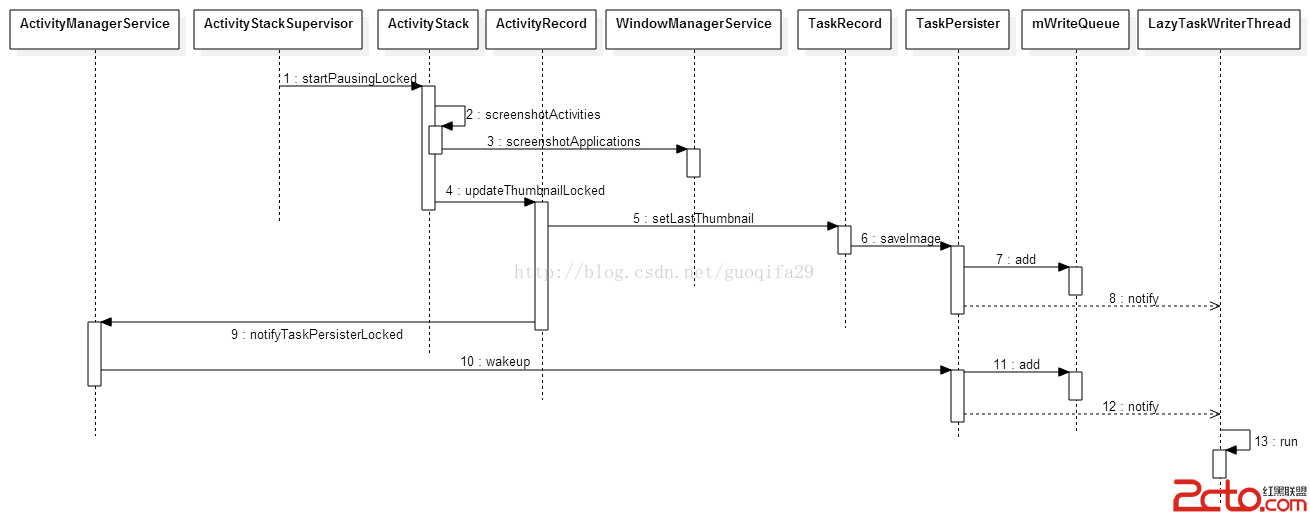
Android 5.0 引入了一項實用功能:設備重啟後仍能恢復 Task。在正常的 Activity 切換過程中,AMS(Activity Manager Service
 Android 安全機制(一):四大組件安全與自定義權限
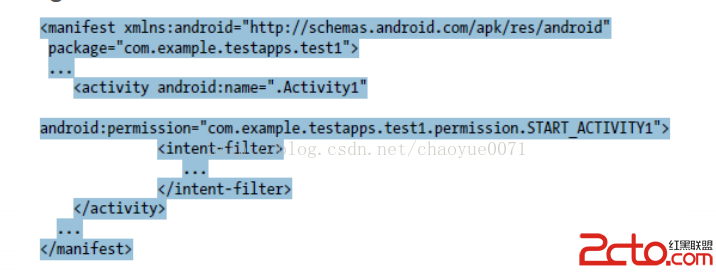
Android 的組件有「公開」與「私有」之分,決定它能否被其他應用調用,控制開關就是清單文件中的 android:exported:設為 true 表示對外開放,設為