

編輯:關於 Android 程式設計
最近專案有個需求:即時提示使用者還能打幾個字,也就是要監聽 EditText 的文字變化。功能本身不難,但每次都用組合方式重寫一遍實在麻煩,於是就把它包成一個自定義控件,以後直接引用。
先看效果:
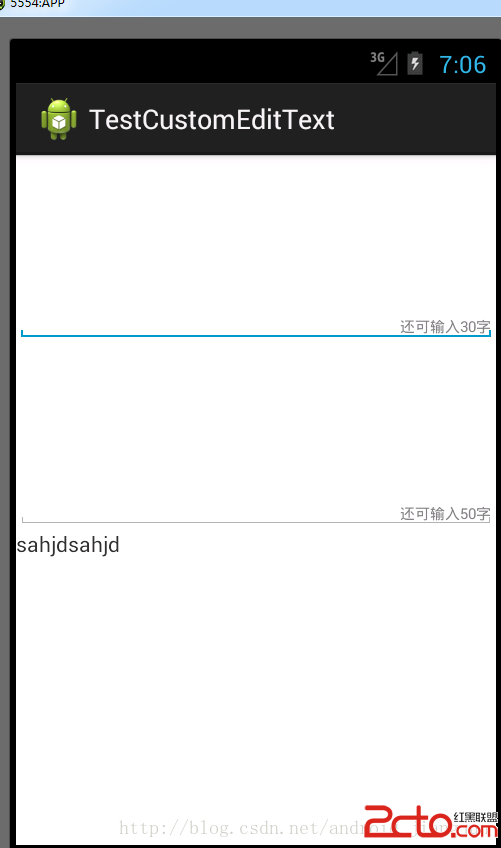
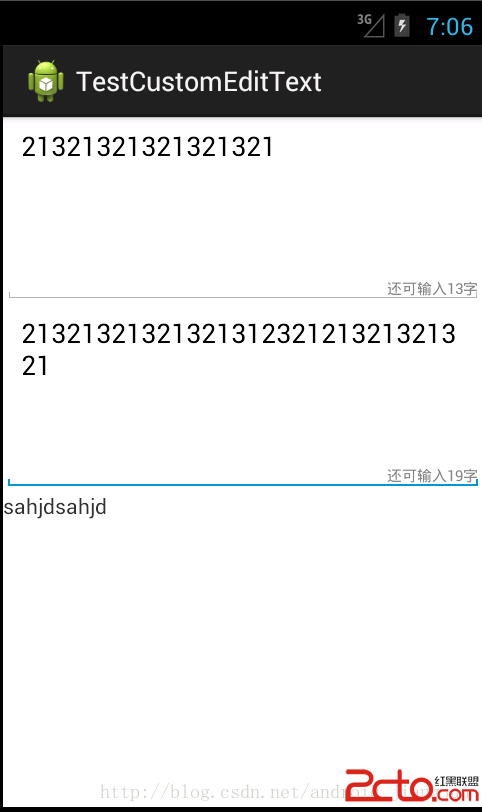
這裡採用「組合控件」的做法:一個 RelativeLayout 裡放 EditText,右下角疊一個 TextView 顯示提示文字。
<RelativeLayout xmlns:android="https://schemas.android.com/apk/res/android"
    android:layout_width="match_parent"
    android:layout_height="wrap_content"
    android:background="#fff" >

    <EditText
        android:id="@+id/edit"
        android:layout_width="match_parent"
        android:layout_height="wrap_content"
        android:gravity="top|left"
        android:minLines="5" >

        <TextView
            android:id="@+id/text"
            android:layout_width="wrap_content"
            android:layout_height="wrap_content"
            android:layout_alignBottom="@id/edit"
            android:layout_alignRight="@id/edit"
            android:layout_marginBottom="3dip"
            android:layout_marginRight="3dip"
            android:hint="還可輸入25字"
            android:textSize="10dip" />
    </EditText>
</RelativeLayout>
package com.gc.testcustomedittext;

import android.annotation.SuppressLint;
import android.content.Context;
import android.content.res.TypedArray;
import android.text.Editable;
import android.text.InputFilter;
import android.text.TextWatcher;
import android.util.AttributeSet;
import android.view.LayoutInflater;
import android.widget.EditText;
import android.widget.RelativeLayout;
import android.widget.TextView;

public class HintEditText extends RelativeLayout implements TextWatcher {

    private EditText mEditText;
    private TextView mTextView;
    private int maxLength = 0;
    private RelativeLayout mRelativeLayout;

    public HintEditText(Context context) {
        super(context);
    }

    public HintEditText(Context context, AttributeSet attrs) {
        super(context, attrs);
        // 讀出自定義屬性 maxLength
        TypedArray mTypedArray = context.obtainStyledAttributes(
                attrs, R.styleable.HintEditText);
        maxLength = mTypedArray.getInt(R.styleable.HintEditText_maxLength, 0);

        mRelativeLayout = (RelativeLayout) LayoutInflater.from(context)
                .inflate(R.layout.custom_edittext, this, true);
        mEditText = (EditText) mRelativeLayout.findViewById(R.id.edit);
        mTextView = (TextView) mRelativeLayout.findViewById(R.id.text);
        mTextView.setHint("還可輸入" + maxLength + "字");

        // 限制最多可輸入的字元數
        mEditText.setFilters(new InputFilter[]{
                new InputFilter.LengthFilter(maxLength)});
        mEditText.addTextChangedListener(this);
    }

    @SuppressLint("NewApi")
    public HintEditText(Context context, AttributeSet attrs, int defStyle) {
        super(context, attrs, defStyle);
    }

    @Override
    public void beforeTextChanged(CharSequence s, int start, int count, int after) {
    }

    @Override
    public void onTextChanged(CharSequence s, int start, int before, int count) {
        // 文字一變,就刷新剩餘字數提示
        mTextView.setHint("還可輸入" + (maxLength - s.toString().length()) + "字");
    }

    @Override
    public void afterTextChanged(Editable s) {
    }
}
<?xml version="1.0" encoding="utf-8"?>
<resources>
    <declare-styleable name="HintEditText">
        <!-- maxLength 為自定義屬性,宣告後即可在 xml 中直接設定 -->
        <attr name="maxLength" format="integer" />
    </declare-styleable>
</resources>
使用自定義屬性時,記得在根節點宣告命名空間:
<LinearLayout xmlns:android="https://schemas.android.com/apk/res/android"
    xmlns:hintedittext="https://schemas.android.com/apk/res/com.gc.testcustomedittext"
    xmlns:tools="https://schemas.android.com/tools"
    android:layout_width="match_parent"
    android:layout_height="match_parent"
    android:orientation="vertical" >

    <com.gc.testcustomedittext.HintEditText
        android:id="@+id/hint_edt"
        android:layout_width="match_parent"
        android:layout_height="wrap_content"
        hintedittext:maxLength="30" />

    <com.gc.testcustomedittext.HintEditText
        android:layout_width="match_parent"
        android:layout_height="wrap_content"
        hintedittext:maxLength="50" />
</LinearLayout>
package com.gc.testcustomedittext;

import android.app.Activity;
import android.os.Bundle;

public class MainActivity extends Activity {
    @Override
    protected void onCreate(Bundle savedInstanceState) {
        super.onCreate(savedInstanceState);
        setContentView(R.layout.activity_main);
    }
}
因為邏輯都封裝在控件內部,Activity 這邊幾乎不需要寫任何程式碼——這正是組合式自定義控件的價值所在。
 QQ好友火炬排行榜怎麼看 你是第幾棒
你是QQ火炬手嗎?在騰訊QQ為里約奧運會推出的火炬傳遞活動中,你已經排到第幾位?下面小編就教你查看好友火炬排行榜。 QQ好友火炬排行榜查看步驟 一、在手機QQ消息主介面下
 Android 驗證碼倒計時:CountDownTimer 與按鈕狀態切換
驗證碼倒計時是表單常見互動。透過 CountDownTimer,可以在指定時間內每秒更新文字,並在結束後恢復可點擊狀態。 封裝思路 建立 CountDownTimerUt
 Android View 體系(一):視圖坐標系完全解析
前言 Android 的 View 體系是介面程式設計的核心,其重要性不亞於四大元件。這個系列會依序談到 View 坐標系、View 的滑動、View 的事件分發等主題,
 Android 實戰:仿支付寶「咻一咻」的波紋擴散特效
春節期間,支付寶的「咻一咻」集福活動可謂家喻戶曉,屏幕上那圈不斷向外擴散的波紋更是讓人印象深刻。本文就來聊聊如何用代碼實現這種波紋擴散特效。 先看效果: 這個效果是作者