

編輯:關於 Android 程式設計
很多銀行類應用在輸入卡號時,會自動每四位插入一個空格,讓用戶更容易核對。這個效果可以通過給 EditText 添加 TextWatcher 來實現,核心邏輯是在文本變化後重新組織字符串並插入空格,同時保持光標位置正確。
class myWatcher implements TextWatcher { int beforeTextLength = 0; int onTextLength = 0; boolean isChanged = false; int location = 0; private char[] tempChar; private StringBuffer buffer = new StringBuffer(); int konggeNumberB = 0; @Override public void onTextChanged(CharSequence s, int start, int before, int count) { onTextLength = s.length(); buffer.append(s.toString()); if (onTextLength == beforeTextLength || onTextLength <= 3 || isChanged) { isChanged = false; return; } isChanged = true; } @Override public void beforeTextChanged(CharSequence s, int start, int count, int after) { beforeTextLength = s.length(); if (buffer.length() > 0) { buffer.delete(0, buffer.length()); } konggeNumberB = 0; for (int i = 0; i < s.length(); i++) { if (s.charAt(i) == ' ') { konggeNumberB++; } } } @Override public void afterTextChanged(Editable s) { if (isChanged) { location = etAccount.getSelectionEnd(); int index = 0; while (index < buffer.length()) { if (buffer.charAt(index) == ' ') { buffer.deleteCharAt(index); } else { index++; } } index = 0; int konggeNumberC = 0; while (index < buffer.length()) { if ((index == 4 || index == 9 || index == 14 || index == 19)) { buffer.insert(index, ' '); konggeNumberC++; } index++; } if (konggeNumberC > konggeNumberB) { location += (konggeNumberC - konggeNumberB); } tempChar = new char[buffer.length()]; buffer.getChars(0, buffer.length(), tempChar, 0); String str = buffer.toString(); if (location > str.length()) { location = str.length(); } else if (location < 0) { location = 0; } etAccount.setText(str); Editable etable = etAccount.getText(); Selection.setSelection(etable, location); isChanged = false; } } } //給editText 添加這個watcher
使用時,只需把這個 myWatcher 對象添加到目標 EditText 上即可。它的處理思路是:先去掉所有已有的空格,再按照第 5、10、15、20 位插入空格,最後根據新增的空格數量修正光標位置,避免輸入過程中光標跳動。
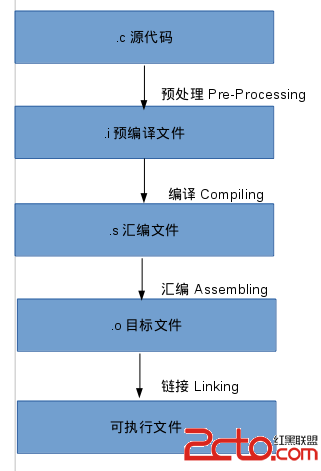 Android 系統開發(一)——GCC 編譯器的編譯與安裝
GCC 編譯器介紹 GCC(GNU C Compiler)是 GNU 專案中符合 ANSI C 標準的編譯系統,可編譯 C、C++、Objective C 等語言,同時也
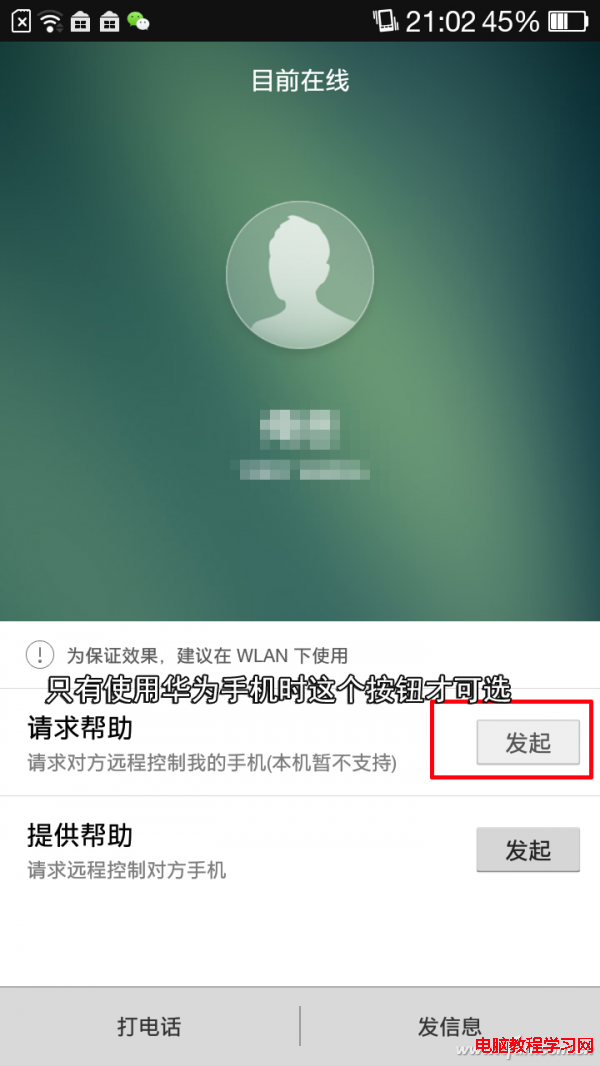 機器冰冷仍有溫情:遠程協助玩轉 Android 手機
許多年長的長輩和不太熟悉手機的朋友,在操作 Android 手機時總會遇到「卡關」問題,例如某個軟體不會設置、某項功能無法開啟等。那麼身在異地的我們又該如何協助他們呢?在
 ListView 分割線的那些事:自定義左右留白與 InsetDrawable 方案
重新定義分割線 Drawable 的 Bounds。 首先,需要清楚一個事實:出現以上情況的矛盾點,在於官方 ListView 的分割線屬性不支持左右留白。所以最佳的解决
 Android 5.0 Linux 內核編譯流程
環境 本文以 Windows 7 64 位元、Ubuntu 12.04 64 位元與 VMware 虛擬機為例,說明 Android 5.0 與 goldfish 內核的