

編輯:關於 Android 程式設計
翻開手上任何一個 Android 項目,基本都能找到一大批工具類。這裡整理出 10 個幾乎每個項目都會用到的,希望能給大家省點時間。
public class L {
    private L() {
        throw new UnsupportedOperationException("cannot be instantiated");
    }

    public static boolean isDebug = true;   // 是否打印日誌,可在 Application.onCreate 中初始化
    private static final String TAG = "way";

    // 使用默認 TAG
    public static void i(String msg) { if (isDebug) Log.i(TAG, msg); }
    public static void d(String msg) { if (isDebug) Log.d(TAG, msg); }
    public static void e(String msg) { if (isDebug) Log.e(TAG, msg); }
    public static void v(String msg) { if (isDebug) Log.v(TAG, msg); }

    // 自定義 TAG
    public static void i(String tag, String msg) { if (isDebug) Log.i(tag, msg); }
    public static void d(String tag, String msg) { if (isDebug) Log.d(tag, msg); }
    public static void e(String tag, String msg) { if (isDebug) Log.e(tag, msg); }
    public static void v(String tag, String msg) { if (isDebug) Log.v(tag, msg); }
}
封裝的價值在於一個開關控制全部:上線前把 isDebug 置為 false,所有日誌自動靜音,不用到處找 Log.d 刪。網上也有把日誌寫入 SD 卡 / 文件的版本,如果需要排查用戶環境的問題可以擴展。
public class T {
    private T() {
        throw new UnsupportedOperationException("cannot be instantiated");
    }

    public static boolean isShow = true;

    public static void showShort(Context context, CharSequence message) {
        if (isShow) Toast.makeText(context, message, Toast.LENGTH_SHORT).show();
    }

    public static void showShort(Context context, int message) {
        if (isShow) Toast.makeText(context, message, Toast.LENGTH_SHORT).show();
    }

    public static void showLong(Context context, CharSequence message) {
        if (isShow) Toast.makeText(context, message, Toast.LENGTH_LONG).show();
    }

    public static void showLong(Context context, int message) {
        if (isShow) Toast.makeText(context, message, Toast.LENGTH_LONG).show();
    }

    public static void show(Context context, CharSequence message, int duration) {
        if (isShow) Toast.makeText(context, message, duration).show();
    }

    public static void show(Context context, int message, int duration) {
        if (isShow) Toast.makeText(context, message, duration).show();
    }
}
同樣是開關思路:調試階段某些提示太吵,一個 isShow 就全關了。同時支持字符串與字符串資源 ID 兩種傳參,寫起來更順手。
public class SPUtils {

    public static final String FILE_NAME = "share_data";

    /** 保存數據,根據傳入對象的類型分派到不同的保存方法 */
    public static void put(Context context, String key, Object object) {
        SharedPreferences sp = context.getSharedPreferences(FILE_NAME, Context.MODE_PRIVATE);
        SharedPreferences.Editor editor = sp.edit();

        if (object instanceof String) {
            editor.putString(key, (String) object);
        } else if (object instanceof Integer) {
            editor.putInt(key, (Integer) object);
        } else if (object instanceof Boolean) {
            editor.putBoolean(key, (Boolean) object);
        } else if (object instanceof Float) {
            editor.putFloat(key, (Float) object);
        } else if (object instanceof Long) {
            editor.putLong(key, (Long) object);
        } else {
            editor.putString(key, object.toString());
        }

        SharedPreferencesCompat.apply(editor);
    }

    /** 讀取數據,根據默認值的類型推斷已保存數據的類型 */
    public static Object get(Context context, String key, Object defaultObject) {
        SharedPreferences sp = context.getSharedPreferences(FILE_NAME, Context.MODE_PRIVATE);

        if (defaultObject instanceof String) {
            return sp.getString(key, (String) defaultObject);
        } else if (defaultObject instanceof Integer) {
            return sp.getInt(key, (Integer) defaultObject);
        } else if (defaultObject instanceof Boolean) {
            return sp.getBoolean(key, (Boolean) defaultObject);
        } else if (defaultObject instanceof Float) {
            return sp.getFloat(key, (Float) defaultObject);
        } else if (defaultObject instanceof Long) {
            return sp.getLong(key, (Long) defaultObject);
        }
        return null;
    }

    public static void remove(Context context, String key) {
        SharedPreferences sp = context.getSharedPreferences(FILE_NAME, Context.MODE_PRIVATE);
        SharedPreferencesCompat.apply(sp.edit().remove(key));
    }

    public static void clear(Context context) {
        SharedPreferences sp = context.getSharedPreferences(FILE_NAME, Context.MODE_PRIVATE);
        SharedPreferencesCompat.apply(sp.edit().clear());
    }

    public static boolean contains(Context context, String key) {
        SharedPreferences sp = context.getSharedPreferences(FILE_NAME, Context.MODE_PRIVATE);
        return sp.contains(key);
    }

    public static Map<String, ?> getAll(Context context) {
        SharedPreferences sp = context.getSharedPreferences(FILE_NAME, Context.MODE_PRIVATE);
        return sp.getAll();
    }

    /** 兼容類:盡可能使用 apply 代替 commit */
    private static class SharedPreferencesCompat {
        private static final Method sApplyMethod = findApplyMethod();

        @SuppressWarnings({ "unchecked", "rawtypes" })
        private static Method findApplyMethod() {
            try {
                Class clz = SharedPreferences.Editor.class;
                return clz.getMethod("apply");
            } catch (NoSuchMethodException e) {
                // 低版本沒有 apply
            }
            return null;
        }

        public static void apply(SharedPreferences.Editor editor) {
            try {
                if (sApplyMethod != null) {
                    sApplyMethod.invoke(editor);
                    return;
                }
            } catch (IllegalArgumentException e) {
                // fall through
            } catch (IllegalAccessException e) {
                // fall through
            } catch (InvocationTargetException e) {
                // fall through
            }
            editor.commit();
        }
    }
}
為什麼要用 apply 而不是 commit?因為 commit() 是同步的,會阻塞調用線程;而我們大部分寫 SharedPreferences 的操作都在 UI 線程裡,這畢竟是一次 IO,能異步就異步。apply() 會把寫入放到後台執行。
但 apply() 是較新的 API,為了兼容老版本,這裡用反射做了一次探測:找到 apply 方法就用它,找不到就退回 commit()。這個 SharedPreferencesCompat 的思路也可以直接搬到別的兼容場景裡。
public class DensityUtils {

    private DensityUtils() {
        throw new UnsupportedOperationException("cannot be instantiated");
    }

    /** dp 轉 px */
    public static int dp2px(Context context, float dpVal) {
        return (int) TypedValue.applyDimension(
                TypedValue.COMPLEX_UNIT_DIP, dpVal,
                context.getResources().getDisplayMetrics());
    }

    /** sp 轉 px */
    public static int sp2px(Context context, float spVal) {
        return (int) TypedValue.applyDimension(
                TypedValue.COMPLEX_UNIT_SP, spVal,
                context.getResources().getDisplayMetrics());
    }

    /** px 轉 dp */
    public static float px2dp(Context context, float pxVal) {
        final float scale = context.getResources().getDisplayMetrics().density;
        return (pxVal / scale);
    }

    /** px 轉 sp */
    public static float px2sp(Context context, float pxVal) {
        return (pxVal / context.getResources().getDisplayMetrics().scaledDensity);
    }
}
注意 px↔sp 的換算要用 scaledDensity 而不是 density,因為 sp 會跟隨用戶的系統字號設置縮放,這一點經常被寫錯。
public class SDCardUtils {

    private SDCardUtils() {
        throw new UnsupportedOperationException("cannot be instantiated");
    }

    /** 判斷 SDCard 是否可用 */
    public static boolean isSDCardEnable() {
        return Environment.getExternalStorageState().equals(Environment.MEDIA_MOUNTED);
    }

    /** 獲取 SDCard 路徑 */
    public static String getSDCardPath() {
        return Environment.getExternalStorageDirectory().getAbsolutePath() + File.separator;
    }

    /** 獲取指定路徑所在分區的剩餘可用容量(字節) */
    public static long getFreeBytes(String filePath) {
        if (filePath.startsWith(getSDCardPath())) {
            filePath = getSDCardPath();
        } else {
            filePath = Environment.getDataDirectory().getAbsolutePath();
        }
        StatFs stat = new StatFs(filePath);
        long availableBlocks = (long) stat.getAvailableBlocks() - 4;
        return stat.getBlockSize() * availableBlocks;
    }

    /** 獲取系統存儲路徑 */
    public static String getRootDirectoryPath() {
        return Environment.getRootDirectory().getAbsolutePath();
    }
}
public class ScreenUtils {

    private ScreenUtils() {
        throw new UnsupportedOperationException("cannot be instantiated");
    }

    /** 獲得屏幕寬度 */
    public static int getScreenWidth(Context context) {
        WindowManager wm = (WindowManager) context.getSystemService(Context.WINDOW_SERVICE);
        DisplayMetrics outMetrics = new DisplayMetrics();
        wm.getDefaultDisplay().getMetrics(outMetrics);
        return outMetrics.widthPixels;
    }

    /** 獲得屏幕高度 */
    public static int getScreenHeight(Context context) {
        WindowManager wm = (WindowManager) context.getSystemService(Context.WINDOW_SERVICE);
        DisplayMetrics outMetrics = new DisplayMetrics();
        wm.getDefaultDisplay().getMetrics(outMetrics);
        return outMetrics.heightPixels;
    }

    /** 獲得狀態欄高度 */
    public static int getStatusHeight(Context context) {
        int statusHeight = -1;
        try {
            Class<?> clazz = Class.forName("com.android.internal.R$dimen");
            Object object = clazz.newInstance();
            int height = Integer.parseInt(
                    clazz.getField("status_bar_height").get(object).toString());
            statusHeight = context.getResources().getDimensionPixelSize(height);
        } catch (Exception e) {
            e.printStackTrace();
        }
        return statusHeight;
    }

    /** 截屏(不含狀態欄) */
    public static Bitmap snapShotWithoutStatusBar(Activity activity) {
        View view = activity.getWindow().getDecorView();
        view.setDrawingCacheEnabled(true);
        view.buildDrawingCache();
        Bitmap bmp = view.getDrawingCache();

        Rect frame = new Rect();
        activity.getWindow().getDecorView().getWindowVisibleDisplayFrame(frame);
        int statusBarHeight = frame.top;

        Bitmap bp = Bitmap.createBitmap(bmp, 0, statusBarHeight,
                getScreenWidth(activity), getScreenHeight(activity) - statusBarHeight);
        view.destroyDrawingCache();
        return bp;
    }
}
取狀態欄高度這段用了反射訪問 com.android.internal.R$dimen,這是個內部類,在不同 ROM 和系統版本上並不保證存在——所以外面必須包 try-catch,失敗時返回 -1 由調用方自行降級處理。
public class AppUtils {

    private AppUtils() {
        throw new UnsupportedOperationException("cannot be instantiated");
    }

    /** 獲取應用程序名稱 */
    public static String getAppName(Context context) {
        try {
            PackageManager pm = context.getPackageManager();
            PackageInfo packageInfo = pm.getPackageInfo(context.getPackageName(), 0);
            return context.getResources().getString(packageInfo.applicationInfo.labelRes);
        } catch (NameNotFoundException e) {
            e.printStackTrace();
        }
        return null;
    }

    /** 獲取應用版本名稱 */
    public static String getVersionName(Context context) {
        try {
            PackageManager pm = context.getPackageManager();
            PackageInfo packageInfo = pm.getPackageInfo(context.getPackageName(), 0);
            return packageInfo.versionName;
        } catch (NameNotFoundException e) {
            e.printStackTrace();
        }
        return null;
    }
}
public class KeyBoardUtils {

    /** 打開軟鍵盤 */
    public static void openKeybord(EditText mEditText, Context mContext) {
        InputMethodManager imm = (InputMethodManager)
                mContext.getSystemService(Context.INPUT_METHOD_SERVICE);
        imm.showSoftInput(mEditText, InputMethodManager.RESULT_SHOWN);
        imm.toggleSoftInput(InputMethodManager.SHOW_FORCED, InputMethodManager.HIDE_IMPLICIT_ONLY);
    }

    /** 關閉軟鍵盤 */
    public static void closeKeybord(EditText mEditText, Context mContext) {
        InputMethodManager imm = (InputMethodManager)
                mContext.getSystemService(Context.INPUT_METHOD_SERVICE);
        imm.hideSoftInputFromWindow(mEditText.getWindowToken(), 0);
    }
}
public class NetUtils {

    private NetUtils() {
        throw new UnsupportedOperationException("cannot be instantiated");
    }

    /** 判斷網絡是否連接 */
    public static boolean isConnected(Context context) {
        ConnectivityManager connectivity =
                (ConnectivityManager) context.getSystemService(Context.CONNECTIVITY_SERVICE);
        if (null != connectivity) {
            NetworkInfo info = connectivity.getActiveNetworkInfo();
            if (null != info && info.isConnected()) {
                return info.getState() == NetworkInfo.State.CONNECTED;
            }
        }
        return false;
    }

    /** 判斷是否為 WiFi 連接 */
    public static boolean isWifi(Context context) {
        ConnectivityManager cm =
                (ConnectivityManager) context.getSystemService(Context.CONNECTIVITY_SERVICE);
        if (cm == null) return false;
        NetworkInfo info = cm.getActiveNetworkInfo();
        return info != null && info.getType() == ConnectivityManager.TYPE_WIFI;
    }

    /** 打開網絡設置界面 */
    public static void openSetting(Activity activity) {
        Intent intent = new Intent(Intent.ACTION_VIEW);
        ComponentName cm = new ComponentName("com.android.settings",
                "com.android.settings.WirelessSettings");
        intent.setComponent(cm);
        activity.startActivityForResult(intent, 0);
    }
}
public class HttpUtils {

    private static final int TIMEOUT_IN_MILLIONS = 5000;

    public interface CallBack {
        void onRequestComplete(String result);
    }

    /** 異步 Get 請求 */
    public static void doGetAsyn(final String urlStr, final CallBack callBack) {
        new Thread() {
            public void run() {
                try {
                    String result = doGet(urlStr);
                    if (callBack != null) callBack.onRequestComplete(result);
                } catch (Exception e) {
                    e.printStackTrace();
                }
            }
        }.start();
    }

    /** 異步 Post 請求 */
    public static void doPostAsyn(final String urlStr, final String params,
                                  final CallBack callBack) {
        new Thread() {
            public void run() {
                try {
                    String result = doPost(urlStr, params);
                    if (callBack != null) callBack.onRequestComplete(result);
                } catch (Exception e) {
                    e.printStackTrace();
                }
            }
        }.start();
    }

    /** Get 請求,返回響應數據 */
    public static String doGet(String urlStr) {
        HttpURLConnection conn = null;
        InputStream is = null;
        ByteArrayOutputStream baos = null;
        try {
            URL url = new URL(urlStr);
            conn = (HttpURLConnection) url.openConnection();
            conn.setReadTimeout(TIMEOUT_IN_MILLIONS);
            conn.setConnectTimeout(TIMEOUT_IN_MILLIONS);
            conn.setRequestMethod("GET");
            conn.setRequestProperty("accept", "*/*");
            conn.setRequestProperty("connection", "Keep-Alive");

            if (conn.getResponseCode() == 200) {
                is = conn.getInputStream();
                baos = new ByteArrayOutputStream();
                int len = -1;
                byte[] buf = new byte[128];
                while ((len = is.read(buf)) != -1) {
                    baos.write(buf, 0, len);
                }
                baos.flush();
                return baos.toString();
            } else {
                throw new RuntimeException(" responseCode is not 200");
            }
        } catch (Exception e) {
            e.printStackTrace();
        } finally {
            try { if (is != null) is.close(); } catch (IOException e) { }
            try { if (baos != null) baos.close(); } catch (IOException e) { }
            if (conn != null) conn.disconnect();
        }
        return null;
    }

    /** 向指定 URL 發送 POST 請求
     *  param 格式為 name1=value1&name2=value2 */
    public static String doPost(String url, String param) {
        PrintWriter out = null;
        BufferedReader in = null;
        String result = "";
        try {
            HttpURLConnection conn = (HttpURLConnection) new URL(url).openConnection();
            conn.setRequestProperty("accept", "*/*");
            conn.setRequestProperty("connection", "Keep-Alive");
            conn.setRequestMethod("POST");
            conn.setRequestProperty("Content-Type", "application/x-www-form-urlencoded");
            conn.setRequestProperty("charset", "utf-8");
            conn.setUseCaches(false);
            // POST 必須設置這兩行
            conn.setDoOutput(true);
            conn.setDoInput(true);
            conn.setReadTimeout(TIMEOUT_IN_MILLIONS);
            conn.setConnectTimeout(TIMEOUT_IN_MILLIONS);

            if (param != null && !param.trim().equals("")) {
                out = new PrintWriter(conn.getOutputStream());
                out.print(param);
                out.flush();
            }

            in = new BufferedReader(new InputStreamReader(conn.getInputStream()));
            String line;
            while ((line = in.readLine()) != null) {
                result += line;
            }
        } catch (Exception e) {
            e.printStackTrace();
        } finally {
            try {
                if (out != null) out.close();
                if (in != null) in.close();
            } catch (IOException ex) {
                ex.printStackTrace();
            }
        }
        return result;
    }
}
這 10 個類都是「能跑就行」的粒度,落地時建議做幾點改進:
ByteArrayOutputStream.toString() 不指定編碼依賴平台默認值)、無法取消、沒有連接複用等麻煩。建議改用 OkHttp 或 Retrofit。NetworkInfo 在較新系統中已被標記為 deprecated,判斷網絡類型推薦改用 NetworkCapabilities。final 類 + 私有構造,示例裡已經通過拋異常的方式實現了「不可實例化」,加上 final 修飾更嚴謹。putString 來實現。如果在使用過程中發現問題,或者有更好的實現思路,歡迎交流——這些類本來就該在不斷迭代中變得更好。
 QQ厘米秀怎麼換角色?性別與七個角色的切換教學
厘米秀從手機QQ 6.2.2 版開始提供,等於把電腦端的QQ秀搬到行動裝置上。不過第一次進入時,系統會依帳號資料預設一個角色,於是常見一種尷尬:本人是女生,厘米秀卻是個男
 如何修改 Android Studio 的 Android SDK Path
為什麼要改這個路徑?情況是這樣的:之前用 Eclipse 開發時已經裝過一份 Android SDK,後來裝 Android Studio 時又裝了一份,兩份並存顯得多餘
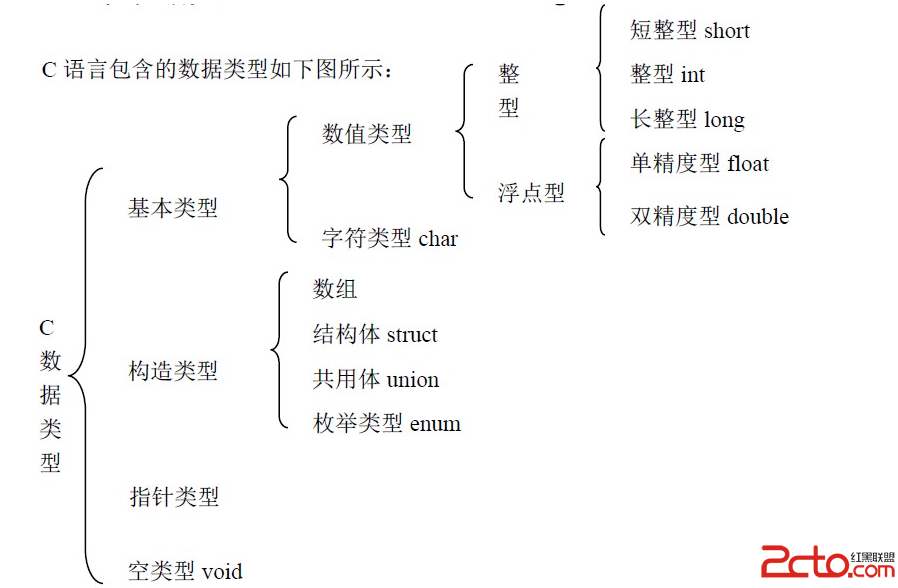 Android For JNI(二)——C 語言基礎:數據類型、輸入輸出、內存地址與內存修改器原理
 把 Hello World 跑通之後,就可以正式邁進 C 語言的大門
 源碼剖析:為什麼谷歌要求用 newInstance 而不是構造函數來實例化 Fragment
翻 Google 官方文檔時會發現一種頗有意思的寫法——用靜態工廠方法來創建 Fragment。其實你在 Android Studio 裡新建一個 Blank Fragm