

編輯:關於 Android 程式設計
寫 Android 佈局時有一個細節,很多人寫了幾年都沒想過為什麼:為什麼有些屬性以 layout_ 開頭,有些不是?為什麼同一個屬性換個父容器就報錯?本文把這件事講清楚,內容包括控件屬性的分類、控件與容器屬性的關係,以及各類屬性的實際用法。
通常意義上講,我們給一個控件賦值時面對的屬性大體分兩類:一類以 layout_ 開頭,一類不是。以 TextView 為例:
<RelativeLayout
    android:layout_width="match_parent"
    android:layout_height="match_parent" >

    <TextView
        android:layout_width="wrap_content"
        android:layout_height="wrap_content"
        android:text="hello_world" />

</RelativeLayout>這裡設置了三個屬性:layout_width、layout_height 以及 text。前兩個以 layout_ 開頭,最後一個不是。
結論是:以 layout_ 開頭的屬性是從父容器中繼承而來的,控件本身並不具有這些屬性;而 text 則是 TextView 自身擁有的屬性。
這個結論聽起來有點反直覺——畢竟我們寫的是 TextView 的 layout_width。但從 Java 層面看就很清楚了:佈局 XML 中的屬性最終由對應的 LayoutParams 對象承接,而 LayoutParams 是由父容器創建並持有的。
為了說明 layout 屬性屬於容器,做個對比實驗:把 TextView 分別放進 RelativeLayout 和 LinearLayout,然後給它設置 layout_centerInParent。之所以選這個屬性,是因為它為 RelativeLayout 所獨有,LinearLayout 並不支持。
<RelativeLayout
    android:layout_width="wrap_content"
    android:layout_height="wrap_content" >

    <TextView
        android:layout_width="wrap_content"
        android:layout_height="wrap_content"
        android:layout_centerInParent="true"
        android:text="hello_world" />
</RelativeLayout>

<LinearLayout
    android:layout_width="wrap_content"
    android:layout_height="wrap_content" >

    <TextView
        android:layout_width="wrap_content"
        android:layout_height="wrap_content"
        android:layout_centerInParent="true"
        android:text="hello world2" />
</LinearLayout>
如圖設置之後,第一個不會報錯,第二個則會在編輯器中提示:
Invalid layout param in a LinearLayout: layout_centerInParent
由此可以得出結論:layout 開頭的屬性並非 TextView 所擁有,而是從其父容器那裡繼承來的關於佈局的屬性。推而廣之,控件的屬性可以分為「自身屬性」和「容器中的佈局屬性」兩類。
這些是文本控件特有的能力,包括:
text、textSize、textColor、textStyle、typeface、textAllCaps、shadowColor、shadowRadiusgravity、lines、maxLines、minLines、singleLine、ellipsize、lineSpacingExtra、lineSpacingMultiplierwidth、height、minWidth、maxWidth、ems、maxEmsinputType、imeOptions、digits、hint、editable、cursorVisible所有控件都具備的通用能力:
background、alpha、visibility、padding 系列、rotation、scaleX、scaleY、translationXclickable、longClickable、focusable、focusableInTouchMode、onClicknextFocusLeft、nextFocusRight、nextFocusUp、nextFocusDownscrollX、scrollY、scrollbars、fadeScrollbarsid、tag、contentDescription、keepScreenOn、layerType把這兩部分加起來,就是 TextView 的完整屬性集合。
然而我們在 XML 編輯器中會發現,除了以上屬性,還有大量以 layout 開頭的屬性可以設置——這些全部來自容器。以 LinearLayout 為例,其 LinearLayout.LayoutParams 提供的屬性如下。
自身定義的屬性:
android:layout_gravity:控制子控件在容器中的對齊方式(注意與 gravity 的區別,後者是控件內部內容的對齊)。android:layout_weight:剩餘空間的分配比例,是 LinearLayout 最核心的能力。從 ViewGroup.MarginLayoutParams 繼承的屬性:
android:layout_marginTop、layout_marginBottom、layout_marginLeft、layout_marginRightlayout_marginStart、layout_marginEnd(支持 RTL 布局的版本)從 ViewGroup.LayoutParams 繼承的屬性:
android:layout_width:設置視圖的基本寬度。android:layout_height:設置視圖的基本高度。以上所有屬性加起來,就是 LinearLayout 作為父容器所能提供的完整佈局屬性集合。所以回到最初的問題:TextView 可以設置的屬性 = 自身屬性 + 父容器提供的佈局屬性。
理解「layout_ 屬性來自容器」這一件事,能解釋很多日常遇到的困惑:為什麼換父容器後報錯、為什麼某個屬性不生效、為什麼 margin 在某些容器中被忽略。掌握這個思維模型之後,分析 RelativeLayout、TableLayout、ConstraintLayout 就只是查文檔的功夫——套路完全一致:看它自帶哪些 LayoutParams 屬性,再看它繼承了哪些。
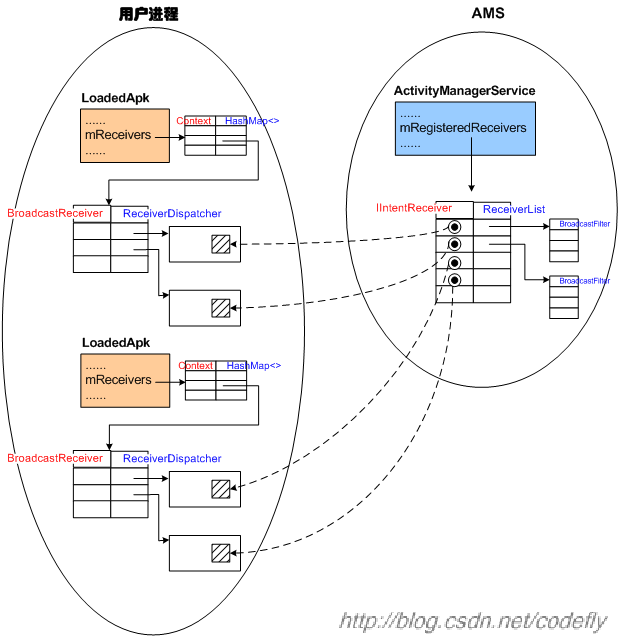 深入解析 Android 動態廣播的註冊流程
動態廣播的角色 在 Android 中,BroadcastReceiver 是一套基於發布與訂閱模型的元件通信機制。它可以用於同一進程內的元件互動,也可以透過跨進程方式完
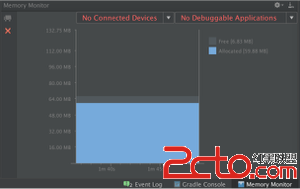 Android 記憶體分析工具全面總結
Android 的一些記憶體知識 垃圾回收(GC) 垃圾回收包含兩個過程:判定階段(判斷哪些物件可以被回收)與收集階段(具體的回收策略)。 判定階段主要有兩種方式: 引用
 Android 無線開發常用技術全景綜述
本文原作者為阿里行動安全客戶端、YunOS 資深工程師 Hao,這是他在嵌入式企鵝圈發表的首篇原創文章,對 Android 無線開發的幾項關鍵技術做了整體性梳理。 完整
 360 手機衛士開啟來電顯示歸屬地:圖解設定流程
想知道來電是哪個地區打來的,用 360 手機衛士開啟歸屬地顯示就能做到。設定路徑並不深,照下面三步走完即可。 1. 安裝並打開 360 手機衛士,切換到「隱私保護」,點擊