

編輯:關於 Android 程式設計
計算機由一堆硬件組成,操作系統是為了有效控制這些硬件資源的軟件。除了有效控制硬件資源的分配、並提供計算機運行所需的功能之外,為了給程序員提供更易開發軟件的環境,操作系統還提供了一整組系統調用接口。
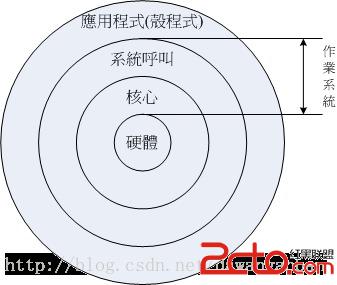
如上圖所示,最中間的是硬件,操作系統由內核和系統調用接口組成。其中內核直接操作硬件,負責對硬件資源的控制和進程管理;系統調用接口向上提供統一的調用接口,方便開發人員調用。最上層則是應用程序,在應用程序中調用系統接口,就能實現對硬件的操作。
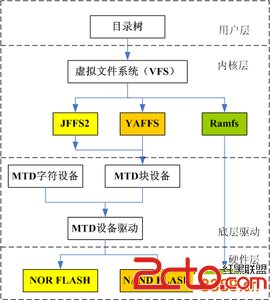
如上圖 Linux 的 I/O 系統結構圖所示,內核層有一個虛擬文件系統,它使用標準的 C 類庫封裝的 API,所以我們要操作文件系統,只需調用這裡的 API 即可。
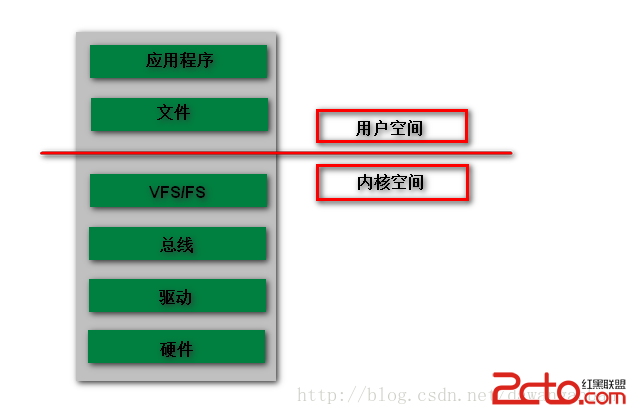
1、打開文件:一個應用程序通過要求內核打開相應的文件,宣告它要訪問一個 I/O 設備。內核返回一個非負整數,叫做文件描述符(File Descriptor)。後續對該文件的所有操作,都通過這個描述符來引用。

打開文件通常涉及 open、creat 等系統調用;關閉文件則使用 close。當不再需要某文件時,通過 close 釋放對應的描述符資源。
我們可以去 GNU 下載 libc 的源代碼和幫助文檔(源碼下載地址:https://ftp.gnu.org/gnu/glibc/)。
打開和關閉文件流:
 #include <stdio.h>
#include <sys/types.h>
#include <sys/stat.h>
#include <fcntl.h>
#include <stdlib.h>

int main(int argc, char *argv[]){
    // open file
    if(argc < 2){
        printf("please input filename\n");
        exit(1);
    } else {
        int fd;
        umask(0000);
        fd = open(argv[1], O_RDWR | O_CREAT, 0666);
        if(fd < -1){
            printf("error\n");
            exit(1);
        } else {
            printf("success=%d\n", fd);
            close(fd);
            printf("closed\n");
        }
    }
    return 0;
}
讀文件(寫文件的過程與讀文件類似):
 #include <stdio.h>
#include <sys/types.h>
#include <sys/stat.h>
#include <fcntl.h>
#include <stdlib.h>
#include <string.h>

int main(int argc, char *argv[]){
    // open file
    if(argc < 2){
        printf("please input filename\n");
        exit(1);
    } else {
        int fd;
        umask(0000);
        fd = open(argv[1], O_RDWR | O_CREAT, 0666);
        if(fd < -1){
            printf("error\n");
            exit(1);
        } else {
            printf("success=%d\n", fd);
            char buf[1024];
            memset(buf, 0, 1024);
            int returnum = read(fd, buf, 1024);
            if(returnum != -1){
                printf("buf=%s\n", buf);
            } else {
                printf("read error\n");
                exit(1);
            }
            close(fd);
            printf("closed\n");
        }
    }
    return 0;
}
總的來說,Linux 的底層 I/O 通過 open 獲取文件描述符、read/write 進行讀寫、close 釋放資源,構成了最基礎也最直接的文件操作方式。理解這套機制,是深入學習 Android 系統底層的重要基礎。
 Android RecyclerView 點擊事件實作解析
一、為什麼要用 RecyclerView 自從 Android L 問世,RecyclerView 就逐步取代 ListView 成為展示大量資料的首選。相比 ListV
 改寫 ActionBar Tab 指示器顏色:從 styles.xml 到 selector 的完整流程
我想改的就是上方那條藍色的指示線,把它換成紅色。 這個問題困擾了我很久。一開始照著官方文件的說明試,改了半天卻完全沒有效果,畫面還是那條藍線。 後來才找到真正的原因:
 微信理財通安全嗎?登入、支付與贖回風險解析
微信理財通的安全性與手機短信、支付密碼綁定有關。登入密碼可能透過短信重置,因此手機要設鎖屏密碼。 支付密碼通常需要銀行卡、身分證與手機等資料,破解難度較高。贖回資金主要只
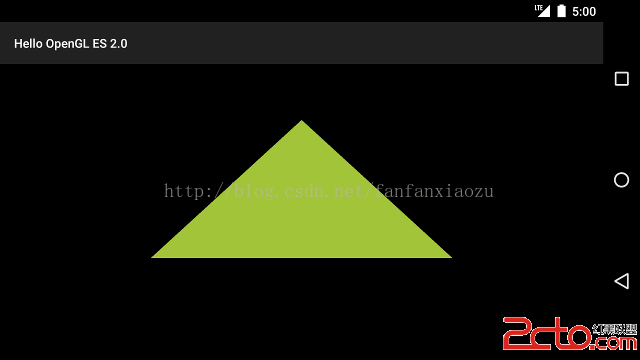 Android OpenGL ES 繪圖教程之三:圖形的繪制
定義好要被 OpenGL 繪制的形狀之後,接下來自然就是把它們畫出來。使用 OpenGL ES 2.0 繪圖所需的代碼往往比想象中多,因為這套 API 提供了大量控制圖形