

編輯:關於 Android 程式設計
AndroidAnnotations 是一個以編譯期產生程式碼為核心的開發框架,透過 Java 註解把 findViewById、setOnClickListener、Intent 傳值、執行緒切換等樣板程式碼全部省掉。本文依功能分類整理常用註解。
@EActivity(R.layout.main)
public class MyActivity extends Activity { }

@EFragment(R.layout.my_fragment_layout)
public class MyFragment extends Fragment { }
使用時要記得,框架會在編譯期產生一個「原名 + 下底線」的子類別,因此 XML 中要寫 com.company.MyFragment_,程式碼中則是 new MyFragment_()。
@EBean
public class MyClass { }

@EActivity
public class MyActivity extends Activity {
    @Bean MyOtherClass myOtherClass;
    @Bean(MyImplementation.class) MyInterface myInterface;   // 也可注入介面
}
限制:這個類別只能有一個建構子,且最多只能有一個 Context 參數。若需要單例,宣告為 @EBean(scope = Scope.Singleton);但單例類別中不可注入 View 或事件綁定,因為它的生命週期比 Activity / Service 更長,容易造成記憶體洩漏。
還可以在注入完成後插入自訂邏輯:
@AfterInject
public void doSomethingAfterInjection() {
    // 此時 notificationManager 等依賴都已就緒
}
@EView
public class CustomButton extends Button {
    @App MyApplication application;
    public CustomButton(Context context, AttributeSet attrs) {
        super(context, attrs);
    }
}
// 使用:CustomButton button = CustomButton_.build(context);
@EViewGroup(R.layout.title_with_subtitle)
public class TitleWithSubtitle extends RelativeLayout {
    @ViewById protected TextView title, subtitle;
    // ...
}
@EApplication public class MyApplication extends Application { }
@EService     public class MyService extends Service { }
@EReceiver    public class MyReceiver extends BroadcastReceiver { }
@EProvider    public class MyContentProvider extends ContentProvider { }
// Service 的啟動與停止
MyService_.intent(getApplication()).start();
MyService_.intent(getApplication()).stop();
另外 @Receiver 可以在 Activity 內直接取代宣告整個 BroadcastReceiver:
@EActivity
public class MyActivity extends Activity {
    @Receiver(actions = "org.androidannotations.ACTION_1")
    protected void onAction1() { }
}
@EActivity
public class MyActivity extends Activity {
    @ViewById EditText myEditText;              // 變數名需與 id 一致
    @ViewById(R.id.myTextView) TextView textView;

    @StringRes(R.string.hello) String myHelloString;   // 不可宣告為 private
    @ColorRes(R.color.backgroundColor) int someColor;
    @AnimationRes(R.anim.fadein) Animation fadein;
    @DimensionRes(R.dimen.fontsize) float fontSizeDimension;
    @SystemService NotificationManager notificationManager;
    @HtmlRes(R.string.hello_html) Spanned myHelloString2;
}
其他資源註解還包括 @BooleanRes、@ColorStateListRes、@DrawableRes、@IntArrayRes、@IntegerRes、@LayoutRes、@MovieRes、@TextRes、@TextArrayRes、@StringArrayRes 等。
這一點非常關鍵:初始化 View 的程式碼要寫在 @AfterViews 標註的方法中,不要寫在 onCreate(),因為 onCreate() 執行時 view 尚未注入。
@EActivity(R.layout.main)
public class MyActivity extends Activity {
    @ViewById TextView myTextView;

    @AfterViews
    void updateTextWithDate() {
        myTextView.setText("Date: " + new Date());
    }
}
@EActivity
public class MyActivity extends Activity {
    @Extra("myStringExtra") String myMessage;
    @Extra String anotherMessage;    // 名稱自動對應變數名
}

// 帶值跳轉
MyActivity_.intent().myMessage("hello").start();
@Click(R.id.myButton)
void myButtonWasClicked() { }

@Click                       // 不指定 id 時,方法名即為 id 名稱
void anotherButton() { }

@Click
void yetAnotherButton(View clickedView) { }
其他點擊相關:@LongClick(長按)、@Touch(觸碰)。AdapterView 系列則有 @ItemClick、@ItemLongClick、@ItemSelect,方法參數可以是 position,也可以直接是 Adapter 的實體物件:
@ItemClick
public void myListItemClicked(MyItem clickedItem) { }   // 等同 adapter.getItem(position)

@ItemClick
public void myListItemClicked(int position) { }
@TextChange(R.id.helloTextView)
void onTextChangesOnHelloTextView(CharSequence text, TextView hello, int before, int start, int count) { }

@BeforeTextChange(R.id.helloTextView)
void beforeTextChangedOnHelloTextView(TextView hello, CharSequence text, int start, int count, int after) { }

@AfterTextChange(R.id.helloTextView)
void afterTextChangedOnHelloTextView(Editable text, TextView hello) { }

@SeekBarProgressChange(R.id.seekBar)
void onProgressChangeOnSeekBar(SeekBar seekBar, int progress, boolean fromUser) { }
此外還有 @SeekBarTouchStart 與 @SeekBarTouchStop 分別對應開始與結束拖曳的事件。
@EActivity
@OptionsMenu(R.menu.my_menu)
public class MyActivity extends Activity {

    @OptionMenuItem MenuItem menuSearch;

    @OptionsItem(R.id.menuShare)
    void myMethod() { }

    @OptionsItem
    void homeSelected() { }        // 對應 R.id.home

    @OptionsItem
    boolean menuSearch() {         // 回傳 false 讓系統繼續處理,true 表示已消費
        menuSearch.setVisible(false);
        return true;
    }

    @OptionsItem({ R.id.menu_search, R.id.menu_delete })
    void multipleMenuItems() { }
}
@Background
void someBackgroundWork(String aParam, long anotherParam) { }

@UiThread
void doInUiThread(String aParam, long anotherParam) { }

@Background(delay = 2000)                       // 延遲 2 秒
void doInBackgroundAfterTwoSeconds() { }

@Background(id = "cancellable_task")            // 可取消的任務
void someCancellableBackground() { }

BackgroundExecutor.cancelAll("cancellable_task", true);
還可用 @Background(serial = "test") 讓多個背景方法序列執行,避免並發;@UiThread 則可用 propagation = Propagation.REUSE 在已處於 UI 線程時直接執行、不必再切換。
背景任務回報進度到 UI 的標準寫法:
@EActivity
public class MyActivity extends Activity {
    @Background
    void doSomeStuffInBackground() {
        publishProgress(0);
        publishProgress(100);
    }

    @UiThread
    void publishProgress(int progress) {
        // 更新進度條
    }
}
@OnActivityResult(REQUEST_CODE)
void onResult(int resultCode, Intent data) { }

@OnActivityResult(ANOTHER_REQUEST_CODE)
void onResult(Intent data) { }
AndroidAnnotations 的價值在於把「宣告式」的部分交給註解、把「邏輯」留給自己,程式碼行數與可讀性都大幅改善。官方 Cookbook(github.com/excilys/androidannotations/wiki/Cookbook)有更完整的清單。需要注意的是,本框架主要活躍於 2013~2015 年間,新專案若導入應先評估其與新版 Android Gradle Plugin、AndroidX 的相容性,或考慮改用 Kotlin 的 view binding、Hilt 等現代方案。
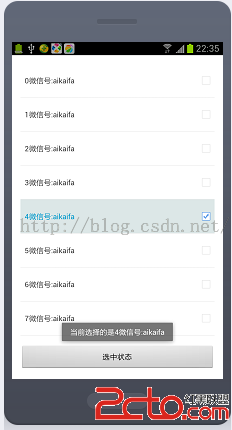 五分鐘學會 ListView 的單選與多選:用 Choice 模式取代一堆 if
做過 ListView 單選的人大概都有類似經驗:在 Adapter 裡自己開一個 selectPosition 變數記住目前選中項,需求確實能滿足。可是產品一轉身又要求
 全面解析Android內建換膚功能的實現路徑
Android平台的API並沒有為換膚提供一套現成的簡便機制,這大概與國外軟體更看重功能和易用、換膚文化並不流行有關。既然系統不直接支援,就只能靠自己去鑽研。所謂換膚,可
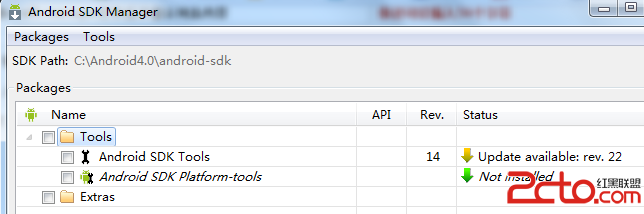 Android 開發環境配置的常見坑與解法整理
剛踏入 Android 開發這條路,第一件事就是自己動手把開發環境搭起來。可別小看這一步,從 JDK、SDK 到 ADT,一路走下來幾乎步步是坑,解決完一個又冒出一個,折
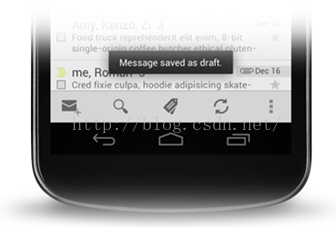 Android 對話框全攻略:Toast、AlertDialog、清單框與自訂 Dialog
本章涵蓋:Toast 提示框、AlertDialog 對話框、特色對話框、自訂對話框。目標:熟練掌握 Toast 與 Dialog 的用法,認識幾種常見的清單式對話框,並