

編輯:關於 Android 程式設計
HttpURLConnection 是 Android 上進行 HTTP 連線的基礎工具。本文示範如何以 GET 方式抓取網頁 HTML 內容,並顯示於畫面上,重點在於串流讀取與編碼處理。
使用 ScrollView 包裹 TextView,方便顯示較長的內容:
<?xml version="1.0" encoding="utf-8"?> <LinearLayout xmlns:android="https://schemas.android.com/apk/res/android" xmlns:tools="https://schemas.android.com/tools" android:layout_width="fill_parent" android:layout_height="fill_parent" android:orientation="vertical" > <ScrollView android:layout_width="fill_parent" android:layout_height="fill_parent" > <TextView android:id="@+id/textView" android:layout_width="fill_parent" android:layout_height="wrap_content" /> </ScrollView> </LinearLayout>
StreamTool 負責把 InputStream 轉為位元組陣列,使用 1KB 緩衝區迴圈讀取,是後續所有網路讀取的基礎:
package com.example.utils; import java.io.ByteArrayOutputStream; import java.io.InputStream; public class StreamTool { public static byte[] readInputStream(InputStream inStream) throws Exception { ByteArrayOutputStream outStream = new ByteArrayOutputStream(); byte[] buffer = new byte[1024]; int len = 0; while ((len = inStream.read(buffer)) != -1) { outStream.write(buffer, 0, len); } inStream.close(); return outStream.toByteArray(); } }
HtmlService 建立 HttpURLConnection 連線,設定請求方法與逾時時間,再將取得的位元組以 UTF-8 解碼為字串:
package com.example.image; import java.io.InputStream; import java.net.HttpURLConnection; import java.net.URL; import com.example.utils.StreamTool; public class HtmlService { public static String getHtml(String path) throws Throwable { URL url = new URL(path); HttpURLConnection conn = (HttpURLConnection) url.openConnection(); conn.setRequestMethod("GET"); conn.setConnectTimeout(5 * 1000); InputStream inStream = conn.getInputStream(); byte[] data = StreamTool.readInputStream(inStream); String html = new String(data, "utf-8"); return (html); } }
MainActivity 取得 TextView 後呼叫 HtmlService,並以 try-catch 處理例外:
package com.example.image; import android.app.Activity; import android.os.Bundle; import android.util.Log; import android.widget.TextView; import android.widget.Toast; public class MainActivity extends Activity { private static final String TAG = "htmlcodeview"; @Override protected void onCreate(Bundle savedInstanceState) { super.onCreate(savedInstanceState); setContentView(R.layout.activity_image); TextView textView = (TextView) this.findViewById(R.id.textView); try { textView.setText(HtmlService.getHtml("https://www.baidu.com")); } catch (Throwable e) { Log.e(TAG, e.toString()); Toast.makeText(MainActivity.this, "error", 1).show(); } } }
別忘了在 AndroidManifest.xml 加入網路權限:
<uses-permission android:name="android.permission.INTERNET"/>
提醒:在較新版本的 Android 中,網路操作需放在子執行緒,並在主要執行緒更新 UI,上述範例著重於 HttpURLConnection 的核心用法。
 Android 解析 JSON 全攻略:伺服器端封裝與客戶端四種常見結構
App 與伺服器溝通,JSON 幾乎是預設選擇。實務上真正麻煩的往往不是「怎麼解析」,而是「伺服器回傳的結構長什麼樣子」——單一物件、物件陣列、純字串陣列、陣列裡包 Ma
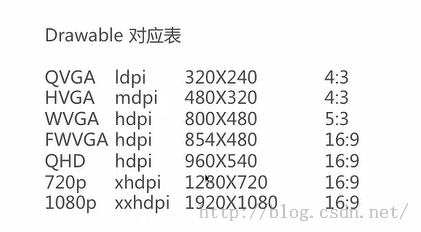 Android .9 圖(Nine-patch)完全上手:讓背景圖怎麼拉都不變形
做 Android UI 的人都遇過同一個場景:設計師給的圖在設計稿上很漂亮,放進 App 一拉伸、一換解析度,圓角被壓扁、邊框變粗、文字還歪一邊。與其為每種解析度各做一
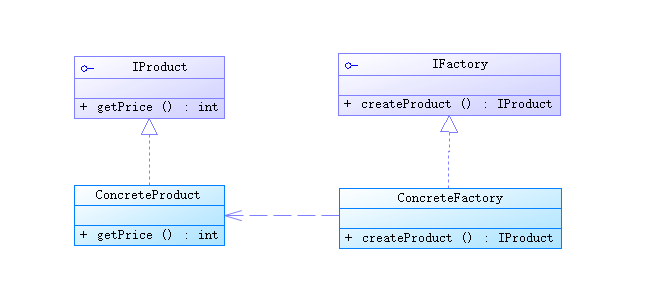 設計模式學習筆記(3):工廠方法模式與簡單工廠的取捨
日常開發中我們習慣直接 new 一個對象,但有時候對象的創建並不那麼簡單:可能需要計算初始值、需要根據條件選擇具體子類、或者在創建目標對象之前得先準備一堆輔助對象。這時候
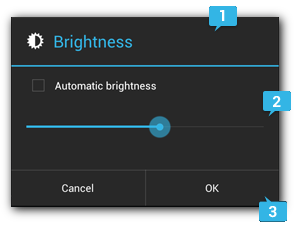 Android UI 系列:Dialog 對話框完整圖解
在介面上彈出一個對話框,是 Android 開發中再日常不過的操作。本篇系統性地梳理 Dialog 的概念,並逐一實作五種常見的 AlertDialog 變體。 一、D