

編輯:關於 Android 程式設計
Flurry 是行動端相當早期的統計服務,主要提供會話(session)統計與自定義事件追蹤。接入方式不複雜,但要把事件管理得有條理,需要一點設計。
把 Flurry 的 jar 包放進專案的 libs 目錄,並在 AndroidManifest.xml 中宣告網路權限:
<uses-permission android:name="android.permission.INTERNET" />
直接在各處寫字串是維護的噩夢——事件名一改就得全域搜尋。正確做法是把事件名與參數鍵集中成常數,並用一個統一的管理類包住 SDK 呼叫:
public class FlurryTypes {

    // ===== 事件名稱常數 =====
    public static final String DOWNLOAD_BOOK = "down_load_book";
    public static final String BOOK_NAME = "book_name";
    public static final String VIEW_AUTHOR = "view_author";
    public static final String AUTHOR_NAME = "author_name";
    public static final String VIEW_BOOK = "view_author";
    public static final String DOWNLOAD_ERROR = "down_load_error";
    public static final String CLICK_MENU = "click_menu";
    public static final String OPERATION = "operation";
    public static final String AUTHOR_LIST = "author_list";
    public static final String MY_FAV = "My_fav";
    public static final String TURN_ON_PAGE = "turn_on_page_animation";
    public static final String VOICE_TURN_ON = "voice_turn_on";
    public static final String CHANGE_BACKGROUND = "change_background";
    public static final String FEEDBACK = "feed_back";
    public static final String SHARE = "share";
    public static final String CHECK_UPDATE = "check_update";
    public static final String DELETE_FAVORITE = "delete_favorite_book";
    public static final String DELETE_AUTHOR = "delete_author";

    /** 會話開始 */
    public static final void onStartSession(Context context) {
        if (Global.ENABLE) {
            try {
                FlurryAgent.setUseHttps(false);
                FlurryAgent.setCaptureUncaughtExceptions(true);
                // 這個是 KEY
                FlurryAgent.onStartSession(context, "ZJN9MZFDFQNZPFVHNJCX");
                FlurryAgent.setLogEvents(true);
            } catch (Throwable t) { }
        }
    }

    /** 會話結束 */
    public static final void onEndSession(Context context) {
        if (Global.ENABLE) {
            try {
                FlurryAgent.onEndSession(context);
            } catch (Throwable t) { }
        }
    }

    /** 無參數事件 */
    public static final void onEvent(String eventId) {
        if (Global.ENABLE) {
            try {
                Map<String, String> params = new HashMap<String, String>();
                FlurryAgent.onEvent(eventId, params);
            } catch (Throwable t) { }
        }
    }

    /** 帶完整參數表的事件 */
    public static final void onEventUseMap(String eventId, Map<String, String> map) {
        if (Global.ENABLE) {
            try {
                FlurryAgent.onEvent(eventId, map);
            } catch (Throwable t) { }
        }
    }

    /** 單一參數值 */
    public static final void onEvent(String eventId, String paramValue) {
        if (Global.ENABLE) {
            try {
                HashMap<String, String> params = new HashMap<String, String>();
                params.put(eventId, paramValue);
                FlurryAgent.onEvent(eventId, params);
            } catch (Throwable t) { }
        }
    }

    /** 單一鍵值對 */
    public static final void onEvent(String eventId, String paramKey, String paramValue) {
        if (Global.ENABLE) {
            try {
                Map<String, String> params = new HashMap<String, String>();
                params.put(paramKey, paramValue);
                FlurryAgent.onEvent(eventId, params);
            } catch (Throwable t) { }
        }
    }
}
會話統計需要在 Activity 生命週期上做配對:
@Override
protected void onStart() {
    super.onStart();
    FlurryTypes.onStartSession(this);
}

@Override
protected void onStop() {
    super.onStop();
    FlurryTypes.onEndSession(this);
}
這段最好在 BaseActivity 中統一實作,避免遺漏。
單一參數的寫法:
FlurryTypes.onEvent(FlurryTypes.DELETE_AUTHOR,
        FlurryTypes.AUTHOR_NAME, info.name);
多參數的寫法:
Map<String, String> map = new HashMap<String, String>();
map.put(FlurryTypes.BOOK_NAME, novelinfo.name);
map.put(FlurryTypes.AUTHOR_NAME, novelinfo.author);
FlurryTypes.onEventUseMap(FlurryTypes.DOWNLOAD_BOOK, map);
Global.ENABLE 開關。開發與測試環境關閉統計,避免污染正式資料。這是埋點系統的基本配備。
try-catch 全包。統計 SDK 不該成為崩潰來源。任何統計呼叫失敗都應該靜默吞掉,絕不能影響主流程。
事件名常數化。改名字只需改一處,IDE 也能追蹤每個事件的使用點。
原始程式碼中有幾處問題,實用時建議調整:
VIEW_BOOK 與 VIEW_AUTHOR 的值重複了(都是 "view_author"),這會導致兩種不同行為的資料被混在一起統計,是很典型的複製貼上事故。
setUseHttps(false) 不建議。關閉 HTTPS 意味著事件資料以明文傳輸。若 SDK 版本支援,應保持預設的 true。
setCaptureUncaughtExceptions(true) 需謹慎。它會讓 SDK 接管未捕獲例外,可能影響你自己的 Crash 收集策略。若同時使用 Crashlytics 等工具,應只保留一個。
catch (Throwable) 範圍過大。它會連 OutOfMemoryError、ThreadDeath 一起吞掉,這些是不該被忽略的嚴重錯誤。建議至少縮小到 Exception。
牙刷事件 ID 應唯一。onEvent(String, String) 那個重載把 paramValue 同時當成 key 用,語意容易混淆,建議統一使用鍵值對形式。
Flurry 在國內的可用性已大不如前。新專案可考慮 Firebase Analytics(免費、與 Google 生態整合良好)、或國內的友盟、神策、GrowingIO 等。各家 SDK 的接入模式其實高度相似——都是「會話配對 + 事件常數 + 統一管理類」,把上面的封裝骨架換掉底層呼叫即可移植。
無論用哪家,兩個原則不變:事件名要常數化、統計呼叫絕不能影響主流程。
 RecyclerView 完全指南:LayoutManager、分割線、動畫與點擊事件
RecyclerView 問世已經有一段時間,透過 support-v7 即可使用。官方對它的定位是「在有限視窗中呈現大量資料集」,而這件事 ListView、GridV
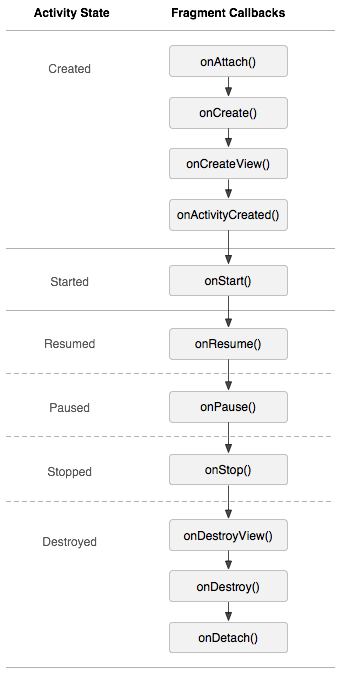 Fragment 完全解析(上):從誕生背景到動態使用
曾經有段時間,好像聊什麼都能扯到 Fragment,做什麼都要先問一句「Fragment 能不能實現」。玩笑歸玩笑,Fragment 之所以被反覆提起,是因為它確實解決了
 Android 6.0 動態權限管理的解決方案
Android 6.0 版本(API 23)推出了許多新特性,大幅提升了用戶體驗,同時也給程序員帶來了新的負擔。動態權限管理就是其中之一:一方面讓用戶更容易控制自己的隱私
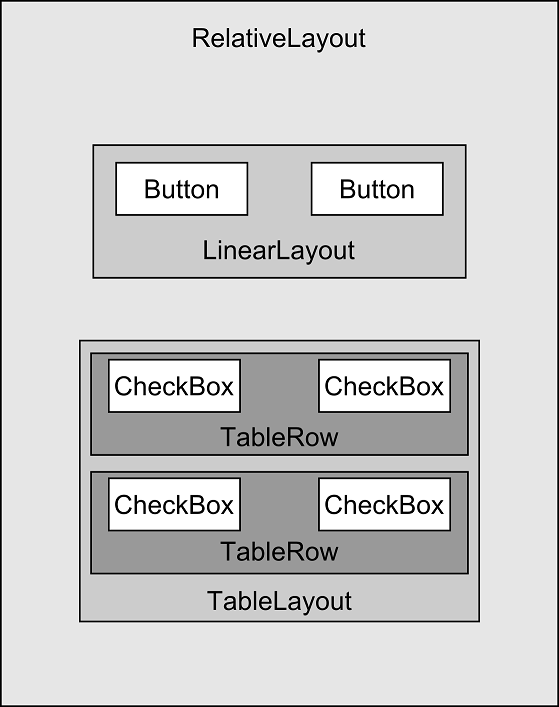 Android 編程基礎:界面組成與事件監聽器
一、界面的組成結構 1. 用戶界面的基本單元稱為 View,全部繼承自 android.view.View。系統預置了大量基礎組件,例如 Button、CheckBox、