

編輯:關於 Android 程式設計
實作 APK 自動更新,大致分為三個步驟:取得本地版本、取得伺服器版本、比對後下載更新。
/**
 * 獲取本地軟件版本
 */
public static int getLocalVersion(Context ctx){
 int localVersion = 0;
 try {
 PackageInfo packageInfo = ctx.getApplicationContext()
 .getPackageManager().getPackageInfo(ctx.getPackageName(), 0);
 localVersion = packageInfo.versionCode;
 Log.d("TAG", "本軟件的版本。。"+localVersion);
 } catch (NameNotFoundException e) {
 e.printStackTrace();
 }
 return localVersion;
}
取得伺服器版本的方式有很多種,可自由發揮。取得後與本地 APK 版本進行比較,若本地版本低於伺服器版本,就進行更新。以下以非同步下載搭配通知欄顯示進度為例(僅供參考):
/**
 * 用於更新app版本
 *
 * @param ctx 上下文對象
 * @param url 更新版本的地址
 */
private static PendingIntent pendingIntent;
public static void UpdateVersion(final Context ctx, String url) {
 createNotification(ctx); // 創建文件,讀取app_name
 createFile(ctx.getResources().getString(R.string.app_name));
 new AsyncTask() {
 @Override protected String doInBackground(String... params) {
 int down_step = 1;// 提示step
 int totalSize;// 文件總大小
 int downloadCount = 0;// 已經下載好的大小
 int updateCount = 0;// 已經上傳的文件大小
 InputStream inputStream;
 OutputStream outputStream;
 URL url;
 HttpURLConnection httpURLConnection = null;
 try {
 url = new URL(params[0]);
 httpURLConnection = (HttpURLConnection) url.openConnection();
 httpURLConnection.setConnectTimeout(TIMEOUT);
 httpURLConnection.setReadTimeout(TIMEOUT);
 totalSize = httpURLConnection.getContentLength();
 if (httpURLConnection.getResponseCode() == 404) {
 throw new Exception("fail!");
 }
 inputStream = httpURLConnection.getInputStream();
 outputStream = new FileOutputStream(updateFile, false);// 文件存在則覆蓋掉
 byte buffer[] = new byte[1024];
 int readsize = 0;
 while ((readsize = inputStream.read(buffer)) != -1) {
 outputStream.write(buffer, 0, readsize);
 downloadCount += readsize;// 時時獲取下載到的大小
 if (updateCount == 0 || (downloadCount * 100 / totalSize - down_step) >= updateCount) {
 updateCount += down_step;
 builder = new Notification.Builder(ctx)
 .setSmallIcon(R.drawable.logo)
 .setContentText("正在下載(" + updateCount + "%)...")
 .setProgress(100, updateCount, false);
 manager.notify(8, builder.build());
 }
 }
 if (httpURLConnection != null) {
 httpURLConnection.disconnect();
 }
 inputStream.close();
 outputStream.close();
 } catch (MalformedURLException e) {
 e.printStackTrace();
 } catch (IOException e) {
 e.printStackTrace();
 } catch (Exception e) {
 e.printStackTrace();
 }
 return null;
 }
 @Override protected void onPostExecute(String result) {
 // 下載完成,點擊安裝
 System.out.println("updateFile.." + updateFile);
 Uri uri = Uri.fromFile(updateFile);
 Intent intent = new Intent(Intent.ACTION_VIEW);
 intent.setDataAndType(uri, "application/vnd.android.package-archive");
 pendingIntent = PendingIntent.getActivity(ctx, 0, intent, 0);
 builder = new Notification.Builder(ctx)
 .setSmallIcon(R.drawable.logo)
 .setContentIntent(pendingIntent)
 .setContentTitle("apk下載更新")
 .setContentText("下載成功,請點擊安裝")
 .setProgress(100, 100, false);
 manager.notify(8, builder.build());
 }
 }.execute(url);
}
private static void createNotification(Context ctx) {
 // 最普通的通知欄
 manager = (NotificationManager) ctx.getSystemService(ctx.NOTIFICATION_SERVICE);
 builder = new Notification.Builder(ctx).setSmallIcon(R.drawable.logo)
 .setContentTitle("apk下載更新").setContentText("准備下載...")
 .setProgress(100, 0, false);
 manager.notify(8, builder.build());
}
下載完成後,使用者即可點擊通知進行安裝。
特別提醒:若你的 APK 已經簽名,而手機上現有的 APK 未經簽名,安裝時會出現「簽名不同的套件衝突」而無法安裝,這種情況只能先卸載未簽名的 APK 後再重新安裝。
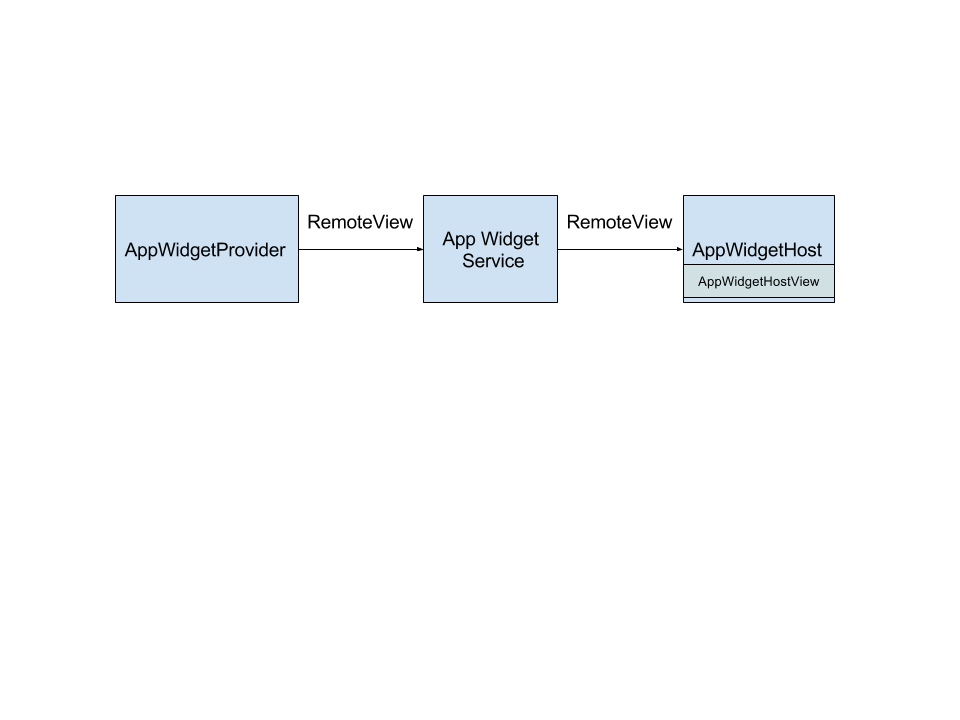 AppWidget 原始碼分析:API 類與跨進程更新
API 類總覽 AppWidget 是 Android 桌面小工具的重要機制。開發者若要實作一個可被桌面使用的元件,通常會接觸到 AppWidgetProvider、Ap
 Android 中文 TTS 語音合成實作教學
Android 系統原生提供了五種語言的語音合成支援:德文、英文、西班牙文、法文與義大利文,其中並不包含中文。好消息是,Android 允許第三方提供中文 TTS 支援,
 Android OkHttp 的 HTTP 攔截器 Interceptor 用法示例
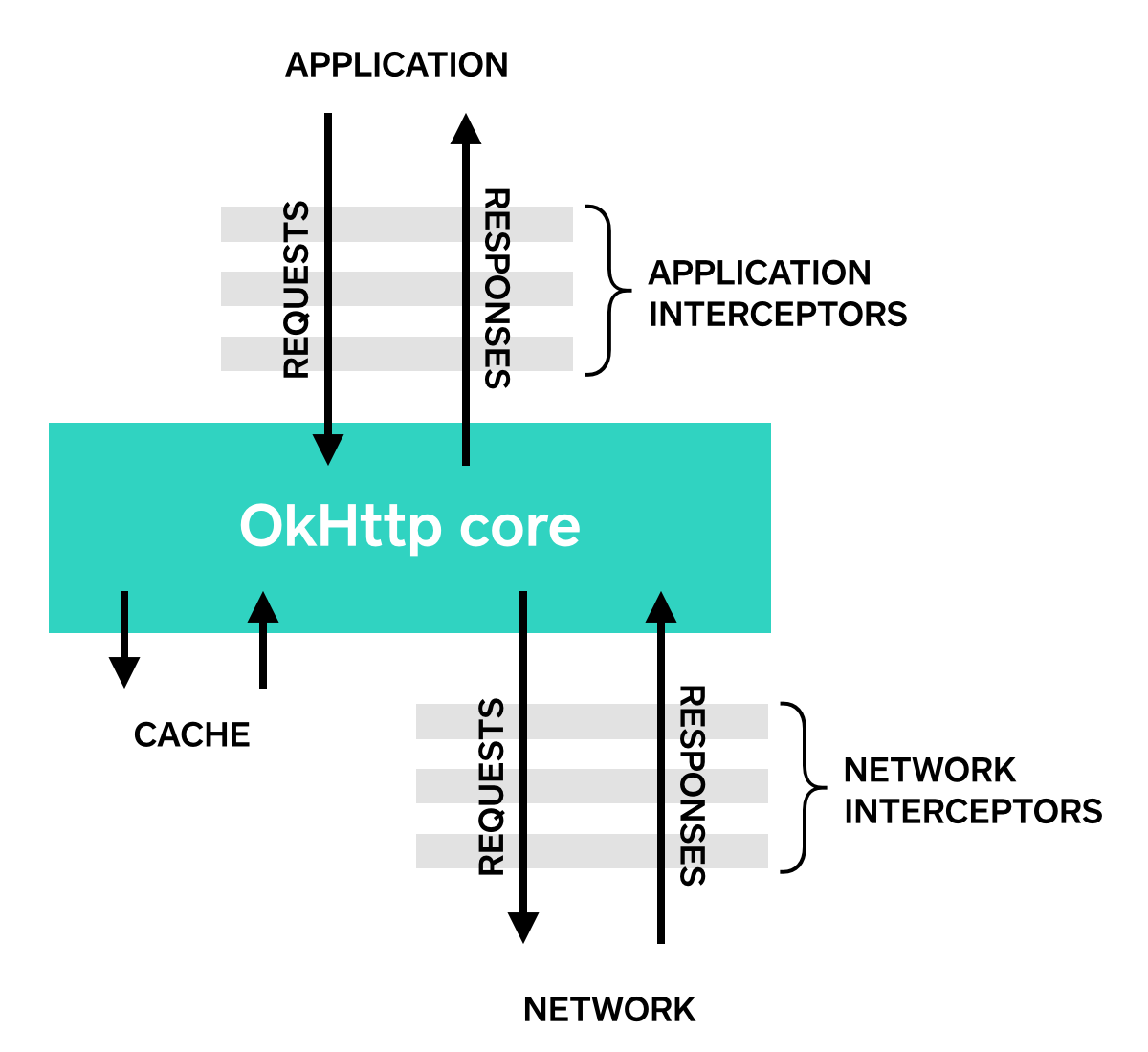
OkHttp(GitHub:https://github.com/square/okhttp)的 Interceptor 正如其名「攔截器」,會攔截你的 Request
 用 ListView 打造自定義表格:動態列、單元格合並與自定義鍵盤
要解決的三個問題 1. 列數不固定:根據數據源動態生成不同列數; 2. 支持按數據定義合並單元格; 3. 可填寫的單元格能自由選擇自定義鍵盤或系統鍵盤。 圍繞這三點做了