

編輯:關於 Android 程式設計
應用被使用者卸載後,一般的程式碼自然無從執行,但我們仍希望能在此刻做些收尾工作,例如引導使用者前往特定網頁。本文透過 JNI 與 Linux 的 inotify 機制,實現一個能監聽自身卸載的觀察者。
核心思路是:透過 fork 建立子行程,讓子行程以 inotify 監聽應用資料目錄;一旦目錄被刪除(即應用被卸載),便觸發對應的 shell 命令。關鍵程式碼如下:
// LOG 巨集定義
#define LOG_INFO(tag, msg)  __android_log_write(ANDROID_LOG_INFO, tag, msg)
#define LOG_DEBUG(tag, msg) __android_log_write(ANDROID_LOG_DEBUG, tag, msg)
#define LOG_WARN(tag, msg)  __android_log_write(ANDROID_LOG_WARN, tag, msg)
#define LOG_ERROR(tag, msg) __android_log_write(ANDROID_LOG_ERROR, tag, msg)

static char c_TAG[] = "onEvent";
static jboolean b_IS_COPY = JNI_TRUE;

jstring Java_com_example_uninstallself_Observer_register(JNIEnv* env, jobject thiz,
        jstring path, jstring url, jint version) {
    jstring tag = (*env)->NewStringUTF(env, c_TAG);
    LOG_DEBUG(..., "init OK");

    // fork 子行程,執行輪詢任務
    pid_t pid = fork();
    if (pid < 0) {
        LOG_ERROR(..., "fork failed !!!");
    } else if (pid == 0) {
        // 子行程註冊目錄監聽器
        int fileDescriptor = inotify_init();
        if (fileDescriptor < 0) { exit(1); }

        int watchDescriptor = inotify_add_watch(fileDescriptor,
                (*env)->GetStringUTFChars(env, path, NULL), IN_DELETE);
        if (watchDescriptor < 0) { exit(1); }

        // 配置緩衝區以讀取 event
        void *p_buf = malloc(sizeof(struct inotify_event));
        if (p_buf == NULL) { exit(1); }

        LOG_DEBUG(..., "start observer");
        // read 會阻塞行程,直到收到目錄被刪除的事件
        size_t readBytes = read(fileDescriptor, p_buf, sizeof(struct inotify_event));

        free(p_buf);
        inotify_rm_watch(fileDescriptor, IN_DELETE);
        LOG_DEBUG(..., "uninstalled");

        if (version >= 17) {
            // 4.2 以上系統權限管理更嚴格,需加上 --user 0
            execlp("am", "am", "start", "--user", "0",
                    "-a", "android.intent.action.VIEW",
                    "-d", (*env)->GetStringUTFChars(env, url, NULL), (char *) NULL);
        } else {
            execlp("am", "am", "start",
                    "-a", "android.intent.action.VIEW",
                    "-d", (*env)->GetStringUTFChars(env, url, NULL), (char *) NULL);
        }
        // 延伸:am(Activity Manager)還能開啟程式、服務、送出 broadcast 等
    }
    // 父行程直接退出,使子行程被 init 行程領養,避免僵死
    return (*env)->NewStringUTF(env, "Hello from JNI !");
}
在 Java 層透過 native 方法對外暴露這個能力:
public class UninstallObserver {
    static { System.loadLibrary("observer"); }

    /**
     * @param path    需要監聽的路徑,可用 getApplicationContext().getFilesDir().getPath()
     * @param url     卸載後要開啟的網址
     * @param version android.os.Build.VERSION.SDK_INT
     */
    public static native String register(String path, String url, int version);
}
在 Activity 中呼叫即可,這裡順帶示範了資料目錄路徑與 SDK 版本的取得:
@Override
protected void onCreate(Bundle savedInstanceState) {
    super.onCreate(savedInstanceState);
    setContentView(R.layout.activity_main);
    Toast.makeText(getApplicationContext(),
            getApplicationContext().getFilesDir().getPath() + "," + Build.VERSION.SDK_INT, 1).show();
    long a = System.currentTimeMillis();
    String str = UninstallObserver.register(
            getApplicationContext().getFilesDir().getPath(),
            "https://www.baidu.com",
            android.os.Build.VERSION.SDK_INT);
    long b = System.currentTimeMillis();
    Toast.makeText(getApplicationContext(), str + "," + (b - a), 1).show();
}
透過 fork 讓監聽任務在子行程中獨立運行,再搭配 inotify 對資料目錄的刪除事件進行監聽,就能在應用被卸載的那一刻準時觸發自訂行為。這是一種結合 Native 層能力與系統機制的巧妙做法。
 Android WebView 快取機制與設定
WebView 快取能保存 HTML、JS、CSS 與其他資源,讓網頁在離線或網路不佳時仍有機會顯示。Android 的 WebView 快取可分為頁面快取與資料快取。快
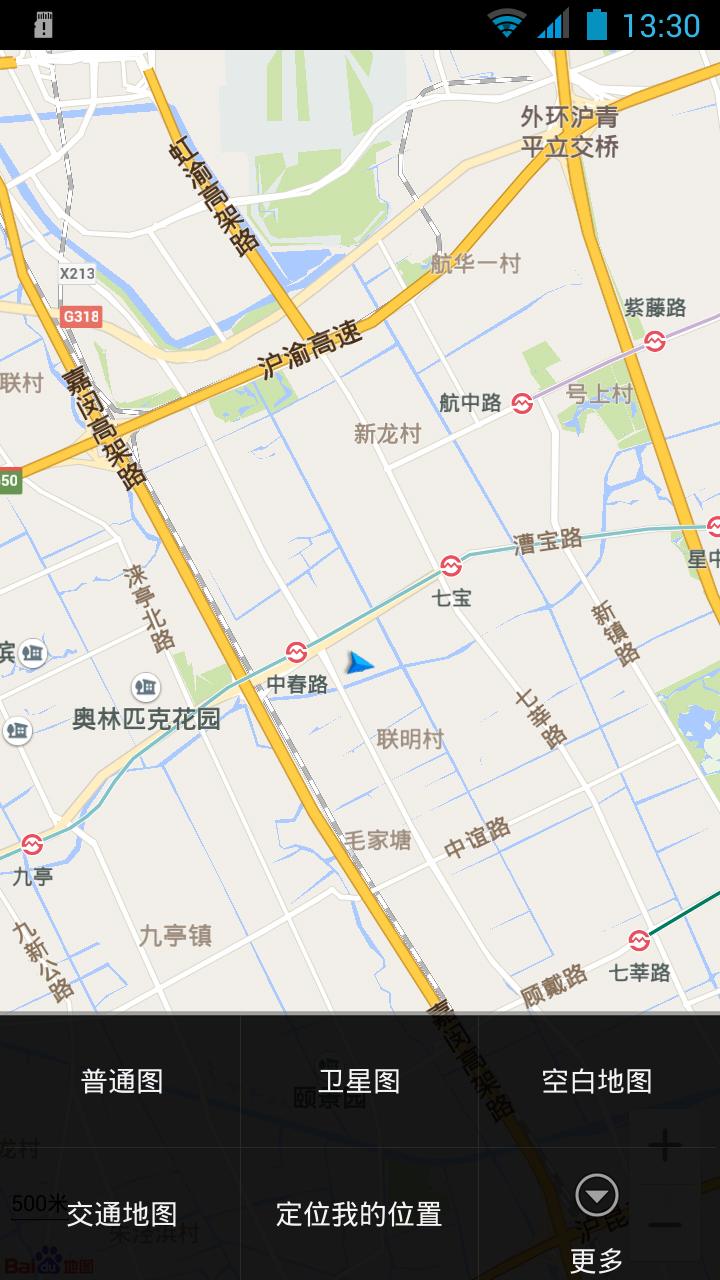 第三方 SDK 集成:百度地圖(二)定位功能實戰
本篇在百度地圖基礎應用的基礎上,進一步實現定位相關功能,包括多種地圖模式切換、定位模式切換以及覆蓋物展示等。 菜單配置(Menu) 核心代碼(M
 Android Socket 通信實作分析
Socket 是 Android 中常見的 TCP/IP 通信方式,可讓裝置與伺服器或其他裝置交換資料。實作時通常分為伺服器端與客戶端:伺服器以 ServerSocket
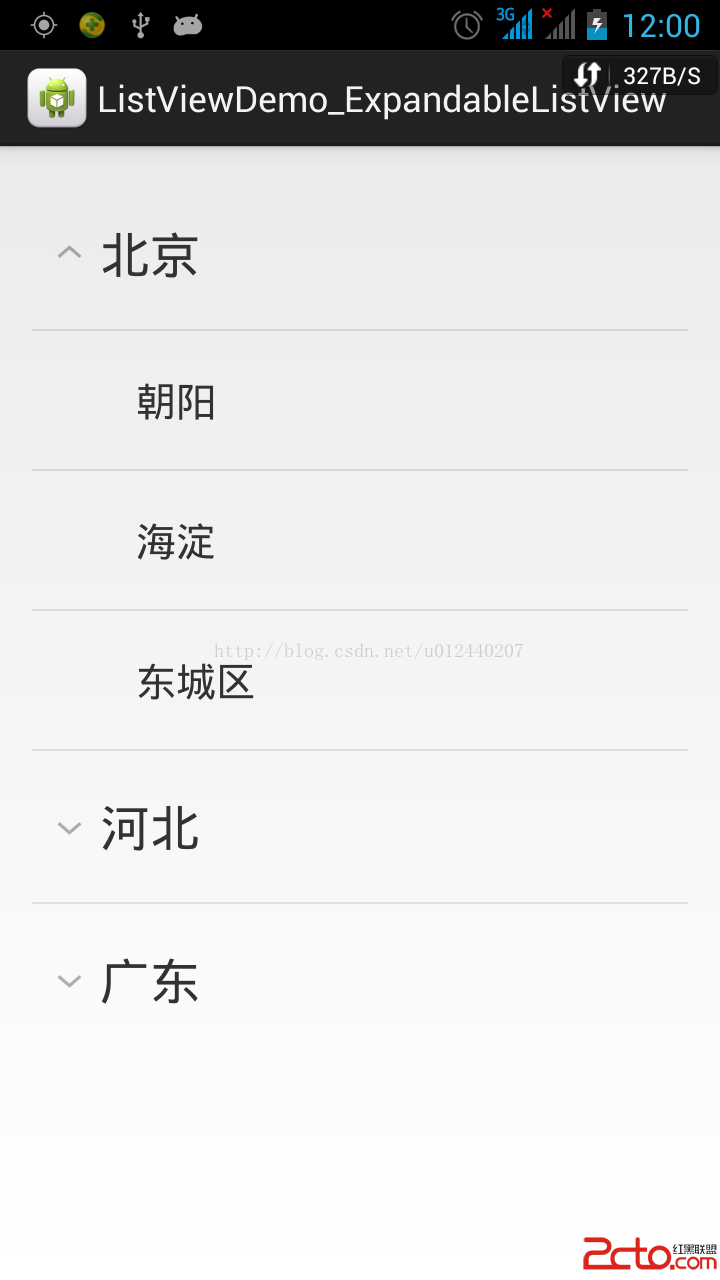 Android ExpandableListView 實作教學
前面幾篇談過 ListView,但實務上經常需要多層次的清單來呈現階層資料——最典型的就是通訊錄或好友列表那種「群組可展開、展開後列出成員」的形式。這時就該用 Expan