

編輯:關於 Android 程式設計
找了一圈開源方案,包含 GitHub 上頗有名氣的 Android-PullToRefresh,總覺得不太合手,最後決定自己寫一個,過程中自然也借鑑了一些前人的思路。核心元件是 PullToRefreshView,繼承 RelativeLayout,內部透過 scrollTo 移動內容來模擬「把 header 拉出來」的效果。
整個控件圍繞幾組狀態常數運轉:PULL_TO_REFRESH(下拉刷新)、RELEASE_TO_REFRESH(放開即刷新)、REFRESHING(使用者手勢觸發的刷新中)、MANUAL_REFRESHING(程式碼強制進入的刷新中)。模式則有 MODE_PULL_DOWN_TO_REFRESH、MODE_PULL_UP_TO_REFRESH 與 MODE_BOTH 三種。
手勢處理分兩段:onInterceptTouchEvent() 負責攔截判斷,確認滑動方向與邊界條件成立後設定 isBeingDragged;onTouchEvent() 負責實際位移與放開手勢後的狀態收斂。滑動距離除以 FRICTION = 2.0f 得到阻尼效果,讓跟手手感更自然。
擴充性集中在兩個方法:isReadyForPullDown() 與 isReadyForPullUp()。內建已處理 ListView 與 ScrollView,若要支援 GridView 或 WebView,只要在這兩個方法裡補上對應 View 的邊界判斷即可。
package com.zs.pulltorefreshtest;
import android.content.Context;
import android.util.AttributeSet;
import android.util.Log;
import android.view.MotionEvent;
import android.view.View;
import android.view.ViewConfiguration;
import android.view.ViewGroup;
import android.widget.LinearLayout;
import android.widget.ListView;
import android.widget.RelativeLayout;
import android.widget.ScrollView;
import android.widget.Scroller;
/**
* 下拉刷新控件,主要測試了 ScrollView,
* 代碼中已實現 ListView 下拉和上拉刷新,不過沒有怎麼測
* 至於 GridView、WebView 等,代碼中沒有實現,不過很好拓展,在 isReadyForPullUp() 和
* isReadyForPullDown() 這兩個方法中加入相應的 View 的上下邊界判斷就 OK 了
*/
public class PullToRefreshView extends RelativeLayout {
/** 手指滑動距離與控件移動距離的比例為 2:1 */
static final float FRICTION = 2.0f;
static final int PULL_TO_REFRESH = 0x0; // 顯示「下拉刷新」
static final int RELEASE_TO_REFRESH = 0x1; // 顯示「釋放刷新」
static final int REFRESHING = 0x2; // 使用者下拉進入的刷新狀態
static final int MANUAL_REFRESHING = 0x3; // 程式碼強制進入的刷新狀態
private static final int MODE_PULL_TO_SCROLL_HEADER_OR_FOOTER = 0x0;
public static final int MODE_PULL_DOWN_TO_REFRESH = 0x1;
public static final int MODE_PULL_UP_TO_REFRESH = 0x2;
public static final int MODE_BOTH = 0x3;
private Context context;
private Scroller scroller;
private int touchSlop;
private float initialMotionY;
private float lastMotionX;
private float lastMotionY;
private boolean isBeingDragged = false;
private int headerState = PULL_TO_REFRESH;
private int footerState = PULL_TO_REFRESH;
private int mode = MODE_PULL_DOWN_TO_REFRESH;
private int currentMode;
private int index = 1;
private boolean disableScrollingWhileRefreshing = false;
private boolean isPullToRefreshEnabled = true;
private LoadingLayout headerLayout;
private LoadingLayout footerLayout;
private int headerHeight;
private int pullWithRefreshingCount = 0;
private int pullWithLoadingMoreCount = 0;
private OnRefreshListener onRefreshListener;
private OnLoadMoreListener onLoadMoreListener;
public PullToRefreshView(Context context) {
super(context);
init(context, null);
}
public PullToRefreshView(Context context, AttributeSet attrs) {
super(context, attrs);
init(context, attrs);
}
private void init(Context context, AttributeSet attrs) {
scroller = new Scroller(context);
touchSlop = ViewConfiguration.get(context).getScaledTouchSlop();
this.context = context;
this.addLoadingView();
}
/** 依當前模式載入頭部與底部布局,並先把它們藏起來 */
public void addLoadingView() {
String pullDownLabel = context.getString(R.string.pull_to_refresh_pull_down_label);
String refreshingDownLabel = context.getString(R.string.pull_to_refresh_refreshing_down_label);
String releaseDownLabel = context.getString(R.string.pull_to_refresh_release_down_label);
String pullUpLabel = context.getString(R.string.pull_to_refresh_pull_up_label);
String refreshingUpLabel = context.getString(R.string.pull_to_refresh_refreshing_up_label);
String releaseUpLabel = context.getString(R.string.pull_to_refresh_release_up_label);
if (mode == MODE_PULL_DOWN_TO_REFRESH || mode == MODE_BOTH) {
headerLayout = new LoadingLayout(context, MODE_PULL_DOWN_TO_REFRESH,
releaseDownLabel, pullDownLabel, refreshingDownLabel);
addView(headerLayout, 0, new LinearLayout.LayoutParams(
ViewGroup.LayoutParams.MATCH_PARENT,
ViewGroup.LayoutParams.WRAP_CONTENT));
measureView(headerLayout);
headerHeight = headerLayout.getMeasuredHeight();
}
if (mode == MODE_PULL_UP_TO_REFRESH || mode == MODE_BOTH) {
footerLayout = new LoadingLayout(context, MODE_PULL_UP_TO_REFRESH,
releaseUpLabel, pullUpLabel, refreshingUpLabel);
RelativeLayout.LayoutParams lp2 = new RelativeLayout.LayoutParams(
ViewGroup.LayoutParams.MATCH_PARENT,
ViewGroup.LayoutParams.WRAP_CONTENT);
lp2.addRule(RelativeLayout.ALIGN_PARENT_BOTTOM);
addView(footerLayout, lp2);
measureView(footerLayout);
headerHeight = footerLayout.getMeasuredHeight();
}
switch (mode) {
case MODE_BOTH:
index = 2;
setPadding(0, -headerHeight, 0, -headerHeight);
break;
case MODE_PULL_UP_TO_REFRESH:
index = 1;
setPadding(0, 0, 0, -headerHeight);
break;
case MODE_PULL_DOWN_TO_REFRESH:
default:
index = 1;
setPadding(0, -headerHeight, 0, 0);
break;
}
}
/** 頭尾視圖加入後重新配置邊距,避免隱藏 header/footer 時連內容一起被裁掉 */
@Override
protected void onLayout(boolean changed, int l, int t, int r, int b) {
super.onLayout(changed, l, t, r, b);
View contentView = null;
RelativeLayout.LayoutParams lp1 = null;
switch (mode) {
case MODE_BOTH:
contentView = this.getChildAt(index);
lp1 = (LayoutParams) contentView.getLayoutParams();
lp1.setMargins(0, headerHeight, 0, headerHeight);
break;
case MODE_PULL_UP_TO_REFRESH:
contentView = this.getChildAt(index);
lp1 = (LayoutParams) contentView.getLayoutParams();
lp1.setMargins(0, 0, 0, headerHeight);
break;
case MODE_PULL_DOWN_TO_REFRESH:
default:
contentView = this.getChildAt(index);
lp1 = (LayoutParams) contentView.getLayoutParams();
lp1.setMargins(0, headerHeight, 0, 0);
break;
}
}
private void measureView(View child) {
ViewGroup.LayoutParams p = child.getLayoutParams();
if (p == null) {
p = new ViewGroup.LayoutParams(
ViewGroup.LayoutParams.MATCH_PARENT,
ViewGroup.LayoutParams.WRAP_CONTENT);
}
int childWidthSpec = ViewGroup.getChildMeasureSpec(0, 0 + 0, p.width);
int lpHeight = p.height;
int childHeightSpec;
if (lpHeight > 0) {
childHeightSpec = MeasureSpec.makeMeasureSpec(lpHeight, MeasureSpec.EXACTLY);
} else {
childHeightSpec = MeasureSpec.makeMeasureSpec(0, MeasureSpec.UNSPECIFIED);
}
child.measure(childWidthSpec, childHeightSpec);
}
@Override
public final boolean onInterceptTouchEvent(MotionEvent event) {
if (!isPullToRefreshEnabled) {
return false;
}
if ((isLoadingMore() || isRefreshing()) && disableScrollingWhileRefreshing) {
return true;
}
final int action = event.getAction();
if (action == MotionEvent.ACTION_CANCEL || action == MotionEvent.ACTION_UP) {
isBeingDragged = false;
return false;
}
if (action != MotionEvent.ACTION_DOWN && isBeingDragged) {
return true;
}
switch (action) {
case MotionEvent.ACTION_DOWN:
if (isReadyForPull()) {
lastMotionY = initialMotionY = event.getY();
lastMotionX = event.getX();
isBeingDragged = false;
}
break;
case MotionEvent.ACTION_MOVE:
if (isReadyForPull()) {
final float y = event.getY();
final float dy = y - lastMotionY;
final float yDiff = Math.abs(dy);
final float xDiff = Math.abs(event.getX() - lastMotionX);
if (yDiff > touchSlop && yDiff > xDiff) {
if ((mode == MODE_PULL_DOWN_TO_REFRESH || mode == MODE_BOTH)
&& dy >= 0.0001f && isReadyForPullDown()) {
lastMotionY = y;
isBeingDragged = true;
currentMode = MODE_PULL_DOWN_TO_REFRESH;
} else if ((mode == MODE_PULL_UP_TO_REFRESH || mode == MODE_BOTH)
&& dy <= 0.0001f && isReadyForPullUp()) {
lastMotionY = y;
isBeingDragged = true;
currentMode = MODE_PULL_UP_TO_REFRESH;
} else if ((isRefreshing() && getScrollY() < 0)
|| (isLoadingMore() && getScrollY() > 0)) {
// header/footer 已顯示,開啟跟隨手指滑動模式
lastMotionY = y;
isBeingDragged = true;
currentMode = MODE_PULL_TO_SCROLL_HEADER_OR_FOOTER;
}
}
}
break;
}
return isBeingDragged;
}
@Override
public final boolean onTouchEvent(MotionEvent event) {
if (!isPullToRefreshEnabled) {
return false;
}
if (isRefreshing() && disableScrollingWhileRefreshing) {
return true;
}
if (event.getAction() == MotionEvent.ACTION_DOWN && event.getEdgeFlags() != 0) {
return false;
}
switch (event.getAction()) {
case MotionEvent.ACTION_DOWN:
if (isReadyForPull()) {
lastMotionY = initialMotionY = event.getY();
return true;
}
break;
case MotionEvent.ACTION_MOVE:
if (isBeingDragged) {
lastMotionY = event.getY();
this.pullEvent();
return true;
}
break;
case MotionEvent.ACTION_CANCEL:
case MotionEvent.ACTION_UP:
if (isBeingDragged) {
isBeingDragged = false;
if (isRefreshing() && pullWithRefreshingCount == 0) {
pullWithRefreshingCount = 1;
}
if (isLoadingMore() && pullWithLoadingMoreCount == 0) {
pullWithLoadingMoreCount = 1;
}
switch (currentMode) {
case MODE_PULL_TO_SCROLL_HEADER_OR_FOOTER:
smoothScrollTo(0); // 隱藏 header/footer
break;
case MODE_PULL_UP_TO_REFRESH:
if (footerState == RELEASE_TO_REFRESH && null != onLoadMoreListener) {
setLoadingMoreInternal(true);
onLoadMoreListener.onLoadMore();
} else {
smoothScrollTo(0);
}
break;
case MODE_PULL_DOWN_TO_REFRESH:
if (headerState == RELEASE_TO_REFRESH && null != onRefreshListener) {
setRefreshingInternal(true);
onRefreshListener.onRefresh();
} else {
smoothScrollTo(0);
}
break;
}
return true;
}
break;
}
return false;
}
/** 處理使用者滑動 */
private boolean pullEvent() {
final int newHeight;
final int oldHeight = this.getScrollY();
switch (currentMode) {
case MODE_PULL_TO_SCROLL_HEADER_OR_FOOTER:
newHeight = Math.round((initialMotionY - lastMotionY));
break;
case MODE_PULL_UP_TO_REFRESH:
newHeight = Math.round(Math.max(initialMotionY - lastMotionY, 0) / FRICTION);
break;
case MODE_PULL_DOWN_TO_REFRESH:
default:
newHeight = Math.round(Math.min(initialMotionY - lastMotionY, 0) / FRICTION);
break;
}
if (newHeight != 0) {
switch (currentMode) {
case MODE_PULL_UP_TO_REFRESH:
if (footerState == PULL_TO_REFRESH && headerHeight < Math.abs(newHeight)) {
footerState = RELEASE_TO_REFRESH;
footerLayout.releaseToRefresh();
return true;
} else if (footerState == RELEASE_TO_REFRESH
&& headerHeight >= Math.abs(newHeight)) {
footerState = PULL_TO_REFRESH;
footerLayout.pullToRefresh();
return true;
}
break;
case MODE_PULL_DOWN_TO_REFRESH:
if (headerState == PULL_TO_REFRESH && headerHeight < Math.abs(newHeight)) {
headerState = RELEASE_TO_REFRESH;
headerLayout.releaseToRefresh();
return true;
} else if (headerState == RELEASE_TO_REFRESH
&& headerHeight >= Math.abs(newHeight)) {
headerState = PULL_TO_REFRESH;
headerLayout.pullToRefresh();
return true;
}
break;
}
}
scrollTo(newHeight);
return oldHeight != newHeight;
}
/** 判斷是否可以進行上拉或下拉手勢 */
private boolean isReadyForPull() {
switch (mode) {
case MODE_PULL_DOWN_TO_REFRESH:
return isReadyForPullDown();
case MODE_PULL_UP_TO_REFRESH:
return isReadyForPullUp();
case MODE_BOTH:
return isReadyForPullUp() || isReadyForPullDown();
}
return false;
}
/** 判斷是否可以下拉刷新(此處為擴充點) */
private boolean isReadyForPullDown() {
if (getChildCount() > 1) {
View childView = this.getChildAt(index);
if (childView instanceof ListView) {
int top = ((ListView) childView).getChildAt(0).getTop();
int pad = ((ListView) childView).getListPaddingTop();
return (Math.abs(top - pad) < 3)
&& ((ListView) childView).getFirstVisiblePosition() == 0;
} else if (childView instanceof ScrollView) {
return ((ScrollView) childView).getScrollY() == 0;
}
}
return false;
}
/** 判斷是否可以上拉加載更多(此處為擴充點) */
private boolean isReadyForPullUp() {
if (getChildCount() > 1) {
View childView = this.getChildAt(index);
if (childView instanceof ListView) {
int top = ((ListView) childView).getChildAt(
((ListView) childView).getCount()).getBottom();
int pad = ((ListView) childView).getListPaddingBottom();
return (Math.abs(top - pad) < 3)
&& ((ListView) childView).getFirstVisiblePosition()
== ((ListView) childView).getCount();
} else if (childView instanceof ScrollView) {
int off = ((ScrollView) childView).getScrollY()
+ ((ScrollView) childView).getHeight()
- ((ScrollView) childView).getChildAt(0).getHeight();
return off >= 0;
}
}
return false;
}
public final boolean isPullToRefreshEnabled() {
return isPullToRefreshEnabled;
}
public final boolean isDisableScrollingWhileRefreshing() {
return disableScrollingWhileRefreshing;
}
public final boolean isRefreshing() {
return headerState == REFRESHING || headerState == MANUAL_REFRESHING;
}
public final boolean isLoadingMore() {
return footerState == REFRESHING || footerState == MANUAL_REFRESHING;
}
public final void setDisableScrollingWhileRefreshing(boolean b) {
this.disableScrollingWhileRefreshing = b;
}
public final void setPullToRefreshEnabled(boolean enable) {
this.isPullToRefreshEnabled = enable;
}
public final void setRefreshing() {
this.setRefreshing(true);
}
public final void setLoadingMore() {
this.setLoadingMore(true);
}
public final void setRefreshing(boolean doScroll) {
if (!isRefreshing()) {
setRefreshingInternal(doScroll);
headerState = MANUAL_REFRESHING;
}
}
public final void setLoadingMore(boolean doScroll) {
if (!isLoadingMore()) {
setLoadingMoreInternal(doScroll);
footerState = MANUAL_REFRESHING;
}
}
public final void onRefreshComplete() {
if (headerState != PULL_TO_REFRESH) {
resetHeader();
}
pullWithRefreshingCount = 0;
}
public final void onLoadMoreComplete() {
if (footerState != PULL_TO_REFRESH) {
resetFooter();
}
pullWithLoadingMoreCount = 0;
}
protected void resetHeader() {
headerState = PULL_TO_REFRESH;
isBeingDragged = false;
if (null != headerLayout) {
headerLayout.reset();
}
smoothScrollTo(0);
}
protected void resetFooter() {
footerState = PULL_TO_REFRESH;
isBeingDragged = false;
if (null != footerLayout) {
footerLayout.reset();
}
smoothScrollTo(0);
}
protected void setRefreshingInternal(boolean doScroll) {
headerState = REFRESHING;
pullWithRefreshingCount = 0;
if (null != headerLayout) {
headerLayout.refreshing();
}
if (doScroll) {
smoothScrollTo(-headerHeight);
}
}
protected void setLoadingMoreInternal(boolean doScroll) {
footerState = REFRESHING;
pullWithLoadingMoreCount = 0;
if (null != footerLayout) {
footerLayout.refreshing();
}
if (doScroll) {
smoothScrollTo(headerHeight);
}
}
protected final void scrollTo(int y) {
scrollTo(0, y);
}
protected final void smoothScrollTo(int y) {
scroller.startScroll(0, getScrollY(), 0, -(getScrollY() - y), 500);
invalidate();
}
@Override
public void computeScroll() {
if (scroller.computeScrollOffset()) {
scrollTo(0, this.scroller.getCurrY());
postInvalidate();
}
}
public final void setOnRefreshListener(OnRefreshListener listener) {
this.onRefreshListener = listener;
}
public final void setOnLoadMoreListener(OnLoadMoreListener listener) {
this.onLoadMoreListener = listener;
}
public static interface OnRefreshListener {
public void onRefresh();
}
public static interface OnLoadMoreListener {
public void onLoadMore();
}
}
使用方式很直觀:在布局中把目標列表放進 PullToRefreshView,然後設定兩個監聽器,業務邏輯完成後記得呼叫 onRefreshComplete() 或 onLoadMoreComplete() 讓控件收合,否則 header 會一直停在展開狀態。
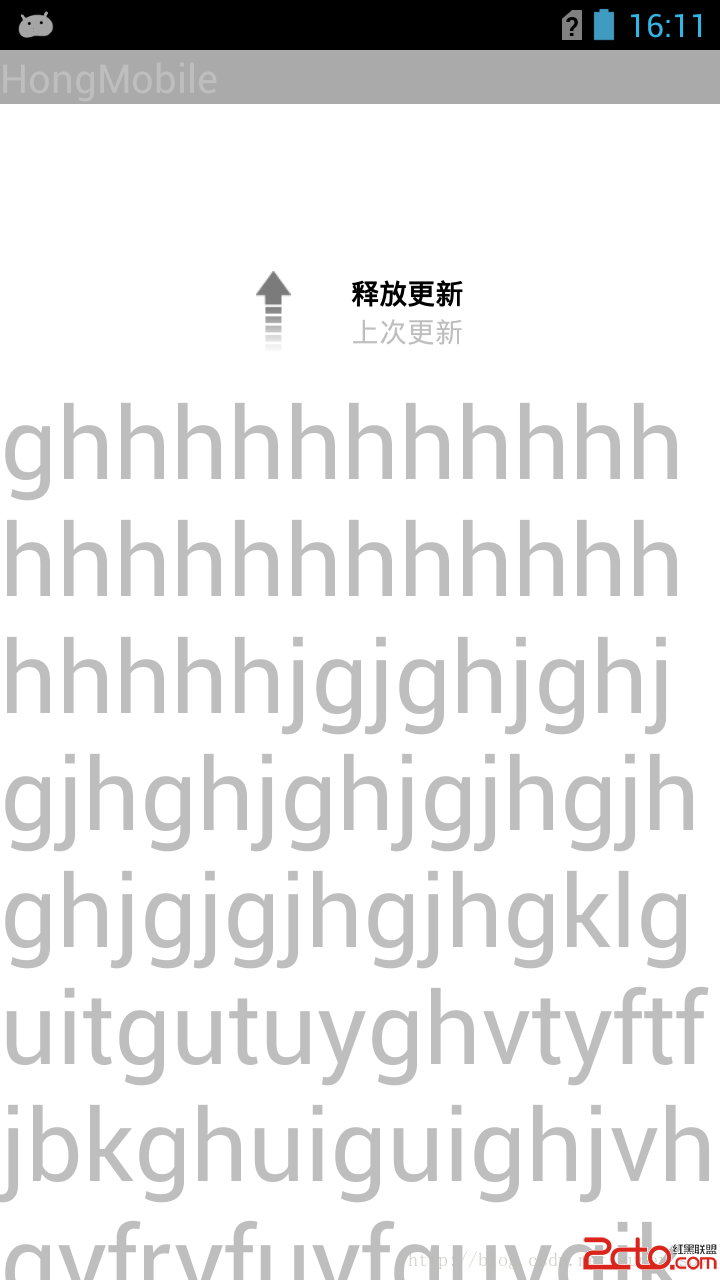
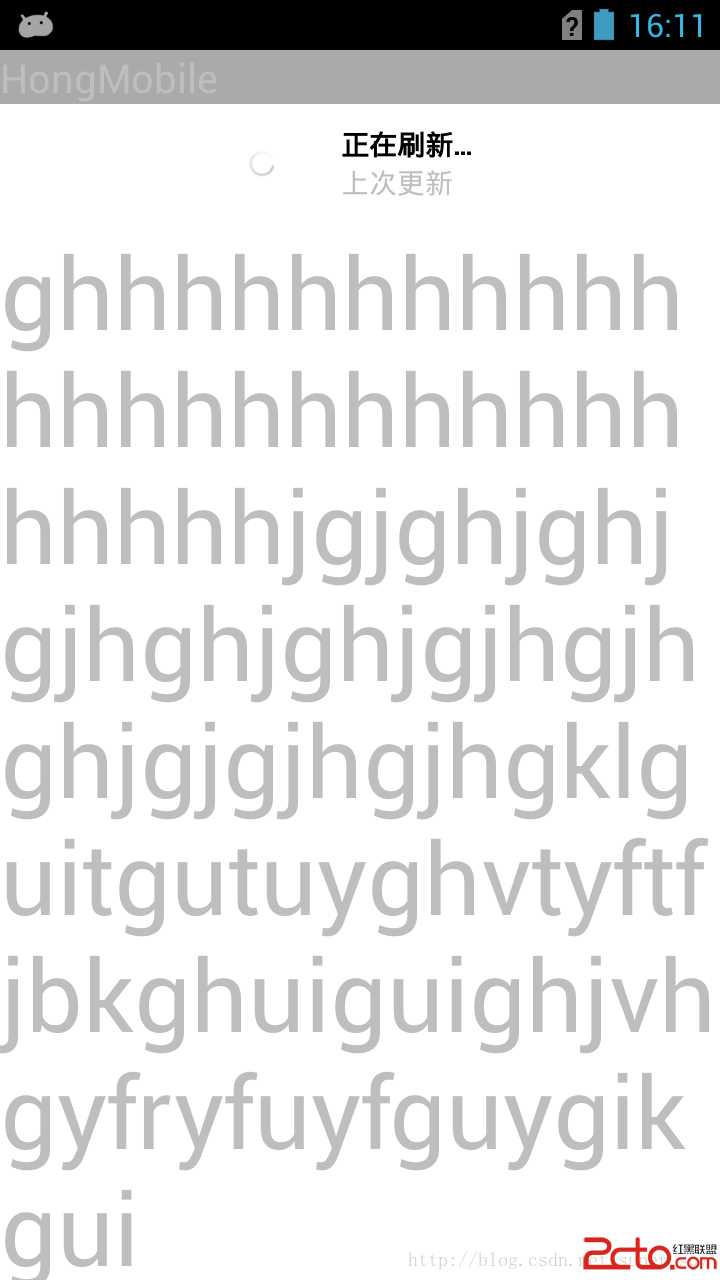
由於時間關係,主要測試了 ScrollView,ListView 的上拉與下拉雖已實作但測試不充分;GridView、WebView 未實作,但如前所述的兩個邊界判斷方法補上即可支援。
原始碼下載:
https://download.csdn.net/detail/super_spy/7642641
 AIDL 入門隨記:綁定本地與遠端 Service 的實作對比
本文記錄 AIDL 的簡單使用,並對比綁定本地 Service 與遠端 Service 的差異。 綁定本地 Service 的用法 第一步:建立介面與實體類 publ
 Android 給圖片加水印,其實只要三步
加水印聽起來像個大工程,實際核心只有三步: 1、載入原始圖片2、載入水印圖片3、保存合成後的圖片 原理說穿了很樸素:取出原圖的寬高,新建一張同尺寸的 Bitmap 當畫布
 Android 權限控制實戰:自定義權限的完整實作
盼了這麼久,終於要談談如何自定義權限了,其實這個過程相當簡單。為了方便說明,我會用到兩個 App 作為示範: Permission App:用於定義一個新權限的應用。Cl
 掃二維碼下載 APK 並統計掃描次數的實作方案
需求:想讓使用者掃描一個二維碼就能下載 App,並統計被掃描的次數。 兩種實現方法: 1. 一般我們用草料生成二維碼,若沒註冊,只能生成一個包含下載網址的靜態碼,沒有統計