

編輯:關於 Android 程式設計
相對於 SharedPreferences 只能存鍵值對,直接操作檔案更適合保存使用者帳號、設定快照或稍具結構的資料。context.getFilesDir() 指向應用私有的 files 目錄,不需要任何權限,卸載時也會一併清除,是最安全的起點。
public static boolean saveUserInfo(Context context, String username, String password) {
    try {
        // 定義一個檔案路徑物件
        File file = new File(context.getFilesDir(), "info.txt");
        // 定義檔案的寫入流
        FileOutputStream fos = new FileOutputStream(file);
        // 用自訂分隔符把兩段資料寫入同一行
        fos.write((username + "##" + password).getBytes());
        // 關閉寫入流
        fos.close();
        return true;
    } catch (Exception e) {
        e.printStackTrace();
        return false;
    }
}
public static Map<String, String> getSavedUserInfo(Context context) {
    try {
        // 定義一個檔案路徑物件
        File file = new File(context.getFilesDir(), "info.txt");
        // 定義檔案讀取流
        FileInputStream fis = new FileInputStream(file);
        // 包裝成按行讀取的 BufferedReader
        BufferedReader br = new BufferedReader(new InputStreamReader(fis));
        // 讀取文本檔案中的一行資料
        String string = br.readLine();
        // 以分隔符切開字串
        String[] infos = string.split("##");
        // 封裝成 Map 回傳
        Map<String, String> map = new HashMap<String, String>();
        map.put("username", infos[0]);
        map.put("password", infos[1]);
        return map;
    } catch (Exception e) {
        e.printStackTrace();
        return null;
    }
}
這段範例的重點在於「自訂分隔符 + 單行存放」的簡易序列化手法,寫得少也讀得快。但要留意三個問題:一是若使用者名稱本身含有 ##,切分就會出錯;二是 split() 的參數是規則運算式,井號雖非保留字元,若換成「.」「|」這類符號必須自行轉義;三是密碼以純文字存在檔案中並不安全,正式專案請改用 SharedPreferences 搭配 EncryptedSharedPreferences,或至少做過雜湊處理,切勿沿用這種明文做法。
另外,讀寫檔案屬於 I/O 操作,不該放在主執行緒,檔案稍大就會觸發 ANR 甚至 StrictMode 警告,建議一律放到背景執行緒,完成後再回主執行緒更新介面。
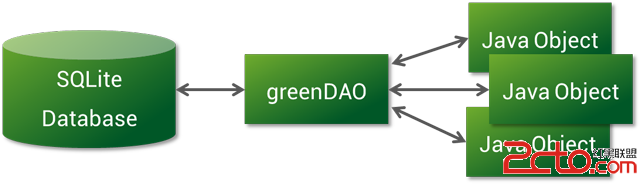 GreenDao 學習筆記:Android 高性能 ORM 的初始化、代碼生成與關係映射
GreenDao 是 Android 平台上性能表現相當出色的 ORM 框架,同類選擇還有 OrmLite 等。 它還附帶一個獨立子項目 GreenDao Genera
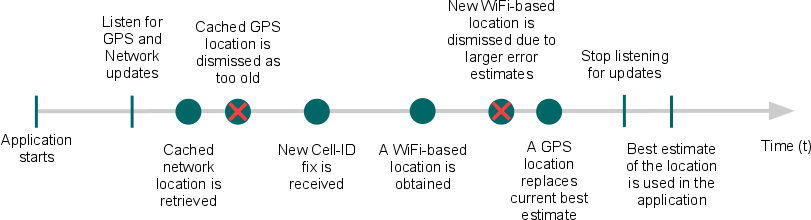 Android 官方文件導讀:Location and Sensors APIs(上)定位策略篇
定位(Location)與感測器(Sensors)這兩組 API,充分發揮了行動裝置的先天優勢。你可以用裝置內建的 GPS 模組或網路定位取得位置,也可以用加速度計(ac
 Android 元件詳解:RadioButton 單選按鈕與 Checkbox 複選框全攻略
在 Android 的表單設計裡,RadioButton(單選按鈕)與 CheckBox(複選框)是最常見的兩種選擇型元件。它們外觀相似、用法接近,但承載的互動邏輯截然不
 Android 中搭建 FTP 伺服器的入門指南
先簡單介紹一下 FTP:FTP(File Transfer Protocol)即檔案傳輸協定。它的作用是讓使用者連上一台運行著 FTP 伺服器程式的遠端電腦,瀏覽遠端有哪