

編輯:關於 Android 程式設計
先把两个最容易混淆的属性摆清楚。绝大多数 Android 控件都同时拥有 padding 与 layout_margin:
padding——控件内部内容到自身边缘的距离;
margin——控件到其父容器边缘的距离。
做实验时我遇到一个怪现象:动态 inflate 进来的子布局,自身的 padding 和 margin 都按预期生效了,但根布局上写的 padding 却对加进来的子布局毫无约束力。
根布局 activity_main.xml 是一个纵向 LinearLayout,声明了 android:padding="8dp":
<LinearLayout xmlns:android="https://schemas.android.com/apk/res/android"
    android:layout_width="match_parent"
    android:layout_height="match_parent"
    android:orientation="vertical"
    android:padding="8dp"
    tools:context=".MainActivity" />
被加载的子布局 table_layout.xml 里放了一个 TextView,它自己带 android:layout_margin="10dp"。
动态加载的代码走的是 addContentView():
LinearLayout subLayout = (LinearLayout) getLayoutInflater()
        .inflate(R.layout.table_layout, null);
TextView tableNameTextView = subLayout.findViewById(R.id.tableLayout_tableName);
tableNameTextView.setText("tablename");
addContentView(subLayout,
        new LayoutParams(LayoutParams.MATCH_PARENT, LayoutParams.WRAP_CONTENT));
结果:子布局内部那个 10dp 边距正常显示,可 table_layout 整体却紧贴 activity_main 的边缘,根布局的 8dp padding 像是从来没写过。
我试过给根布局和子布局分别设 margin、padding,也试过拆成 top/right/bottom/left 四项单独设置,全都没用。最后奏效的办法却简单得让人无语:在原来的根布局里再套一层布局,把这一层当成新的"根"来加载子布局。
<LinearLayout xmlns:android="https://schemas.android.com/apk/res/android"
    android:layout_width="match_parent"
    android:layout_height="match_parent"
    android:orientation="vertical"
    tools:context=".MainActivity" >

    <LinearLayout android:id="@+id/mainLayout"
        android:layout_width="match_parent"
        android:layout_height="match_parent"
        android:orientation="vertical"
        android:paddingBottom="8dp"
        android:paddingLeft="8dp"
        android:paddingRight="8dp" />
</LinearLayout>
LinearLayout subLayout = (LinearLayout) getLayoutInflater()
        .inflate(R.layout.table_layout, null);
TextView tableNameTextView = subLayout.findViewById(R.id.tableLayout_tableName);
tableNameTextView.setText("tablename");
LinearLayout mainLayout = findViewById(R.id.mainLayout);
mainLayout.addView(subLayout);
原因不在 padding 本身,而在 addContentView() 的语义。它会把 View 直接挂到 Window 的 android:id/content 容器里,而不是挂到你写的那个 XML 根节点下——你在 activity_main.xml 上设置的 padding,自然管不到一个与它平级、由系统容器承载的 View。
改成 mainLayout.addView(subLayout) 之后,父子关系才真正建立,父容器的 padding 也就顺理成章地生效了。所以说"根布局有特殊限制"其实是个误解:真正的根是系统那个 content 容器,你写的布局从来都不是它的直接子节点。
 Android 地圖開發:帶列表的 POI 周邊搜索實現
需求背景 先看效果:以公司附近的國貿為中心點,上方是一張地圖,下方是與之聯動的地理位置列表。有些場景下只展示位置列表(比如 QQ 動態裡的「所在位置」),本質上是同一類功
 如何使用 RecyclerView
1. 概述 這是一篇翻譯文章。作為一名 Android 工程師,這是我第一次翻譯國外網站的文章,難免會有一些遺漏和錯誤,歡迎指正。 RecyclerView 是一種全新的
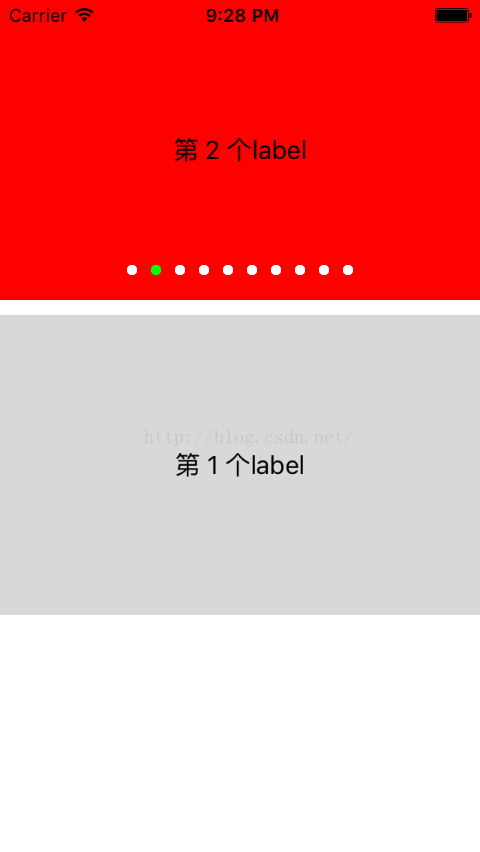 iOS 開發筆記:UIScrollView 與 UIPageControl 的搭配實戰
UIScrollView 是 iOS 裡最基礎的內容滾動視圖。作為父視圖時,它可以承載任意多個子視圖,再透過它特有的 contentSize 屬性來決定可滾動的範圍——水
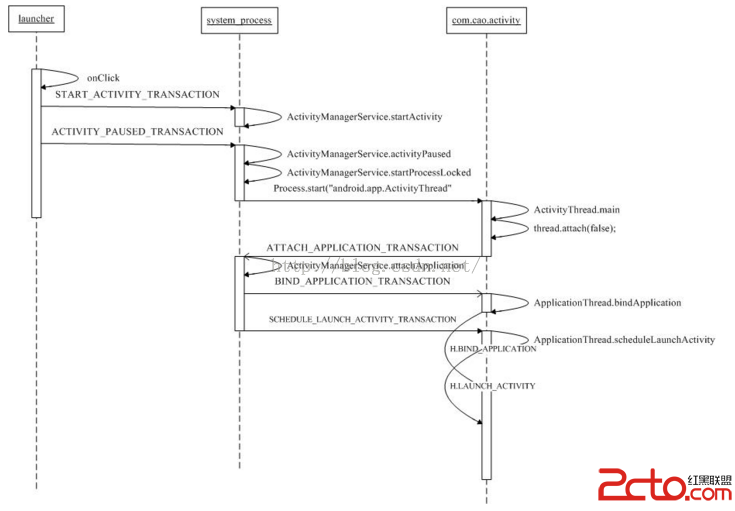 Android 加殼原理深度分析:從源碼視角看脫殼流程
0x00 閱讀本文前,建議先讀一读《Android 加殼原理》及參考文章《Android 中的 Apk 的加固(加殼)原理解析和實現》,否則本文理解起來會比較吃力。 0x