

編輯:關於 Android 程式設計
Android 強制要求網路、檔案這類耗時操作不能放在 UI 線程上,否則動輒 ANR。因此「非同步處理」幾乎是所有 Android 開發者的第一堂必修課。這篇筆記整理兩條最常見的路線:AsyncTask 與 Thread。
AsyncTask 已經替非同步操作準備好一組現成的回呼方法,你只要繼承它並覆寫需要的環節,就能完成「背景做事、UI 更新」的整套流程。在較新的 SDK 上,它還能透過多個 CPU 核心與內部執行緒池同時管理多個任務。
四個關鍵方法各司其職:
onPreExecute():背景操作開始前執行,跑在 UI 線程上,適合做初始化與顯示進度條。doInBackground():在背景執行緒跑真正的耗時工作,是唯一必須實作的方法。publishProgress():由 doInBackground() 呼叫,用來週期性地把進度回報給 UI 線程。onProgressUpdate():在 UI 線程被觸發,接收上面傳來的進度參數並更新畫面。onPostExecute():背景任務結束後自動在 UI 線程呼叫,用來收尾與呈現結果。整個設計的價值就在於:AsyncTask 以背景方式處理操作,全程不阻塞 UI 線程,而你要寫的程式碼卻像同步一樣直白。
方式一:實例化子類後呼叫 execute()。在 API 11 以上的裝置上,任務會「平行」執行,多核心處理器上能明顯加快完成速度,也讓 App 整體更順。
方式二:呼叫 executeOnExecutor(AsyncTask.THREAD_POOL_EXECUTOR, params),可保證多個任務同時執行且彼此獨立。
若反而希望任務序列執行、不要並發,可以改用 executeOnExecutor(AsyncTask.SERIAL_EXECUTOR),但要留意線性行為在 API 14 以上才被明確保證。
public class SimpleAsyncTask extends Activity {

    @Override
    protected void onCreate(Bundle savedInstanceState) {
        super.onCreate(savedInstanceState);
        setContentView(R.layout.activity_main);
        CountingTask tsk = new CountingTask();
        tsk.execute();
    }

    private class CountingTask extends AsyncTask<Void, Integer, Integer> {

        @Override
        protected Integer doInBackground(Void... unused) {
            int i = 0;
            while (i < 100) {
                SystemClock.sleep(100);
                i++;
                if (i % 5 == 0) {
                    publishProgress(i); // 每 5% 回報一次進度
                }
            }
            return i;
        }

        protected void onProgressUpdate(Integer... progress) {
            TextView tv = (TextView) findViewById(R.id.text);
            tv.setText(progress[0] + " % Complete!");
        }

        protected void onPostExecute(Integer result) {
            TextView tv = (TextView) findViewById(R.id.text);
            tv.setText("Count Complete! Count to " + result.toString());
        }
    }
}
public class SimpleMultiCoreAsyncTask extends Activity {

    @Override
    protected void onCreate(Bundle savedInstanceState) {
        super.onCreate(savedInstanceState);
        setContentView(R.layout.activity_simple_multi_core_async_task);

        CountingTask tsk = new CountingTask();
        tsk.executeOnExecutor(AsyncTask.THREAD_POOL_EXECUTOR, R.id.tv_AsyncTask_1);

        startParallelTask(R.id.tv_AsyncTask_2);
        startParallelTask(R.id.tv_AsyncTask_3);
        startParallelTask(R.id.tv_AsyncTask_4);
        startParallelTask(R.id.tv_AsyncTask_5);
        startParallelTask(R.id.tv_AsyncTask_6);
        // 注意:實測同時啟動的只有前 5 個,第 6 個要等前面完成
    }

    private void startParallelTask(int _id) {
        CountingTask tsk = new CountingTask();
        tsk.executeOnExecutor(AsyncTask.THREAD_POOL_EXECUTOR, _id);
    }

    private class CountingTask extends AsyncTask<Integer, Integer, Integer> {
        private int _counterID;

        @Override
        protected Integer doInBackground(Integer... _id) {
            _counterID = _id[0];
            int i = 0;
            while (i < 100) {
                SystemClock.sleep(100);
                i++;
                if (i % 5 == 0) {
                    publishProgress(i);
                }
            }
            return i;
        }

        protected void onProgressUpdate(Integer... progress) {
            TextView tv = (TextView) findViewById(_counterID);
            tv.setText(progress[0] + " % Complete!");
        }

        protected void onPostExecute(Integer result) {
            TextView tv = (TextView) findViewById(_counterID);
            tv.setText("Count Complete! Count to " + result.toString());
        }
    }
}
相較於 AsyncTask,直接用 Thread 導入既有程式碼更為直觀。若一個 Activity 需要管理自己的執行緒生命週期,通常會搭配一個 Handler 型別的成員變數;Thread 啟動後,透過 Handler 的 post() 與主 UI 線程溝通。此外,Activity 的 runOnUiThread()、View 的 post() 與 postDelayed() 也都能達到同樣效果。
public class SimpleThread extends Activity {

    @Override
    protected void onCreate(Bundle savedInstanceState) {
        super.onCreate(savedInstanceState);
        setContentView(R.layout.activity_simple_thread);

        final TextView tv_thread = (TextView) findViewById(R.id.tv_thread);

        new Thread(new Runnable() {
            @Override
            public void run() {
                int i = 0;
                while (i < 100) {
                    SystemClock.sleep(250);
                    i++;
                    final int curCount = i;
                    if (curCount % 5 == 0) {
                        tv_thread.post(new Runnable() {
                            @Override
                            public void run() {
                                tv_thread.setText(curCount + " % Complete!");
                            }
                        });
                    }
                }

                tv_thread.post(new Runnable() {
                    @Override
                    public void run() {
                        tv_thread.setText("Count Complete!");
                    }
                });
            }
        }).start();
    }
}
任務簡單、需要回報進度並更新少量 UI 時,AsyncTask 寫起來最省事;需要更細緻地控制執行緒本身、或要與既有的背景服務整合時,直接用 Thread 搭配 Handler 更合適。近年來 Kotlin 協程與 Executor/Coroutine 已經成為主流選擇,但理解這兩種古典寫法,仍有助於讀懂舊專案底層在做什麼。
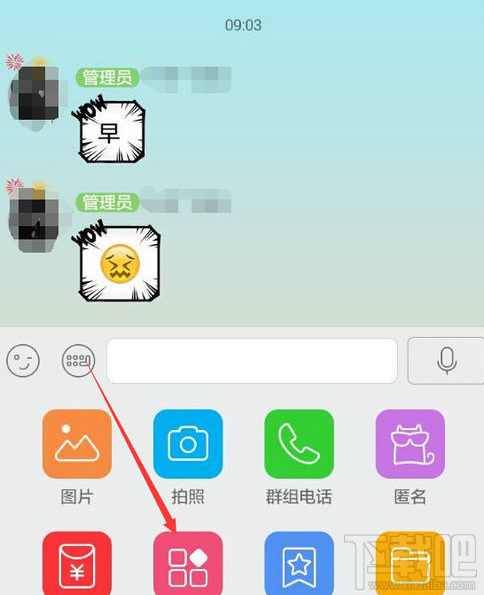 手機QQ群簽到在哪裡?連續簽到的獎勵與操作路徑
群簽到是QQ群裡一個容易被忽略的小功能,但獎勵還算實際:連續 15 天可獲得群空間橙名特權,連續 30 天則可換到會員試用。代價只是每天點兩下。簽到能得到什麼・連續 15
 Android 中用 Pinyin4j 實作通訊錄拼音搜尋
Pinyin4j 嚴格說來是個 Java 開源庫,但在 Android 開發中被使用的頻率並不低。手機通訊錄的「搜尋聯絡人」功能,用 Pinyin4j 就能輕鬆實現——不
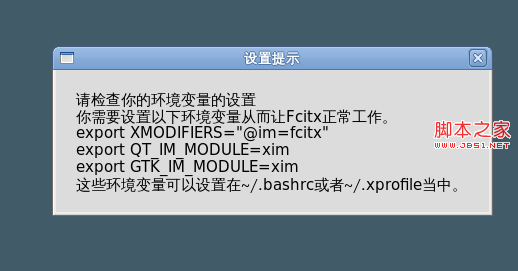 Eclipse Indigo 與 ibus 衝突問題分析:Android 開發環境實錄
今天在筆記型電腦上開發時又碰到了老問題。經過反覆確認,Eclipse Indigo 版本與 ibus 1.3.11 之間確實存在衝突。具體表現是:在 Eclipse 編輯
 自定義滑動按鈕 MyToggleButton
自定義滑動按鈕的實作 滑動按鈕本質上是一個自定義 View,需要處理背景圖、滑塊圖、觸摸事件與狀態回呼。透過滑塊的位置,可以判斷目前是開啟或關閉。 初始化與測量 建立