

編輯:關於 Android 程式設計
要在 App 中直接改動系統的日期與時間,本質上需要系統層級的權限。以下做法在 Android 2.3 與 4.0 上測試可行,但需要 ROOT 權限,一般第三方應用無法使用。
import java.io.DataOutputStream;
import java.io.File;
import java.io.IOException;
import java.util.Calendar;

import android.os.SystemClock;

public class SystemDateTime {

    static final String TAG = "SystemDateTime";

    public static void setDateTime(int year, int month, int day, int hour, int minute)
            throws IOException, InterruptedException {
        requestPermission();

        Calendar c = Calendar.getInstance();
        c.set(Calendar.YEAR, year);
        c.set(Calendar.MONTH, month - 1);
        c.set(Calendar.DAY_OF_MONTH, day);
        c.set(Calendar.HOUR_OF_DAY, hour);
        c.set(Calendar.MINUTE, minute);

        long when = c.getTimeInMillis();
        if (when / 1000 < Integer.MAX_VALUE) {
            SystemClock.setCurrentTimeMillis(when);
        }

        long now = Calendar.getInstance().getTimeInMillis();
        if (now - when > 1000) {
            throw new IOException("failed to set Date.");
        }
    }

    public static void setDate(int year, int month, int day)
            throws IOException, InterruptedException {
        requestPermission();

        Calendar c = Calendar.getInstance();
        c.set(Calendar.YEAR, year);
        c.set(Calendar.MONTH, month);
        c.set(Calendar.DAY_OF_MONTH, day);

        long when = c.getTimeInMillis();
        if (when / 1000 < Integer.MAX_VALUE) {
            SystemClock.setCurrentTimeMillis(when);
        }

        long now = Calendar.getInstance().getTimeInMillis();
        if (now - when > 1000) {
            throw new IOException("failed to set Date.");
        }
    }

    public static void setTime(int hour, int minute)
            throws IOException, InterruptedException {
        requestPermission();

        Calendar c = Calendar.getInstance();
        c.set(Calendar.HOUR_OF_DAY, hour);
        c.set(Calendar.MINUTE, minute);

        long when = c.getTimeInMillis();
        if (when / 1000 < Integer.MAX_VALUE) {
            SystemClock.setCurrentTimeMillis(when);
        }

        long now = Calendar.getInstance().getTimeInMillis();
        if (now - when > 1000) {
            throw new IOException("failed to set Time.");
        }
    }

    static void requestPermission() throws InterruptedException, IOException {
        createSuProcess("chmod 666 /dev/alarm").waitFor();
    }

    static Process createSuProcess() throws IOException {
        File rootUser = new File("/system/xbin/ru");
        if (rootUser.exists()) {
            return Runtime.getRuntime().exec(rootUser.getAbsolutePath());
        } else {
            return Runtime.getRuntime().exec("su");
        }
    }

    static Process createSuProcess(String cmd) throws IOException {
        DataOutputStream os = null;
        Process process = createSuProcess();
        try {
            os = new DataOutputStream(process.getOutputStream());
            os.writeBytes(cmd + "\n");
            os.writeBytes("exit $?\n");
        } finally {
            if (os != null) {
                try {
                    os.close();
                } catch (IOException e) {
                }
            }
        }
        return process;
    }
}
一、取得 root shell。createSuProcess() 先嘗試 /system/xbin/ru,找不到就退回標準的 su 指令,透過 DataOutputStream 把命令寫進 root shell 的 stdin。
二、放寬 /dev/alarm 權限。這是關鍵的一步。系統時間的實際寫入由 SystemClock.setCurrentTimeMillis() 完成,而它背後依賴 /dev/alarm 這個字符裝置。若權限不足,呼叫會失敗,因此先用 root 執行 chmod 666 /dev/alarm。
三、驗證是否真的成功。寫入後立刻再讀一次時間,若與目標值相差超過一秒就拋出 IOException。這種「寫完馬上回讀確認」的習慣很值得學習,能避免靜默失敗。
月份的 0 起算問題。程式碼中 setDateTime() 用了 month - 1,但 setDate() 卻直接傳入 month。這顯然是不一致的——Calendar.MONTH 是從 0 開始計數,兩個方法應該統一,否則 setDate() 會有兩個月的偏差。
為什麼要檢查 Integer.MAX_VALUE。SystemClock.setCurrentTimeMillis() 內部對時間值有範圍限制,因此在呼叫前先做一次工程量級的檢查,可以避免傳入不合理的值。
現代版本的替代方案。從 Android 4.1 開始,SystemClock.setCurrentTimeMillis() 已對普通應用關閉,且 SET_TIME 權限屬於 signature 等級,只有以系統簽章簽發的應用才能取得。因此現今的正確做法是:
1. 若你是系統/OEM 應用,用平台簽章簽發 APK 並在 manifest 宣告 android.permission.SET_TIME。
2. 若只是一般應用, should 引導使用者到 Settings.ACTION_DATE_SETTINGS 由他自己設定。
3. 若你的目的只是讓 App 取得正確時間,考慮使用 NTP 或伺服器時間同步,完全不必碰系統時鐘。
另外提醒,改動系統時間會影響 HTTPS 憑證驗證、AlarmManager 排程與各種簽章有效期限的判斷,正式環境中請務必謹慎評估。
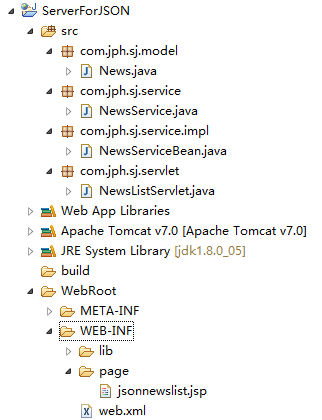 Android 網路編程:獲取並解析網路 JSON 數據實作
要從網路取得 JSON 數據,需要服務器端提供相應的支援。本文將完整示範如何建立一個回傳 JSON 的服務器端,並在 Android 端下載、解析並展示這些數據。 一、建
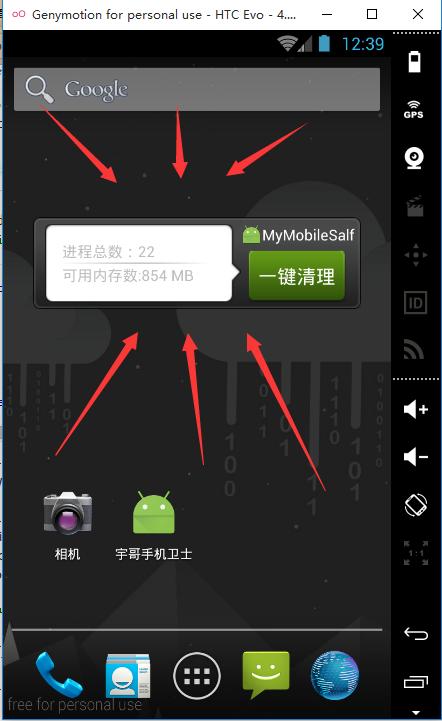 android——App Widget 桌面小工具的完整實作
一、效果展示 在 Android 手機的桌面上,我們常能看到這樣的小元件: 在這些元件上,可以顯示 App 的一些重要交互資訊。以我最近開發的手機衛士為例,widget
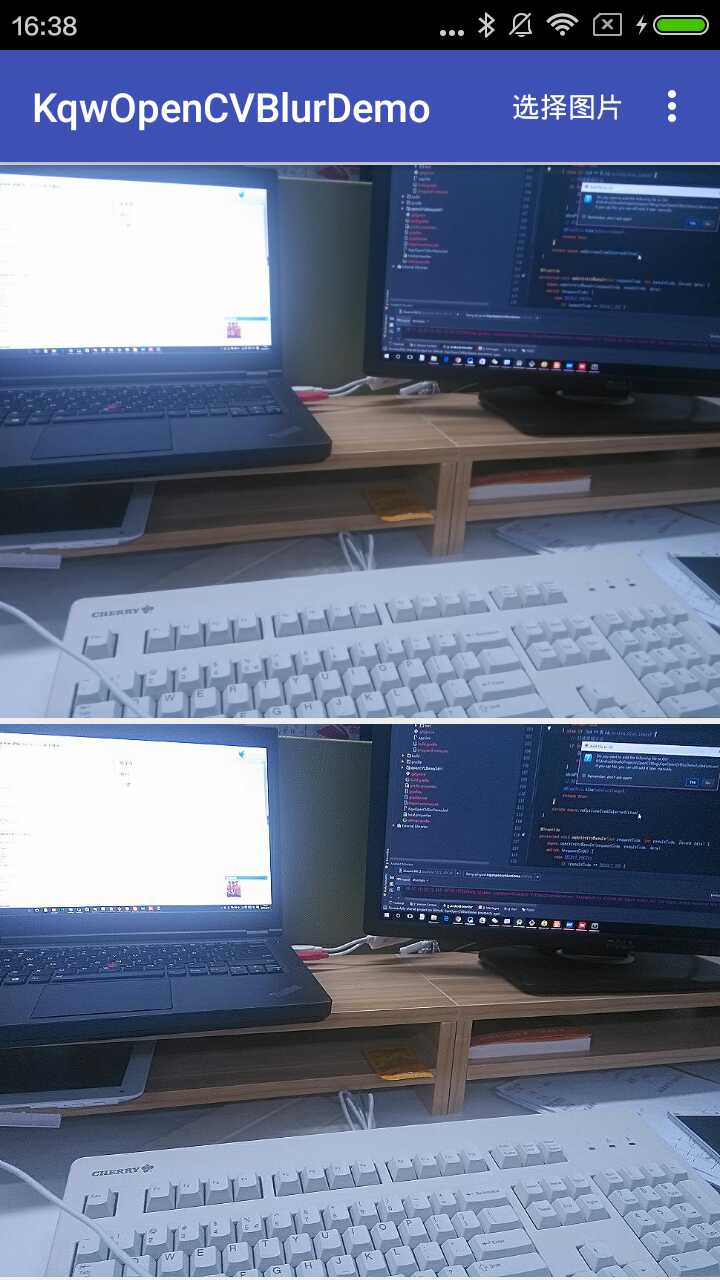 OpenCV 實戰:自定義卷積核實現圖片銳化
效果預覽 原理與源碼 KqwOpenCVBlurDemo 銳化本質上也是一種線性濾波:錨點像素權重較高,周圍像素權重較低甚至為負。既然如此,我們完全可以自己構造一個這
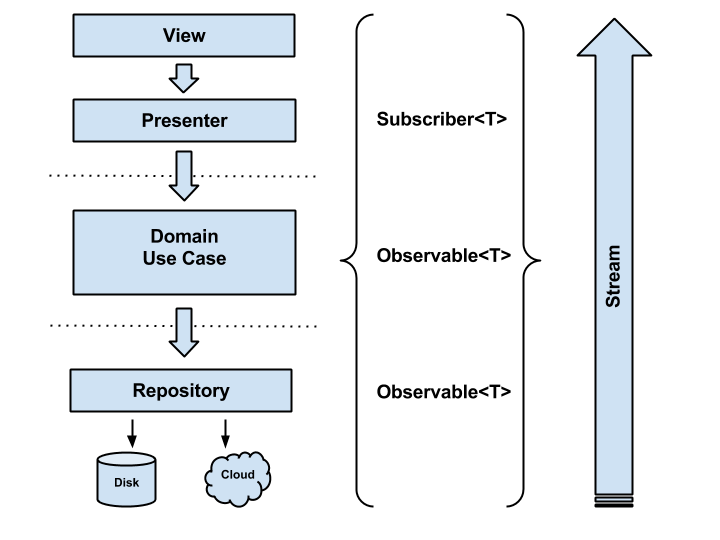 Android Clean Architecture 實戰與快取改造
Clean Architecture 的核心精神 在 Android 專案中,Retrofit、RxJava 與 MVP 已相當常見,而 Clean Architectu