

編輯:關於 Android 程式設計
Android 作為目前主流的行動作業系統,與 SQLite 佔用資源少的優勢十分契合,因此平台內建了一個嵌入式關聯式資料庫——SQLite。若需要在 Android 上儲存資料,SQLite 是非常合適的選擇。以下以一個「班級與學生」的實例,示範資料庫操作的完整套路。
1. 班級 classes:class_id(主鍵)、class_name
2. 學生 students:student_id(主鍵)、student_name、score、class_id(外鍵)
建立資料表:
CREATE TABLE classes(
    class_id varchar(10) primary key,
    class_name varchar(20));

CREATE TABLE students(
    student_id varchar(10) primary key,
    student_name varchar(20),
    score varchar(4),
    class_id varchar(10),
    foreign key (class_id) references classes(class_id)
    on delete cascade on update cascade );
package com.tang.databasedemo;

import android.content.Context;
import android.database.sqlite.SQLiteDatabase;
import android.database.sqlite.SQLiteOpenHelper;
import android.util.Log;

public class DBHelper extends SQLiteOpenHelper {
    public DBHelper(Context context) {
        super(context, "info.db", null, 1);
    }

    @Override
    public void onCreate(SQLiteDatabase db) {
        String classesSQL = "CREATE TABLE classes(class_id varchar(10) primary key , "
                + "class_name varchar(20))";
        String studentsSQL = "CREATE TABLE students(student_id varchar(10) primary key , "
                + "student_name varchar(20) ,score varchar(4) ,class_id varchar(10), "
                + "foreign key (class_id) references classes(class_id) "
                + "on delete cascade on update cascade )";
        db.execSQL(classesSQL);
        Log.d("my", "create table classes:" + classesSQL);
        db.execSQL(studentsSQL);
        Log.d("my", "create table students:" + studentsSQL);
    }

    @Override
    public void onUpgrade(SQLiteDatabase db, int oldVersion, int newVersion) { }
}
package com.tang.databasedemo;

public class Class {
    private String classId;
    private String className;
    public String getClassId() { return classId; }
    public void setClassId(String classId) { this.classId = classId; }
    public String getClassName() { return className; }
    public void setClassName(String className) { this.className = className; }
    public String toString() {
        return "Class--->" + "classId:" + classId + " className:" + className;
    }
}
package com.tang.databasedemo;

public class Student {
    private String studentId;
    private String studentName;
    private String score;
    private String classId;
    public String getStudentId() { return studentId; }
    public void setStudentId(String studentId) { this.studentId = studentId; }
    public String getStudentName() { return studentName; }
    public void setStudentName(String studentName) { this.studentName = studentName; }
    public String getScore() { return score; }
    public void setScore(String score) { this.score = score; }
    public String getClassId() { return classId; }
    public void setClassId(String classId) { this.classId = classId; }
    public String toString() {
        return "Student--->" + "studentId:" + studentId + " studentName:" + studentName
                + " score:" + score + " classId:" + classId;
    }
}
package com.tang.databasedemo;

import java.util.ArrayList;
import java.util.List;
import android.content.Context;
import android.database.Cursor;
import android.database.sqlite.SQLiteDatabase;

public class DBServer {
    private DBHelper dbhelper;

    public DBServer(Context context) {
        this.dbhelper = new DBHelper(context);
    }

    /** 新增班級 */
    public void addClass(Class entity) {
        SQLiteDatabase db = this.dbhelper.getWritableDatabase();
        db.execSQL("insert into classes(class_id,class_name) values(?,?)",
                new Object[]{entity.getClassId(), entity.getClassName()});
        db.close();
    }

    /** 新增學生 */
    public void addStudent(Student entity) {
        SQLiteDatabase db = this.dbhelper.getWritableDatabase();
        db.execSQL("insert into students(student_id,student_name,score,class_id) values(?,?,?,?)",
                new Object[]{entity.getStudentId(), entity.getStudentName(),
                        entity.getScore(), entity.getClassId()});
        db.close();
    }

    /** 刪除班級(連帶刪除該班學生) */
    public void deleteClass(String class_id) {
        SQLiteDatabase db = this.dbhelper.getWritableDatabase();
        // 執行具備級聯關係的語句前,必須先開啟 PRAGMA foreign_keys=ON,否則級聯預設失效
        db.execSQL("PRAGMA foreign_keys=ON");
        db.execSQL("delete from classes where class_id=?", new Object[]{class_id});
        db.close();
    }

    /** 刪除學生 */
    public void deleteStudent(String student_id) {
        SQLiteDatabase db = this.dbhelper.getWritableDatabase();
        db.execSQL("delete from students where student_id=?", new Object[]{student_id});
        db.close();
    }

    /** 修改學生資訊 */
    public void updateStudentInfo(Student entity) {
        SQLiteDatabase db = this.dbhelper.getWritableDatabase();
        db.execSQL("update students set student_name=?,score=?,class_id=? where student_id=?",
                new Object[]{entity.getStudentName(), entity.getScore(),
                        entity.getClassId(), entity.getStudentId()});
        db.close();
    }

    /** 以班級編號查詢該班所有學生(依分數遞減排序) */
    public List<Student> findStudentsByClassId(String classId) {
        List<Student> list = new ArrayList<Student>();
        SQLiteDatabase db = this.dbhelper.getWritableDatabase();
        Cursor cursor = db.rawQuery("select student_id, student_name ,score from students "
                + "where class_id=? order by score desc", new String[]{classId});
        while (cursor.moveToNext()) {
            Student temp = new Student();
            temp.setStudentId(cursor.getString(cursor.getColumnIndex("student_id")));
            temp.setStudentName(cursor.getString(cursor.getColumnIndex("student_name")));
            temp.setScore(cursor.getString(cursor.getColumnIndex("score")));
            temp.setClassId(classId);
            list.add(temp);
        }
        db.close();
        return list;
    }

    /** 以班級名稱查詢該班所有學生(依分數遞增排序) */
    public List<Student> findStudentsByClassName(String className) {
        List<Student> list = new ArrayList<Student>();
        SQLiteDatabase db = this.dbhelper.getWritableDatabase();
        Cursor cursor = db.rawQuery("select student_id, student_name,score,classes.class_id "
                + "from students,classes where students.class_id=classes.class_id "
                + "and classes.class_name=? order by score asc", new String[]{className});
        while (cursor.moveToNext()) {
            Student temp = new Student();
            temp.setStudentId(cursor.getString(cursor.getColumnIndex("student_id")));
            temp.setStudentName(cursor.getString(cursor.getColumnIndex("student_name")));
            temp.setScore(cursor.getString(cursor.getColumnIndex("score")));
            temp.setClassId(cursor.getString(3));
            list.add(temp);
        }
        db.close();
        return list;
    }

    /** 查詢所有學生 */
    public List<Student> findAllStudents() {
        List<Student> list = new ArrayList<Student>();
        SQLiteDatabase db = this.dbhelper.getWritableDatabase();
        Cursor cursor = db.rawQuery("select * from students where 1=1 order by score desc", null);
        while (cursor.moveToNext()) {
            Student temp = new Student();
            temp.setStudentId(cursor.getString(cursor.getColumnIndex("student_id")));
            temp.setStudentName(cursor.getString(cursor.getColumnIndex("student_name")));
            temp.setScore(cursor.getString(cursor.getColumnIndex("score")));
            temp.setClassId(cursor.getString(cursor.getColumnIndex("class_id")));
            list.add(temp);
        }
        db.close();
        return list;
    }

    /** 取得所有班級 */
    public List<Class> findAllClasses() {
        List<Class> list = new ArrayList<Class>();
        SQLiteDatabase db = this.dbhelper.getWritableDatabase();
        Cursor cursor = db.rawQuery("select * from classes where 1=1", null);
        while (cursor.moveToNext()) {
            Class temp = new Class();
            temp.setClassId(cursor.getString(cursor.getColumnIndex("class_id")));
            temp.setClassName(cursor.getString(cursor.getColumnIndex("class_name")));
            list.add(temp);
        }
        db.close();
        return list;
    }

    /** 查詢成績最好的學生 */
    public Student findMaxScoreStudent() {
        Student temp = new Student();
        SQLiteDatabase db = this.dbhelper.getWritableDatabase();
        Cursor cursor = db.rawQuery("select student_id,student_name,class_id,max(score) "
                + "from students where 1=1", null);
        cursor.moveToFirst();
        temp.setStudentId(cursor.getString(0));
        temp.setStudentName(cursor.getString(1));
        temp.setClassId(cursor.getString(2));
        temp.setScore(cursor.getString(3));
        return temp;
    }

    /** 判斷學生是否存在 */
    public boolean isStudentsExists(String studentId) {
        SQLiteDatabase db = this.dbhelper.getWritableDatabase();
        Cursor cursor = db.rawQuery("select count(*) from students where student_id=?",
                new String[]{studentId});
        cursor.moveToFirst();
        return cursor.getLong(0) > 0;
    }

    /** 判斷班級是否存在 */
    public boolean isClassExists(String s) {
        SQLiteDatabase db = this.dbhelper.getWritableDatabase();
        Cursor cursor = db.rawQuery("select count(*) from classes where class_id=? or class_name=?",
                new String[]{s, s});
        cursor.moveToFirst();
        return cursor.getLong(0) > 0;
    }
}
在 Activity 中透過按鈕事件呼叫 DBServer 的相關方法,即可實現新增、刪除、修改與查詢等操作。核心要點如下:
private void addAStudent() {
    String tempSID = sId.getText().toString();
    String tempSName = sName.getText().toString();
    String tempScore = score.getText().toString();
    String tempCID = cId.getText().toString();
    if (checkInfo(tempSID) && checkInfo(tempSName) && checkInfo(tempScore) && checkInfo(tempCID)) {
        Student temp = new Student();
        temp.setStudentId(tempSID);
        temp.setStudentName(tempSName);
        temp.setScore(tempScore);
        temp.setClassId(tempCID);
        db.addStudent(temp);
    }
}

private void deleteAClass() {
    final String tempCID = cId.getText().toString();
    if (checkInfo(tempCID) && db.isClassExists(tempCID)) {
        new AlertDialog.Builder(this)
            .setTitle("提示:")
            .setMessage("刪除一個班級將會刪除該班的所有學生資訊,確定?")
            .setPositiveButton("確定", new DialogInterface.OnClickListener() {
                @Override public void onClick(DialogInterface dialog, int which) {
                    db.deleteClass(tempCID);
                }
            })
            .setNegativeButton("取消", null)
            .show();
    }
}
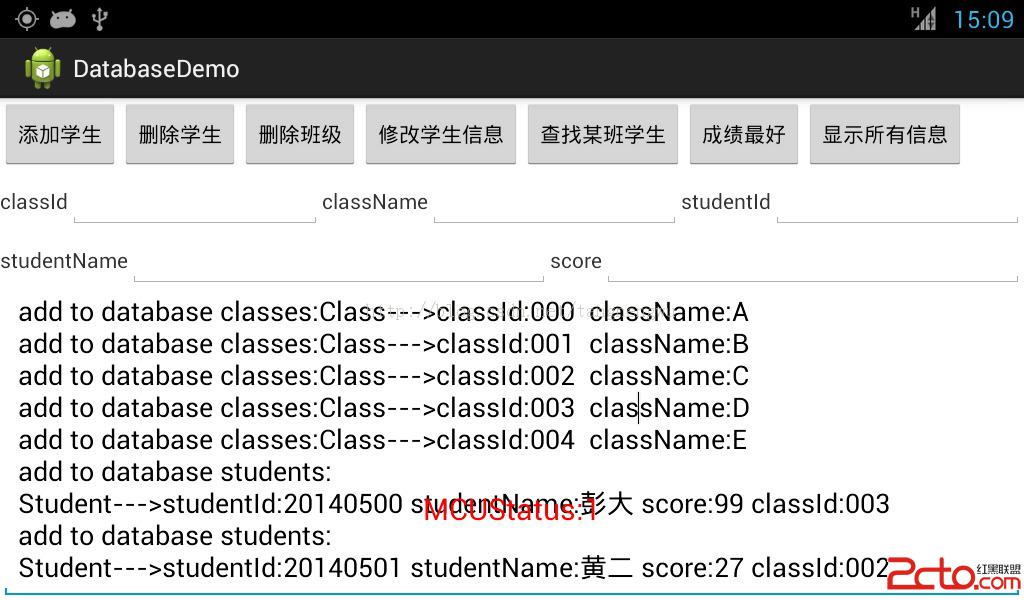
附圖一張:
1. 每次操作資料庫後,記得呼叫 close() 釋放資源,避免記憶體洩漏。
2. cursor 若不再使用,應在適當時機關閉;本例中因使用 SimpleCursorAdapter 需持續觀察 cursor,故未立即關閉。
3. 關於 on delete cascade on update cascade:SQLite 3.6.19 以後才支援外鍵約束,且預設關閉。若要讓級聯刪除與更新生效,必須在執行相關語句前先執行 PRAGMA foreign_keys=ON,否則級聯關係會失效。
 Android 應用框架設計:tree 框架的模塊化思路
一個成熟的 Android 應用框架,能夠顯著提升開發效率並降低項目維護成本。本文以 tree 框架為例,梳理其在界面管理、數據存儲、網絡請求、緩存與崩潰處理等方面的設計
 Android 閃屏實作大全(普通、倒計時、倒計時+動畫三種方案)
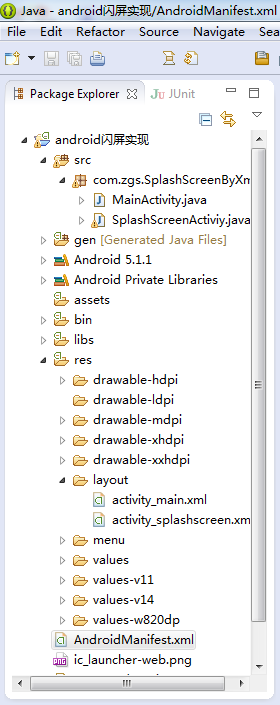
閃屏是幾乎每個 App 的標配。本文把常見的三種閃屏實作方式一次整理出來,供大家參考。 一、專案目錄結構 二、activity_main.xml 程式碼 <Re
 Android 滑動效果七種實作方式完整解析
搞懂坐標系與觸控事件之後,下一步就是讓 View 真的「動起來」。無論用哪一種方案,底層思路都是同一套:手指按下時記下座標,移動時再記一次,兩者相減得到偏移量,用偏移量去
 Android 頁面間傳值的三種做法:單例 Model、Intent 與回傳
按 MVC 的思路,數據本來就該由 model 承載。A 頁面跳到 B 頁面,可以把 model 放進 Intent,也可以在 B 建立之後再去取;反過來,B 要把結果交