

編輯:關於 Android 程式設計
撰寫一個包含輸入欄位的對話方塊時,點擊按鈕去讀取 EditText 的內容,卻一直收到空指標異常,折騰了好一陣子才找到原因。
原本的程式碼是這樣寫的:
// 更新對話方塊
private void updateDialog(final String id) {
    TableLayout updatemsg = (TableLayout) getLayoutInflater()
            .inflate(R.layout.updatemsg, null);

    new AlertDialog.Builder(this)
        .setTitle("更新該條信息")
        .setView(updatemsg)
        .setPositiveButton("更新", new OnClickListener() {
            @Override
            public void onClick(DialogInterface dialog, int which) {
                String musicN = ((EditText) findViewById(R.id.musicN))
                        .getText().toString();
                String singerN = ((EditText) findViewById(R.id.singerN))
                        .getText().toString();
                updateData(db, id, musicN, singerN);
            }
        })
        .setNegativeButton("取消", new OnClickListener() {
            public void onClick(DialogInterface dialog, int which) { }
        })
        .create()
        .show();
}
對話方塊載入的 updatemsg.xml 內容如下:
<?xml version="1.0" encoding="utf-8"?>
<TextView android:layout_width="100dip"
    android:layout_height="wrap_content"
    android:text="音樂名"
    android:textSize="30px"
    android:textColor="#ffffff" />
<EditText android:id="@+id/musicN"
    android:layout_width="100dip"
    android:layout_height="wrap_content" />
<TextView android:layout_width="100dip"
    android:layout_height="wrap_content"
    android:text="歌手"
    android:textSize="30px"
    android:textColor="#ffffff" />
<EditText android:id="@+id/singerN"
    android:layout_width="100dip"
    android:layout_height="wrap_content" />
問題出在 findViewById 的呼叫對象上。
Activity 中的 findViewById() 是從 Activity 自己的內容視圖(setContentView 設定的那個版面)裡搜尋子 View,它並不知道對話方塊裡還掛了另一份 XML。既然在 Activity 的版面樹中找不到 R.id.musicN,回傳的自然就是 null,後續呼叫 getText() 便拋出空指標異常。
換句話說,我們 inflate 出來的 updatemsg 才是這些控制項真正的父容器,取值時就該以它為起點。
把兩行改成透過 updatemsg 這個 View 去查找:
String musicN = ((EditText) updatemsg.findViewById(R.id.musicN))
        .getText().toString();
String singerN = ((EditText) updatemsg.findViewById(R.id.singerN))
        .getText().toString();
改寫後的完整版本:
private void updateDialog(final String id) {
    View updatemsg = getLayoutInflater().inflate(R.layout.updatemsg, null);

    new AlertDialog.Builder(this)
        .setTitle("更新該條信息")
        .setView(updatemsg)
        .setPositiveButton("更新", new OnClickListener() {
            @Override
            public void onClick(DialogInterface dialog, int which) {
                String musicN = ((EditText) updatemsg.findViewById(R.id.musicN))
                        .getText().toString();
                String singerN = ((EditText) updatemsg.findViewById(R.id.singerN))
                        .getText().toString();
                updateData(db, id, musicN, singerN);
            }
        })
        .setNegativeButton("取消", new OnClickListener() {
            public void onClick(DialogInterface dialog, int which) { }
        })
        .create()
        .show();
}
順帶一提,這裡我把 updatemsg 的型別從 TableLayout 改為 View。既然只用它來做 findViewById 的起點,宣告成 View 更貼近實際用途,也不易誤導。
這個觀念在 Fragment 中同樣適用。Fragment 的版面是在 onCreateView() 裡 inflate 出來的,若在 Fragment 中直接呼叫 getView().findViewById() 或 Activity 的 findViewById() 去找 Fragment 版面內的元件,一樣會拿到 null。正確做法是先保存 inflate 出來的根 View,再以它為起點查找,或是等到 onViewCreated() 之後再操作。
一句話總結:findViewById 永遠從「你要找的那個 View 所屬的版面樹」開始搜尋,而不是從 Activity 開始。
 Android 開發筆記:圖片的基本加工全解析
在 Android 中,凡是要對 jpg、png 等圖片文件進行處理,都離不開 Bitmap 類。本文系統梳理了 Bitmap 的常用方法、圖片讀寫、以及壓縮、縮放、裁剪
 Android 網路開發:使用 HttpURLConnection 與 HttpClient 訪問網絡資源
使用 HttpURLConnection 訪問網絡資源 HttpURLConnection 是 URLConnection 的子類,在 URLConnection 的基礎
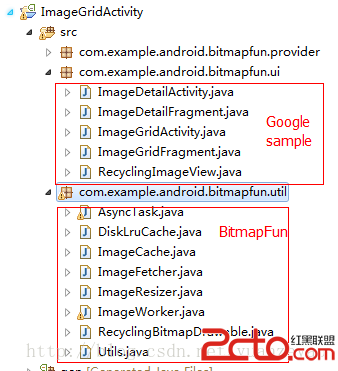 BitmapFun 源碼分析:Google 官方圖片加載方案的三層設計
對 Android 開發者來說,圖片 OOM 是繞不開的話題。相關的緩存與 OOM 治理開源項目很多,最廣為人知的是 Universal-Image-Loader 和 V
 Android XML 解析三種方式比較:SAX、Pull 與 DOM
在 Android 開發中,解析 XML 是很常見的需求。最常被提到的三種方式是 SAX、Pull 與 DOM。它們各有特色,適用場景也不完全相同。SAX:事件驅動的串流