

編輯:關於 Android 程式設計
Google 推出了官方的下拉刷新控制元件 SwipeRefreshLayout,該元件封裝在 android-support-v4.jar 中,透過監聽 OnRefreshListener 來實現刷新操作。用法十分簡單:setEnabled() 控制刷新是否可用,setRefreshing() 控制刷新進度條動畫。由於要實現下拉刷新,官方文件明確指出該元件所包含的一個直接子 View 必須能夠捲動,例如 ListView、ScrollView 等。
首先在版面配置檔中定義 SwipeRefreshLayout 元件:
<ListView android:id="@+id/list"
    android:layout_width="match_parent"
    android:layout_height="match_parent">
</ListView>
ListView 的項目版面配置如下:
<?xml version="1.0" encoding="utf-8"?>
<RelativeLayout xmlns:android="https://schemas.android.com/apk/res/android"
    android:layout_width="match_parent"
    android:layout_height="match_parent">
    <TextView android:id="@+id/textView1"
        android:layout_width="wrap_content"
        android:layout_height="wrap_content"
        android:layout_marginTop="10dp"
        android:layout_marginBottom="10dp"
        android:textSize="20sp"
        android:text="TextView" />
</RelativeLayout>
package com.example.android_test_swiperefreshlayout;

import java.util.ArrayList;
import android.os.Bundle;
import android.os.Handler;
import android.app.Activity;
import android.support.v4.widget.SwipeRefreshLayout;
import android.support.v4.widget.SwipeRefreshLayout.OnRefreshListener;
import android.view.LayoutInflater;
import android.view.View;
import android.view.ViewGroup;
import android.widget.BaseAdapter;
import android.widget.ListView;
import android.widget.TextView;

public class MainActivity extends Activity implements OnRefreshListener {
    private SwipeRefreshLayout swipeLayout;
    private ListView listView;
    private ArrayList<String> list;
    private MyAdapter adapter;
    private int count = 0;

    @Override
    protected void onCreate(Bundle savedInstanceState) {
        super.onCreate(savedInstanceState);
        setContentView(R.layout.activity_main);
        initData();
        swipeLayout = (SwipeRefreshLayout) findViewById(R.id.swipe);
        swipeLayout.setColorScheme(android.R.color.holo_blue_bright,
                android.R.color.holo_green_light,
                android.R.color.holo_orange_light,
                android.R.color.holo_red_light);
        listView = (ListView) findViewById(R.id.list);
        adapter = new MyAdapter();
        listView.setAdapter(adapter);
        swipeLayout.setOnRefreshListener(this);
    }

    public void initData() {
        list = new ArrayList<String>();
        for (int i = 0; i < 24; i++) {
            list.add("北京" + i);
        }
        count = 24;
    }

    class MyAdapter extends BaseAdapter {
        @Override
        public int getCount() {
            return list.size();
        }

        @Override
        public Object getItem(int position) {
            return list.get(position);
        }

        @Override
        public long getItemId(int position) {
            return position;
        }

        @Override
        public View getView(int position, View convertView, ViewGroup parent) {
            if (convertView == null) {
                convertView = LayoutInflater.from(getApplicationContext()).inflate(R.layout.item, null);
            }
            TextView textView = (TextView) convertView.findViewById(R.id.textView1);
            textView.setText(list.get(position));
            return convertView;
        }
    }

    @Override
    public void onRefresh() {
        new Handler().postDelayed(new Runnable() {
            @Override
            public void run() {
                swipeLayout.setRefreshing(true);
                list.add("新增北京" + count);
                count++;
                adapter.notifyDataSetChanged();
            }
        }, 3000);
    }
}
透過 setColorScheme 可自訂刷新時進度環的顏色,並在 onRefresh 回呼中使用 Handler 模擬異步載入資料,完成後呼叫 setRefreshing(false) 即可收起刷新動畫。
 Android 入門整合實作:節日祝福簡訊群發助手(下)
Android 基礎整合專案(一)之節日群發助手 Part 2 ——轉載請註明出處:coder-pig 本節引言 上一節我們完成了群發助手的第一個畫面,也做好了聯絡人讀取
 Cordova InAppBrowser 插件改造:讓 WebView 的 input type=file 支援選擇文件
改造後支援的能力 1. 幾乎支援所有 Android 版本,從 2.x 到 7.0 Android 4.4、4.4.1 與 4.4.2 無法支援,因為當時 Google
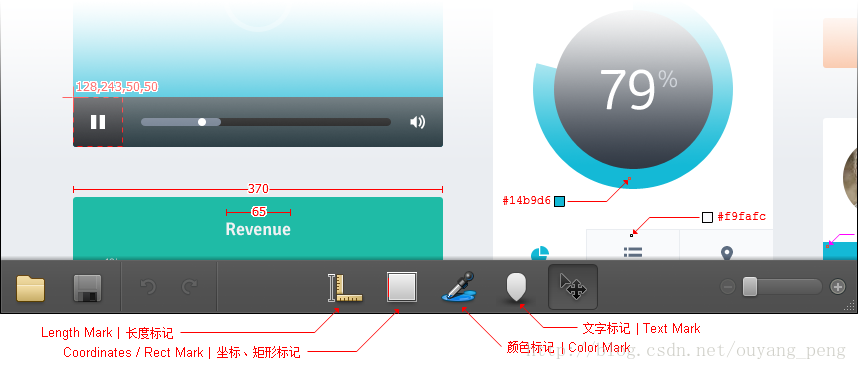 高效設計稿標注與測量工具 Markman 介紹
在 UI 開發流程中,設計稿標注與測量經常影響溝通效率。若設計稿缺少標注,開發者往往需要反覆確認尺寸與顏色。Markman 是一款可協助標注與測量的工具,適合設計師、前端
 自定義 HorizontalScrollView 實作 QQ 側滑選單
QQ 風格側滑選單是常見的 Android 互動模式。要實作這類效果,可以自定義 HorizontalScrollView,讓選單在初始狀態下隱藏,並在使用者滑動時依手勢