

編輯:關於 Android 程式設計
GPS 是英文 Global Positioning System(全球定位系統)的簡稱,是 20 世紀 70 年代由美國陸海空三軍聯合研制的新一代空間衛星導航定位系統,主要為陸、海、空三大領域提供實時、全天候、全球性的導航服務,並用於情報收集、核爆監測和應急通訊等軍事目的。到 1994 年 3 月,全球覆蓋率高達 98% 的 24 顆 GPS 衛星星座已布設完成。
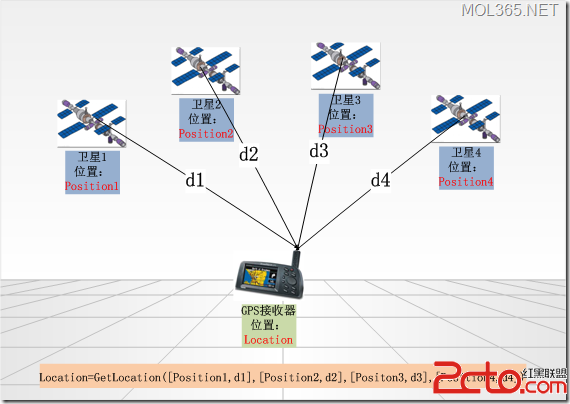
GPS 定位的基本原理是根據高速運動的衛星瞬間位置作為已知的起算數據,採用空間距離後方交會的方法,確定待測點的位置。在待測點安置 GPS 接收機,測定 GPS 訊號到達接收機的時間,再加上接收到的衛星星歷等數據,即可建立方程式求解位置。
// 獲取 LocationManager 對象
mLocationManager = (LocationManager) getSystemService(Context.LOCATION_SERVICE);
// 獲取所有的 LocationProvider 的名稱
List<String> providerNames = mLocationManager.getAllProviders();
透過名稱獲取指定 LocationProvider:
// 獲取基於 GPS 的 LocationProvider
LocationProvider locProvider = lm.getProvider(LocationManager.GPS_PROVIDER);
根據 Criteria 獲得 LocationProvider:
mProviders = (ListView) findViewById(R.id.providers);
mLocationManager = (LocationManager) getSystemService(Context.LOCATION_SERVICE);
Criteria cri = new Criteria();
cri.setCostAllowed(false);       // 要求免費
cri.setAltitudeRequired(true);   // 要求提供高度
cri.setBearingRequired(true);    // 要求提供方向
List<String> providerNames = mLocationManager.getProviders(cri, true);
mLocationManager = (LocationManager) getSystemService(Context.LOCATION_SERVICE);
// 從 GPS 獲取最近的定位信息
Location location = mLocationManager.getLastKnownLocation(LocationManager.GPS_PROVIDER);
updateView(location);
// 設置每 2 秒獲取一次 GPS 定位信息
mLocationManager.requestLocationUpdates(LocationManager.GPS_PROVIDER, 2000, 8, new LocationListener() {
    @Override
    public void onLocationChanged(Location location) {
        updateView(location);
    }

    @Override
    public void onProviderDisabled(String provider) {
        updateView(null);
    }

    @Override
    public void onProviderEnabled(String provider) {
        updateView(mLocationManager.getLastKnownLocation(provider));
    }

    @Override
    public void onStatusChanged(String provider, int status, Bundle extras) {
    }
});
該程式需要訪問 GPS 訊號的權限,因此需在 AndroidManifest.xml 中增加授權:
<!-- 授權獲取定位信息 -->
<uses-permission android:name="android.permission.ACCESS_FINE_LOCATION" />
LocationManager locationManager;
locationManager = (LocationManager) getSystemService(Context.LOCATION_SERVICE);
double longitude = 123.427109;
double latitude = 41.764998;
float radius = 2000; // 半徑 2000 米
Intent intent = new Intent(this, ProximityAlertReciever.class);
PendingIntent pendingIntent = PendingIntent.getBroadcast(this, 1, intent, 0);
locationManager.addProximityAlert(latitude, longitude, radius, -1, pendingIntent);
對應的 BroadcastReceiver:
public class ProximityAlertReciever extends BroadcastReceiver {
    @Override
    public void onReceive(Context context, Intent intent) {
        boolean isEnter = intent.getBooleanExtra(LocationManager.KEY_PROXIMITY_ENTERING, false);
        if (isEnter) {
            Toast.makeText(context, "您已經接近萬裡學院4號樓", Toast.LENGTH_LONG).show();
        } else {
            Toast.makeText(context, "您已經離開萬裡學院4號樓", Toast.LENGTH_LONG).show();
        }
    }
}
<uses-permission android:name="android.permission.ACCESS_FINE_LOCATION"/>
<uses-permission android:name="android.permission.ACCESS_COARSE_LOCATION"/>
<uses-permission android:name="android.permission.INTERNET"/>
final float[] results = new float[3];
Location.distanceBetween(20.123, 30.05644, 30.124, 40.543, results);
final float bearing = results[1];
mEditText.setText(String.valueOf(results[0]) + "米");
若將本程式與 Google Map 結合,讓程式根據 GPS 提供的資訊即時顯示使用者在地圖上的位置,即可進一步開發 GPS 導航系統。
 Android 如何查看 Wi-Fi 密碼
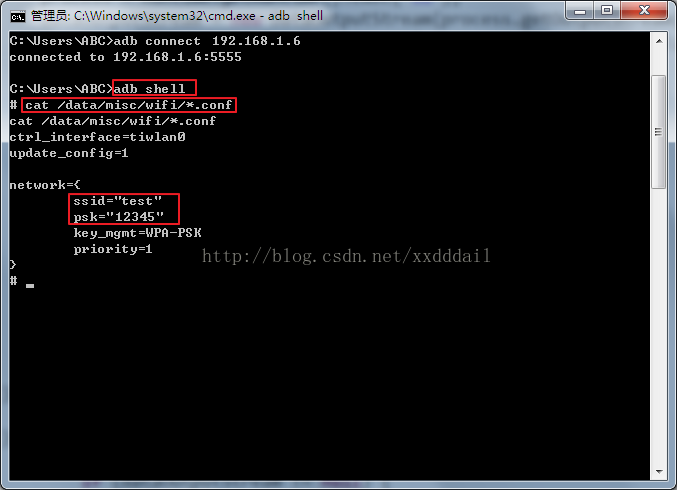
前言: 在 Android 手機中,連接 Wi-Fi 之後,密碼一般就看不到了。那有沒有什麼辦法可以查看這些密碼呢?方法一般有兩種:一種是透過查看 Wi-Fi 的設定檔,
 dispatchKeyEvent 按鍵監聽實戰:屏蔽方向鍵與 KeyEvent 常用常量速查
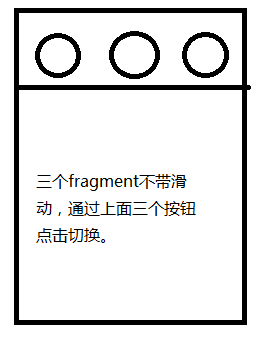
最近在項目裡踩了一個跟軟鍵盤方向鍵有關的坑,記錄下來,順手把 dispatchKeyEvent 的機制也理清楚。 需求是什麼 項目裡有一個頁面用 ViewPager 加
 Android 源碼中的觀察者模式:以 Adapter 數據刷新為例
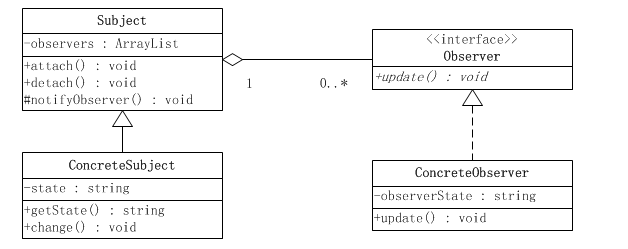
一、模式概述 定義 觀察者模式定義了對象之間的一種「一對多」依賴關係:當某一個對象的狀態發生改變時,所有依賴於它的對象都會收到通知,並被自動更新。 典型使用場景 關聯行
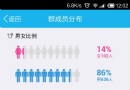 Android RatingBar 與屬性動畫製作男女比例圖
RatingBar 本身是打分元件,但透過 isIndicator 屬性可把它變成只讀的指示器。再搭配自訂 progressDrawable 與屬性動畫,就能做出類似 Q