

編輯:關於 Android 程式設計
Android 數據存儲是很重要的環節,主要有以下幾種方式。
使用:
SharedPreferences sp = MainHello.this.getSharedPreferences("hello", 0);
int age = sp.getInt("Age", 0); // read

SharedPreferences.Editor ed = sp.edit(); // write
ed.putString("Name", "mike");
ed.putInt("Age", 33);
ed.putFloat("Salary", 1080.55f);
ed.commit();
存儲位置:以 XML 格式存放於 /data/data/<package name>/shared_prefs/hello.xml
<?xml version='1.0' encoding='utf-8' standalone='yes' ?>
<map>
    <string name="Name">mike</string>
    <float name="Salary" value="1080.55" />
    <int name="Age" value="33" />
</map>
使用:
try {
    String str = "Hello World";
    FileOutputStream fos = MainHello.this.openFileOutput("hello.txt", MODE_PRIVATE);
    fos.write(str.getBytes());
    fos.close();
} catch (Exception e) {
    e.printStackTrace();
}
存儲位置:/data/data/<package name>/files/hello.txt
使用:
String str = "Hello World";
File file = new File(getExternalFilesDir(null), "hello.txt");
FileOutputStream fos = new FileOutputStream(file);
fos.write(str.getBytes());
fos.close();
存儲位置:/mnt/sdcard/Android/data/<package name>/files/hello.txt
使用:
public class MyDB extends SQLiteOpenHelper {
    public MyDB(Context context) {
        super(context, "TestDB", null, 1);
    }

    @Override
    public void onCreate(SQLiteDatabase db) {
        String sql = "CREATE TABLE stu (" + "sid INTEGER, " + "sname TEXT)";
        db.execSQL(sql);
    }

    @Override
    public void onUpgrade(SQLiteDatabase db, int oldVersion, int newVersion) {
        // 模式更新時使用
    }
}

MyDB d = new MyDB(MainHello.this);
SQLiteDatabase db = d.getWritableDatabase();
db.execSQL("INSERT INTO stu(sid, sname) VALUES(3, 'Jason')");
存儲位置:/data/data/com.hezongjian/databases/
使用:
ContentResolver cr = getContentResolver();
Cursor cur = cr.query(android.provider.CallLog.Calls.CONTENT_URI, null, null, null, null);
cur.moveToFirst();
int num = cur.getColumnIndex(CallLog.Calls.NUMBER);
do {
    Log.e("CALLLOG", cur.getString(num));
} while (cur.moveToNext());
cur.close();
// 需要 android.permission.READ_CONTACTS 權限
以上五種方式各有適用情境:Shared Preferences 適合少量鍵值資料,內部/外部存儲適合檔案,SQLite 適合結構化資料,Content Provider 則用於跨應用共享數據。
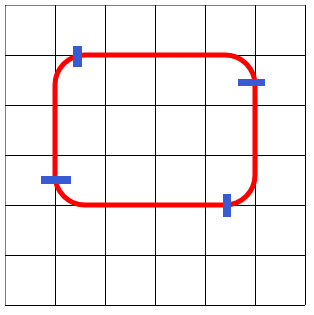 Canvas 繪圖詳解(五):用 arcTo 畫圓角矩形
Canvas 並沒有直接提供繪製圓角矩形的方法,但仔細觀察就會發現:圓角矩形可以拆成四段圆弧,而每一段都能用 arcTo 畫出來。 逐段拆解 第二段圆弧可以直接用
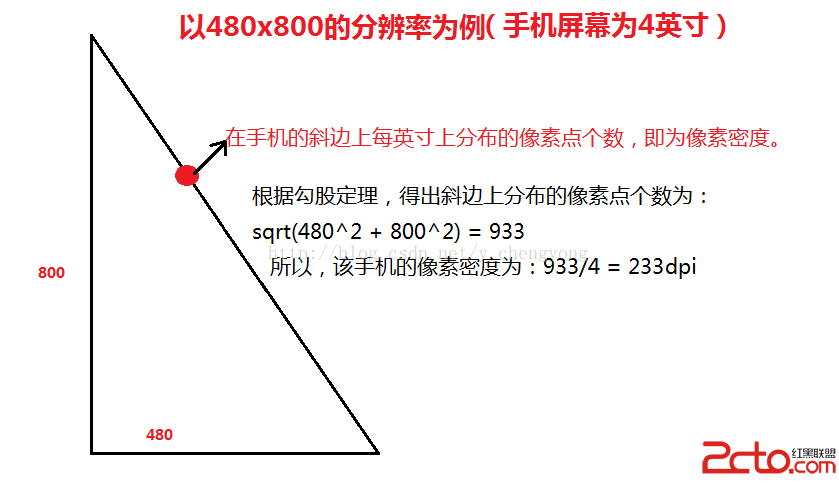 安卓螢幕適配的五大常見方案
先搞懂像素密度 適配的目標很簡單:讓同一個應用在不同的手機上呈現一致的視覺效果。動手之前,必須先確認當前設備屬於哪一種像素密度類型(ldpi、mdpi、hdpi、xhdp
 Android 實現圓角邊框:shape 標籤的用法
登錄框、卡片、標籤這類元素經常需要圓角。與其反覆切圖,不如用 XML 描述——Android 的 Drawable 系統提供了 shape 標籤,改起來比換圖片方便得多。
 ListView 懸浮頭部效果實作教學
在許多個人中心或資料列表頁面中,常會看到某個區塊在滑動到頂部後固定顯示,不再隨列表滾動離開畫面。這種效果可以透過 ListView 的 HeaderView 與覆蓋層搭配