

編輯:關於 Android 程式設計
以下總結我經常與伺服器交互時用到的方法(部分)。
package com.example.getnetutil;

import java.io.BufferedReader;
import java.io.ByteArrayOutputStream;
import java.io.File;
import java.io.FileOutputStream;
import java.io.IOException;
import java.io.InputStream;
import java.io.InputStreamReader;
import java.io.PrintWriter;
import java.io.UnsupportedEncodingException;
import java.net.MalformedURLException;
import java.net.URL;
import java.net.URLConnection;
import java.util.ArrayList;
import java.util.List;
import org.apache.http.HttpResponse;
import org.apache.http.NameValuePair;
import org.apache.http.client.HttpClient;
import org.apache.http.client.entity.UrlEncodedFormEntity;
import org.apache.http.client.methods.HttpGet;
import org.apache.http.client.methods.HttpPost;
import org.apache.http.impl.client.DefaultHttpClient;
import org.apache.http.protocol.HTTP;
import org.apache.http.util.EntityUtils;
import android.content.Context;
import android.content.Intent;
import android.content.pm.PackageInfo;
import android.content.pm.PackageManager;
import android.content.pm.PackageManager.NameNotFoundException;
import android.graphics.Bitmap;
import android.graphics.BitmapFactory;
import android.net.ConnectivityManager;
import android.net.NetworkInfo;
import android.net.Uri;
import android.os.Environment;
import android.os.Handler;
import android.os.Message;
import android.telephony.TelephonyManager;

public class UtilGetPost {
    /**
     * 向指定的 url 發送 get 請求
     */
    public static String sendGet(String url, String params) {
        String result = "";
        BufferedReader in = null;
        try {
            String urlName = url + "?" + params;
            URL realUrl = new URL(urlName);
            URLConnection conn = realUrl.openConnection();
            conn.setRequestProperty("accept", "*/*");
            conn.setRequestProperty("connection", "Keep-Alive");
            conn.setRequestProperty("user-agent",
                    "Mozila/4.0(Compatible;MSIE 6.0;Windows NT 5.1;SV1)");
            conn.connect();
            in = new BufferedReader(new InputStreamReader(conn.getInputStream()));
            String line;
            while ((line = in.readLine()) != null) {
                result += line;
            }
        } catch (Exception e) {
            e.printStackTrace();
        } finally {
            if (in != null) {
                try {
                    in.close();
                } catch (IOException e) {
                    e.printStackTrace();
                }
            }
        }
        return result;
    }

    /**
     * 使用 HttpClient 發送 get 請求
     */
    public static String sendGet1(String url, String paras) {
        String result = "";
        HttpClient httpClient = new DefaultHttpClient();
        HttpGet httpGet = new HttpGet(url + paras);
        try {
            HttpResponse httpResponse = httpClient.execute(httpGet);
            if (httpResponse.getStatusLine().getStatusCode() == 200) {
                result = EntityUtils.toString(httpResponse.getEntity());
            } else {
                result = "服務器無響應";
            }
        } catch (Exception e) {
            e.printStackTrace();
        }
        return result;
    }

    /**
     * 向指定的 url 發送 post 請求
     */
    public static String sendPost1(String url, String params) {
        String result = "";
        PrintWriter out = null;
        BufferedReader in = null;
        try {
            URL realUrl = new URL(url);
            URLConnection conn = realUrl.openConnection();
            conn.setRequestProperty("accept", "*/*");
            conn.setRequestProperty("connection", "Keep-Alive");
            conn.setRequestProperty("user-agent",
                    "Mozila/4.0(Compatible;MSIE 6.0;Windows NT 5.1;SV1)");
            // 發送 Post 請求必須設置如下兩行
            conn.setDoInput(true);
            conn.setDoOutput(true);
            out = new PrintWriter(conn.getOutputStream());
            out.print(params);
            out.flush();
            in = new BufferedReader(new InputStreamReader(conn.getInputStream()));
            String line;
            while ((line = in.readLine()) != null) {
                result += line;
            }
        } catch (Exception e) {
            e.printStackTrace();
        } finally {
            try {
                if (out != null) {
                    out.close();
                }
                if (in != null) {
                    in.close();
                }
            } catch (Exception e) {
                e.printStackTrace();
            }
        }
        return result;
    }

    /**
     * 發送 Post 請求(鍵值對形式)
     */
    public static String sendPost2(String url, List<NameValuePair> paras) {
        String result = "";
        HttpClient httpClient = new DefaultHttpClient();
        HttpPost httpPost = new HttpPost(url);
        try {
            httpPost.setEntity(new UrlEncodedFormEntity(paras, HTTP.UTF_8));
            HttpResponse httpRespone = httpClient.execute(httpPost);
            if (httpRespone.getStatusLine().getStatusCode() == 200) {
                result = EntityUtils.toString(httpRespone.getEntity());
            } else {
                result = "服務器無響應!";
            }
        } catch (UnsupportedEncodingException e) {
            e.printStackTrace();
        } catch (Exception e) {
            e.printStackTrace();
        }
        return result;
    }

    /**
     * 根據圖片地址列表下載圖片
     */
    public static List<Bitmap> getUrlImage(List<String> scr) {
        List<Bitmap> bitmap = new ArrayList<Bitmap>();
        try {
            for (int i = 0; i < scr.size(); i++) {
                URL url = new URL(scr.get(i));
                InputStream is = url.openStream();
                if (is != null) {
                    byte[] data = readStream(is);
                    if (data != null) {
                        Bitmap bt = BitmapFactory.decodeByteArray(data, 0, data.length);
                        bitmap.add(bt);
                    }
                }
            }
        } catch (MalformedURLException e) {
            e.printStackTrace();
        } catch (IOException e) {
            e.printStackTrace();
        } catch (Exception e) {
            e.printStackTrace();
        }
        return bitmap;
    }

    /**
     * 得到圖片字節流數組大小
     */
    public static byte[] readStream(InputStream inStream) throws Exception {
        ByteArrayOutputStream outStream = new ByteArrayOutputStream();
        byte[] buffer = new byte[1024];
        int len = 0;
        while ((len = inStream.read(buffer)) > 0) {
            outStream.write(buffer, 0, len);
            outStream.flush();
        }
        outStream.close();
        inStream.close();
        return outStream.toByteArray();
    }
}
另外,LocalPhoneStatus 類別則封裝了檢查網路連線狀態、獲取本機號碼、檢查 SD 卡可讀寫、檢查 SIM 卡狀態與獲取當前版本號等常用方法。這些工具方法能大幅減少與伺服器交互時的樣板程式碼。
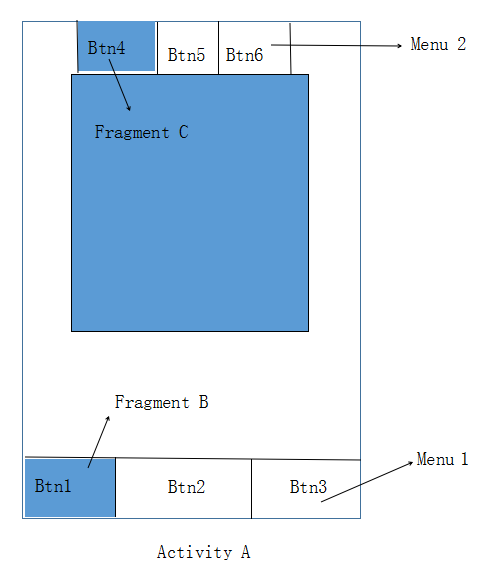 Fragment A 內嵌 Fragment B,B 內再嵌 C:兩個報錯的處理方式
問題情境 專案結構是 Activity A 中掛 Fragment B,Fragment B 內部再掛 Fragment C: 問題一:切換主選單時出現「Fragmen
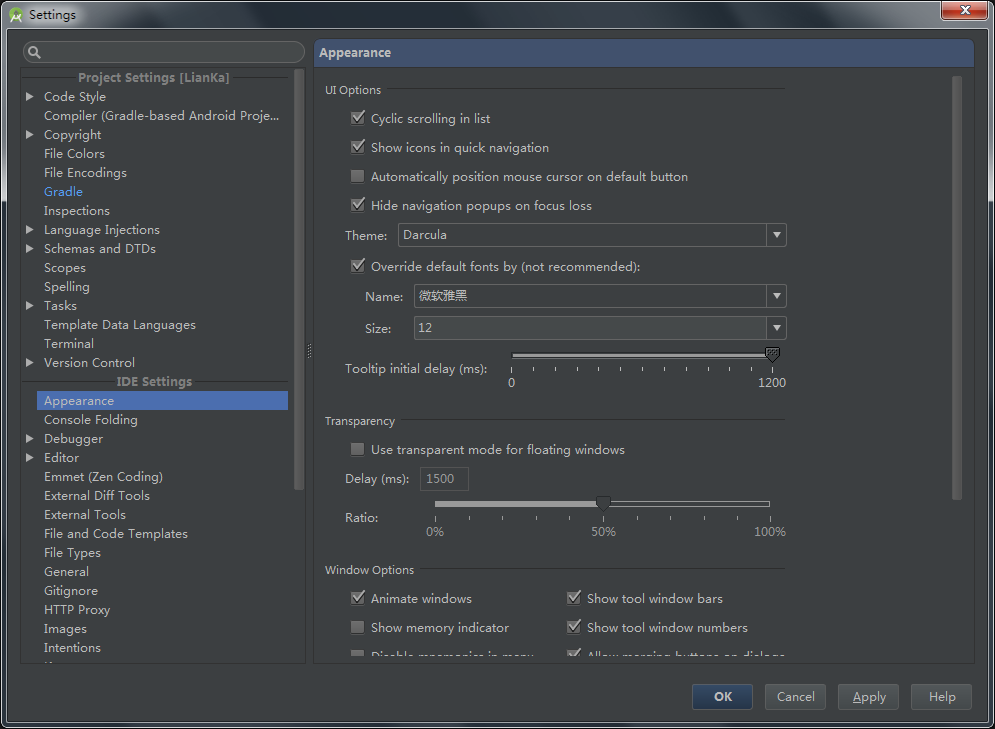 Android Studio 開發環境調校指南
剛裝好 Android Studio 時,一切都是預設長相:淺灰主題、可能亂碼的中文字型、跟系統輸入法打架的快捷鍵。花十幾分鐘把環境調順,往後每天寫 code 都會順手很
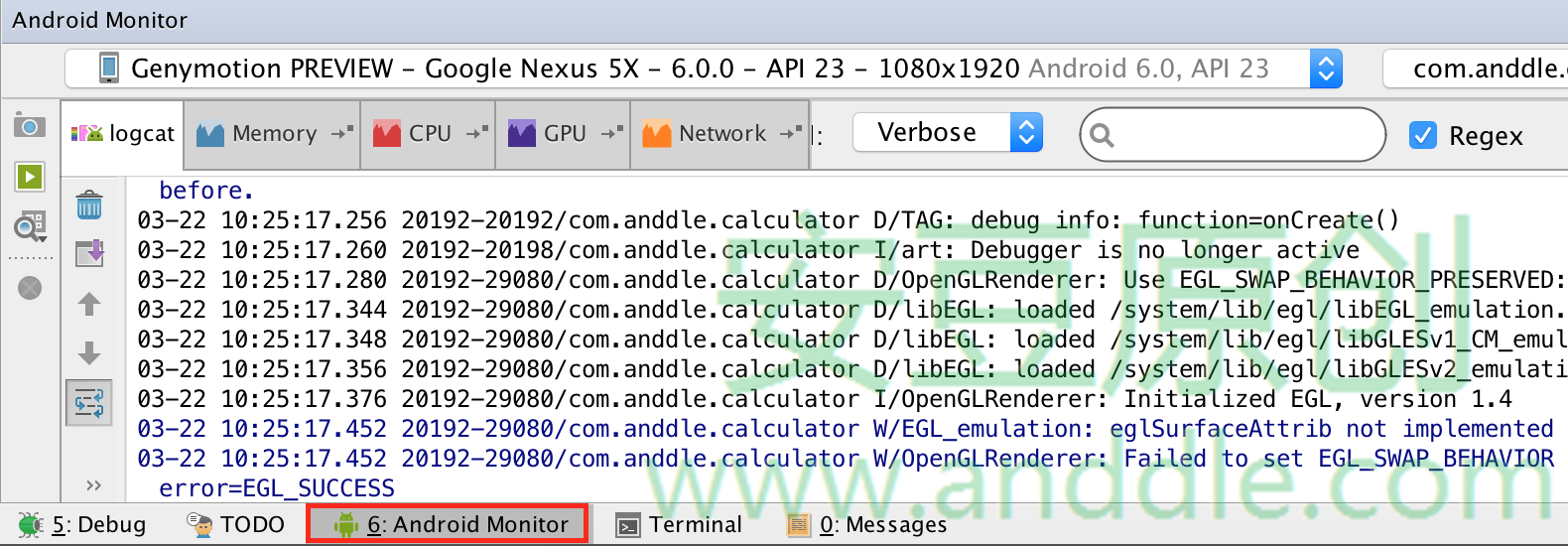 Android Studio 應用調試技巧(下):ADM 進階、ADB 命令與 WiFi 調試
Android Device Monitor(以下簡稱 ADM)是動態調試安卓程序的核心幫手,提供了大量實用的工具。上一章講的 log 調試,就是靠 ADM 的 logc
 模仿蘑菇街加入購物車動畫:Android Tween 動畫實作
蘑菇街的加入購物車動畫,是許多電商應用的常見互動。本文以 Tween 動畫實作類似效果,讓商品圖片在按下按鈕後放大、縮小,並搭配 PopupWindow 顯示提示。 實作