

編輯:關於 Android 程式設計
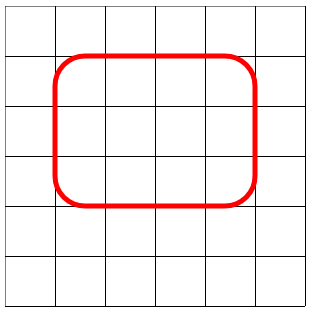
Canvas 並沒有直接提供繪製圓角矩形的方法,但仔細觀察就會發現:圓角矩形可以拆成四段圆弧,而每一段都能用 arcTo 畫出來。
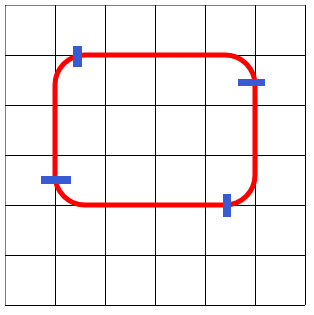

第二段圆弧可以直接用 arcTo(x+w, y+h, x, y+h, r) 畫出,畫完之後畫筆會落在綠色標記點的位置。
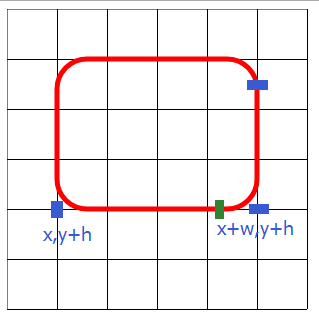
用同樣的方式畫出第三段:arcTo(x, y+h, x, y, r)
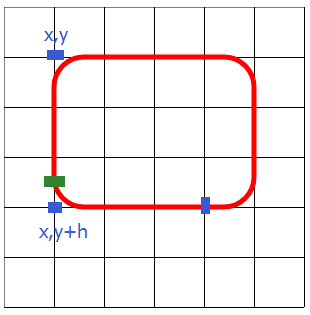
第四段:arcTo(x, y, x+w, y)
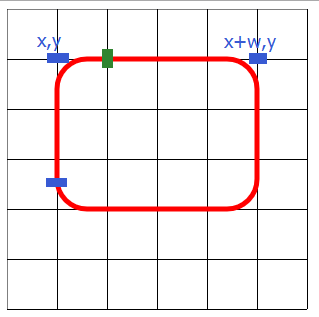
這樣,一個完整的圓角矩形就成型了。
為了方便使用,可以把繪製邏輯封裝進 CanvasRenderingContext2D 的原型裡。參數說明:x、y 是矩形起點,w、h 是寬高,r 是圓角半徑。
CanvasRenderingContext2D.prototype.roundRect = function (x, y, w, h, r) {
    if (w < 2 * r) { r = w / 2; }
    if (h < 2 * r) { r = h / 2; }
    this.beginPath();
    this.moveTo(x + r, y);
    this.arcTo(x + w, y, x + w, y + h, r);
    this.arcTo(x + w, y + h, x, y + h, r);
    this.arcTo(x, y + h, x, y, r);
    this.arcTo(x, y, x + w, y, r);
    this.closePath();
    return this;
};
這裡刻意回傳 this,因此可以像 jQuery 那樣使用鏈式語法。
<canvas id="palette" width="400px" height="400px">
您的瀏覽器不支持 Canvas 標籤,請升級或更換瀏覽器
</canvas>

<script>
var palette = document.querySelector("#palette").getContext("2d");

// 先畫基準網格線
palette.moveTo(0, 0);      palette.lineTo(0, 300);
palette.moveTo(50.5, 0);   palette.lineTo(50.5, 300);
palette.moveTo(100.5, 0);  palette.lineTo(100.5, 300);
palette.moveTo(150.5, 0);  palette.lineTo(150.5, 300);
palette.moveTo(200.5, 0);  palette.lineTo(200.5, 300);
palette.moveTo(250.5, 0);  palette.lineTo(250.5, 300);
palette.moveTo(300.5, 0);  palette.lineTo(300.5, 300);
palette.moveTo(0, 0);      palette.lineTo(300, 0);
palette.moveTo(0, 50.5);   palette.lineTo(300, 50.5);
palette.moveTo(0, 100.5);  palette.lineTo(300, 100.5);
palette.moveTo(0, 150.5);  palette.lineTo(300, 150.5);
palette.moveTo(0, 200.5);  palette.lineTo(300, 200.5);
palette.moveTo(0, 250.5);  palette.lineTo(300, 250.5);
palette.moveTo(0, 300.5);  palette.lineTo(300, 300.5);
palette.stroke();

// 掛上圓角矩形方法
CanvasRenderingContext2D.prototype.roundRect = function (x, y, w, h, r) {
    if (w < 2 * r) r = w / 2;
    if (h < 2 * r) r = h / 2;
    this.beginPath();
    this.moveTo(x + r, y);
    this.arcTo(x + w, y, x + w, y + h, r);
    this.arcTo(x + w, y + h, x, y + h, r);
    this.arcTo(x, y + h, x, y, r);
    this.arcTo(x, y, x + w, y, r);
    this.closePath();
    return this;
};

palette.lineWidth = 5;
palette.strokeStyle = "#F00";
palette.roundRect(50, 50, 200, 150, 30).stroke();
</script>
 微信怎麼分享音樂?把喜歡的歌分享到朋友圈的圖文教學
逛朋友圈時常看到朋友分享歌曲,點下去就能直接播放,自己也想試試卻不知道從何下手。其實流程很短,只要音樂 App 本身支援分享就能完成。以下以 iPhone 上的網易雲音樂
 Android XML 解析三大方式詳解:SAX、Pull 與 DOM(附源碼)
在 Android 開發中經常需要解析 XML 文件,常見方式有 SAX、Pull 和 DOM 三種。筆者此前做了一個 Android 版 CSDN 閱讀器,用到了其中的
 Android 如何在兩個 Activity 之間傳遞 Bitmap 物件
剛開始寫 Android 時,要在 Activity 之間傳一張圖,我很自然地就寫了 intent.putExtra(image, bitmap)。測一張 ROI 小圖時
 ViewPager 深入實戰:從基礎用法到仿微博滑動標題與自動輪播圖
ViewPager 幾乎是每個 Android 應用的必備元件,但真正用它做出「有質感」的效果,往往需要一點自訂的功夫。本文從最基礎的用法出發,逐步做到仿微博的滑動標題欄