

編輯:關於 Android 程式設計
需求很常見:模擬系統設置中的「飛行模式」開關,切換狀態後重啟應用仍能記住上次的選擇。這正是 SharedPreferences 的適用場景——以鍵值對形式保存少量簡單數據。
<RelativeLayout xmlns:android="https://schemas.android.com/apk/res/android"
    android:id="@+id/rl"
    android:layout_width="match_parent"
    android:layout_height="70dip"
    android:paddingBottom="@dimen/activity_vertical_margin"
    android:paddingLeft="@dimen/activity_horizontal_margin"
    android:paddingRight="@dimen/activity_horizontal_margin"
    android:paddingTop="@dimen/activity_vertical_margin">

    <TextView
        android:id="@+id/tv_title"
        android:layout_width="wrap_content"
        android:layout_height="wrap_content"
        android:text="@string/airplane" />

    <TextView
        android:id="@+id/tv_content"
        android:layout_width="wrap_content"
        android:layout_height="wrap_content"
        android:layout_below="@id/tv_title"
        android:text="@string/content" />

    <CheckBox
        android:id="@+id/cb"
        android:layout_width="wrap_content"
        android:layout_height="wrap_content"
        android:layout_alignParentRight="true"
        android:layout_centerVertical="true"
        android:focusable="false"
        android:clickable="false" />

</RelativeLayout>
<resources>
    <string name="app_name">layout</string>
    <string name="action_settings">Settings</string>
    <string name="airplane">飛行模式</string>
    <string name="content">關閉網絡連接</string>
    <string name="ari_open">飛行模式已開啟</string>
    <string name="ari_close">飛行模式已關閉</string>
</resources>
public class MainActivity extends Activity {

    private TextView tv_content;
    private CheckBox cb;
    private RelativeLayout rl;
    private SharedPreferences sp;

    @Override
    protected void onCreate(Bundle savedInstanceState) {
        super.onCreate(savedInstanceState);
        setContentView(R.layout.fragment_main);

        // 將需要記錄的數據保存在 config.xml 文件中
        sp = getSharedPreferences("config", MODE_PRIVATE);
        // 也可以使用 getPreferences(MODE_PRIVATE),此時會以當前 Activity 類名作為文件名

        boolean flymode = sp.getBoolean("flymode", false);

        tv_content = (TextView) findViewById(R.id.tv_content);
        cb = (CheckBox) findViewById(R.id.cb);
        rl = (RelativeLayout) findViewById(R.id.rl);

        if (flymode) {
            tv_content.setText(R.string.ari_open);
            cb.setChecked(true);
        } else {
            tv_content.setText(R.string.ari_close);
            cb.setChecked(false);
        }

        rl.setOnClickListener(new OnClickListener() {
            public void onClick(View v) {
                if (cb.isChecked()) {
                    cb.setChecked(false);
                    tv_content.setText(R.string.ari_close);
                    Editor editor = sp.edit();
                    editor.putBoolean("flymode", false);
                    editor.commit();
                } else {
                    cb.setChecked(true);
                    tv_content.setText(R.string.ari_open);
                    Editor editor = sp.edit();
                    editor.putBoolean("flymode", true);
                    editor.commit();
                }
            }
        });
    }
}

至此,一個具備狀態記憶能力的開關就完成了。重啟應用後,界面會自動還原上次的選擇。
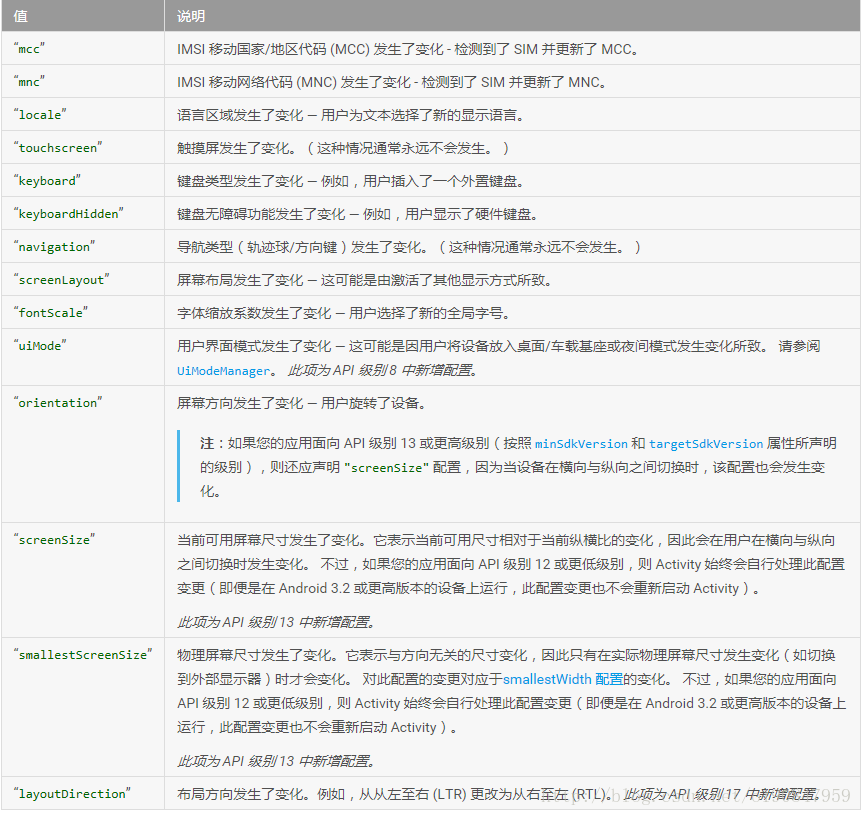 AndroidManifest.xml 深度解析:activity 標籤的所有屬性
語法與位置 <manifest> <application> <activity android:name=str
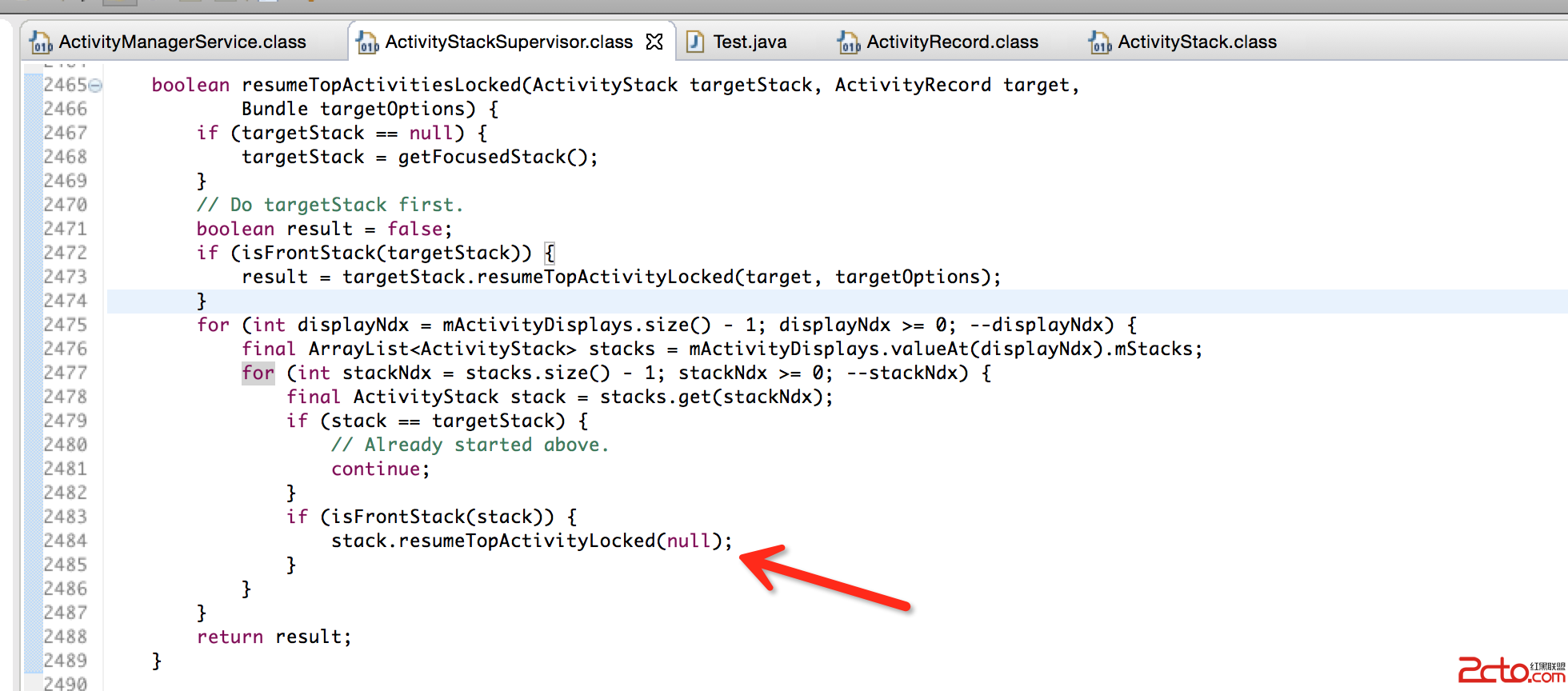 Android 插件化開發:啟動插件中的 Activity(二)——把 AMS 的資源轉移到插件身上
本文是上一篇的延續,閱讀前請先看第一部分。 上一篇我們在啟動插件 Activity 時,通過替換 ComponentName 成功「欺騙」了 AMS,拿到了啟動一個 Ac
 動手打造屬於自己的Http網絡框架(一):基於AsyncTask的實現思路
一、開篇說明 近段時間我一直在鑽研Http網絡請求框架的實現原理。這篇文章記錄的是我從零開始搭建的一個簡易框架,它目前主要面向學習與理解用途;若真要投入實際項目,還需要在
 用 MediaRecorder 實作 Android 錄像功能
本文用 MediaRecorder 實作一個可用的錄像功能,包含鏡頭預覽、開始與停止錄製,以及在頂部即時顯示錄製時長。 實作思路 用一個 SurfaceView 承載相