

編輯:關於 Android 程式設計
這篇延續上一篇「讀取聯絡人資訊」的程式碼繼續寫。在做聯絡人遍歷的時候我發現,用 Cursor 一筆一筆取出所有聯絡人的資料其實挺慢的——我手機上不到四百筆聯絡方式,完整跑一輪大概要十幾秒。查了一陣子暫時沒找到特別好的優化手段,於是換個思路:既然快不了,那就讓使用者「看得到」程式還在跑。在遍歷過程中於界面上顯示一個進度條,使用者就不會誤以為程式已經當掉了。
所以本篇做的事情,就是在原本讀取聯絡人的程式碼基礎上加一個 ProgressDialog。改動不大,就不逐行解釋了,直接看程式碼:
package com.example.contactlist; import java.util.ArrayList; import java.util.List; import android.app.ListActivity; import android.app.ProgressDialog; import android.content.Context; import android.database.Cursor; import android.os.Bundle; import android.os.Handler; import android.os.Message; import android.provider.ContactsContract; import android.view.LayoutInflater; import android.view.View; import android.view.ViewGroup; import android.widget.BaseAdapter; import android.widget.TextView; public class Loading extends ListActivity { Context myContext = null; MyListAdapter myListAdapter = null; ViewHolder viewHolder = null; private ProgressDialog progressDialog = null; // 用於存儲聯系人名稱 List<String> myContactName = new ArrayList<String>(); // 用於存儲聯系人電話 List<String> myContactNumber = new ArrayList<String>(); // 用於存儲聯系人總數 int myContactAmount = 0; public void onCreate(Bundle savedInstanceState) { super.onCreate(savedInstanceState); getContactList(); } /** * 用Handler來更新UI */ private Handler handler = new Handler() { @Override public void handleMessage(Message msg) { // 通過arg1來判斷是繼續更新進度,還是顯示聯系人列表 switch (msg.arg1) { case 1: progressDialog.setProgress(msg.arg2); break; case 2: myListAdapter = new MyListAdapter(Loading.this); setListAdapter(myListAdapter); break; } } }; /** * 點擊按鈕事件listener */ private void getContactList() { // 顯示ProgressDialog progressDialog = new ProgressDialog(Loading.this); progressDialog.setProgressStyle(ProgressDialog.STYLE_HORIZONTAL); progressDialog.setTitle("正在獲取聯系人信息,請稍等:"); progressDialog.setIndeterminate(false); progressDialog.show(); final Cursor cursor = getContentResolver().query( ContactsContract.Contacts.CONTENT_URI, null, null, null, null); // 獲取聯系人總數 int myContactAmount = cursor.getCount(); progressDialog.setMax(myContactAmount); // 新建線程 new Thread() { public void run() { int i = 0; while (cursor.moveToNext()) { i++; // 聯系人的ID String id = cursor.getString(cursor .getColumnIndex(ContactsContract.Contacts._ID)); // 聯系人的名稱 String name = cursor .getString(cursor.getColumnIndex(ContactsContract.Contacts.DISPLAY_NAME)); // 聯系人的電話 String number = ""; // 聯系人是否有電話號碼 int isHas = Integer .parseInt(cursor.getString(cursor .getColumnIndex(ContactsContract.Contacts.HAS_PHONE_NUMBER))); // 如果聯系人有電話,則遍歷他的所有電話號碼 if (isHas > 0) { Cursor c = getContentResolver() .query(ContactsContract.CommonDataKinds.Phone.CONTENT_URI, null, ContactsContract.CommonDataKinds.Phone.CONTACT_ID + " = " + id, null, null); while (c.moveToNext()) { number += c .getString(c .getColumnIndex(ContactsContract.CommonDataKinds.Phone.NUMBER)) + " "; } c.close(); } myContactName.add(name); myContactNumber.add(number); Message msg = new Message(); msg.arg1 = 1; msg.arg2 = i; handler.sendMessage(msg); } // 遍歷結束後,關閉進度條 progressDialog.dismiss(); cursor.close(); Message msg = new Message(); msg.arg1 = 2; handler.sendMessage(msg); } }.start(); } class MyListAdapter extends BaseAdapter { public MyListAdapter(Context context) { myContext = context; } public int getCount() { return myContactName.size(); } public Object getItem(int position) { return position; } public long getItemId(int position) { return position; } public View getView(int position, View convertView, ViewGroup parent) { if (convertView == null) { viewHolder = new ViewHolder(); convertView = LayoutInflater.from(myContext).inflate( R.layout.list, null); viewHolder.name = (TextView) convertView .findViewById(R.id.name); viewHolder.number = (TextView) convertView .findViewById(R.id.number); convertView.setTag(viewHolder); } else { viewHolder = (ViewHolder) convertView.getTag(); } viewHolder.name.setText(myContactName.get(position)); viewHolder.number.setText(myContactNumber.get(position)); return convertView; } } private static class ViewHolder { TextView name; TextView number; } }
幾個值得留意的細節:進度條的最大值來自 cursor.getCount(),遍歷計數器 i 每走一步就透過 Handler 回推給 setProgress();全部跑完再 dismiss() 關閉,並用 msg.arg1 = 2 通知主執行緒把 Adapter 掛上去。之所以要用 Handler,是因為 UI 更新只能在主執行緒做,而讀取動作放在子執行緒裡才不會卡住畫面。
列表項的布局檔 list.xml:
<?xml version="1.0" encoding="utf-8"?>
<LinearLayout xmlns:android="https://schemas.android.com/apk/res/android"
    android:id="@+id/LinearLayout1"
    android:layout_width="match_parent"
    android:layout_height="match_parent"
    android:orientation="vertical" >
    <TextView
        android:id="@+id/name"
        android:layout_width="80dp"
        android:layout_height="40dp" />
    <TextView
        android:id="@+id/number"
        android:layout_width="fill_parent"
        android:layout_height="40dp" />
</LinearLayout>
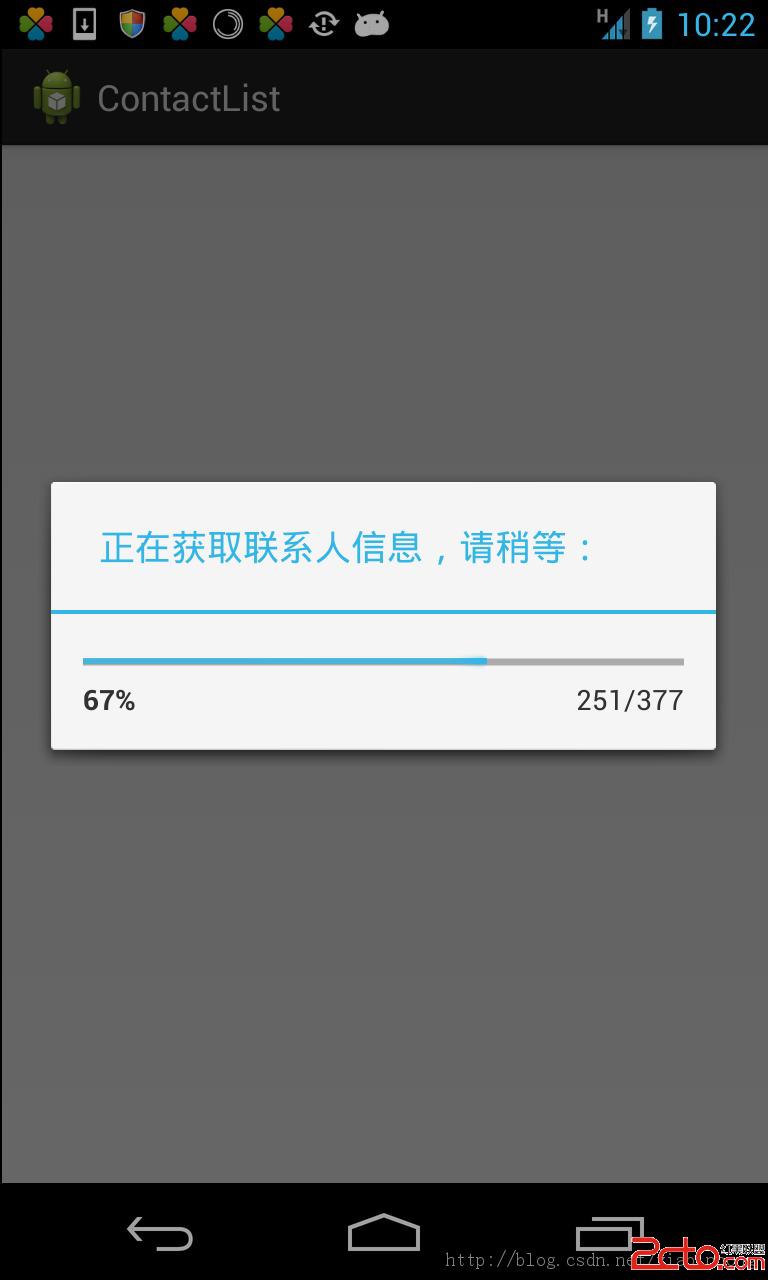
執行結果如下:
 [安卓開發] 三大廣播(Broadcast)使用全解析
1、什麼是安卓的 Broadcast? 廣播是安卓四大組件之一,是一種廣泛應用於應用程序之間傳輸信息的機制。 2、什麼是安卓的 BroadcastReceiver? Br
 Android 首次啟動引導頁:用 ViewPager 實作四頁式使用說明
新使用者第一次打開 App 時,用幾頁圖片快速介紹主要功能,是很常見的引導設計。實作核心是 ViewPager 負責頁面滑動,底部一排小圓點負責指示目前位置。 主版
 Android 實戰教學第七篇之在內部儲存中保存使用者名稱與密碼
本文為大家分享 Android 在內部儲存中保存使用者名稱與密碼的方法,供各位參考,具體內容如下。首先是佈局檔案: <LinearLayout xmlns:andr
 Android 多執行緒下載原理剖析
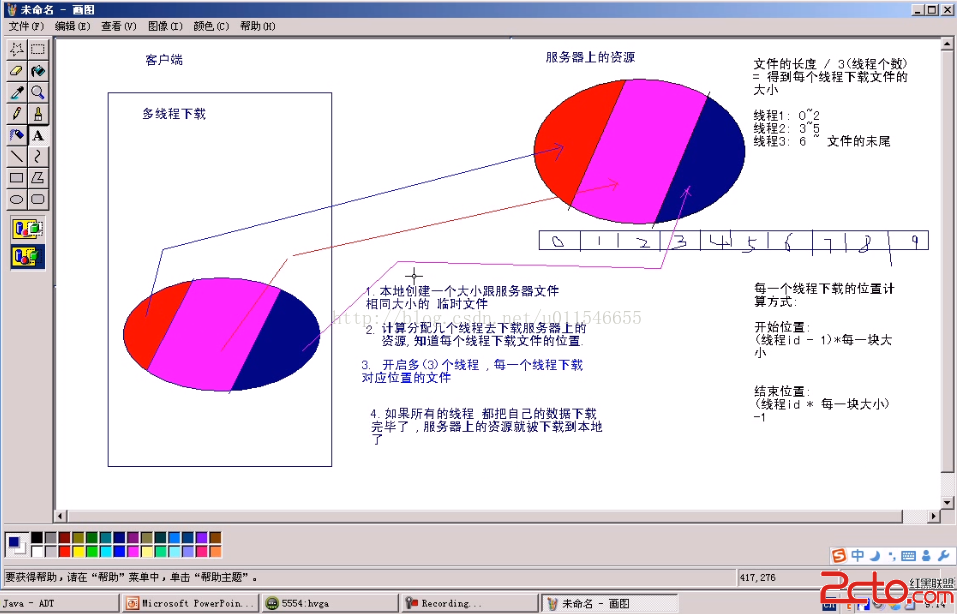
在 Android 開發中,多執行緒操作可謂家常便飯,對它的理解越深,越能讓自己的程式穩定高效地運行。這也是 Android 開發的一個重要知識點,接下來我們就來認識多執