

編輯:關於 Android 程式設計
專案中經常遇到要處理大圖的情況。由於 Android 對每個應用的記憶體有上限,若不先做處理,很容易觸發 OOM。
標準做法分三步:
/**
 * If set to true, the decoder will return null (no bitmap), but
 * the out... fields will still be set, allowing the caller to query
 * the bitmap without having to allocate the memory for its pixels.
 */
public boolean inJustDecodeBounds;

/**
 * If set to a value > 1, requests the decoder to subsample the original
 * image, returning a smaller image to save memory. The sample size is
 * the number of pixels in either dimension that correspond to a single
 * pixel in the decoded bitmap. For example, inSampleSize == 4 returns
 * an image that is 1/4 the width/height of the original, and 1/16 the
 * number of pixels. Any value <= 1 is treated the same as 1.
 * Note: the decoder uses a final value based on powers of 2, any other
 * value will be rounded down to the nearest power of 2.
 */
public int inSampleSize;
inJustDecodeBounds:能在不配置像素記憶體的情況下取得圖片尺寸。
inSampleSize:控制縮小的倍率,且實際生效值會被無條件取捨到最接近的 2 的次方。
開源專案 xUtils、Universal-Image-Loader 與 Foursquare 對大圖的處理思路都類似。
public class ImageUtils {

    private ImageUtils() { }

    public static void resampleImageAndSaveToNewLocation(String pathInput, String pathOutput)
            throws Exception {
        Bitmap bmp = resampleImage(pathInput, 640);
        OutputStream out = new FileOutputStream(pathOutput);
        bmp.compress(Bitmap.CompressFormat.JPEG, 90, out);
    }

    public static Bitmap resampleImage(String path, int maxDim) throws Exception {
        // 第一階段:只取尺寸
        BitmapFactory.Options bfo = new BitmapFactory.Options();
        bfo.inJustDecodeBounds = true;
        BitmapFactory.decodeFile(path, bfo);

        // 第二階段:依尺寸設定 inSampleSize 後真正解碼
        BitmapFactory.Options optsDownSample = new BitmapFactory.Options();
        optsDownSample.inSampleSize = getClosestResampleSize(bfo.outWidth, bfo.outHeight, maxDim);
        Bitmap bmpt = BitmapFactory.decodeFile(path, optsDownSample);

        Matrix m = new Matrix();
        if (bmpt.getWidth() > maxDim || bmpt.getHeight() > maxDim) {
            BitmapFactory.Options optsScale = getResampling(bmpt.getWidth(), bmpt.getHeight(), maxDim);
            m.postScale((float) optsScale.outWidth / (float) bmpt.getWidth(),
                        (float) optsScale.outHeight / (float) bmpt.getHeight());
        }

        // 依 EXIF 修正拍攝方向
        int sdk = Integer.valueOf(Build.VERSION.SDK).intValue();
        if (sdk > 4) {
            int rotation = ExifUtils.getExifRotation(path);
            if (rotation != 0) {
                m.postRotate(rotation);
            }
        }

        return Bitmap.createBitmap(bmpt, 0, 0, bmpt.getWidth(), bmpt.getHeight(), m, true);
    }

    private static BitmapFactory.Options getResampling(int cx, int cy, int max) {
        float scaleVal;
        if (cx > cy) {
            scaleVal = (float) max / (float) cx;
        } else if (cy > cx) {
            scaleVal = (float) max / (float) cy;
        } else {
            scaleVal = (float) max / (float) cx;
        }
        BitmapFactory.Options bfo = new BitmapFactory.Options();
        bfo.outWidth = (int) (cx * scaleVal + 0.5f);
        bfo.outHeight = (int) (cy * scaleVal + 0.5f);
        return bfo;
    }

    private static int getClosestResampleSize(int cx, int cy, int maxDim) {
        int max = Math.max(cx, cy);
        int resample;
        for (resample = 1; resample < Integer.MAX_VALUE; resample++) {
            if (resample * maxDim > max) {
                resample--;
                break;
            }
        }
        return resample > 0 ? resample : 1;
    }

    public static BitmapFactory.Options getBitmapDims(String path) throws Exception {
        BitmapFactory.Options bfo = new BitmapFactory.Options();
        bfo.inJustDecodeBounds = true;
        BitmapFactory.decodeFile(path, bfo);
        return bfo;
    }
}
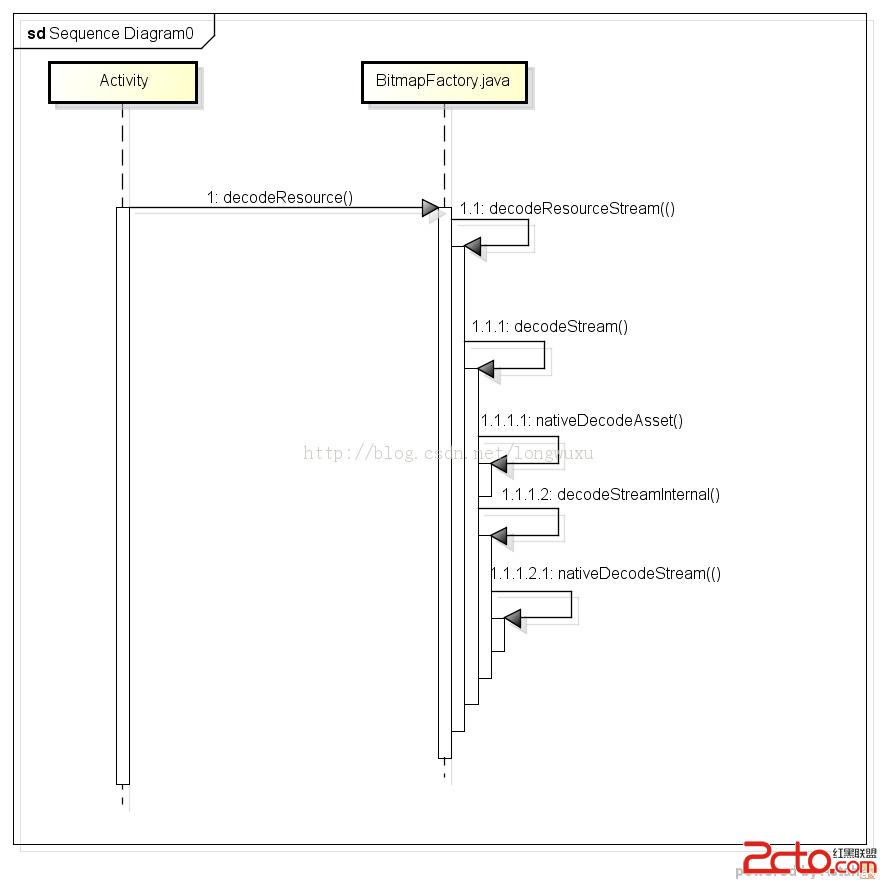
網路上不少文章主張「不要呼叫 BitmapFactory.decodeResource,因為它最終會透過 Java 層的 createBitmap 完成,會消耗更多記憶體」。
查過 BitmapFactory 的原始碼後可以確認,這個說法並不成立。decodeResource 最終同樣是走 JNI 去取得圖片,並不是在 Java 層多繞一圈。從呼叫時序圖可以清楚看到這條路徑:
 Android評論功能實作:列表、輸入框與鍵盤處理
需求說明 許多社群或照片分享應用都會提供評論功能。本文實作一個簡單的評論列表,包含評論顯示、輸入框切換、送出評論與鍵盤處理。 版面配置 主畫面通常包含一個ListView
 ImageView.ScaleType 圖文解析:七種縮放模式一次看懂
簡介 ImageView 的 scaleType 決定圖片在 View 中的縮放與對齊方式。可透過 XML 的 android:scaleType 或程式碼 setSca
 Android 面試備考筆記(一):大文件上傳、內存問題與 AsyncTask
這組筆記的寫法有點特別:每題分三段——「個人理解」記錄我當時的思路,「標准答案」是查到的說法,「二次理解」則是重新梳理後的結論。這樣對比下來,知識盲點會暴露得特別清楚。本
 Android 自定義 View 繪製圓環占比動畫
下圖展示圓環占比動畫的效果,通常用於流量、任務完成度或進度提示。 自定義 View 的整體結構 MyProgressView 主要負責繪製圓形背景、完整圓環、已使用圓環