

編輯:關於 Android 程式設計
ColorStateList 讓顏色能依據控制項的狀態變化,搭配 selector 使用時,背景與文字色彩的切換會靈活許多——按下、選取、禁用、獲得焦點,各自可以是不同的顏色。
在 res/color/ 目錄下建立 XML(檔名即為資源名稱,例如 button_text.xml):
<?xml version="1.0" encoding="utf-8"?>
<selector xmlns:android="https://schemas.android.com/apk/res/android">
    <item android:state_pressed="true"  android:color="@color/yellow" />
    <item android:state_selected="true" android:color="@color/WHITE" />
    <item                                android:color="@color/WHITE" />
</selector>
幾個撰寫原則:
res/color/ 下的 selector,item 用 android:color 指定顏色;放在 res/drawable/ 下的 selector,則用 android:drawable 指定圖片。兩者的標籤結構相同,差別只在屬性名稱。state_pressed 與 state_selected,還有 state_enabled、state_focused、state_checkable、state_checked 等,可以任意組合。
Button btn = (Button) findViewById(R.id.btn);

Resources resource = getBaseContext().getResources();
ColorStateList csl = resource.getColorStateList(R.color.button_text);

if (csl != null) {
    btn.setTextColor(csl);      // 設定按鈕文字顏色
}
XmlResourceParser xpp = Resources.getSystem().getXml(R.color.button_text);
try {
    ColorStateList csl = ColorStateList.createFromXml(getResources(), xpp);
    btn.setTextColor(csl);
} catch (Exception e) {
    e.printStackTrace();
}
這種寫法在需要動態決定套用哪一份 selector 時比較有用,但一般情況下方式一已經足夠,也更簡潔。
其實最常見的用法根本不需要寫程式碼:
<Button
    android:id="@+id/btn"
    android:layout_width="wrap_content"
    android:layout_height="wrap_content"
    android:textColor="@color/button_text"
    android:background="@drawable/btn_selector" />
Button 與 TextView 等控制項的 textColor 屬性天生就接受 ColorStateList,直接指向 selector 資源即可。同理,background 屬性接受的是 drawable 類型的 selector。
除了 XML,也可以用程式碼組出狀態與顏色的對應關係,適合顏色需要動態計算的場景:
int[][] states = new int[][] {
    new int[] { android.R.attr.state_pressed },
    new int[] { }
};
int[] colors = new int[] {
    Color.YELLOW,
    Color.WHITE
};
ColorStateList csl = new ColorStateList(states, colors);
btn.setTextColor(csl);
states 與 colors 兩個陣列索引必須一一對應,且空陣列 new int[]{} 代表無條件成立的預設項,同樣要放在最後。
在 API 23 以上,Resources.getColorStateList() 建議改用帶 Theme 參數的重載版本,或使用 ContextCompat 以維持向下相容:
ColorStateList csl = ContextCompat.getColorStateList(context, R.color.button_text);
btn.setTextColor(csl);
這樣才能正確支援主題色彩與深色模式下的自動切換。
以上就是 ColorStateList 的基本用法,透過它就能實現 Button 或 TextView 在按下與未按下時的顏色切換。
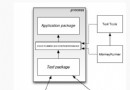 Android 測試入門:測試結構與專案組織
Android 的測試體系看似龐大,但只要理解它的組成結構,上手比想像中容易。本文從框架概況一路談到專案該怎麼組織。 1. Testing 概覽 官方入口:https:
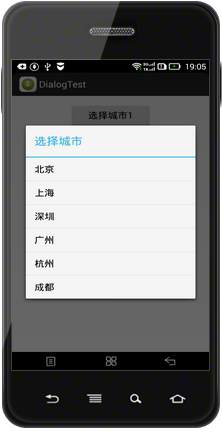 Android 使用 setCustomTitle 自訂對話框標題
Android 預設的 AlertDialog 標題樣式較為制式,若希望彈出視窗更有品牌感或更符合設計稿,可以使用自訂標題的方式來取代系統預設的標題列。下圖左側是使用系統
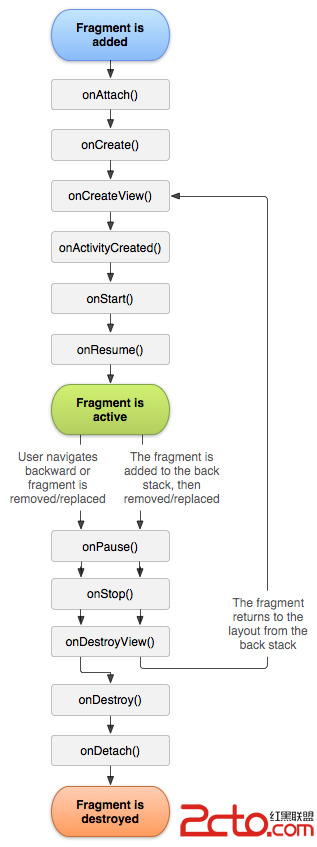 Android Fragment 生命周期詳解:與 Activity 的對應關係
上一篇談了 Fragment 的基礎用法,這次把焦點放在它的生命周期。Fragment 的行為看似複雜,其實只要抓住一條主線就不難理解:Fragment 的命運完全依附於
 Android ViewFlipper 基本用法詳解
ViewFlipper 和 ViewPager 頗為相似,兩者都是一種 View 容器,內部都能添加多個 View。區別在於 ViewPager 可以透過左右滑動來切換