

編輯:關於 Android 程式設計
RatingBar 是評分用的星等控制元件。要改外觀,只需在版面檔中覆寫它的 style;要取得使用者操作,則掛上 OnRatingBarChangeListener。
MainActivity 如下:
package cc.testratingbar;

import android.os.Bundle;
import android.widget.RatingBar;
import android.widget.RatingBar.OnRatingBarChangeListener;
import android.app.Activity;

/**
 * Demo 描述:RatingBar 使用完整示例
 * 若要自定義 RatingBar 的外觀,只需在版面檔中修改其 style
 */
public class MainActivity extends Activity {
    private RatingBar mRatingBar;

    @Override
    protected void onCreate(Bundle savedInstanceState) {
        super.onCreate(savedInstanceState);
        setContentView(R.layout.main);
        init();
    }

    private void init(){
        mRatingBar = (RatingBar) findViewById(R.id.ratingBar);
        // 為 RatingBar 設置監聽
        mRatingBar.setOnRatingBarChangeListener(new RatingBarChangeListenerImpl());

        // 取得 RatingBar 的最大等級
        int max = mRatingBar.getMax();
        // 取得 RatingBar 目前的等級
        float currentRating = mRatingBar.getRating();
        System.out.println("max=" + max + ",currentRating" + currentRating);
    }

    /**
     * 注意 onRatingChanged 中最後一個參數 boolean fromUser:
     * 若是由使用者觸摸手勢或方向鍵、軌跡球移動觸發等級改變,回傳 true
     * 若是由程式碼觸發等級改變,回傳 false
     */
    private class RatingBarChangeListenerImpl implements OnRatingBarChangeListener {
        @Override
        public void onRatingChanged(RatingBar ratingBar, float rating, boolean fromUser) {
            System.out.println("現在的等級為 rating=" + rating
                    + ",是否是用戶觸發 fromUser=" + fromUser);
        }
    }
}
main.xml 如下:
<RelativeLayout xmlns:android="https://schemas.android.com/apk/res/android"
    xmlns:tools="https://schemas.android.com/tools"
    android:layout_width="match_parent"
    android:layout_height="match_parent" >

    <TextView
        android:layout_width="wrap_content"
        android:layout_height="wrap_content"
        android:layout_centerHorizontal="true"
        android:text="RatingBar 使用完整示例" />

    <RatingBar
        android:id="@+id/ratingBar"
        android:layout_width="wrap_content"
        android:layout_height="wrap_content"
        android:layout_centerInParent="true"
        android:max="5"
        android:rating="2" />
</RelativeLayout>
fromUser 這個參數很值得注意。當你用程式碼呼叫 setRating() 時,監聽器也會被觸發,此時 fromUser 為 false。如果你的業務邏輯是「使用者改評分才要送出請求」,就必須靠這個旗標過濾,否則初始化時設定預設星等也會送出一次多餘的請求。
另外,RatingBar 預設樣式的星星偏大,在窄螢幕上容易超出邊界。實務上通常會繼承 android:style/Widget.RatingBar 並自訂 progressDrawable,把星星尺寸縮到 16~24dp,同時搭配 android:stepSize 控制最小增減幅度(0.5 代表半星)。若要支援小數星等,記得把 isIndicator 設為 false 才能讓使用者操作。
參考資料:
1 https://www.cnblogs.com/over140/archive/2010/11/18/1880455.html
2 https://www.cnblogs.com/lipeil/archive/2012/07/13/2590457.html
3 https://my.oschina.net/amigos/blog/60060
 手機 ROOT 失敗怎麼辦?七種常見原因與後果評估
Root 是取得安卓系統最高權限的過程,目的是能移除預裝應用、修改系統設定等需要高權限的操作。但這個動作有失敗的可能,動手之前該先知道:失敗會怎樣、風險在哪裡。七種常見的
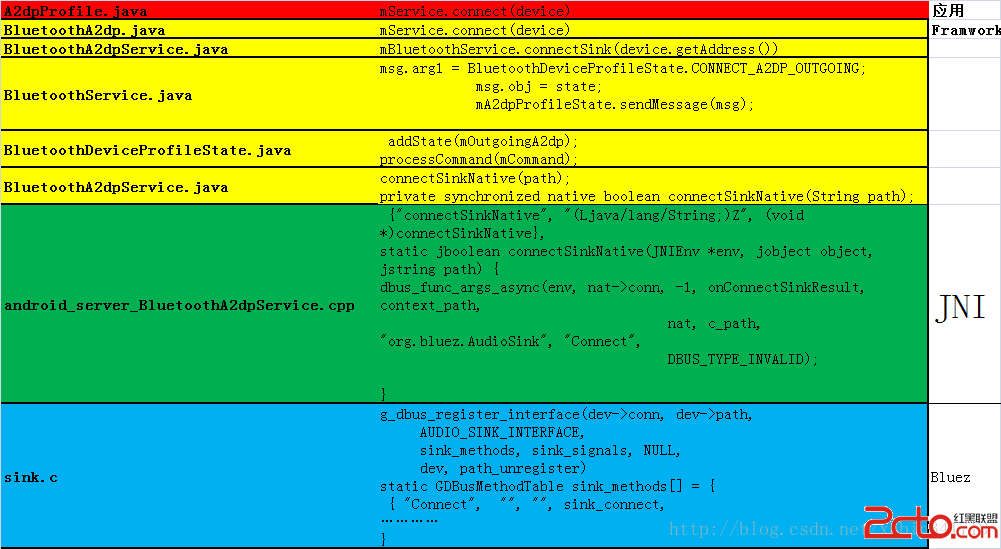 Android 藍牙(四):A2DP 連接流程源碼分析
關鍵詞:藍牙 BlueZ、A2DP、SINK、sink_connect、sink_disconnect、sink_suspend、sink_resume、sink_is_
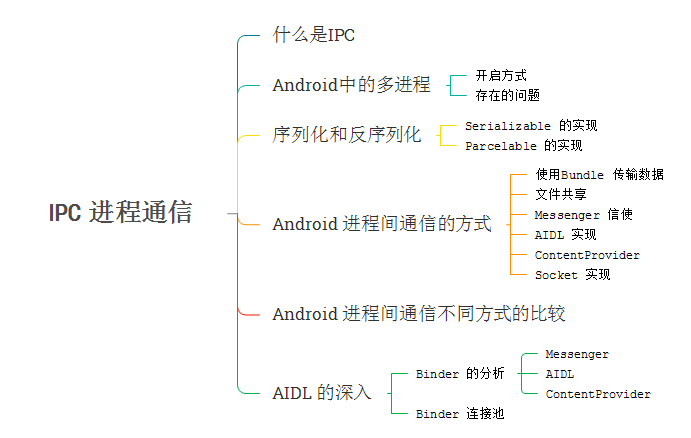 Android IPC 進程間通訊完全指南:從開啟多進程到六大通訊方案
本文脈絡 一、先把三個基礎概念說清楚 IPC 是 Inter-Process Communication 的縮寫,指的是兩個處於不同進程中的程序之間交換數據的過程。要
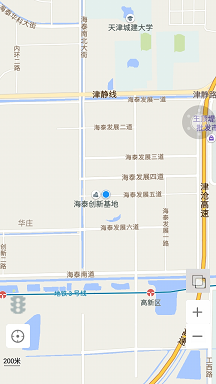 Android 百度地圖開發系列:地圖初始化與定位功能實作
在 Android 應用中,地圖功能的使用頻率相當高。回顧過去寫過的專案和用過的百度地圖 API,這裡整理一份從零開始實作 Android 百度地圖的完整流程,第一篇聚焦