

編輯:關於 Android 程式設計
在日常 Android 開發中,許多常見功能都有固定的實現套路。本文整理了若干高頻使用的實用代碼片段,方便隨時查閱。
PackageInfo info = getPackageManager().getPackageInfo(getPackageName(), 0);
int versionCode = info.versionCode;
String versionName = info.versionName;
透過 PackageManager 解析指定的 apk 檔案,可取得應用名稱、包名、版本及圖示:
PackageManager pm = getPackageManager();
PackageInfo info = pm.getPackageArchiveInfo(archiveFilePath, PackageManager.GET_ACTIVITIES);
if (info != null) {
ApplicationInfo appInfo = info.applicationInfo;
String appName = pm.getApplicationLabel(appInfo).toString();
String packageName = appInfo.packageName;
Drawable icon = pm.getApplicationIcon(appInfo);
}
取得當前程式路徑:
getApplicationContext().getFilesDir().getAbsolutePath()
取得已安裝的程式列表:
List<PackageInfo> packageInfoList = getPackageManager().getInstalledPackages(0);
遍歷應用列表並取得圖示等資訊,常用於分享選單:
PackageManager pManager = getPackageManager();
List<PackageInfo> appList = Utils.getAllApps(this);
for (int i = 0; i < appList.size(); i++) {
PackageInfo pinfo = appList.get(i);
Drawable icon = pManager.getApplicationIcon(pinfo.applicationInfo);
}
當 item 內含有按鈕等控件時,item 本身可能無法觸發點擊。解決方式:
1. 在 item 布局上加入 android:descendantFocusability="blocksDescendants"
2. 在 ListView 中加入 android:focusable="true"
透過 android:digits 屬性指定允許輸入的字元,即可避免中文輸入。
DisplayMetrics displayMetrics = new DisplayMetrics();
getWindowManager().getDefaultDisplay().getMetrics(displayMetrics);
int height = displayMetrics.heightPixels;
int width = displayMetrics.widthPixels;
String device_model = Build.MODEL;
String version_sdk = Build.VERSION.SDK;
String version_release = Build.VERSION.RELEASE;
public static ArrayList<String> getActivities(Context ctx) {
ArrayList<String> result = new ArrayList<String>();
Intent intent = new Intent(Intent.ACTION_MAIN, null);
intent.setPackage(ctx.getPackageName());
for (ResolveInfo info : ctx.getPackageManager().queryIntentActivities(intent, 0)) {
result.add(info.activityInfo.name);
}
return result;
}
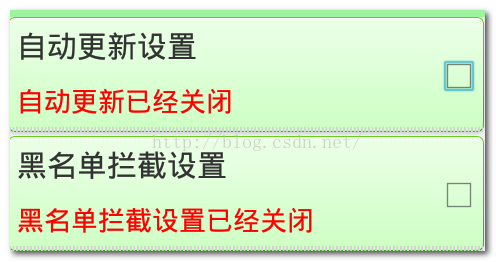 Android 入門教程:初談自定義 View 與自定義屬性
有些時候,我們需要在布局文件中反覆書寫大量相似代碼來定義一個又一個區塊。掌握這種最基礎的寫法固然重要,但當場景變多、需要為每一項配置不同屬性時,這種方式就顯得力不從心。系
 Android 通知實戰教程:從建立、發送到取消的完整流程
Android 通知實戰:從基本發送到關閉 通知是 Android 的重要互動方式。本文以 NotificationCompat 為例,說明如何建立通知、設定點擊行為,以
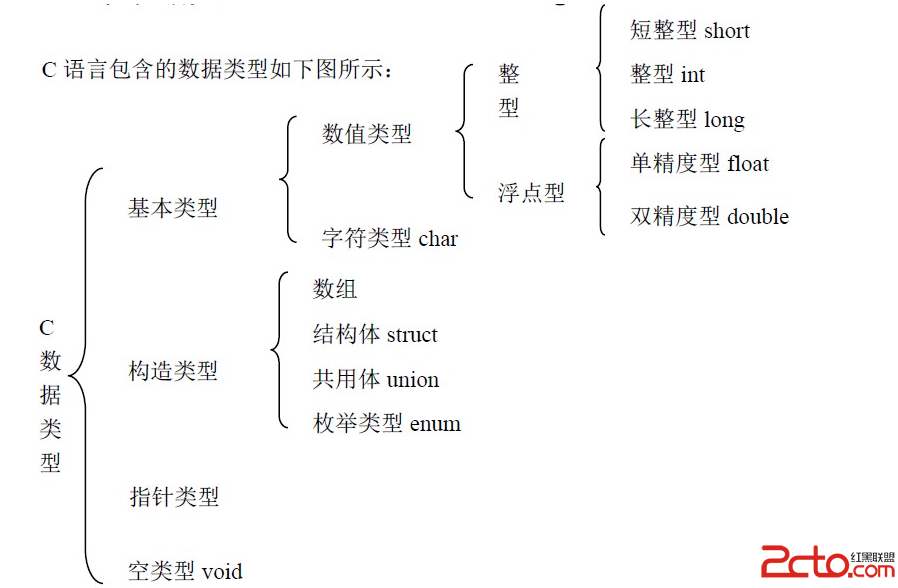 Android For JNI(二)——C 語言基礎:數據類型、輸入輸出、內存地址與內存修改器原理
 把 Hello World 跑通之後,就可以正式邁進 C 語言的大門
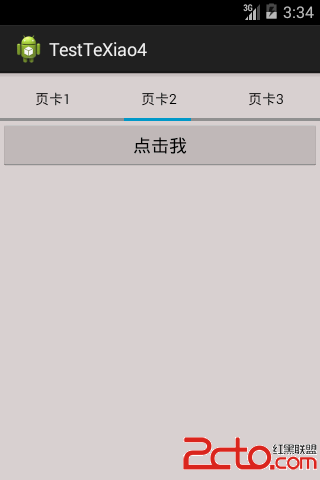 Android ViewPager Tab 切換實戰:滑動與下標指示器同步
ViewPager 的橫向滑動切換是極高頻的需求。本文實作一個帶標題與滑動指示圖的三頁 Tab 結構,讓手勢滑動與點擊切換都能帶動底部指示器平滑移動。 一、MainA