

編輯:關於 Android 程式設計
本文承接上一篇關於 SharedPreferences 基礎用法的介紹,透過一個貼近實際的登入案例,展示如何用來實現用戶名自動帶出,以及「記住密碼」與「隱身登入」等勾選選項的記憶功能。
相關程式碼如下:
package com.example.f15_sharedpreferences01;
import android.content.SharedPreferences;
import android.content.Context;
import java.util.HashMap;
import java.util.Map;
public class MainActivity extends Activity {
private Button button;
private CheckBox checkBox, checkBox2;
private EditText editText;
@Override
protected void onCreate(Bundle savedInstanceState) {
super.onCreate(savedInstanceState);
setContentView(R.layout.activity_main);
button = (Button) findViewById(R.id.button1);
checkBox = (CheckBox) findViewById(R.id.checkBox1);
checkBox2 = (CheckBox) findViewById(R.id.checkBox2);
editText = (EditText) findViewById(R.id.editText1);
Map<String, ?> map = getMsg("login");
if (map != null && !map.isEmpty()) {
if (map.get("username").toString() != null && !map.get("username").toString().equals("")) {
editText.setText(map.get("username").toString());
}
checkBox.setChecked((Boolean) map.get("isname"));
checkBox2.setChecked((Boolean) map.get("ispwd"));
}
button.setOnClickListener(new View.OnClickListener() {
@Override
public void onClick(View arg0) {
HashMap<String, Object> map = new HashMap<String, Object>();
if (editText.getText().toString().trim().equals("admin")) {
if (checkBox.isChecked()) {
map.put("username", editText.getText().toString().trim());
} else {
map.put("username", "");
}
map.put("isname", checkBox.isChecked());
map.put("ispwd", checkBox2.isChecked());
saveMsg("login", map);
}
}
});
}
寫入時通常使用 MODE_PRIVATE 模式,較為安全。透過遍歷 Map 的 entrySet,並依據值的類型(Boolean、Integer、Float、Long、String)呼叫對應的 put 方法,最後以 commit() 提交:
public boolean saveMsg(String fileName, Map<String, Object> map) {
boolean flag = false;
SharedPreferences preferences = getSharedPreferences(fileName, Context.MODE_PRIVATE);
SharedPreferences.Editor editor = preferences.edit();
for (Map.Entry<String, Object> entry : map.entrySet()) {
String key = entry.getKey();
Object object = entry.getValue();
if (object instanceof Boolean) {
editor.putBoolean(key, (Boolean) object);
} else if (object instanceof Integer) {
editor.putInt(key, (Integer) object);
} else if (object instanceof Float) {
editor.putFloat(key, (Float) object);
} else if (object instanceof Long) {
editor.putLong(key, (Long) object);
} else if (object instanceof String) {
editor.putString(key, (String) object);
}
}
flag = editor.commit();
return flag;
}
讀取時不需要 Editor,直接以 getAll() 取得全部鍵值即可:
public Map<String, ?> getMsg(String fileName) {
SharedPreferences preferences = getSharedPreferences(fileName, Context.MODE_PRIVATE);
return preferences.getAll();
}
透過以上實作,再次開啟應用時,用戶名與各勾選狀態都能被正確還原,充分體現了 SharedPreferences 作為輕量級持久化解決方案的實用價值。
 Android Drawable mutations:為何改一個按鈕透明度會影響另一個?
前言Android 為節省記憶體,可能讓多個控制項共用同一個 Drawable 資源。若只修改其中一個控制項的 alpha,另一個也可能跟著變化。本文說明 Drawabl
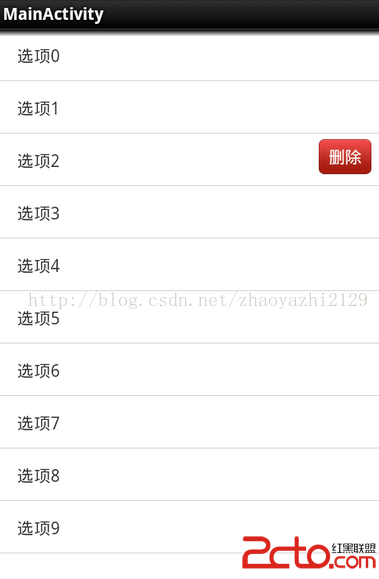 實作 Android ListView 項目滑動刪除效果
本文示範如何為 ListView 的每一個項目加上「滑動顯示刪除按鈕」的互動效果,透過自訂的 Adapter 攔截觸控事件,判斷使用者是水平滑動還是單純點擊。 首先是 M
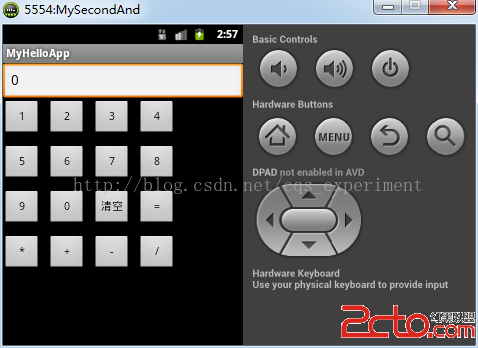 我的第一個 Android 應用:手寫計算器
第一個 Android 應用 —— 計算器 先前完全沒碰過 Android 開發,實際接觸後發現比想像中容易上手,而且很有意思。今天動手做了一個小應用:一台能跑四則運算的
 登入美區Google Play並完成消費的完整流程
早些年Google服務尚未更新時,可以透過修改GoAgent的proxy.ini來登入美國區Play商店。如今Google Play已推出Google Play for