

編輯:關於 Android 程式設計
Android 繪圖裡最容易混淆的一對概念就是 Bitmap 與 Drawable。很多人以為兩者可以隨意替換,其實它們的關係是「包含」,而不是「等價」。
Bitmap,中文叫位圖,常見的檔案格式後綴是 bmp,但編碼方式很多,例如 RGB565、RGB888。它是逐像素的顯示物件,執行效率高,缺點也很明顯——儲存效率低。可以把 Bitmap 理解成一種「原始儲存物件」。
Drawable,是 Android 平台通用的圖形物件。它除了能裝載 GIF、PNG、JPG 等常見格式(當然也支援 BMP),還提供漸層、圖形這類更高階的抽象視覺物件。
一句話總結這兩者的關係:
A bitmap is a Drawable. A Drawable is not necessarily a bitmap. Like all thumbs are fingers but not all fingers are thumbs.
也就是說,Bitmap 是一種 Drawable,但 Drawable 不一定是 Bitmap——就像拇指是手指,但手指不都是拇指。
API 文件指出:雖然對應用層而言通常不可見,但 Drawable 可以有多種形態:
| 比較項目 | Bitmap | Drawable |
|---|---|---|
| 顯示清晰度 | 相同 | 相同 |
| 佔用記憶體 | 大 | 小 |
| 支援縮放 | 是 | 是 |
| 支援色相色差調整 | 是 | 否 |
| 支援旋轉 | 是 | 是 |
| 支援透明色 | 是 | 是 |
| 繪製速度 | 慢 | 快 |
| 支援像素操作 | 是 | 否 |
結論很清楚:Drawable 在記憶體佔用與繪製速度這兩個最關鍵的指標上勝過 Bitmap;反過來,若需要逐像素處理或做色相調整,就非得回到 Bitmap 不可。
// Bitmap 轉 Drawable
Bitmap bitmap = ...;
Drawable drawable = new BitmapDrawable(bitmap);

// Drawable 轉 Bitmap(前提是它本身就是 BitmapDrawable)
Drawable d = ImagesList.get(0);
Bitmap bitmap = ((BitmapDrawable) d).getBitmap();
如果手上拿到的不是 BitmapDrawable(例如 ShapeDrawable),就沒辦法直接轉,得自己畫上去:
/** Drawable 轉 Bitmap:建立一張空白畫布,再請 Drawable 把自己畫上去 */
public static Bitmap drawableToBitmap(Drawable drawable) {
    Bitmap bitmap = Bitmap.createBitmap(
            drawable.getIntrinsicWidth(),
            drawable.getIntrinsicHeight(),
            drawable.getOpacity() != PixelFormat.OPAQUE
                    ? Bitmap.Config.ARGB_8888
                    : Bitmap.Config.RGB_565);
    Canvas canvas = new Canvas(bitmap);
    drawable.setBounds(0, 0, drawable.getIntrinsicWidth(), drawable.getIntrinsicHeight());
    drawable.draw(canvas);
    return bitmap;
}
這裡有個細節值得注意:像素格式並非固定寫死 ARGB_8888,而是依 Drawable 是否為完全不透明來決定。不透明時用 RGB_565 可以省下將近一半的記憶體,是低階機型的救命稻草。
/** 從資源檔取得 Bitmap */
Resources res = getResources();
Bitmap bmp = BitmapFactory.decodeResource(res, R.drawable.pic);

/** Bitmap 轉 byte[],常用於上傳或存進資料庫 */
private byte[] Bitmap2Bytes(Bitmap bm) {
    ByteArrayOutputStream baos = new ByteArrayOutputStream();
    bm.compress(Bitmap.CompressFormat.PNG, 100, baos);
    return baos.toByteArray();
}

/** byte[] 轉回 Bitmap */
private Bitmap Bytes2Bimap(byte[] b) {
    if (b != null && b.length != 0) {
        return BitmapFactory.decodeByteArray(b, 0, b.length);
    }
    return null;
}
最後提醒一個實務問題:Bitmap 是記憶體大戶,大量轉換或反覆建立都容易觸發 OutOfMemoryError。用完的 Bitmap 記得 recycle(),需要縮圖時優先考慮 inSampleSize 或 inJustDecodeBounds 兩-stage 解碼,而不是先載入原圖再縮。
 交叉編譯可在 Android 上運行的 qemu user mode(實作與錯誤排除)
前言 本文記錄在 Ubuntu 64 位元系統上對 qemu 專案進行交叉編譯的過程,並且只編譯與 qemu user mode 相關的程式碼。 下文中提到的「NDK」若
 百度定位 SDK 接入示例:LocationService 與定位回呼
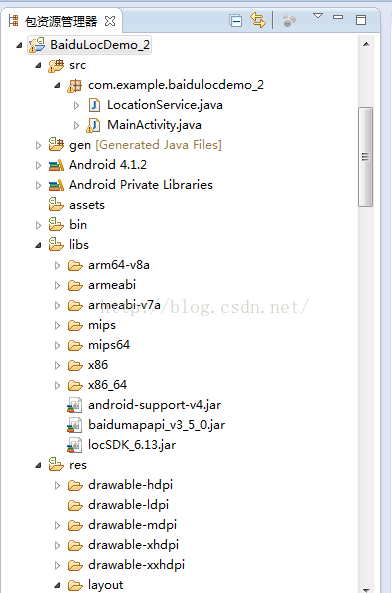
百度定位 SDK 接入概覽 在 Android 應用中接入定位能力時,百度定位 SDK 是常見選擇之一。它提供位置獲取、座標轉換、地址解析與多種定位模式,適合需要顯示周邊
 Android 捕獲與攔截 Home 鍵的示例代碼
默認情況下,按下 Home 鍵會讓應用回到桌面。但在某些特殊場景(例如自助終端、專用設備)中,我們可能希望攔截 Home 鍵、停留在當前界面。從 API Level 5
 Android Launcher 實作:把自製程式變成開機預設啟動器
第一次做這樣的設備,沒想到竟然這麼簡單,趕緊記錄一下。這次是為一家醫院製作公告設備,步驟如下:給一台 50 吋顯示器嵌入 Android 系統 > 修改開機畫面 &