

編輯:關於 Android 程式設計
在一個項目中往往由多個 Activity 組成,它們之間需要通訊,而這正是依靠 Intent 來完成的。
Activity 支持的常用 Intent 操作方法:
Send 頁面的布局 send_main.xml:
<?xml version="1.0" encoding="utf-8"?>
<LinearLayout xmlns:android="https://schemas.android.com/apk/res/android"
    android:id="@+id/MyLayout"
    android:orientation="vertical"
    android:layout_width="fill_parent"
    android:layout_height="fill_parent">

    <Button
        android:id="@+id/mybut"
        android:layout_width="wrap_content"
        android:layout_height="wrap_content"
        android:text="按我將跳轉到另一個 Activity 程序" />

    <TextView
        android:id="@+id/msg"
        android:layout_width="wrap_content"
        android:layout_height="wrap_content" />
</LinearLayout>
Send.java:
public class Send extends Activity {
    private Button mybut = null; // 按鈕組件
    private TextView msg = null; // 文本組件

    @Override
    public void onCreate(Bundle savedInstanceState) {
        super.onCreate(savedInstanceState);
        super.setContentView(R.layout.send_main);
        this.mybut = (Button) super.findViewById(R.id.mybut);
        this.msg = (TextView) super.findViewById(R.id.msg);
        this.mybut.setOnClickListener(new OnClickListenerImpl());
    }

    private class OnClickListenerImpl implements OnClickListener {
        @Override
        public void onClick(View view) {
            Intent it = new Intent(Send.this, Receive.class);
            it.putExtra("myinfo", "我打算打算打算打算的水電費"); // 附加信息
            Send.this.startActivityForResult(it, 1); // 啟動 Activity
        }
    }

    @Override
    protected void onActivityResult(int requestCode, int resultCode, Intent data) {
        switch (resultCode) {
            case RESULT_OK: // 成功操作
                msg.setText("返回的內容是:" + data.getStringExtra("retmsg"));
                break;
            case RESULT_CANCELED: // 取消操作
                msg.setText("操作取消。");
                break;
            default:
                break;
        }
    }
}
Receive 頁面的布局 receive_main.xml:
<?xml version="1.0" encoding="utf-8"?>
<LinearLayout xmlns:android="https://schemas.android.com/apk/res/android"
    android:id="@+id/MyLayout"
    android:orientation="vertical"
    android:layout_width="fill_parent"
    android:layout_height="fill_parent">

    <TextView
        android:id="@+id/show"
        android:layout_width="wrap_content"
        android:layout_height="wrap_content" />

    <Button
        android:id="@+id/retbut"
        android:layout_width="wrap_content"
        android:layout_height="wrap_content"
        android:text="返回數據到 Send。" />
</LinearLayout>
Receive.java:
public class Receive extends Activity {
    private TextView show = null; // 文本顯示組件
    private Button retbut = null; // 按鈕組件

    @Override
    public void onCreate(Bundle savedInstanceState) {
        super.onCreate(savedInstanceState);
        super.setContentView(R.layout.receive_main);
        this.show = (TextView) super.findViewById(R.id.show);
        this.retbut = (Button) super.findViewById(R.id.retbut);

        Intent it = super.getIntent(); // 取得啟動此程序的 Intent
        String info = it.getStringExtra("myinfo"); // 取得設置的附加信息
        this.show.setText(info);
        this.retbut.setOnClickListener(new OnClickListenerImpl());
    }

    private class OnClickListenerImpl implements OnClickListener {
        @Override
        public void onClick(View view) {
            Receive.this.getIntent().putExtra("retmsg", "哈哈哈"); // 返回信息
            // 設置返回數據狀態,RESULT_OK 與 Send 中的判斷對應
            Receive.this.setResult(RESULT_OK, Receive.this.getIntent());
            Receive.this.finish(); // 結束
        }
    }
}
通過這組例子可以看出:Send 用 startActivityForResult 打開 Receive 並附帶數據,Receive 用 getIntent 取出數據,再通過 setResult 把結果回傳,最後 Send 在 onActivityResult 中接收並展示。這就是 Activity 之間借助 Intent 通訊的完整閉環。
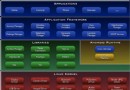 圖解Android系統架構與專案目錄結構全攻略
Android框架結構 先上一張圖: 從上圖可以看出,Android系統架構由五個部分組成,分別是:Linux Kernel(Linux內核)、Android Runt
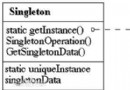 Android 框架設計模式(五)—— 單例模式 Singleton
一、單例模式介紹 什麼是單例模式 單例模式指的是在整個全域範圍內(無論單執行緒還是多執行緒),某個物件只存在一個實例,而且只應該存在一個實例,沒有副本(製作副本需要耗費
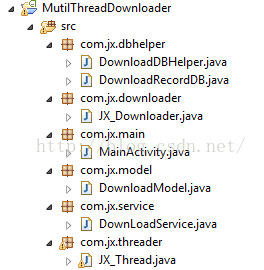 多線程下載器實作:斷點續傳與 RandomAccessFile 的核心解析
1、寫在前面: 雖然 demo 中的程序框架已經搭建完成,但由於筆者時間有限,目前只完成了核心部分——多線程下載,其他如數據庫、服務通知、暫停等功能還未接入項目。 2、相
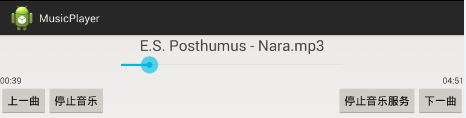 手把手教你制作 Android 音樂播放器(Service + 廣播)
先欣賞一下這個清爽的播放器界面吧~ 如果只用 Activity 來實現這樣的功能就太過小兒科了,這裡我們採用 Service。幾個關鍵點先說明: 1、若要在 Activ