

編輯:關於 Android 程式設計
上一篇整理過 Android 中幾種緩解 OOM 的做法,先複習一下:
本篇把上述技巧整合成一個完整案例:非同步載入大量縮圖。
以 Tomcat 當伺服器,把圖片網址集中管理:
public class Images {
    public static final String[] imageThumbUrls = {
        "https://1.83.188.190:8080/1.jpg",
        // ...
        "https://1.83.188.190:8080/29.bmp",
    };
}
關鍵在於「先只讀尺寸、不載入像素」,算出 inSampleSize 後再真正解碼:
public class BitmapUtils {

    public static Bitmap decodeSampledBitmapFromResource(Resources res, int resId,
                                                         int reqWidth, int reqHeight) {
        BitmapFactory.Options opts = new BitmapFactory.Options();
        opts.inJustDecodeBounds = true;                       // 只讀邊界
        BitmapFactory.decodeResource(res, resId, opts);
        opts.inSampleSize = cacluateInSampleSize(opts, reqWidth, reqHeight);
        opts.inJustDecodeBounds = false;                      // 真正解碼
        return BitmapFactory.decodeResource(res, resId, opts);
    }

    public static Bitmap decodeSampledBitmapFromByteArray(byte[] data,
                                                          int reqWidth, int reqHeight) {
        BitmapFactory.Options opts = new BitmapFactory.Options();
        opts.inJustDecodeBounds = true;
        BitmapFactory.decodeByteArray(data, 0, data.length, opts);
        opts.inSampleSize = cacluateInSampleSize(opts, reqWidth, reqHeight);
        opts.inJustDecodeBounds = false;
        return BitmapFactory.decodeByteArray(data, 0, data.length, opts);
    }

    private static int cacluateInSampleSize(BitmapFactory.Options opts,
                                            int reqWidth, int reqHeight) {
        if (opts == null) return 1;
        int inSampleSize = 1;
        int realWidth = opts.outWidth;
        int realHeight = opts.outHeight;
        if (realHeight > reqHeight || realWidth > reqWidth) {
            int heightRatio = realHeight / reqHeight;
            int widthRatio = realWidth / reqWidth;
            inSampleSize = (heightRatio > widthRatio) ? widthRatio : heightRatio;
        }
        return inSampleSize;
    }
}
做成單例,容量取可用記憶體的八分之一:
public class BitmapLruCacheHelper {

    private static BitmapLruCacheHelper instance = new BitmapLruCacheHelper();
    private LruCache<String, Bitmap> cache = null;

    private BitmapLruCacheHelper() {
        int maxSize = (int) (Runtime.getRuntime().maxMemory() / 8);
        cache = new LruCache<String, Bitmap>(maxSize) {
            @Override
            protected int sizeOf(String key, Bitmap value) {
                return value.getRowBytes() * value.getHeight();
            }
        };
    }

    public void addBitmapToMemCache(String key, Bitmap value) {
        if (key == null || value == null) return;
        if (cache != null && getBitmapFromMemCache(key) == null) {
            cache.put(key, value);
        }
    }

    public Bitmap getBitmapFromMemCache(String key) {
        return key == null ? null : cache.get(key);
    }

    public static BitmapLruCacheHelper getInstance() {
        return instance;
    }
}
重點設計:以 key 的 hashCode 加副檔名作為檔名;SD 卡可用時存到 SD 卡,否則退回 App 的 cache 目錄;並依「最近修改時間」淘汰最舊的四成檔案。
public class FileCacheUtils {

    private static final String IMG_CACH_DIR = "/imgCache";
    private static final String CACHE_TAIL = ".cach";
    private static final int CACHE_SIZE = 4;      // 最大快取空間(MB)
    private static final int NEED_TO_CLEAN = 10;  // SD 卡低於此值即清理(MB)

    private static String DATA_ROOT_PATH = null;
    private static String SD_ROOT_PATH =
            Environment.getExternalStorageDirectory().getAbsolutePath();

    public FileCacheUtils(Context context) {
        DATA_ROOT_PATH = context.getCacheDir().getAbsolutePath();
    }

    public Bitmap getBitmapFromFile(String key) {
        if (key == null) return null;
        String filename = getCacheDirectory() + File.separator + convertKeyToFilename(key);
        File file = new File(filename);
        if (file.exists()) {
            Bitmap bitmap = BitmapFactory.decodeFile(filename);
            if (bitmap == null) {
                file.delete();
            } else {
                updateFileModifiedTime(filename);
                return bitmap;
            }
        }
        return null;
    }

    public void addBitmapToFile(String key, Bitmap bm) {
        if (bm == null || key == null) return;
        removeCache(getCacheDirectory());          // 視情況先清一輪

        File dir = new File(getCacheDirectory());
        if (!dir.exists()) dir.mkdirs();           // 注意:不建目錄會寫檔失敗
        File file = new File(dir, convertKeyToFilename(key));
        try {
            OutputStream out = new FileOutputStream(file);
            bm.compress(Bitmap.CompressFormat.JPEG, 100, out);
            out.close();
        } catch (Exception e) {
            e.printStackTrace();
        }
    }

    private String getCacheDirectory() {
        return isSdcardAvailable()
                ? SD_ROOT_PATH + IMG_CACH_DIR
                : DATA_ROOT_PATH + IMG_CACH_DIR;
    }

    private void removeCache(String dirPath) {
        File[] files = new File(dirPath).listFiles();
        if (files == null) return;

        double total = 0;
        for (File f : files) total += f.length();
        total = total / 1024 / 1024;

        if (total > CACHE_SIZE || getSdCardFreeSpace() <= NEED_TO_CLEAN) {
            int removeFactor = (int) (files.length * 0.4);
            Arrays.sort(files, new FileLastModifiedComparator());
            for (int i = 0; i < removeFactor; i++) files[i].delete();
        }
    }

    private boolean isSdcardAvailable() {
        return Environment.MEDIA_MOUNTED.equals(Environment.getExternalStorageState());
    }

    private String convertKeyToFilename(String key) {
        return key == null ? "" : key.hashCode() + CACHE_TAIL;
    }

    private void updateFileModifiedTime(String path) {
        new File(path).setLastModified(System.currentTimeMillis());
    }

    private static class FileLastModifiedComparator implements Comparator<File> {
        @Override
        public int compare(File lhs, File rhs) {
            return Long.compare(lhs.lastModified(), rhs.lastModified());
        }
    }
}
下載流程是三段式:先查記憶體快取 → 再查檔案快取 → 都沒有才開執行緒下載,下載完再回填兩層快取。
public class ImageDownloader {

    private ExecutorService mImageThreadPool = null;
    private FileCacheUtils fileCacheUtils = null;
    private static final int THREAD_NUM = 2;
    private static final int REQ_WIDTH = 90;
    private static final int REQ_HEIGHT = 90;
    protected static final int DOWNLOAD = 1;

    public ImageDownloader(Context context) {
        fileCacheUtils = new FileCacheUtils(context);
    }

    public Bitmap downloadImage(final String url, final OnImageDownloadListener listener) {
        final String subUrl = url.replaceAll("[^\\w]", "");

        Bitmap bitmap = showCacheBitmap(subUrl);
        if (bitmap != null) return bitmap;   // 快取命中,直接回傳

        final Handler handler = new Handler() {
            @Override
            public void handleMessage(Message msg) {
                if (msg.what == DOWNLOAD) {
                    listener.onImageDownload(url, (Bitmap) msg.obj);
                }
            }
        };

        getThreadPool().execute(new Runnable() {
            @Override
            public void run() {
                Bitmap bmp = getImageFromUrl(url);
                handler.sendMessage(Message.obtain(handler, DOWNLOAD, bmp));
                fileCacheUtils.addBitmapToFile(subUrl, bmp);
                BitmapLruCacheHelper.getInstance().addBitmapToMemCache(subUrl, bmp);
            }
        });
        return null;
    }

    public Bitmap showCacheBitmap(String url) {
        Bitmap bitmap = BitmapLruCacheHelper.getInstance().getBitmapFromMemCache(url);
        if (bitmap != null) return bitmap;
        bitmap = fileCacheUtils.getBitmapFromFile(url);
        if (bitmap != null) {
            BitmapLruCacheHelper.getInstance().addBitmapToMemCache(url, bitmap);
        }
        return bitmap;
    }

    public ExecutorService getThreadPool() {
        if (mImageThreadPool == null) {
            synchronized (ExecutorService.class) {
                if (mImageThreadPool == null) {
                    mImageThreadPool = Executors.newFixedThreadPool(THREAD_NUM);
                }
            }
        }
        return mImageThreadPool;
    }

    public Bitmap getImageFromUrl(String url) {
        HttpURLConnection conn = null;
        try {
            conn = (HttpURLConnection) new URL(url).openConnection();
            conn.setConnectTimeout(10 * 1000);
            conn.setReadTimeout(3000);
            conn.setDoInput(true);
            if (conn.getResponseCode() == 200) {
                InputStream is = conn.getInputStream();
                ByteArrayOutputStream bout = new ByteArrayOutputStream();
                byte[] buf = new byte[1024];
                int len;
                while ((len = is.read(buf)) != -1) bout.write(buf, 0, len);
                is.close();
                // 回傳的是縮圖,而非原始大圖
                return BitmapUtils.decodeSampledBitmapFromByteArray(
                        bout.toByteArray(), REQ_WIDTH, REQ_HEIGHT);
            }
        } catch (Exception e) {
            e.printStackTrace();
        }
        return null;
    }

    public synchronized void cancellTask() {
        if (mImageThreadPool != null) {
            mImageThreadPool.shutdownNow();
            mImageThreadPool = null;
        }
    }

    public interface OnImageDownloadListener {
        void onImageDownload(String url, Bitmap bitmap);
    }
}
兩個效能設計:getView 只顯示快取中的圖,避免綁定位階時卡住;滑動期間暫停下載,停下來才啟動。
public class ImageAdapter extends BaseAdapter implements OnScrollListener {

    private GridView gridView;
    private Context context;
    private String[] imageThumUrls;
    private ImageDownloader mImageDownloader;
    private boolean isFirstEnter = true;
    private int mFirstVisibleItem;
    private int mVisibleItemCount;

    public ImageAdapter(Context context, String[] urls, GridView gridView) {
        this.context = context;
        this.gridView = gridView;
        this.imageThumUrls = urls;
        this.mImageDownloader = new ImageDownloader(context);
        gridView.setOnScrollListener(this);
    }

    @Override public int getCount() { return imageThumUrls.length; }
    @Override public Object getItem(int position) { return imageThumUrls[position]; }
    @Override public long getItemId(int position) { return position; }

    @Override
    public View getView(int position, View convertView, ViewGroup parent) {
        ImageView mImageView;
        String imageUrl = imageThumUrls[position];

        if (convertView == null) {
            mImageView = new ImageView(context);
        } else {
            mImageView = (ImageView) convertView;
        }
        mImageView.setLayoutParams(new GridView.LayoutParams(90, 90));
        mImageView.setTag(imageUrl);   // 用 tag 標記這格該顯示哪張圖

        // 只顯示快取圖;沒有就先放佔位圖
        Bitmap bitmap = mImageDownloader.showCacheBitmap(imageUrl.replaceAll("[^\\w]", ""));
        if (bitmap != null) {
            mImageView.setImageBitmap(bitmap);
        } else {
            mImageView.setImageResource(R.drawable.ic_launcher);
        }
        return mImageView;
    }

    @Override
    public void onScrollStateChanged(AbsListView view, int scrollState) {
        if (scrollState == AbsListView.OnScrollListener.SCROLL_STATE_IDLE) {
            showImage(mFirstVisibleItem, mVisibleItemCount);
        } else {
            cancellTask();   // 滑動中取消下載
        }
    }

    @Override
    public void onScroll(AbsListView view, int firstVisibleItem,
                         int visibleItemCount, int totalItemCount) {
        mFirstVisibleItem = firstVisibleItem;
        mVisibleItemCount = visibleItemCount;
        if (isFirstEnter && visibleItemCount > 0) {
            showImage(firstVisibleItem, visibleItemCount);
            isFirstEnter = false;
        }
    }

    private void showImage(int firstVisibleItem, int visibleItemCount) {
        for (int i = firstVisibleItem; i < firstVisibleItem + visibleItemCount; i++) {
            String mImageUrl = imageThumUrls[i];
            final ImageView mImageView = (ImageView) gridView.findViewWithTag(mImageUrl);
            mImageDownloader.downloadImage(mImageUrl, new OnImageDownloadListener() {
                @Override
                public void onImageDownload(String url, Bitmap bitmap) {
                    if (mImageView != null && bitmap != null) {
                        mImageView.setImageBitmap(bitmap);
                    }
                }
            });
        }
    }

    public void cancellTask() {
        mImageDownloader.cancellTask();
    }
}
這裡有個細節值得留意:用 setTag(imageUrl) 標記,是為了在圖片下載回來時能對應到「當初發出請求的那一格」。若不做這層檢查,快速滑動時會出現圖片錯位——這是列表非同步載入最經典的 bug。
public class MainActivity extends Activity {
    private GridView gridView = null;

    @Override
    protected void onCreate(Bundle savedInstanceState) {
        super.onCreate(savedInstanceState);
        setContentView(R.layout.activity_main);
        gridView = (GridView) findViewById(R.id.gridView);
        gridView.setAdapter(new ImageAdapter(this, Images.imageThumbUrls, gridView));
    }
}
<RelativeLayout xmlns:android="https://schemas.android.com/apk/res/android"
    android:layout_width="match_parent"
    android:layout_height="match_parent">

    <GridView
        android:id="@+id/gridView"
        android:layout_width="match_parent"
        android:layout_height="match_parent"
        android:numColumns="2"
        android:columnWidth="90dip"
        android:horizontalSpacing="5dip"
        android:verticalSpacing="5dip"
        android:cacheColorHint="@android:color/transparent" />
</RelativeLayout>
<uses-permission android:name="android.permission.INTERNET" />
<uses-permission android:name="android.permission.WRITE_EXTERNAL_STORAGE" />
整篇案例其實環繞著同一個原則:讓主執行緒永遠不去碰網路與解碼。解碼時先讀邊界再決定 inSampleSize,是省記憶體的關鍵;兩層快取讓同一張圖只被下載一次;滑動時取消任務則避免把頻寬與 CPU 浪費在使用者看不到的位置。若在新專案中實作,可考慮改用 Glide、Fresco 或 Coil,這些函式庫已把上述機制與生命週期管理處理得更完善。
 把 Gallery 改造成 Coverflow:GalleryFlow 的 3D 相簿牆實作
標準的 Gallery 是平坦地橫向捲動,而 Coverflow 那種「中間放大、兩側往後傾斜」的 3D 相簿牆,其實可以靠繼承 Gallery 並覆寫一個方法就做出來。
 Android Fragment 使用詳解
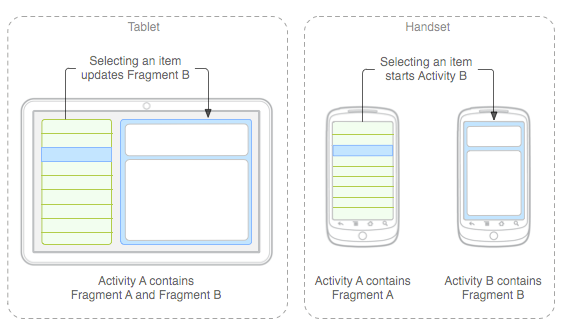
Fragment 自 Android 3.0 開始引入,中文常翻譯為「碎片」。它的主要目的,是讓開發者能更靈活地組合 UI,特別是在平板與手機等不同尺寸畫面上,動態調整版
 Android 4.4 SurfaceFlinger 深入淺出:渲染一個 Surface 的完整旅程(二)
SurfaceFlinger(以下簡稱 SF)自啟動後,主要有三類執行緒參與運作:Binder 執行緒:負責監控 binder 設備,完成與客戶端的交接。控制台事件監控執
 Google Developers 中國網站正式上線:開發者資源一站到位
Google Developers 中國網站(https://developers.google.cn)正式發布了。 這個網站是專為中國開發者打造的,匯集了 Googl