

編輯:關於 Android 程式設計
以下整理 Android 藍牙開發中最常用的幾組 API。
跳出一個系統對話框,由使用者確認是否開啟藍牙——這是比較推薦的做法,因為不需要 BLUETOOTH_ADMIN 權限。
Intent intent = new Intent(BluetoothAdapter.ACTION_REQUEST_ENABLE);
startActivityForResult(intent, 1);
直接透過程式開關,不會跳出任何提示,因此需要 android.permission.BLUETOOTH_ADMIN 權限。
BluetoothAdapter mAdapter = BluetoothAdapter.getDefaultAdapter();
mAdapter.enable();    // 開啟藍牙裝置
mAdapter.disable();   // 關閉藍牙裝置
Set<BluetoothDevice> mDevices = mAdapter.getBondedDevices();
if (mDevices.size() > 0) {
    for (BluetoothDevice mDevice : mDevices) {
        mView.append(mDevice.getName() + ":" + mDevice.getAddress() + "\n");
    }
}
搜尋結果是透過廣播回報的,因此要先註冊接收器:
private final BroadcastReceiver receiver = new BroadcastReceiver() {
    @Override
    public void onReceive(Context mContext, Intent intent) {
        if (BluetoothDevice.ACTION_FOUND.equals(intent.getAction())) {
            BluetoothDevice mDevice = intent.getParcelableExtra(BluetoothDevice.EXTRA_DEVICE);
            if (mDevice.getBondState() != BluetoothDevice.BOND_BONDED) {
                mView.append(mDevice.getName() + ":" + mDevice.getAddress() + "\n");
            }
        } else if (BluetoothAdapter.ACTION_DISCOVERY_FINISHED.equals(intent.getAction())) {
            MainActivity.this.setProgressBarIndeterminateVisibility(false);
        }
    }
};

// 監聽找到裝置
IntentFilter mFilter = new IntentFilter(BluetoothDevice.ACTION_FOUND);
this.registerReceiver(receiver, mFilter);

// 監聽搜尋結束
mFilter = new IntentFilter(BluetoothAdapter.ACTION_DISCOVERY_FINISHED);
this.registerReceiver(receiver, mFilter);
權限:基本操作需要 BLUETOOTH,涉及搜尋與設定藍牙狀態則需要 BLUETOOTH_ADMIN;Android 12 以上改為 BLUETOOTH_CONNECT 與 BLUETOOTH_SCAN,且必須執行期動態申請。
搜尋很耗電:discovery 過程會大量消耗電力,建議設定逾時自動停止,並記得在 Activity 銷毀時呼叫 unregisterReceiver() 解除註冊。
建立連線:拿到裝置位址後,真正的資料傳輸需要透過 createRfcommSocketToServiceRecord() 建立 RFCOMM socket,並在子執行緒中處理阻塞式的 connect() 與 read()/write(),避免卡住 UI 線程。
對方名稱可能為 null:getName() 在某些裝置或權限不足時會傳回 null,串接字串前記得判空。
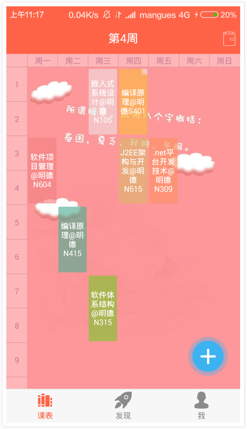 Android 課程表 App 開發實錄:資料抓取、課程歸併與格線繪製
這個專案做了什麼 功能盤點起來大致是:從學校教務系統匯入課程資料、按條件分類顯示、學期的增刪改查、以「週」為單位的課程呈現、修改課程的上課星期與上課週次,以及把課堂自動歸
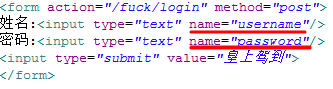 Struts Action 取得請求參數的三種寫法
在 Struts 中接收請求參數並非只有一種做法,實務上常見的有三種。以下依序說明各自的結構與注意事項。 方式一:Action 本身作為 Model,用屬性注入 最直接的
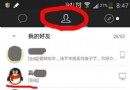 手機 QQ 2015 怎麼刪除好友?四步搞定
手機 QQ 2015 安卓版做了一次幅度不小的改版,無論功能還是介面都有明顯變化,介面佈局與以往差異很大。改版之後有得也有失,其中被問最多的就是「刪除好友的入口跑到哪去了
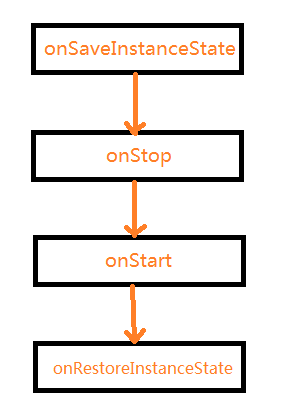 Android 面試知識點全景梳理:從事件分發到 Handler 的 30 道核心題
這份筆記按主題整理了 Android 面試中最常被問到的三十多個問題,覆蓋事件分發、視圖繪製、滑動衝突、動畫原理、Activity 與 Fragment 生命週期、Han