

編輯:關於 Android 程式設計
在 Android 的 ListView 開發中,若於 getView 裡把外部傳入的 Poker 控制項直接加入 convertView,上下滑動時很容易看到「The specified child already has a parent」的錯誤。這類問題通常不是單純的版面配置錯誤,而是 View 的父子關係被重複使用所造成。
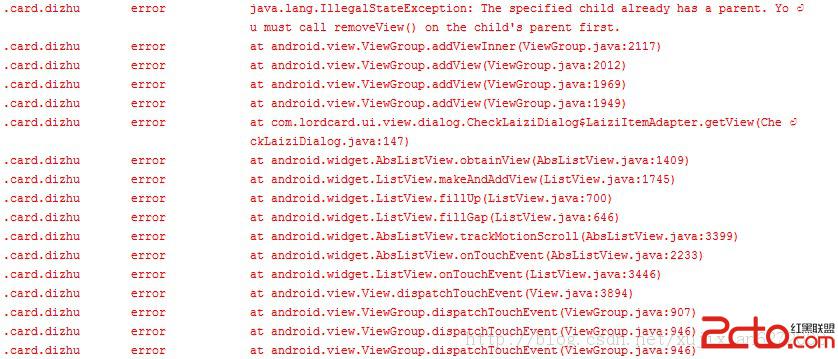
ListView 會重用 convertView,而原本的程式把 Poker 物件本身當成可加入的 View,並在每次 getView 時呼叫 addView。當同一個 Poker View 已經被加入某個 convertView,又被另一個 convertView 引用時,系統就會認為這個子 View 已經有父容器,於是抛出錯誤。
總之,這個錯誤的本質是 View 只能有一個父容器。只要確保每個加入的 View 都來自新的實例,或在重用前先解除舊的父子關係,問題就能避免。
 Android 自學日記(一):從地鐵專業到程序員的兩個月
Android 自學日記(一) 說起日記,記憶還停留在小學的作業上。那時候通篇都是流水賬:幾點起床、去哪裡玩、做了什麼壞事(額,這條不能寫……),反正都是為了應付老師胡
 Android 網絡編程入門:Socket 與 URL 兩條路徑
手機本質上是一個終端:算力與存儲都有限,但勝在便攜、隨時可用,而且幾乎永遠處於聯網狀態。這決定了網絡能力對移動應用的重要性——離開網絡,大多數 App 也就失去了靈魂。
 Android NDK 開發入門:JNI 核心觀念一次搞懂
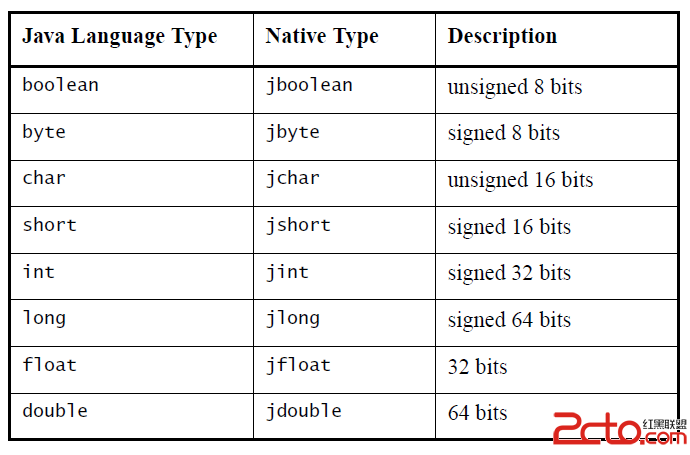
一、JNI 方法的命名規則 先在 Java 層宣告一個 native 方法。下面的 test 是本地方法,參數與回傳值都是字串。 package com.kltz88.
 Android Activity 啟動模式:singleTask 如何整理任務堆疊
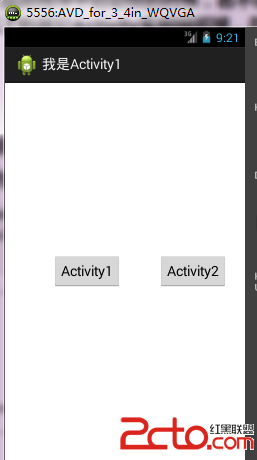
singleTask 的核心規則 singleTask 表示同一個應用中通常只有一個 Activity 實例。若啟動時不存在該實例,會建立新實例;若已存在,系統會清除該實