

編輯:關於 Android 程式設計
為了後續專案方便 reuse,把之前專案裡幾個通用類別整理出來分享。這支是檔案與目錄的簡易操作輔助類,涵蓋存在性檢查、路徑解析、改名、刪除、建立、讀寫與複製等常用動作。
import java.io.BufferedInputStream;
import java.io.File;
import java.io.FileInputStream;
import java.io.FileNotFoundException;
import java.io.FileOutputStream;
import java.io.IOException;
import java.io.InputStream;
import java.io.OutputStream;

/**
 * 文件簡單操作輔助類
 */
public class FILE {

 /** 檔案是否存在 */
 public static boolean isExist(String filePathName) {
 File file = new File(filePathName);
 return (!file.isDirectory() && file.exists());
 }

 public static boolean isDirExist(String filePathName) {
 if(!filePathName.endsWith("/")) filePathName +="/";
 File file = new File(filePathName);
 return (file.isDirectory() && file.exists());
 }

 /** 取得路徑,不含檔名,結尾帶 '/' */
 public static String getPath(String filePathName) {
 try {
 return filePathName.substring(0, filePathName.lastIndexOf('/') + 1);
 } catch (Exception e) {
 return "";
 }
 }

 /**
 * 取得目錄的名稱
 * 注意:只能處理如 /aaaa/ssss/ 或 /aaaa/dsddd 的形式
 */
 public static String getDirPathName(String filePathName) {
 try {
 if(filePathName.endsWith("/"))
 filePathName = filePathName.substring(0, filePathName.lastIndexOf('/'));
 return filePathName.substring(filePathName.lastIndexOf("/") + 1, filePathName.length());
 } catch (Exception e) {
 return "";
 }
 }

 /** 取得檔名,含副檔名 */
 public static String getName(String filePathName) {
 try {
 return filePathName.substring(filePathName.lastIndexOf('/') + 1);
 } catch (Exception e) {
 return "";
 }
 }

 /** 取得檔名,不含副檔名 */
 public static String getNameNoPostfix(String filePathName) {
 try {
 return filePathName.substring(filePathName.lastIndexOf('/') + 1,
 filePathName.lastIndexOf('.'));
 } catch (Exception e) {
 return "";
 }
 }

 /** 重新命名 */
 public static void rename(String filePathName, String newPathName) {
 if(isNullString(filePathName)) return ;
 if(isNullString(newPathName)) return ;
 FILE.delete(newPathName);
 // 新名稱對應的檔案可能已存在,先刪除
 File file = new File(filePathName);
 File newFile = new File(newPathName);
 file.renameTo(newFile);
 }

 /** 刪除檔案 */
 public static void delete(String filePathName) {
 if(isNullString(filePathName)) return ;
 File file = new File(filePathName);
 if (file.isFile() && file.exists()) {
 boolean flag = file.delete();
 LOG.I("LOG", "filePathName reset:"+filePathName+" flag:"+flag);
 }
 }

 /** 建立目錄,路徑上不存在的層級都會一併建立 */
 public static void createDir(String path) {
 File file = new File(path);
 if (!file.exists()) {
 file.mkdirs();
 }
 }

 /**
 * 嘗試建立空白檔案
 * 若檔案已存在則不做任何事並回傳 true
 * @param path 路徑
 * @return 建立失敗(發生 Exception)回傳 false,否則 true
 */
 public static boolean createEmptyFile(String path){
 File file = new File(path);
 if(!file.exists()){
 try{
 return file.createNewFile();
 } catch (Exception e) {
 return false;
 }
 }
 return true;
 }

 /** 取得檔案大小 */
 public static long getSize(String filePathName) {
 if(isNullString(filePathName)) return 0;
 File file = new File(filePathName);
 if (file.isFile()) return file.length();
 return 0;
 }

 /**
 * 讀取檔案資料到 byte 陣列
 * @param filePathName 檔名
 * @param readOffset 從哪裡開始讀
 * @param readLength 讀取長度
 * @param dataBuf 保存資料的緩衝區
 * @param bufOffset 從哪裡開始寫入緩衝區
 */
 public static boolean readData(String filePathName, int readOffset, int readLength,
 byte[] dataBuf, int bufOffset) {
 try {
 int readedTotalSize = 0;
 int onceReadSize = 0;
 BufferedInputStream in = new BufferedInputStream(new FileInputStream(filePathName));
 in.skip(readOffset);
 while (readedTotalSize < readLength
 && (onceReadSize = in.read(dataBuf, bufOffset + readedTotalSize,
 readLength - readedTotalSize)) >= 0) {
 readedTotalSize += onceReadSize;
 }
 in.close();
 in = null;
 } catch (Exception e) {
 return false;
 }
 return true;
 }

 /** 將某個輸入流的內容輸出到檔案 */
 public static boolean writeFile(InputStream in,String filePathName){
 boolean flag = false;
 OutputStream outStream = null;
 try {
 File destFile = new File(filePathName);
 if (destFile.exists()) {
 destFile.delete();
 } else {
 destFile.createNewFile();
 }
 outStream = new FileOutputStream(filePathName);
 byte[] buffer = new byte[1024];
 int count = 0;
 while(true){
 int length = in.read(buffer, 0, 1024);
 if(length > 0){
 outStream.write(buffer, 0, length);
 }else{
 break;
 }
 count+=length;
 }
 if(count > 0){
 flag = true;
 }
 } catch (IOException e) {
 e.printStackTrace();
 }finally{
 if(outStream != null){
 try{outStream.close();}catch(Exception e){e.printStackTrace();}
 }
 }
 return flag;
 }

 /** 判斷字串是否為空 */
 public static boolean isNullString(String str) {
 if(str == null || str.equals("")) return true ;
 return false;
 }

 /** 複製檔案 */
 public static int copy(String fromPathName, String toPathName) {
 try {
 InputStream from = new FileInputStream(fromPathName);
 return copy(from, toPathName);
 } catch (FileNotFoundException e) {
 return -1;
 }
 }

 /** 複製檔案(從輸入流) */
 public static int copy(InputStream from, String toPathName) {
 try {
 FILE.delete(toPathName); // 先刪除,避免覆蓋失敗
 OutputStream to = new FileOutputStream(toPathName);
 byte buf[] = new byte[1024];
 int c;
 while ((c = from.read(buf)) > 0) {
 to.write(buf, 0, c);
 }
 from.close();
 to.close();
 return 0;
 } catch (Exception ex) {
 return -1;
 }
 }

 /** 依 zip 檔路徑推回對應的檔案路徑 */
 public static String zip2FileFullPath(String zipFullPath) {
 int zipIndex = zipFullPath.lastIndexOf(".zip");
 int zipIndexTmp = zipFullPath.lastIndexOf(".ZIP");
 String tmp = "";
 if(zipIndex > -1) {
 tmp = zipFullPath.substring(0, zipIndex);
 } else if(zipIndexTmp > -1) {
 tmp = zipFullPath.substring(0, zipIndexTmp);
 }
 return tmp;
 }

 /** 變更檔案權限 */
 public static void chmod(String permission, String filePathName) {
 try {
 String command = "chmod " + permission + " " + filePathName;
 Runtime runtime = Runtime.getRuntime();
 runtime.exec(command);
 } catch (IOException e) {
 e.printStackTrace();
 }
 }
}
使用上有幾點值得留意:
· getPath、getName 這類方法都用 try-catch 包住 substring,遇到沒有斜線或沒有副檔名的路徑會回傳空字串,呼叫端要記得判空。
· rename 與 copy 都採「先刪目標再寫入」的策略,這是為了避開部分檔案系統上不允許直接覆蓋的問題,但缺點是若中途失敗,原本目標檔已經沒了。
· chmod 透過 Runtime.exec 呼叫 shell,只適用於有權限的環境(例如 root 或自家私有目錄);字串拼接方式也有命令注入風險,正式專案建議改用 File.setReadable() 這類 API。
· 類別名稱 FILE 全大寫不符合 Java 命名慣例,建議整理成 FileUtils 之類的形式;另外 LOG 是外部相依,記得補上對應的日誌工具類。
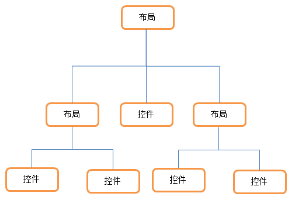 Android UI 開發入門:常用控制項、版面配置與自定義視圖
Android UI 開發是應用體驗的基礎。畫面是否清晰、操作是否直覺,往往取決於控制項選擇、版面配置安排與細節優化。以下從常見控制項、基本版面配置、自定義控制項、Lis
 360 手機 Q5 怎麼插卡?SIM 卡安裝與電信支援說明
360 手機 Q5 配備雙鏡頭、主打高端安全,並支援全網通與 VoLTE 高清通話。新機到手第一步是裝卡,下面把卡型、卡槽與安裝方式說清楚。 裝卡前先了解三件事 網絡制
 Android 事件分發源碼解析(一):搞懂 View 的 Touch 與點擊
在 Android 開發中,事件分發是一個無法繞開的核心知識點。很多看似簡單的問題,背後其實都與事件分發機制有關。例如:為什麼 onTouch 和 onTouchEven
 Android BroadcastReceiver 完全指南:兩種註冊方式、有序與普通廣播及實戰案例
BroadcastReceiver 是什麼 BroadcastReceiver,直譯過來就是「廣播接收者」,顧名思義,它負責接收來自系統或其他應用的廣播消息。 廣播是 A