

編輯:關於 Android 程式設計
在 Android 中處理圖片時,經常需要縮放尺寸。若圖片過大,直接載入可能造成記憶體浪費,甚至引發 OOM。常見做法有兩種:使用 Matrix 縮放,或使用 inSampleSize 降低解碼大小。
若已經有 Bitmap,可以使用 Matrix 對它進行縮放。
public static Drawable resizeImage(Bitmap bitmap, int w, int h) {
    int width = bitmap.getWidth();
    int height = bitmap.getHeight();
    float scaleWidth = ((float) w) / width;
    float scaleHeight = ((float) h) / height;

    Matrix matrix = new Matrix();
    matrix.postScale(scaleWidth, scaleHeight);

    Bitmap resizedBitmap = Bitmap.createBitmap(bitmap, 0, 0, width, height, matrix, true);
    return new BitmapDrawable(resizedBitmap);
}
若圖片來自檔案,可以先只讀取尺寸資訊,再決定合適的 inSampleSize,避免一次載入過大圖片。
BitmapFactory.Options options = new BitmapFactory.Options();
options.inJustDecodeBounds = true;
BitmapFactory.decodeFile(path, options);

int outWidth = options.outWidth;
int outHeight = options.outHeight;

options.inSampleSize = calculateSampleSize(outWidth, outHeight, width, height);
options.inJustDecodeBounds = false;

return new BitmapDrawable(BitmapFactory.decodeFile(path, options));
Matrix 縮放適合已在記憶體中的 Bitmap,但原始圖片仍可能已佔用大量記憶體。inSampleSize 則是在解碼階段就降低影像尺寸,對大圖優化更明顯。
 Android 中使用 DownloadManager 下載並安裝 APK
DownloadManager 是 Android 提供的系統下載服務,適合處理長時間的 HTTP 下載。它會在背景執行下載,並處理失敗重試、網路切換與重新開機後的續傳情
 Android 實作:從相冊選圖與呼叫系統拍照
開發時幾乎一定會碰到「新增圖片」的需求。取得圖片有兩條路:從本機相冊挑選,或呼叫相機即時拍攝。兩者的實作方式其實是同一套邏輯——用 startActivityForRes
 Android 自製 IphoneTreeView:為 ExpandableListView 加上懸浮分組指示器
早前我曾經實作過一次類似的效果,但那個版本在細節處理上相當粗糙。這一回,我參考了系統聯絡人中的 PinnedHeaderListView,並綜合社群裡各方公開的程式碼,重
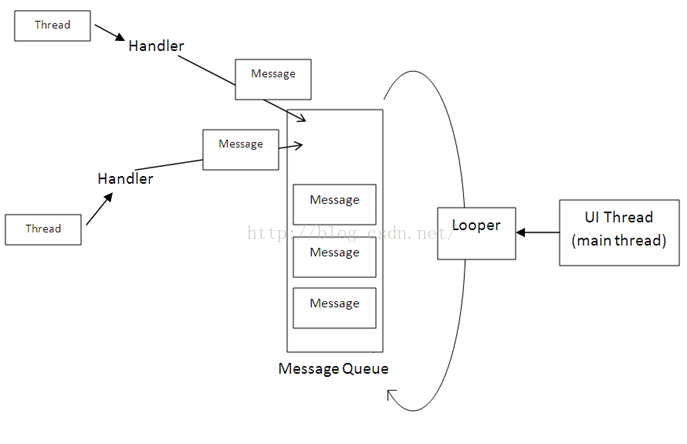 Android 事件流解析(三):線程間通訊的五種實現方式
任何程序本質上都是一堆靜態代碼,我們把代碼打包放進運行環境,再靠事件流的驅動讓它跑起來。Android 也不例外——靜止的代碼只有在動態事件的驅動下才會真正運轉。 驅動