

編輯:關於 Android 程式設計
在 Android 裡,每個應用各自跑在自己的進程當中,進程與進程之間預設是彼此隔離、無法直接溝通的。為了讓不同進程能夠交換資料,也就是所謂的行程間通訊(Inter-Process Communication,簡稱 IPC),Android 提供了 AIDL Service 這套機制。
Android 需要靠 AIDL(Android Interface Definition Language)來描述遠程介面。這種介面描述語言並不是真正的程式語言,它只負責定義兩個進程之間的溝通契約。
寫法雖然和 Java 介面很像,但有幾個關鍵差異:
以下示範如何建立一個名為 ICat 的介面,讓客戶端能取得貓咪的顏色與體重(完整程式碼可參考 AIDLService 與 AIDLClient 兩個專案)。
package com.example.aidlservice;
interface ICat {
    String getColor();
    double getWeight();
}
寫好 AIDL 檔後,ADT 會自動在 gen/com/example/aidlservice/ 目錄下產生一個 ICat.java。這個類別內部有一個 Stub 內部類,同時實作了 IBinder 與 ICat 兩個介面,它就會成為遠程 Service 的回呼類別。
package com.example.aidlservice;
import java.util.Timer;
import java.util.TimerTask;
import com.example.aidlservice.ICat.Stub;
import android.app.Service;
import android.content.Intent;
import android.os.IBinder;
import android.os.RemoteException;

public class AidlService extends Service {
    String[] colors = new String[] { "紅色", "黃色", "黑色" };
    double[] weights = new double[] { 2.3, 3.1, 1.58 };
    private String color;
    private double weight;
    private CatBinder catBinder;
    Timer timer = new Timer();

    @Override
    public void onCreate() {
        super.onCreate();
        catBinder = new CatBinder();
        timer.schedule(new TimerTask() {
            @Override
            public void run() {
                // 隨機改變 color、weight 的值
                int rand = (int) (Math.random() * 3);
                color = colors[rand];
                weight = weights[rand];
                System.out.println("---------" + rand);
            }
        }, 0, 800);
    }

    @Override
    public IBinder onBind(Intent arg0) {
        // 本地 Service 會直接傳 catBinder 本體給客戶端;
        // 遠程 Service 則只傳 catBinder 的代理物件給客戶端。
        return catBinder;
    }

    @Override
    public void onDestroy() {
        timer.cancel();
    }

    // 繼承 Stub,等同於實作 ICat 與 IBinder 介面
    public class CatBinder extends Stub {
        @Override
        public String getColor() throws RemoteException {
            return color;
        }
        @Override
        public double getWeight() throws RemoteException {
            return weight;
        }
    }
}
接著別忘了在 AndroidManifest.xml 註冊這個 Service:
把 Service 端的 AIDL 檔複製到客戶端專案,關鍵是務必放在完全相同的 package 名稱底下。
package com.example.aidlclient;
import com.example.aidlservice.ICat;
import android.os.Bundle;
import android.os.IBinder;
import android.os.RemoteException;
import android.view.View;
import android.view.View.OnClickListener;
import android.widget.Button;
import android.widget.EditText;
import android.app.Activity;
import android.app.Service;
import android.content.ComponentName;
import android.content.Intent;
import android.content.ServiceConnection;

public class AidlClient extends Activity {
    private ICat catService;
    private Button getButton;
    private EditText colorEditText, weightEditText;
    private ServiceConnection conn = new ServiceConnection() {
        @Override
        public void onServiceDisconnected(ComponentName name) {
            catService = null;
        }
        @Override
        public void onServiceConnected(ComponentName name, IBinder service) {
            // 取得遠程 Service onBind 回傳物件的代理
            catService = ICat.Stub.asInterface(service);
        }
    };

    @Override
    protected void onCreate(Bundle savedInstanceState) {
        super.onCreate(savedInstanceState);
        setContentView(R.layout.activity_aidl_client);
        getButton = (Button) findViewById(R.id.getbutton);
        colorEditText = (EditText) findViewById(R.id.coloredittext);
        weightEditText = (EditText) findViewById(R.id.weightedittext);

        Intent intent = new Intent();
        intent.setAction("org.crazyit.aidl.action.AIDL_SERVICE");
        bindService(intent, conn, Service.BIND_AUTO_CREATE);

        getButton.setOnClickListener(new OnClickListener() {
            @Override
            public void onClick(View v) {
                try {
                    colorEditText.setText(catService.getColor());
                    weightEditText.setText(catService.getWeight() + "");
                } catch (RemoteException e) {
                    e.printStackTrace();
                }
            }
        });
    }

    @Override
    protected void onDestroy() {
        super.onDestroy();
        this.unbindService(conn);
    }
}
常見錯誤: java.lang.SecurityException: Binder invocation to an incorrect interface。使用時務必確認,服務端與客戶端所用的介面要「完全相同」,這裡的相同包含 package 名稱,也就是要在不同專案下建立一致的 package。
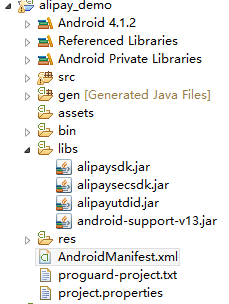 Android 接入支付寶支付的實作指南
接入前的準備 在 Android 應用中接入支付寶之前,商戶通常需要先完成簽約與審核,取得 PID,並建立 RSA 金鑰組。私鑰用於產生數字簽名,公鑰則交由支付寶平台驗證
 RecyclerView 使用指南:從基礎到點擊與增刪動畫
參考官方文檔:https://developer.android.com/training/material/lists-cards.html 一、為什麼有了 ListV
 【React Native 開發】ToolbarAndroid 工具欄控件詳解與實踐(15)
(一)前言 今天我們一起來深入解析 React Native 中的工具欄控件 ToolbarAndroid,並結合最佳實踐進行講解。 該 ToolbarAndroid 組
 Activity 物件傳遞:用 Serializable 讓資料跨頁面移動
問題:Intent 不能直接傳物件 在 Activity 之間傳遞基本資料時,常使用 Intent 的 putExtra 方法。但如果傳入自訂物件,會發現無法直接運作,因