

編輯:關於 Android 程式設計
專案裡常需要拿到裝置的網路資訊,Android 提供的不止一條路徑。以下整理列舉網路介面、查詢 WifiInfo、呼叫 busybox 等幾種常見寫法,各有適用時機。
這是最通用的方式,直接走訪系統的網路介面清單,避開 loopback 與 IPv6:
/** 取得行動裝置的本機 IP */
protected static InetAddress getLocalInetAddress() {
    InetAddress ip = null;
    try {
        Enumeration<NetworkInterface> en_netInterface = NetworkInterface.getNetworkInterfaces();
        while (en_netInterface.hasMoreElements()) {
            NetworkInterface ni = en_netInterface.nextElement();
            Enumeration<InetAddress> en_ip = ni.getInetAddresses();
            while (en_ip.hasMoreElements()) {
                ip = en_ip.nextElement();
                if (!ip.isLoopbackAddress() && ip.getHostAddress().indexOf(":") == -1)
                    break;
                else
                    ip = null;
            }
            if (ip != null)
                break;
        }
    } catch (SocketException e) {
        e.printStackTrace();
    }
    return ip;
}
寫法更精簡的版本,直接回傳字串:
public static String getLocalIpAddress() {
    try {
        for (Enumeration<NetworkInterface> en = NetworkInterface.getNetworkInterfaces();
             en.hasMoreElements();) {
            NetworkInterface intf = en.nextElement();
            for (Enumeration<InetAddress> enumIpAddr = intf.getInetAddresses();
                 enumIpAddr.hasMoreElements();) {
                InetAddress inetAddress = enumIpAddr.nextElement();
                if (!inetAddress.isLoopbackAddress()) {
                    return inetAddress.getHostAddress().toString();
                }
            }
        }
    } catch (SocketException ex) {
        ex.printStackTrace();
    }
    return null;
}
有了 IP 之後,可以透過 NetworkInterface.getByInetAddress() 拿到硬體位址:
@SuppressLint({ "NewApi", "DefaultLocale" })
public static String getMacAddress() {
    String strMacAddr = null;
    try {
        InetAddress ip = getLocalInetAddress();
        byte[] b = NetworkInterface.getByInetAddress(ip).getHardwareAddress();
        StringBuffer buffer = new StringBuffer();
        for (int i = 0; i < b.length; i++) {
            if (i != 0) {
                buffer.append(':');
            }
            String str = Integer.toHexString(b[i] & 0xFF);
            buffer.append(str.length() == 1 ? 0 + str : str);
        }
        strMacAddr = buffer.toString().toUpperCase();
    } catch (Exception e) {
    }
    return strMacAddr;
}
注意 b[i] & 0xFF 這個寫法不可省略。Java 的 byte 是有號數,直接轉十六進位會讓 0x80 以上的位元組變成負數而產生錯誤輸出。
另一種等效寫法,把位元組轉換抽成獨立方法:
public static String getLocalMacAddressFromIp(Context context) {
    String mac_s = "";
    try {
        byte[] mac;
        NetworkInterface ne = NetworkInterface.getByInetAddress(
                InetAddress.getByName(getLocalIpAddress()));
        mac = ne.getHardwareAddress();
        mac_s = byte2hex(mac);
    } catch (Exception e) {
        e.printStackTrace();
    }
    return mac_s;
}

/** 二進位轉十六進位 */
public static String byte2hex(byte[] b) {
    StringBuffer hs = new StringBuffer(b.length);
    String stmp = "";
    int len = b.length;
    for (int n = 0; n < len; n++) {
        stmp = Integer.toHexString(b[n] & 0xFF);
        if (stmp.length() == 1)
            hs = hs.append("0").append(stmp);
        else
            hs = hs.append(stmp);
    }
    return String.valueOf(hs);
}
在已 root 或預先植入 busybox 的環境中,可以直接執行 ifconfig 並解析輸出:
public static String getLocalMacAddressFromBusybox() {
    String result = "";
    String Mac = "";
    result = callCmd("busybox ifconfig", "HWaddr");
    // result 為 null 代表網路不可用
    if (result == null) {
        return "網路異常";
    }
    // 例如:eth0 Link encap:Ethernet HWaddr 00:16:E8:3E:DF:67
    if (result.length() > 0 && result.contains("HWaddr") == true) {
        Mac = result.substring(result.indexOf("HWaddr") + 6, result.length() - 1);
        result = Mac;
    }
    return result;
}

private static String callCmd(String cmd, String filter) {
    String result = "";
    String line = "";
    try {
        Process proc = Runtime.getRuntime().exec(cmd);
        InputStreamReader is = new InputStreamReader(proc.getInputStream());
        BufferedReader br = new BufferedReader(is);
        while ((line = br.readLine()) != null && line.contains(filter) == false) {
            result += line;
        }
        result = line;
    } catch (Exception e) {
        e.printStackTrace();
    }
    return result;
}
若只關心 Wi-Fi 連線狀態,最省事的是問 WifiManager:
public static String getLocalMacAddressFromWifiInfo(Context context) {
    WifiManager wifi = (WifiManager) context.getSystemService(Context.WIFI_SERVICE);
    WifiInfo winfo = wifi.getConnectionInfo();
    return winfo.getMacAddress();
}
從 Android 6.0(API 23)開始,系統對 MAC 位址做了隱私保護,一般應用透過上述 API 拿到的會是固定值 02:00:00:00:00:00,而非真實硬體位址。若需求是裝置唯一識別,現已不建議使用 MAC,可改用 App 自建的安裝識別碼或 Android ID 搭配金鑰保存機制。
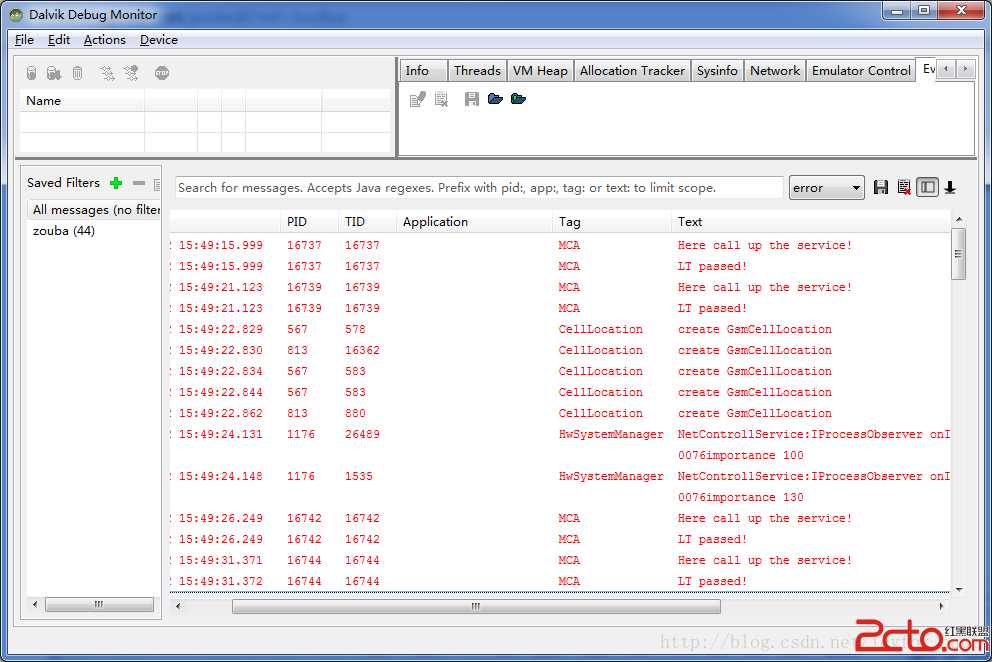 Android 開發技巧:讓 LogCat 分屏顯示,告別擁擠
Eclipse 裡有文件列表、編輯區、類結構等眾多介面元件,在這麼多元件裡再塞一個 Logcat,基本就沒有空間了。與其擠在一起,不如把它拆成兩個視窗;如果你有兩台螢幕,
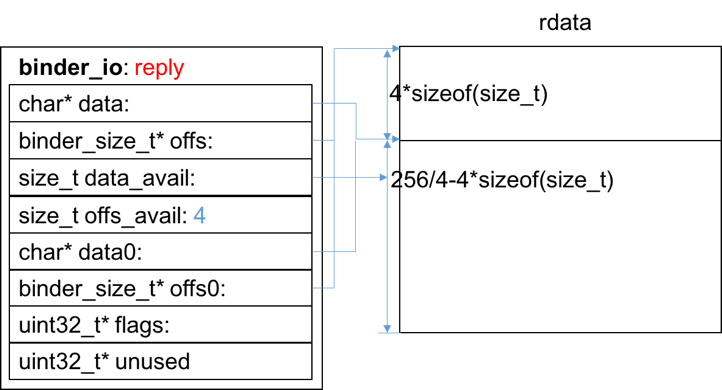 Binder 學習筆記(四):ServiceManager 如何回應一個 checkService 請求
要理解 ServiceManager 是怎樣答覆 checkService 請求的,得從 frameworks/native/cmds/servicemanager/se
 Android 字串格式化:用 String.format 動態組裝 string.xml 資源
一、需求場景 專案裡經常會遇到這樣的畫面:一行文案中夾雜著人數、百分比、稱號與等級,而這些值都要等到執行期才拿得到。 要做出這種效果,一般有兩條路可以走。 方案一:用
 用 TextView 實現文字跑馬燈效果(巧妙「騙取」持久焦點)
常規做法 通常情況下,想實現文字跑馬燈效果,需要在 XML 中這樣設置: <TextView android:layout_width=wrap_conte