

編輯:關於 Android 程式設計
標準的 ExpandableListView 只有兩層(群組與子項),要做三級樹(公司 → 部門 → 員工)就需要在子項的位置再嵌一個 ExpandableListView。核心技巧是動態調整內層列表的高度,因為嵌套的可捲動元件不會自動撐開。
執行效果如下:
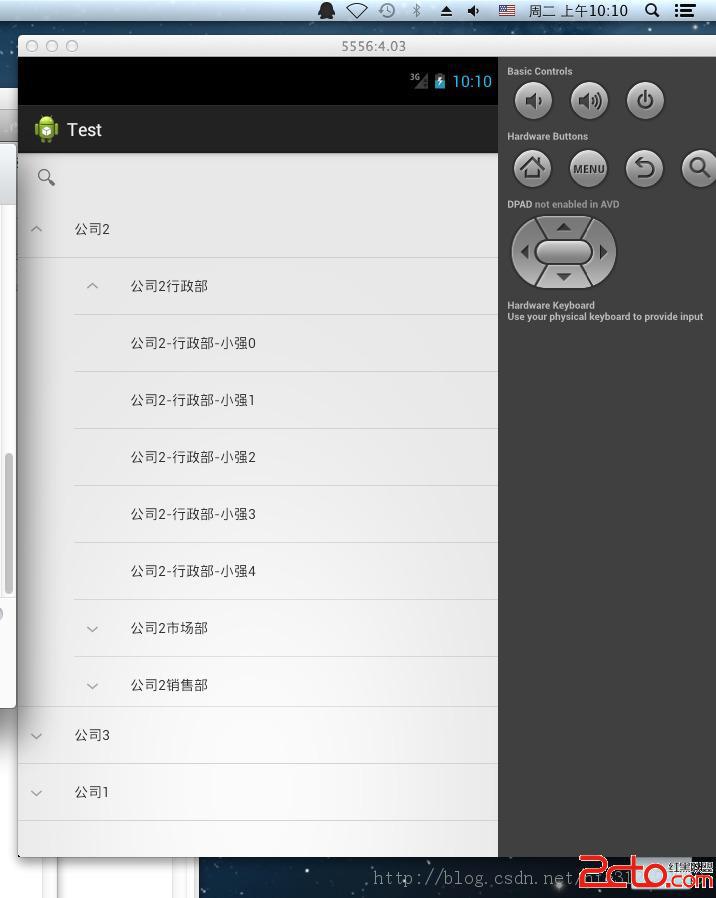
利用 Android 原生控制項 ExpandableListView 做嵌套。外層 adapter 的 getChildView 回傳的不是 TextView,而是另一個綁好 adapter 的 ExpandableListView。由於 AbsListView 不會自動依子項數量計算高度,必須在展開與收合時手動調整 LayoutParams 的 height。
package com.xiaoqiang.test;

import java.util.List;
import java.util.Map;

import android.content.Context;
import android.view.Gravity;
import android.view.View;
import android.view.ViewGroup;
import android.widget.AbsListView;
import android.widget.BaseExpandableListAdapter;
import android.widget.ExpandableListView;
import android.widget.ExpandableListView.OnGroupCollapseListener;
import android.widget.ExpandableListView.OnGroupExpandListener;
import android.widget.TextView;

import com.xiaoqiang.test.TwoExpandableListAdapter.ItemClickCallback;

/**
 * 外層 adapter:公司 → 部門
 */
public class TopExpandableListAdapter extends BaseExpandableListAdapter {

    private Map<String, Map<String, List<ContactBean>>> allContacts;
    private Context context;
    private AbsListView.LayoutParams textviewLP;
    private ItemClickCallback itemClickCallback;
    private int contact_row_height;

    public TopExpandableListAdapter(int contact_row_height, Context context,
            Map<String, Map<String, List<ContactBean>>> allContacts,
            ItemClickCallback itemClickCallback) {
        this.context = context;
        this.contact_row_height = contact_row_height;
        this.itemClickCallback = itemClickCallback;
        this.allContacts = allContacts;
        textviewLP = new AbsListView.LayoutParams(
                ViewGroup.LayoutParams.FILL_PARENT, contact_row_height);
    }

    @Override
    public int getGroupCount() {
        // 公司總數
        int companyCount = allContacts.size();
        return companyCount;
    }

    @Override
    public int getChildrenCount(int groupPosition) {
        // 某公司下的部門數
        return 1;
    }

    @Override
    public Object getGroup(int groupPosition) {
        String companyName = (String) allContacts.keySet().toArray()[groupPosition];
        Map<String, List<ContactBean>> companyDatas = allContacts.get(companyName);
        return companyDatas;
    }

    @Override
    public Object getChild(int groupPosition, int childPosition) {
        Map<String, List<ContactBean>> companyDatas =
                (Map<String, List<ContactBean>>) getGroup(groupPosition);
        String departmentName = (String) companyDatas.keySet().toArray()[childPosition];
        return companyDatas.get(departmentName);
    }

    @Override
    public long getGroupId(int groupPosition) {
        return groupPosition * 100;
    }

    @Override
    public long getChildId(int groupPosition, int childPosition) {
        return groupPosition * 100 + childPosition * 10;
    }

    @Override
    public boolean hasStableIds() {
        return false;
    }

    public ExpandableListView getExpandableListView(
            Map<String, List<ContactBean>> companyDatas) {
        AbsListView.LayoutParams explvLP = new AbsListView.LayoutParams(
                ViewGroup.LayoutParams.FILL_PARENT,
                contact_row_height * companyDatas.size());
        final ExpandableListView childExpandableListView = new ExpandableListView(context);
        childExpandableListView.setLayoutParams(explvLP);
        childExpandableListView.setPadding(contact_row_height, 0, 0, 0);

        final TwoExpandableListAdapter twoExpandableListAdapter =
                new TwoExpandableListAdapter(contact_row_height, context,
                        companyDatas, itemClickCallback);
        childExpandableListView.setAdapter(twoExpandableListAdapter);

        // 收合時縮短高度
        childExpandableListView.setOnGroupCollapseListener(new OnGroupCollapseListener() {
            @Override
            public void onGroupCollapse(int groupPosition) {
                int currentDepartmentcount =
                        twoExpandableListAdapter.getChildrenCount(groupPosition);
                AbsListView.LayoutParams lp =
                        (AbsListView.LayoutParams) childExpandableListView.getLayoutParams();
                lp.height = lp.height - currentDepartmentcount * contact_row_height;
                childExpandableListView.setLayoutParams(lp);
            }
        });

        // 展開時拉長高度
        childExpandableListView.setOnGroupExpandListener(new OnGroupExpandListener() {
            @Override
            public void onGroupExpand(int groupPosition) {
                int currentDepartmentcount =
                        twoExpandableListAdapter.getChildrenCount(groupPosition);
                AbsListView.LayoutParams lp =
                        (AbsListView.LayoutParams) childExpandableListView.getLayoutParams();
                lp.height = lp.height + currentDepartmentcount * contact_row_height;
                childExpandableListView.setLayoutParams(lp);
            }
        });

        return childExpandableListView;
    }

    @Override
    public View getGroupView(int groupPosition, boolean isExpanded,
                             View convertView, ViewGroup parent) {
        TextView textView = new TextView(context);
        textView.setLayoutParams(textviewLP);
        textView.setPadding(contact_row_height, 0, 0, 0);
        textView.setGravity(Gravity.CENTER_VERTICAL);
        textView.setText((String) allContacts.keySet().toArray()[groupPosition]);
        return textView;
    }

    @Override
    public View getChildView(int groupPosition, int childPosition, boolean isLastChild,
                             View convertView, ViewGroup parent) {
        String companyName = (String) allContacts.keySet().toArray()[groupPosition];
        Map<String, List<ContactBean>> companyDatas = allContacts.get(companyName);
        return getExpandableListView(companyDatas);
    }

    @Override
    public boolean isChildSelectable(int groupPosition, int childPosition) {
        return false;
    }
}
package com.xiaoqiang.test;

import java.util.List;
import java.util.Map;

import android.content.Context;
import android.view.Gravity;
import android.view.View;
import android.view.View.OnClickListener;
import android.view.ViewGroup;
import android.widget.AbsListView;
import android.widget.BaseExpandableListAdapter;
import android.widget.TextView;

/**
 * 內層 adapter:部門 → 員工
 */
public class TwoExpandableListAdapter extends BaseExpandableListAdapter {

    private Map<String, List<ContactBean>> departmentContacts;
    private Context context;
    private ItemClickCallback callback;
    private int contact_row_height;

    public TwoExpandableListAdapter(int contact_row_height, Context context,
            Map<String, List<ContactBean>> departmentContacts,
            ItemClickCallback callback) {
        this.contact_row_height = contact_row_height;
        this.context = context;
        this.departmentContacts = departmentContacts;
        this.callback = callback;
    }

    @Override
    public int getGroupCount() {
        // 部門總數
        return departmentContacts.size();
    }

    @Override
    public int getChildrenCount(int groupPosition) {
        // 某部門下的員工總數
        return departmentContacts.get(
                departmentContacts.keySet().toArray()[groupPosition]).size();
    }

    @Override
    public Object getGroup(int groupPosition) {
        return departmentContacts.get(
                departmentContacts.keySet().toArray()[groupPosition]);
    }

    @Override
    public Object getChild(int groupPosition, int childPosition) {
        return departmentContacts.get(
                departmentContacts.keySet().toArray()[groupPosition]).get(childPosition);
    }

    @Override
    public long getGroupId(int groupPosition) {
        return groupPosition * 10;
    }

    @Override
    public long getChildId(int groupPosition, int childPosition) {
        return groupPosition * 10 + childPosition * 1;
    }

    @Override
    public boolean hasStableIds() {
        return false;
    }

    @Override
    public View getGroupView(int groupPosition, boolean isExpanded,
                             View convertView, ViewGroup parent) {
        TextView textView = getTextView(0);
        textView.setText((String) departmentContacts.keySet().toArray()[groupPosition]);
        return textView;
    }

    @Override
    public View getChildView(int groupPosition, int childPosition, boolean isLastChild,
                             View convertView, ViewGroup parent) {
        TextView textView = getTextView(contact_row_height);
        final ContactBean contactBean = departmentContacts.get(
                departmentContacts.keySet().toArray()[groupPosition]).get(childPosition);
        textView.setText(contactBean.getName());
        textView.setOnClickListener(new OnClickListener() {
            @Override
            public void onClick(View v) {
                if (null != callback) {
                    callback.onClick(contactBean);
                }
            }
        });
        return textView;
    }

    /** 取得一個 TextView */
    public TextView getTextView(int paddingleft) {
        AbsListView.LayoutParams textviewLP = new AbsListView.LayoutParams(
                ViewGroup.LayoutParams.FILL_PARENT, contact_row_height);
        TextView textView = new TextView(context);
        textView.setBackgroundResource(R.drawable.contact_selector);
        textView.setLayoutParams(textviewLP);
        textView.setPadding(contact_row_height, 0, 0, 0);
        textView.setGravity(Gravity.CENTER_VERTICAL);
        return textView;
    }

    @Override
    public boolean isChildSelectable(int groupPosition, int childPosition) {
        return false;
    }

    public interface ItemClickCallback {
        void onClick(ContactBean contactBean);
    }
}
package com.xiaoqiang.test;

import java.util.ArrayList;
import java.util.HashMap;
import java.util.List;
import java.util.Map;

import android.app.Activity;
import android.os.Bundle;
import android.widget.ExpandableListView;
import android.widget.Toast;

import com.xiaoqiang.test.TwoExpandableListAdapter.ItemClickCallback;

public class MainActivity extends Activity {

    private ExpandableListView contract_company_listcompany;
    private int contact_row_height = 56;

    @Override
    protected void onCreate(Bundle savedInstanceState) {
        super.onCreate(savedInstanceState);
        setContentView(R.layout.activity_main);
        contract_company_listcompany = (ExpandableListView)
                this.findViewById(R.id.contract_company_listcompany);

        /******** 測試資料 *************/
        Map<String, Map<String, List<ContactBean>>> contacts =
                new HashMap<String, Map<String, List<ContactBean>>>();
        contacts.put("公司1", getCompanydata("公司1"));
        contacts.put("公司2", getCompanydata("公司2"));
        contacts.put("公司3", getCompanydata("公司3"));
        /******** end 測試資料 *************/

        TopExpandableListAdapter topExpandableListAdapter = new TopExpandableListAdapter(
                contact_row_height, this, contacts, itemClickCallback);
        contract_company_listcompany.setAdapter(topExpandableListAdapter);
    }

    /** 點擊聯絡人後的回饋 */
    private ItemClickCallback itemClickCallback = new ItemClickCallback() {
        @Override
        public void onClick(ContactBean contactBean) {
            Toast.makeText(MainActivity.this, contactBean.getName(),
                    Toast.LENGTH_LONG).show();
        }
    };

    /** 測試資料:公司下的部門 */
    public Map<String, List<ContactBean>> getCompanydata(String cname) {
        Map<String, List<ContactBean>> cdata = new HashMap<String, List<ContactBean>>();
        cdata.put(cname + "銷售部", getDepartmentdata(cname, "銷售部"));
        cdata.put(cname + "市場部", getDepartmentdata(cname, "市場部"));
        cdata.put(cname + "行政部", getDepartmentdata(cname, "行政部"));
        return cdata;
    }

    /** 測試資料:某部門下的人員 */
    public List<ContactBean> getDepartmentdata(String cname, String dname) {
        List<ContactBean> cdontacts = new ArrayList<ContactBean>();
        for (int i = 0; i < 5; i++) {
            cdontacts.add(new ContactBean(cname + "-" + dname + "-" + "小強" + i));
        }
        return cdontacts;
    }
}
嵌套 ExpandableListView 能跑,但有幾個先天問題值得先知道再決定要不要用。
高度必須手動維護。程式碼中靠展開/收合回呼加減 contact_row_height × 子項數 來調整內層高度。這代表每個群組的展開狀態都要自己記,一旦資料動態變化(例如新增員工),高度計算就會失準。
內層沒有 view 複用。getChildView 每次都 new 一個 ExpandableListView 並重新 inflate 內層 adapter,滾動效能不佳,資料量大時明顯卡頓。
點擊事件穿透風險。內外兩層都是可捲動元件,觸控事件的分發需要仔細處理,否則會出現內層滾動時外層也跟著動的情況。
更好的替代方案。三層以上的樹狀結構,建議改用 RecyclerView 搭配多種 viewType,把三個層級實作成三種 Item 並以「展開/收合狀態」控制可見性;或使用成熟的三級鏈表庫(如 TreeView、AndroidTreeView)。RecyclerView 強制 ViewHolder 複用、內建差量更新動畫,在效能與維護性上都明顯優於嵌套方案。
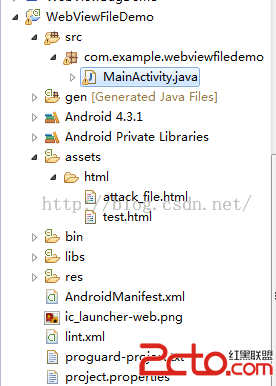 Android WebView 遠程代碼執行漏洞淺析
背景 本文以一個實際的 WebView 示例為切入點,分析遠程代碼執行漏洞的成因。代碼地址為:https://github.com/jltxgcy/AppVulnerab
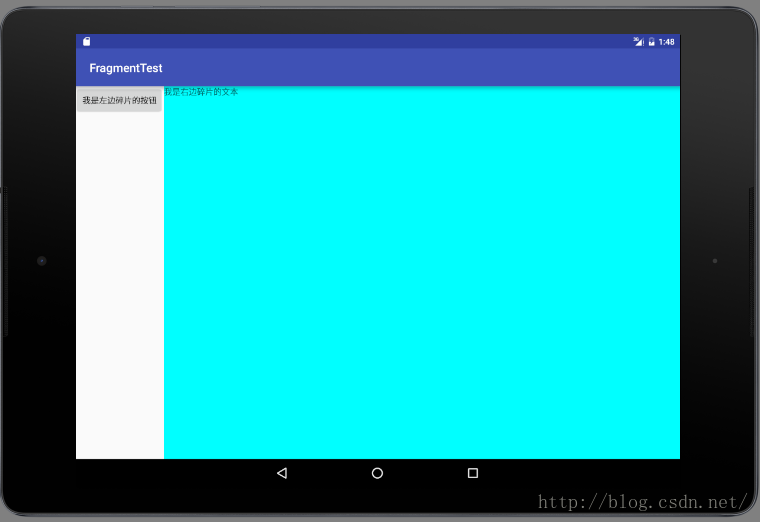 Android 學習之 Fragment(一):從靜態加載到動態切換
Android 為什麼引入 Fragment? 如今形形色色的 Android 設備,螢幕尺寸各異。同樣的佈局,在不同設備上可能呈現出不同效果——手機上顯示完美,到了大屏
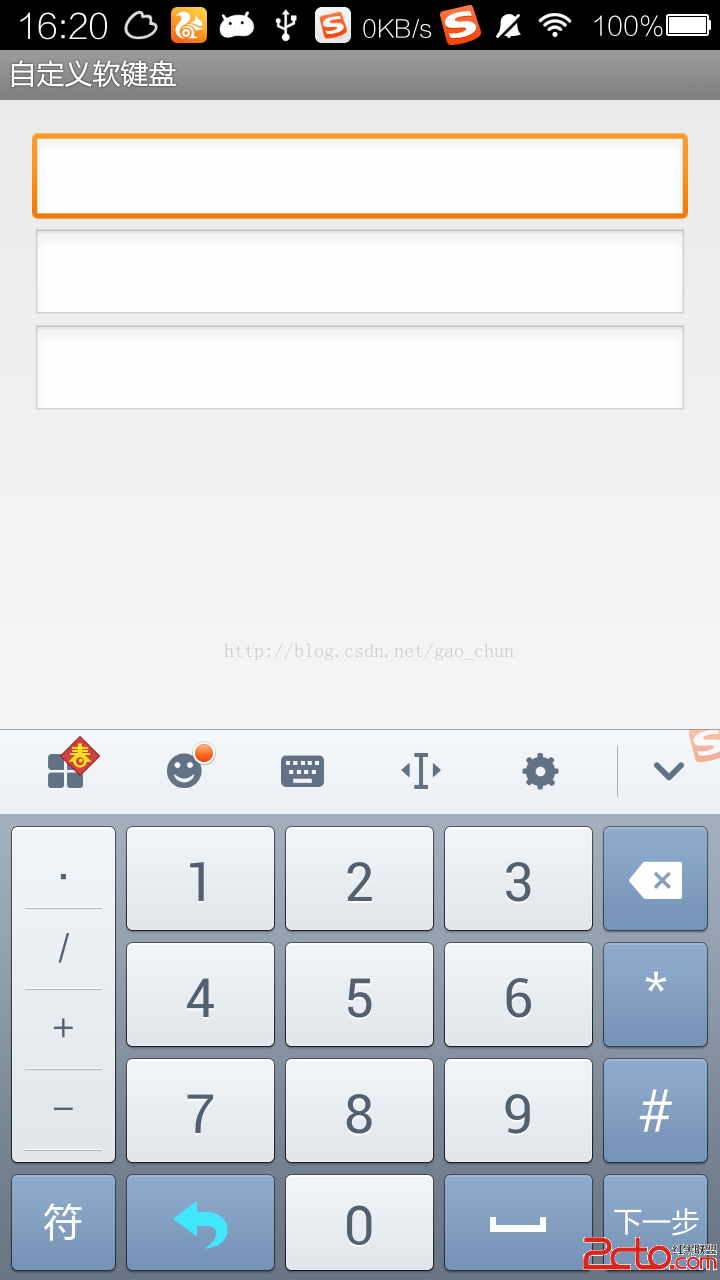 Android 自定義軟鍵盤實作:打造專屬的密碼輸入鍵盤
下面示範如何在 Android 中實作一個自定義的軟鍵盤,特別針對密碼輸入場景做了一些客製化處理,例如按鍵隨機排列、輸入內容短暫顯示後變為星號等。 圖一為搜狗輸入法
 Android 網絡編程入門:API 選擇、架構模式與協議分層全解析
寫 App 遲早要跟伺服器打交道。在動手之前,先把「有哪些工具、走哪種架構、資料怎麼傳」這三件事弄清楚,後續選型就不會亂。這篇筆記做一個整體性的梳理。 一、Androi