

編輯:關於 Android 程式設計
本文假設您已具備下列條件,否則閱讀本文幫助有限:
<1> 已在 Ubuntu 下成功安裝 JDK1.6 並配置環境變數;
<2> 已在 Ubuntu 下成功下載、配置好 Ant 環境;
<3> 已在 Ubuntu 下成功安裝 android-sdk,並配置好 tools、platform-tools 環境變數。
假設 android_sdk 的安裝路徑為 /home/mark/android/android-sdk-linux_x86,下面就開始 Ant 開發 Android 之旅。
打開終端,輸入:
android -h
可列出該命令的說明與用法,其中本文的重點是以下兩個命令:
create project: 建立一個新的 Android 專案
update project: 更新一個 Android 專案(必須已有 AndroidManifest.xml)
可透過 android -h create project 查看建立專案命令的參數:
Usage: android [global options] create project [action options]

Global options:
  -v --verbose  詳細模式:印出錯誤、警告與資訊性訊息
  -h --help     特定命令的說明
  -s --silent   安靜模式:只印出錯誤

Action create project: 建立一個新的 Android 專案。
Options:
  -n --name     專案名稱
  -t --target   新專案的目標 ID [required]
  -p --path     新專案的目錄 [required]
  -k --package  應用的 Android 套件名稱 [required]
  -a --activity 建立的預設 Activity 名稱 [required]
同理可查看 update project 命令的用法:
Usage: android [global options] update project [action options]

Options:
  -p --path       專案目錄 [required]
  -l --library    要加入的 Android library 目錄(相對於此專案目錄)
  -n --name       專案名稱
  -t --target     為專案設定的目標 ID
  -s --subprojects 同時更新子資料夾中的專案(如測試專案)
在 /home/mark 路徑下建立 Android 專案,資訊如下:
工程名稱:TestAntAndroid;Activity 名稱:TestActivity;套件名稱:mark.zhang;版本:4(即 android1.5)。那麼在終端只需:
android create project -k mark.zhang -n TestAntAndroid -a TestActivity -t 4 -p /home/mark/TestAntAndroid
如此便會在 /home/mark 下建立 TestAntAndroid 工程目錄,結構與使用 Eclipse/ADT 建立專案相同。接著修改 res/layout/main.xml:
<?xml version="1.0" encoding="utf-8"?>
<LinearLayout xmlns:android="https://schemas.android.com/apk/res/android"
    android:orientation="vertical"
    android:layout_width="fill_parent"
    android:layout_height="fill_parent">
    <TextView
        android:layout_width="fill_parent"
        android:layout_height="wrap_content"
        android:text="this is my ant compile android app"
        android:textSize="20sp"
        android:textColor="#aa000a" />
</LinearLayout>
提示:執行 android list target 可查看已安裝的 sdk 版本。
只需兩條簡單命令:
cd /home/mark/TestAntAndroid/
ant debug
進入 /home/mark/TestAntAndroid/bin 目錄,即可看到 apk 檔。
將 apk 安裝到模擬器驗證是否可行:
cd /home/mark/TestAntAndroid/bin
adb install TestAntAndroid-debug.apk
若 Android 工程已存在,可用 update project(修改平台版本),系統會自動修改 build.xml 等 Ant 配置檔:
android update project -n TestAntAndroid -t 11 -p /home/mark/TestAntAndroid/
注意:-t 11 表示使用 android-11,當然也可用其他版本更新工程。但有時若不使用較高版本更新,專案會報錯。
控制台顯示資訊:
Updated default.properties
Updated local.properties
File build.xml is too old and needs to be updated. Updated file /home/mark/TestAntAndroid/build.xml
Updated file /home/mark/TestAntAndroid/proguard.cfg
 自製跳動小球動畫:屬性動畫+貝茲曲線+SurfaceView 的組合練習
過去我對複雜動畫與進階 UI 涉入不深,直到前陣子在一個 Android 技術影片裡看到動腦學院的公開課,講的是載入動畫,長達 160 分鐘,我硬是用手機看完了。邊看邊
 LitePal 上手實戰:告別繁瑣的 SQLite 原生寫法
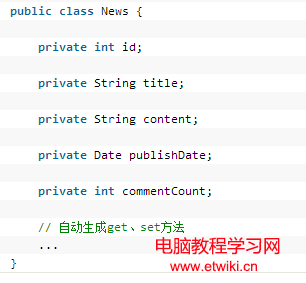
我們都遇過這樣的場景:聊天軟件裡翻到幾個月前的對話記錄,換了新機卻再也找不回來。原因很簡單——那類數據被保存在本地資料庫中,檢索起來極快。在 Android 開發裡,「把
 Android App 卸載後跳轉指定反饋頁面的原理與實作
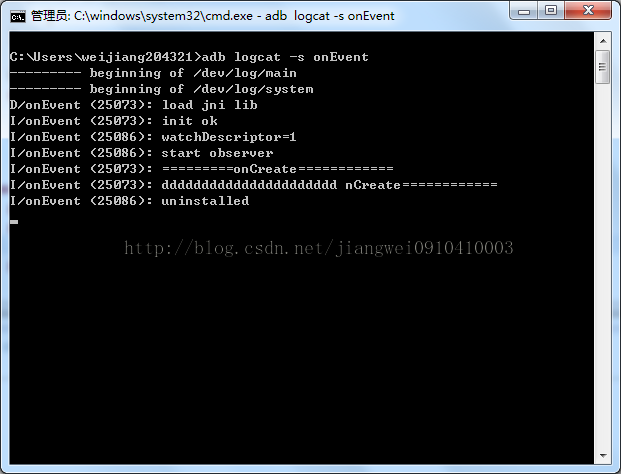
常有人問:某些安全軟體被卸載之後,會自動跳到一個反饋頁面,這是怎麼做到的? 問題的核心其實只有一句話:應用都被卸掉了,怎麼讓後續的程式邏輯繼續跑下去。 一、為什麼要做這
 深度解析 Activity 的本質:從訊息分發看 Android 設計思想
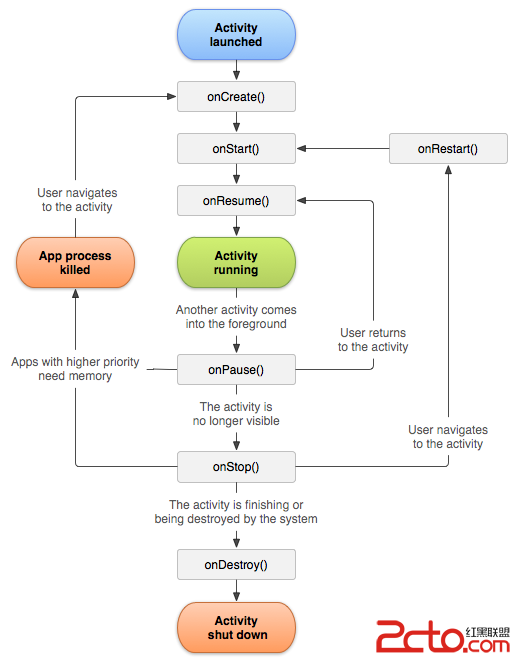
Activity 大概是每個學習 Android 的人接觸的第一個概念,關於它的說法層出不窮——有人說它是窗口,有人說它是活動。本文嘗試從原始碼與設計思想的角度,探討 A