

編輯:關於 Android 程式設計
在 Android 中發送 HTTP POST 請求,可使用 HttpURLConnection。重點是將請求放到子執行緒,並正確寫入輸出流、讀取回應。
URL url = new URL(uri);
HttpURLConnection conn = (HttpURLConnection) url.openConnection();
conn.setDoOutput(true);
conn.setDoInput(true);
conn.setRequestMethod("POST");
conn.setFixedLengthStreamingMode(packetData.length);
conn.setUseCaches(false);

OutputStream os = conn.getOutputStream();
int offset = 0;
int len = READ_WRITE_SIZE;
while (offset != packetData.length) {
  if (offset + len > packetData.length) {
    len = packetData.length - offset;
  }
  os.write(packetData, offset, len);
  os.flush();
  offset = offset + len;
}

InputStream fin = conn.getInputStream();
BufferedReader reader = new BufferedReader(new InputStreamReader(fin));
StringBuilder total = new StringBuilder();
String line;
while ((line = reader.readLine()) != null) {
  total.append(line);
}
textView.setText(total.toString());
注意:不要在主執行緒執行網路請求,否則可能觸發 NetworkOnMainThreadException。實務上可用 Thread、ExecutorService 或其他非同步機制。
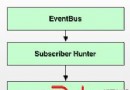 AndroidEventBus 事件總線的設計與實現思路全解析
一、功能定位 AndroidEventBus 是 Android 平台上的事件總線庫,它簡化了 Activity、Fragment、Service 等組件乃至任意物件之間
 Android 開發實作:讓漢字可以用拼音搜尋
前置文章裡我們自己刻了一個 AutoCompleteTextView,當時走的是一條捷徑:事先把每個漢字的拼音當成一個欄位硬寫進資料中。這種做法在教學裡看得懂,放到真實專
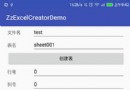 ZzExcelCreator:在 Android 上輕鬆產生 Excel 檔案
專案裡需要把資料匯出成 Excel,最直覺的做法是引入 jxl.jar。但這個庫的問題是原始碼幾乎沒有註解,方法名稱也看不出用途,只能上網逐一搜尋對應用法。既然查都查了,
 自定義錄音動畫 View:聲波跳動、倒數計時與環形進度一次搞定
需求與成品 專案裡要做一个按住說話的錄音元件,附帶剩餘時間倒數、外圈進度條,還有一段會隨音量起伏的模擬聲波。時間壓得很緊,於是直接自己畫一個 View 把它整體繪製出來。