

編輯:關於 Android 程式設計
動手做一個計算器,是練習 Android 元件操作與事件處理的經典題目。本文分享的這個計算器雖然結構簡單,卻已能實現加、減、乘、除四則運算與連續運算,並針對小數運算做了優化,避免浮點數計算時出現精度誤差。

介面主要由一個顯示用的 EditText 與一組代表數字和運算符的 Button 構成,整體以 RelativeLayout 排版:
<RelativeLayout xmlns:android="https://schemas.android.com/apk/res/android"
    xmlns:tools="https://schemas.android.com/tools"
    android:layout_width="match_parent"
    android:layout_height="match_parent"
    android:paddingBottom="@dimen/activity_vertical_margin"
    android:paddingLeft="@dimen/activity_horizontal_margin"
    android:paddingRight="@dimen/activity_horizontal_margin"
    android:paddingTop="@dimen/activity_vertical_margin"
    tools:context=".MainActivity"
    android:background="@drawable/all_bg" >

    <EditText
        android:id="@+id/ed_tv"
        android:layout_width="280dip"
        android:layout_height="80dip"
        android:hint="@string/zone"
        android:textSize="35sp" >
    </EditText>

    <Button
        android:id="@+id/But_cl"
        android:layout_width="280dip"
        android:layout_height="60dip"
        android:text="@string/clean"
        android:textColor="#F8F8FF"
        android:textSize="25sp"
        android:background="#404040" />

    <!-- 其餘數字與運算符按鈕結構類似,這裡以 7、8、9、加號為例 -->
    <Button
        android:id="@+id/But_se"
        android:layout_width="70dip"
        android:layout_height="80dip"
        android:background="@drawable/blankt"
        android:text="@string/seven"
        android:textColor="#F8F8FF"
        android:textSize="25sp" />
    <Button
        android:id="@+id/But_ad"
        android:layout_width="70dip"
        android:layout_height="80dip"
        android:background="@drawable/blankt"
        android:text="@string/addition"
        android:textColor="#F8F8FF"
        android:textSize="25sp" />
</RelativeLayout>
程式邏輯的核心,是把每個按鈕的點擊事件導向同一個 OnClickListener,再根据點擊的按鈕決定要拼接的字元或要執行的運算:
import android.app.Activity;
import android.os.Bundle;
import android.view.View;
import android.view.View.OnClickListener;
import android.widget.Button;
import android.widget.TextView;

public class MainActivity extends Activity {
    TextView tv = null;
    private double number_one = 0.0, number_two = 0.0;
    String arithmetic1 = " ", arithmetic2 = " ";

    private Button button_one, button_two, button_three, button_four, button_five,
        button_six, button_seven, button_eight, button_nine, button_zone,
        button_clean, button_equate, button_tiny, button_addition,
        button_subtraction, button_multiplication, button_division;

    protected void onCreate(Bundle savedInstanceState) {
        super.onCreate(savedInstanceState);
        setContentView(R.layout.activity_main);

        button_zone = (Button) findViewById(R.id.But_zo);
        button_one = (Button) findViewById(R.id.But_on);
        button_two = (Button) findViewById(R.id.But_tw);
        button_three = (Button) findViewById(R.id.But_th);
        button_four = (Button) findViewById(R.id.But_fo);
        button_five = (Button) findViewById(R.id.But_fi);
        button_six = (Button) findViewById(R.id.But_si);
        button_seven = (Button) findViewById(R.id.But_se);
        button_eight = (Button) findViewById(R.id.But_ei);
        button_nine = (Button) findViewById(R.id.But_ni);
        button_equate = (Button) findViewById(R.id.But_eq);
        button_tiny = (Button) findViewById(R.id.But_ti);
        button_addition = (Button) findViewById(R.id.But_ad);
        button_subtraction = (Button) findViewById(R.id.But_su);
        button_multiplication = (Button) findViewById(R.id.But_mu);
        button_division = (Button) findViewById(R.id.But_di);
        button_clean = (Button) findViewById(R.id.But_cl);
        tv = (TextView) findViewById(R.id.ed_tv);

        // 為所有按鈕掛上同一個監聽器
        button_equate.setOnClickListener(Listener);
        button_tiny.setOnClickListener(Listener);
        button_addition.setOnClickListener(Listener);
        button_subtraction.setOnClickListener(Listener);
        button_multiplication.setOnClickListener(Listener);
        button_division.setOnClickListener(Listener);
        button_zone.setOnClickListener(Listener);
        button_one.setOnClickListener(Listener);
        button_two.setOnClickListener(Listener);
        button_three.setOnClickListener(Listener);
        button_four.setOnClickListener(Listener);
        button_five.setOnClickListener(Listener);
        button_six.setOnClickListener(Listener);
        button_seven.setOnClickListener(Listener);
        button_eight.setOnClickListener(Listener);
        button_nine.setOnClickListener(Listener);
        button_clean.setOnClickListener(Listener);
    }

    public OnClickListener Listener = new OnClickListener() {
        public void onClick(View v) {
            Button btn = (Button) v;
            switch (btn.getId()) {
                case R.id.But_zo: if (arithmetic2.equals("=")) { clean(); } tv_changed(0); break;
                case R.id.But_on: if (arithmetic2.equals("=")) { clean(); } tv_changed(1); break;
                case R.id.But_tw: if (arithmetic2.equals("=")) { clean(); } tv_changed(2); break;
                case R.id.But_th: if (arithmetic2.equals("=")) { clean(); } tv_changed(3); break;
                case R.id.But_fo: if (arithmetic2.equals("=")) { clean(); } tv_changed(4); break;
                case R.id.But_fi: if (arithmetic2.equals("=")) { clean(); } tv_changed(5); break;
                case R.id.But_si: if (arithmetic2.equals("=")) { clean(); } tv_changed(6); break;
                case R.id.But_se: if (arithmetic2.equals("=")) { clean(); } tv_changed(7); break;
                case R.id.But_ei: if (arithmetic2.equals("=")) { clean(); } tv_changed(8); break;
                case R.id.But_ni: if (arithmetic2.equals("=")) { clean(); } tv_changed(9); break;
                case R.id.But_eq: tv_changed("="); break;
                case R.id.But_ad: tv_changed("+"); break;
                case R.id.But_mu: tv_changed("*"); break;
                case R.id.But_su: tv_changed("-"); break;
                case R.id.But_di: tv_changed("/"); break;
                case R.id.But_ti: tv_changed("."); break;
                case R.id.But_cl: tv_changed("clean"); break;
                default: break;
            }
        }
    };

    private void tv_changed(int i) {
        String string = tv.getText().toString();
        string += i;
        tv.setText(string);
    }

    private void tv_changed(String str) {
        if (str.equals(".")) {
            tv.setText(tv.getText().toString() + ".");
        }
        if (str.equals("clean")) {
            clean();
        }
        if (str.equals("+") || str.equals("-") || str.equals("*") || str.equals("/")) {
            String str1 = tv.getText().toString();
            number_one = Double.parseDouble(str1) * 10000; // 放大 10000 倍以處理小數精度
            tv.setText(" ");
            arithmetic1 = str;
            tv.setText(str);
            tv.setText(" ");
        }
        if (str.equals("=")) {
            String str1 = tv.getText().toString();
            number_two = Double.parseDouble(str1) * 10000;
            tv.setText(" ");
            arithmetic2 = str;
            tv.setText(str);
            arithmetic(number_one, number_two, arithmetic1);
        }
    }

    private void clean() {
        tv.setText(" ");
        number_two = 0.0;
        arithmetic2 = " ";
    }

    protected void arithmetic(double number_one2, double number_two2, String arithmetic1) {
        tv.setText(" ");
        if (arithmetic1.equals("+")) {
            number_one = (number_one2 + number_two2) / 10000;
            tv.setText(String.valueOf(number_one));
        } else if (arithmetic1.equals("-")) {
            number_one = (number_one2 - number_two2) / 10000;
            tv.setText(String.valueOf(number_one));
        } else if (arithmetic1.equals("*")) {
            number_one = (number_one2 * number_two2) / 100000000;
            tv.setText(String.valueOf(number_one));
        } else {
            number_one = number_one2 / number_two2;
            tv.setText(String.valueOf(number_one));
        }
    }
}
這個範例最巧妙的地方,在於把輸入的數字先乘以 10000 再進行運算,最後再除回來,藉此規避了小數點運算常見的精度誤差問題。當然,這只是入門的簡化做法,若要打造更嚴謹的計算器,後續可以改用 BigDecimal 來處理精確運算。
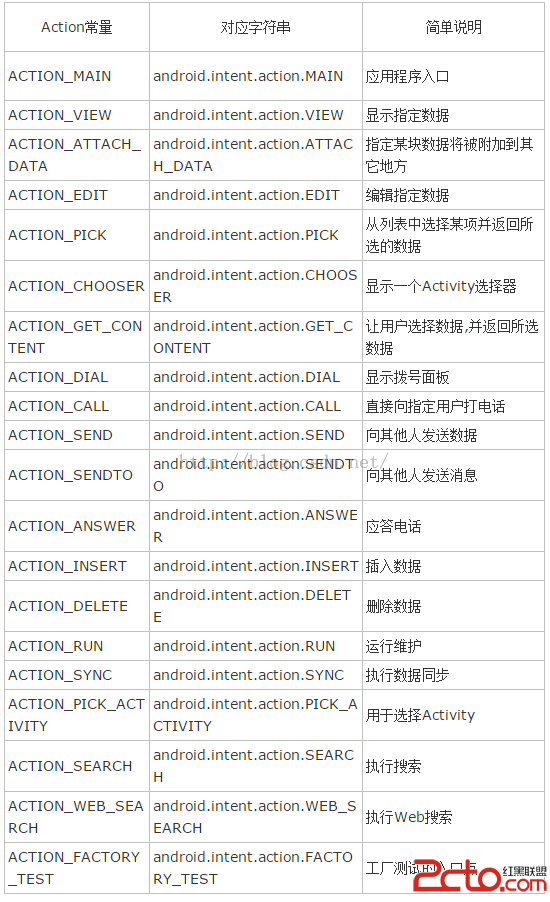 善用 Android 標準 Action 與 Category 直接調用系統內建 Activity
Android 內建了大量標準的 Action 與 Category 常數,透過 Intent 指定它們,就能不寫一行 UI 直接調用系統功能。 實例:讀取聯絡人電話
 Android Studio 與 Eclipse 的十個關鍵差異
Eclipse 是老牌的開發工具,早期寫 Android 的每個人都用過它,裝上 ADT 外掛就能开工。因為是開源的,開發起來頗為爽快……直到遇見 Google 親自操刀
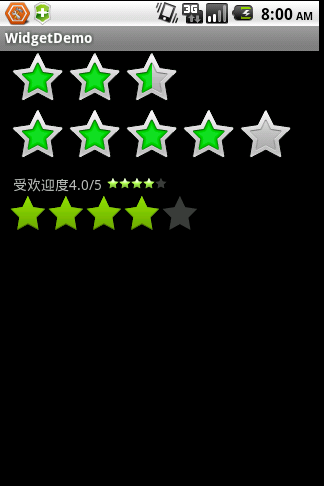 Android RatingBar 自定義星級評分樣式實作
RatingBar 是在 SeekBar 與 ProgressBar 基礎上延伸而來、以星形呈現等級的元件。使用預設樣式時,使用者可以透過觸控、拖曳或按鍵來打分。它內建兩
 Android 複習筆記:SharedPreferences 的使用與源碼解析
典型的應用場合是:進入某個介面後顯示預設值(當然也能直接在佈局檔中指定)。 基本重點 SharedPreferences 產生的檔案最終以 XML 形式存放在 /dat