

編輯:關於 Android 程式設計
做開發時遇到一個很怪的現象:用 Timer 搭配 Handler 週期性更新 UI,每次更新時順手加一個左右擺動的動畫,結果動畫只跑了一遍就再也沒動過。
public class MainActivity extends Activity {

    private int animCount = -1;
    Timer timer = new Timer(true);
    Message message;
    TextView tv_1, tv_2, tv_3, tv_4, tv_5;
    private static Handler handler;

    @Override
    protected void onCreate(Bundle savedInstanceState) {
        super.onCreate(savedInstanceState);
        setContentView(R.layout.activity_main);

        tv_1 = (TextView) this.findViewById(R.id.tv_1);
        tv_2 = (TextView) this.findViewById(R.id.tv_2);
        tv_3 = (TextView) this.findViewById(R.id.tv_3);
        tv_4 = (TextView) this.findViewById(R.id.tv_4);
        tv_5 = (TextView) this.findViewById(R.id.tv_5);

        animPost();
    }

    private void animPost() {
        handler = new Handler() {
            public void handleMessage(Message msg) {
                switch (msg.what) {
                    case 0:
                        if (animCount == 0)      startAnimation(tv_1);
                        else if (animCount == 1) startAnimation(tv_2);
                        else if (animCount == 2) startAnimation(tv_3);
                        else if (animCount == 3) startAnimation(tv_4);
                        else if (animCount == 4) startAnimation(tv_5);
                        break;
                }
                super.handleMessage(msg);
            }
        };

        TimerTask task = new TimerTask() {
            @Override
            public void run() {
                message = (message == null) ? new Message() : Message.obtain();
                message.what = 0;
                handler.sendMessage(message);
                animCount = animCount + 1;
                System.out.print(animCount);
            }
        };

        timer.schedule(task, 0, 3000);
    }

    // 左右擺動
    private void startAnimation(View paramView) {
        TranslateAnimation localTranslateAnimation =
                new TranslateAnimation(2, 0.0F, 2, -0.05F, 1, 0.0F, 1, 0.0F);
        localTranslateAnimation.setDuration(1000);
        localTranslateAnimation.setInterpolator(new AccelerateInterpolator());
        localTranslateAnimation.setRepeatCount(1);

        paramView.startAnimation(localTranslateAnimation); // 這個寫法沒問題
    }
}
一開始我以為是 Timer/Handler 的邏輯出了問題,換了好幾種寫法(包括改用 Thread + sleep 發消息)都一樣。既然不是計時的問題,只好回頭從動畫本身下手,改一下啟動方式試試。
原本用的是:
paramView.setAnimation(localTranslateAnimation);
localTranslateAnimation.start();
改成:
paramView.startAnimation(localTranslateAnimation);
問題就消失了。
關鍵在於這兩種寫法的語意完全不同:
animation.start() 啟動的是 Animation 物件本身。它並不知道要作用在哪個 View 上,即使啟動成功也不保證畫面會動。view.startAnimation(animation) 是 View 主動為自己安排動畫。它會把這個 Animation 掛到自己身上並觸發刷新,這才是「讓這個 View 動起來」的正確路徑。而 setAnimation() 只是「設定」——把動畫對象關聯上去,並不會立刻播放;後面再呼叫 animation.start() 時,由於缺少 View 的參與,實際效果非常不可靠,尤其在反覆呼叫的場景下往往只生效一次。
TranslateAnimation(2, ...) 中的 2 代表 RELATIVE_TO_SELF,用相對比例而非絕對像素,換不同解析度螢幕才不會跑掉。clearAnimation(),否則舊動畫的狀態可能殘留。onDestroy 之後還收到消息——記得 timer.cancel() 加上 handler.removeCallbacksAndMessages(null)。結論:啟動 View 動畫,永遠走 view.startAnimation();Animation.start() 看似能編譯通過,但語意上不是給這個用途的。
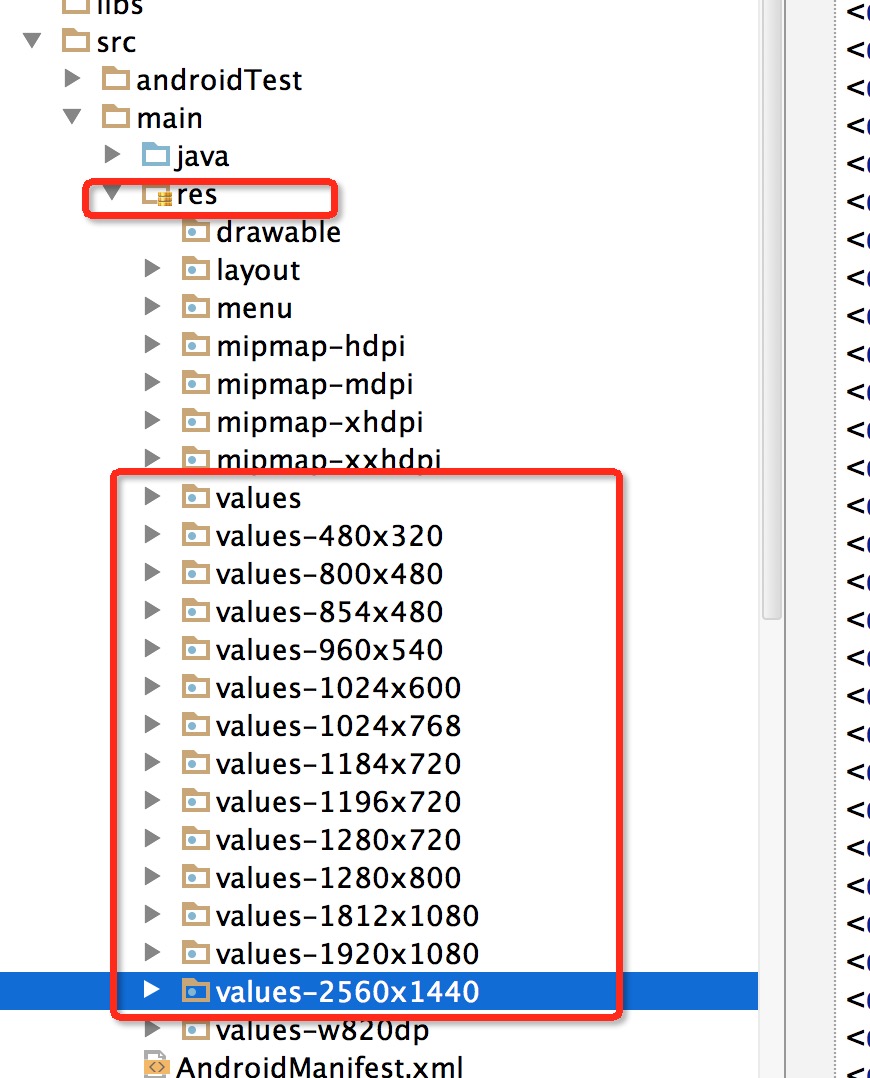 Android 螢幕適配方案:用百分比取代無限堆疊的 dimens
為什麼網頁從不抱怨適配 做 Android 開發的人,大概都對螢幕適配有過一段痛苦回憶。各種尺寸組合起來,簡直無解。 但換個角度想:電腦螢幕的解析度加上手機解析度,種類遠
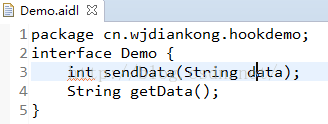 Android Binder 與遠程服務呼叫機制解析
為什麼要理解 Binder 在 Android 系統中,許多核心能力都依賴跨進程通信,例如 Activity 啟動、系統服務取得與底層資源管理。Binder 是 Andr
 Android 元件工具箱(widget toolbox)速覽
Android SDK 本身就附了一套標準的元件工具箱,足以應付大多數初學與一般性的介面需求,不必急著引入第三方庫。以下依用途整理常用控制項。 文字類 TextVie
 微信指紋支付如何取消?關閉設定教學
若使用微信指紋支付時遇到驗證不順,可選擇關閉指紋支付,改回密碼支付。1. 開啟微信,進入「我」>「錢包」。2. 點擊右上角,選擇「支付管理」。3. 關閉「指紋支付」即可。